Mastering Copilot Studio: 2026 Release Wave 1, Agentic Workflows, and Enterprise Governance

Writer

Mastering Copilot Studio: 2026 Release Wave 1, Agentic Workflows, and Enterprise Governance
The recent Copilot Studio user group session dropped a massive amount of technical insight, covering the latest 2026 Release Wave 1 features, a completely revamped workflow designer, and critical enterprise governance updates. Whether you are building highly specific utility agents or architecting organization-wide AI deployments, there is a lot of ground to cover.
Here is a deep dive into the new capabilities, architectural patterns, and administrative controls you need to be implementing.
1. Agentic Capabilities and 2026 Release Wave 1 Features
Microsoft is rapidly closing the gap between conversational bots and true autonomous agents. The latest updates focus heavily on extending agent reach and measuring actual business impact.
Advanced Analytics and Evaluation
To support large-scale enterprise deployments, the analytics suite has seen crucial upgrades:
- Analytics Roles: A new read-only “Analytics viewer” role provides safe access. You can now share agent performance dashboards with stakeholders without risking accidental schema or instruction modifications.
- Custom Metrics: Standard out-of-the-box metrics are rarely enough for enterprise ROI reporting. You can now define business-specific custom metrics (e.g., “Total Savings per Transaction”) mapped to discrete categories (Excellent, Good, Moderate).
- Multi-Turn Conversation Evaluation: Single-turn testing is insufficient for complex agents. The new evaluation framework moves beyond single-response testing. It evaluates entire conversation flows and context retention, highlighting degradation and execution breakdowns via detailed activity maps.
Computer Use (General Availability)
Gone are the days of relying strictly on APIs for every automation. The Computer Use capability allows your agent to automate desktop and web UI tasks via natural language without APIs.
- Configuration: Accessed via
Tools > Add a tool > Create new computer use. It utilizes an instruction builder that maps out step-by-step UI interactions. - Security & Testing: This GA release brings robust features including live UI testing, stored credentials (via Key Vault), explicit domain whitelisting, and strict HTTPS enforcement.
- Human Supervision: Crucially, it includes human supervision triggers. If the agent encounters ambiguity, it pauses execution and emails a designated user for permission, utilizing configurable timeouts (e.g., waiting 1 hour before aborting the action).
M365 Agents Integration
Integrating with the wider Microsoft 365 ecosystem is more fluid than ever:
- M365 Copilot Agent Suggestions: Copilot Studio now provides automated analysis of the M365 memory and graph to proactively suggest up to three personalized agents tailored to a user’s specific workflows.
- M365 Optimized Agents: Agents are now heavily optimized to utilize Exchange and Teams natively, alongside standard code interpreters and visual creators, allowing for sophisticated data processing and content generation directly within M365.
Work IQ and Model Context Protocol (MCP)
Work IQ acts as a real-time enterprise intelligence layer utilizing a three-tier architecture:
- Data: Unifies signals across M365 (files, emails, Teams).
- Context: Understands organizational topology and routines.
- Skills & Tools: Connects agents to real-time enterprise context via MCP servers (e.g., Work IQ Mail).

Connector Integration has also been formalized into three robust methods:
- via the Pre-built tools menu.
- Directly inside Topic nodes.
- Via Power Apps Custom Connectors for deep Line-of-Business integrations.
2. The New AI-Powered Workflow Designer
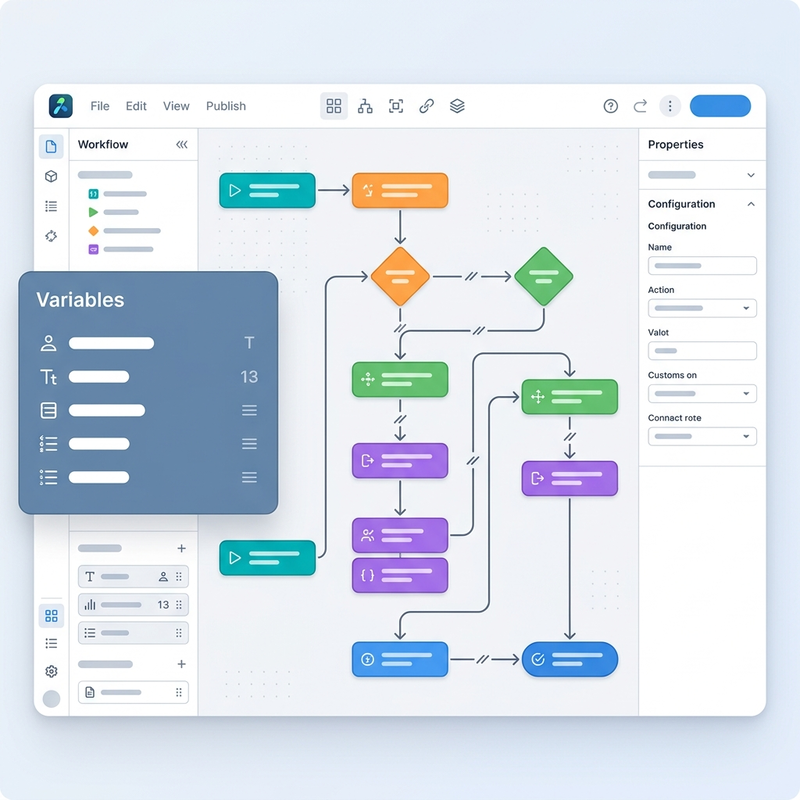
The traditional Power Automate cloud flow interface is being supplemented in Copilot Studio by a purpose-built, AI-native Workflow Designer. This is a structural shift in how we orchestrate logic, establishing clear differences between legacy Cloud flows, current Agent flows, and the new Workflow paradigm.
Redesigned Canvas and UX
- Modern UI: The interface now boasts fluid layouts with horizontal/vertical toggles, allowing developers to map their logic exactly how they visualize it. You can also add node notes for better documentation.
- Canvas Search & Human Review: Pressing
Ctrl+Fallows immediate navigation across massive orchestration flows. Furthermore, native Human Review assignments let you seamlessly embed user approvals mid-workflow. - Inline Testing & Health Center: You no longer need to run an entire flow to debug. The designer supports modular node testing and troubleshooting directly within the canvas.
- Version History: Track changes effectively with side-by-side diff comparisons and instant snapshot restoration.
Advanced AI Controls
- The Classify Control: A built-in AI-driven router that categorizes unstructured input. For example, it can sort incoming emails into “Hardware” vs. “Software” queues based on content comprehension rather than rigid rules.
- Agent Calling: Workflows can route specific steps directly to specialized Copilot Studio or M365 Copilot agents.
- The Variables Block: A massive quality-of-life update. Instead of cluttering your canvas with scattered initializations, this block consolidates all variable initialization and operations (increment, append) into a single, cohesive visual element.
3. Architecture, Governance, and Security
As you scale from development to production, relying on default environment settings is a recipe for data leaks. PPAC (Power Platform Admin Center) has introduced vital guardrails.
Tracking and Threat Detection
- Lifecycle Management: Admins can now effectively track unused or unpublished agents (inactive >90 days) and monitor Entra App IDs to prevent sprawl and orphaned identities.
- Threat Detection: Robust global settings allow administrators to mitigate phishing and injection vectors by completely disabling image and URL outputs from agents.
App MCPs in Model-Driven Apps
This is arguably the most powerful integration feature discussed. By configuring an App MCP, you can expose entire Power Apps as MCP servers. Instead of returning plain text or adaptive cards, your agent can render interactive HTML or full application components directly within the chat interface, seamlessly blending Copilot Studio with Model-Driven architecture.

Data Privacy and Channel Control
- Identity & Access Restrictions: To ensure enterprise data doesn’t bleed into consumer tools, admins must enforce Entra authentication explicitly and can disable external consumer channels (like WhatsApp and Facebook).
- Data & Privacy Controls: Additional security layers let admins restrict bot framework manifest URLs via Skills, keeping communication bounded to approved organizational tenants.
4. Developer Resources and Best Practices
For Solutions Architects orchestrating these systems, keeping up with the tooling is mandatory. Ensure you are leveraging these specific assets:
- Development Resources: Bookmark the latest link aggregators, explore the AI Dev Gallery, and browse available MCP servers via GitHub, Ashi, and the MS Marketplace. Do not skip reading the comprehensive 167-page Copilot Studio Implementation Guide, and utilize the Agent Academy and Licensing Guide to ensure compliance and capacity mapping.
- Admin & Preview Access: Always test experimental features by enabling “Get new features early” in your PPAC environment settings and utilizing the dedicated preview portal (
copilotstudio.preview.microsoft.com).
Agentic development is moving away from basic conversational bots into complex, multi-system orchestration. Mastering the integration between Work IQ, MCP servers, enterprise governance, and the new AI workflow engine is what separates standard assistants from true enterprise AI solutions.
Read next