The Model Is Not the Agent: Understanding Harnesses in Microsoft Foundry

Writer

A model can explain how to produce a quarterly forecast. An agent must retrieve the right data, perform the analysis, recover from missing inputs, generate a report, and stop before it does something it was never authorized to do.
That gap is where the agent harness matters. Better reasoning helps, but reasoning alone does not provide an execution loop, a working filesystem, reusable procedures, or an enforceable network boundary.
Microsoft Foundry offers different ways to divide those responsibilities: a prompt agent with the default runtime, a prompt agent using the Microsoft Copilot harness, or a hosted agent running your own orchestration code. The useful architectural question is not which option sounds most autonomous. It is which parts of execution you need to own, and which boundaries must remain outside the agent’s control.
Availability matters. As of November 10, 2026, the Microsoft Copilot harness in Foundry Agent Service is in public preview. Microsoft announced it on October 28, 2026. Foundry Agent Service being generally available does not make every harness capability generally available. The preview documentation explicitly advises against production workloads. See the harness announcement and current setup guidance.
What a harness actually does
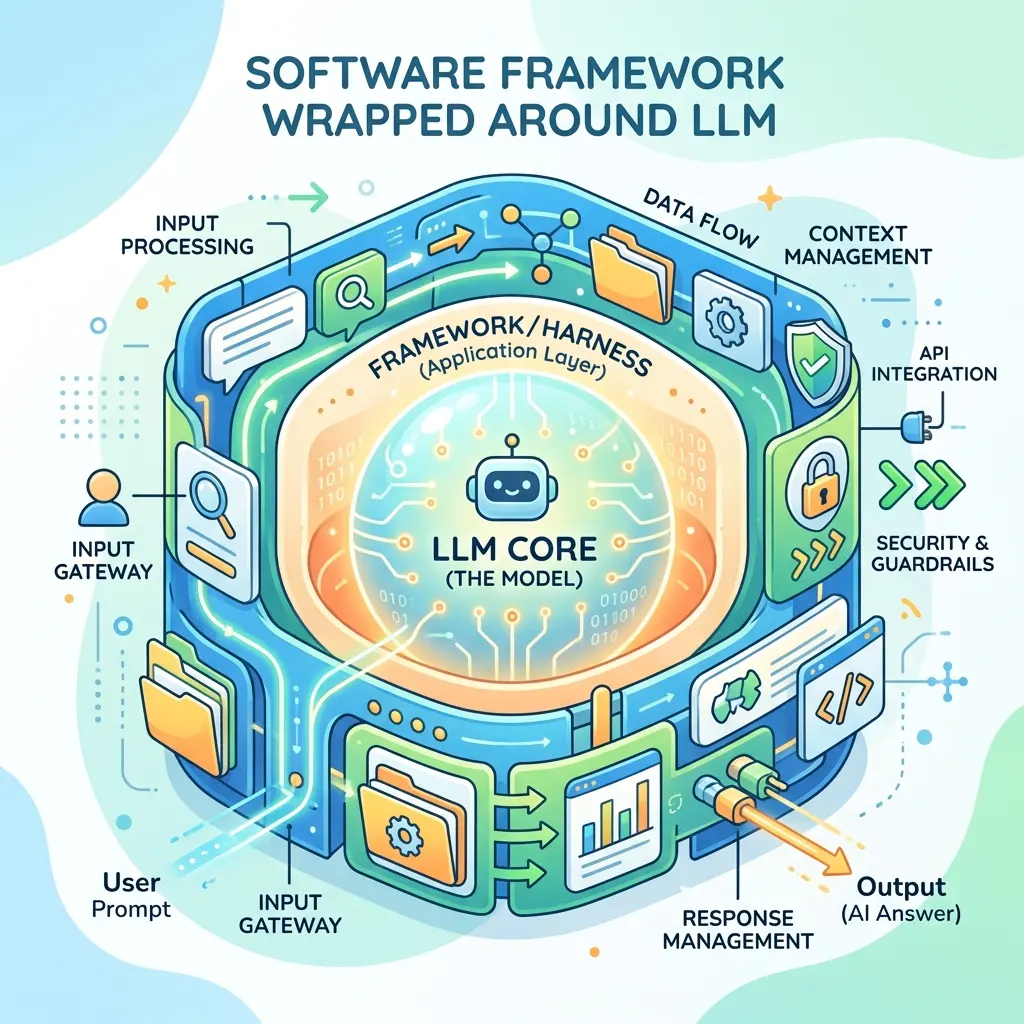
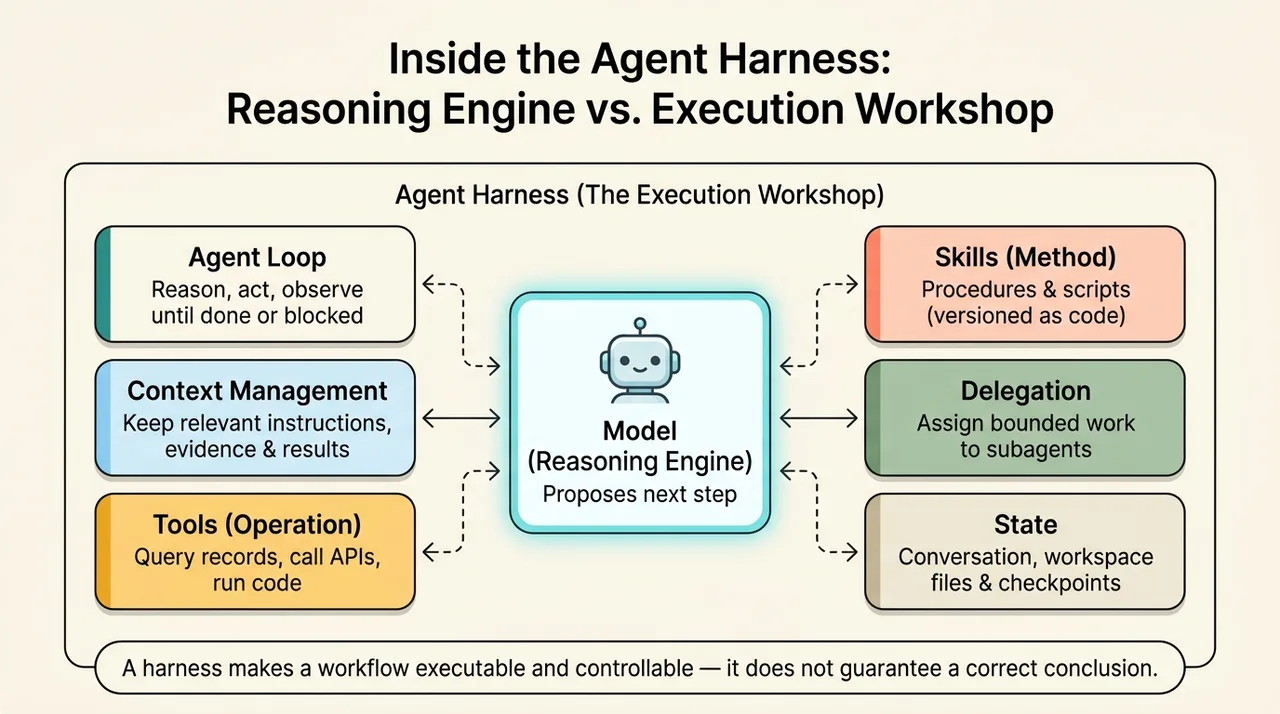
Think of the model as a reasoning engine and the harness as the workshop around it. The engine proposes the next step. The workshop supplies the instruments, working materials, execution machinery, and limits that make the step possible.
This analogy has a boundary: the harness does not make the model’s conclusions correct. It makes a workflow executable and controllable. A beautifully generated report can still contain a poor forecast.
A capable harness typically brings together several components:
- An agent loop: coordinate reasoning, actions, observations, and subsequent steps until the task completes or execution reaches a boundary.
- Context management: keep useful instructions, evidence, and intermediate results available without allowing irrelevant material to overwhelm the model’s working context.
- Tools: expose operations such as retrieving records, calling an application programming interface (API), processing files, or executing code.
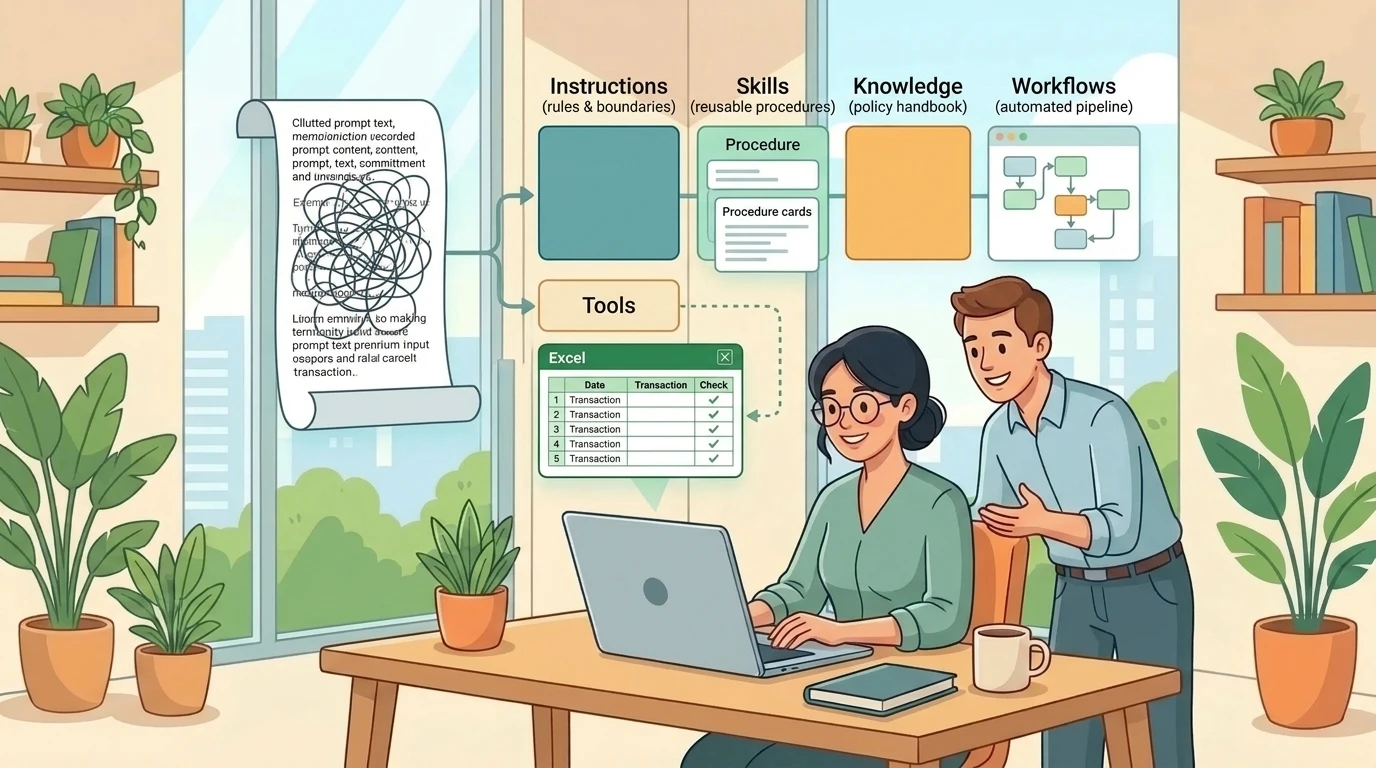
- Skills: package procedures that explain how to accomplish a class of tasks, potentially including scripts and supporting assets.
- Delegation: assign bounded work to subagents and integrate their results.
- State: retain the conversation, files, or checkpoints needed to continue work.
These are architectural categories, not a promise that every harness implements every feature identically. Microsoft’s Copilot harness announcement specifically describes managed context, reusable skills, connected tools, file and code execution, and bounded delegation to built-in subagents.
The distinction between tools and skills is particularly useful. A tool provides an operation; a skill provides a method. A data-query tool might retrieve monthly expenditure. A forecasting skill might explain which periods to compare, how to handle missing categories, and what assumptions must appear in the final report.
Skills are not merely decorative prompt text. When they contain executable scripts or other assets, they become part of the application’s software supply chain. Microsoft’s security guidance recommends reviewing and versioning them as code.
From answering a question to completing a task
The supplied Microsoft Mechanics demonstration uses a finance agent to expose the difference.
Its initial configuration combines a model, instructions, and a Fabric IQ integration. A narrow request, such as spend by category for September, succeeds. A broader request asks the agent to forecast next-quarter expenditure, compare earlier quarters, and produce an executive PDF. In that configuration, the agent stops short and offers alternatives rather than completing the requested work.
With the Copilot harness, the demonstrated workflow proceeds through data retrieval, analysis, additional steps, and artifact generation. The result includes a PDF and a separate forecast file.
That is a useful demonstration, but it is not a controlled benchmark. It does not establish that default prompt agents cannot perform multi-step tasks, that every forecast will be correct, or that changing the harness alone guarantees success.
The transcript’s phrase “no harness at all” is best understood as shorthand for not using the richer Copilot harness. The default runtime still exists. The important difference is the execution machinery and capabilities available to that particular agent, not a universal distinction between an agent with a loop and one with none.
An illustrative forecasting workflow makes the additional responsibilities clearer:
- Resolve the request. Establish the forecast period, currency, categories, and comparison baseline.
- Retrieve evidence. Obtain the historical data through approved tools.
- Inspect the inputs. Check missing periods, inconsistent categories, and unusual values.
- Perform the analysis. Use an explicit forecasting method and record its assumptions.
- Validate the result. Reconcile totals and distinguish historical facts from projections.
- Generate artifacts. Produce the report and supporting data.
- Publish the outputs. Return downloadable files rather than merely leaving them in a temporary workspace.
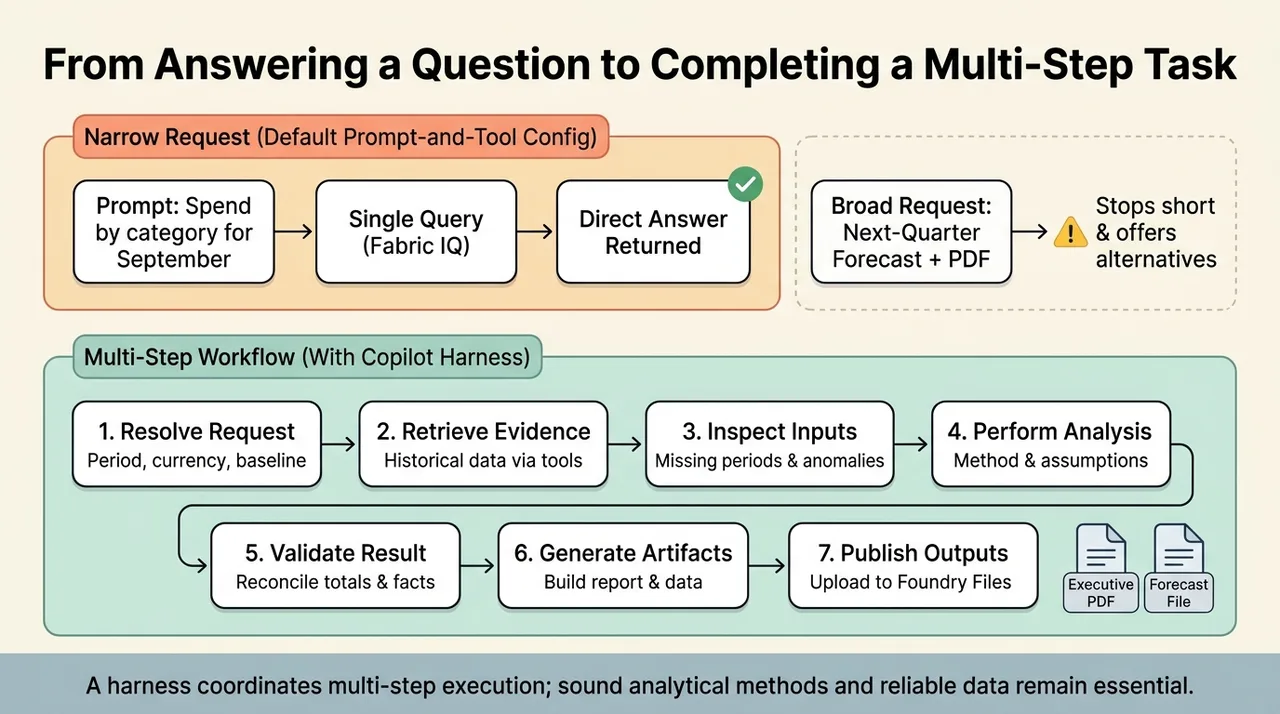
This is an example of how to design the task, not a claim that the demonstration used a particular forecasting algorithm. The source does not establish its method, statistical validation, or accuracy.
A harness can coordinate these steps. It cannot substitute for a sound analytical method or reliable source data.
Three execution choices, not three levels of intelligence
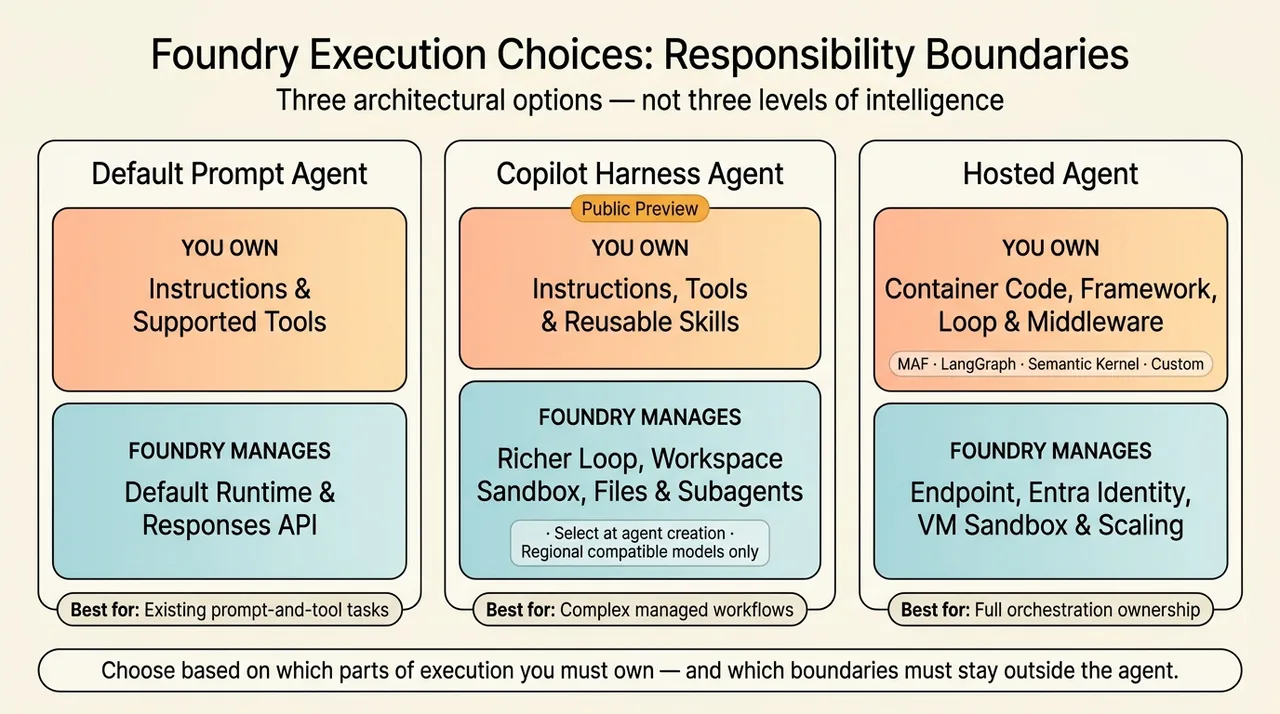
Foundry’s options are better understood as responsibility boundaries than as a maturity ladder. Microsoft’s announcement presents all three as legitimate choices.
| Approach | Execution responsibility | Natural fit |
|---|---|---|
| Prompt agent with the default runtime | Foundry manages the runtime; you configure instructions and supported tools | Tasks adequately served by the existing prompt-and-tool configuration |
| Prompt agent with the Copilot harness | Foundry manages the richer execution loop and sandbox | Skills, files, commands, subagents, and more complex tool coordination without maintaining harness code |
| Hosted agent | Your code owns orchestration and runtime behavior; Foundry manages hosting | Custom frameworks, middleware, dependencies, protocols, or execution policies |
Managed harness: keep the agent declarative
The Copilot harness is an optional managed runtime for a prompt agent. It does not turn the resource into a hosted agent. Applications continue to invoke the agent through its Responses API endpoint, while Foundry operates the harness and execution environment. See how the harness changes a prompt agent.
Model flexibility also has limits. The harness supports compatible models with reasoning and tool-calling capabilities available in the project’s region. That is not equivalent to accepting any arbitrary model endpoint: bring your own model is currently unsupported. The support matrix is the authority for those constraints.
There is another practical correction to the demonstration’s upgrade narrative: during the initial preview, the harness must be selected when creating the agent. You cannot switch an existing default-runtime agent by creating another version. Reusing its instructions and tools in a newly created harness-enabled agent is a different operation from changing the existing agent’s runtime.
Hosted agents: own the loop, not the hosting platform
A hosted agent packages your application code into a container. Your code controls the framework, agent loop, middleware, and dependencies. Foundry provides the endpoint, runtime identity, session infrastructure, scaling, and lifecycle management. The hosted-agent documentation describes support for frameworks such as Microsoft Agent Framework, LangGraph, Semantic Kernel, and custom code.
The source demonstration uses the Claude Agent SDK and mentions Hermes and OpenClaw as other harness choices. The durable architectural point is bring your own orchestration code, not that every named third-party framework has identical certification, support, or integration behavior. Framework compatibility, model access, third-party terms, and application safety remain matters to validate for the actual container.
Foundry Toolkit for Visual Studio Code provides a development and management path, but it is not the only authoring surface. The Foundry samples repository includes examples across agent approaches and software development kits (SDKs).
State is not one thing
“Memory” is often used to describe several different mechanisms. That creates architectural confusion.
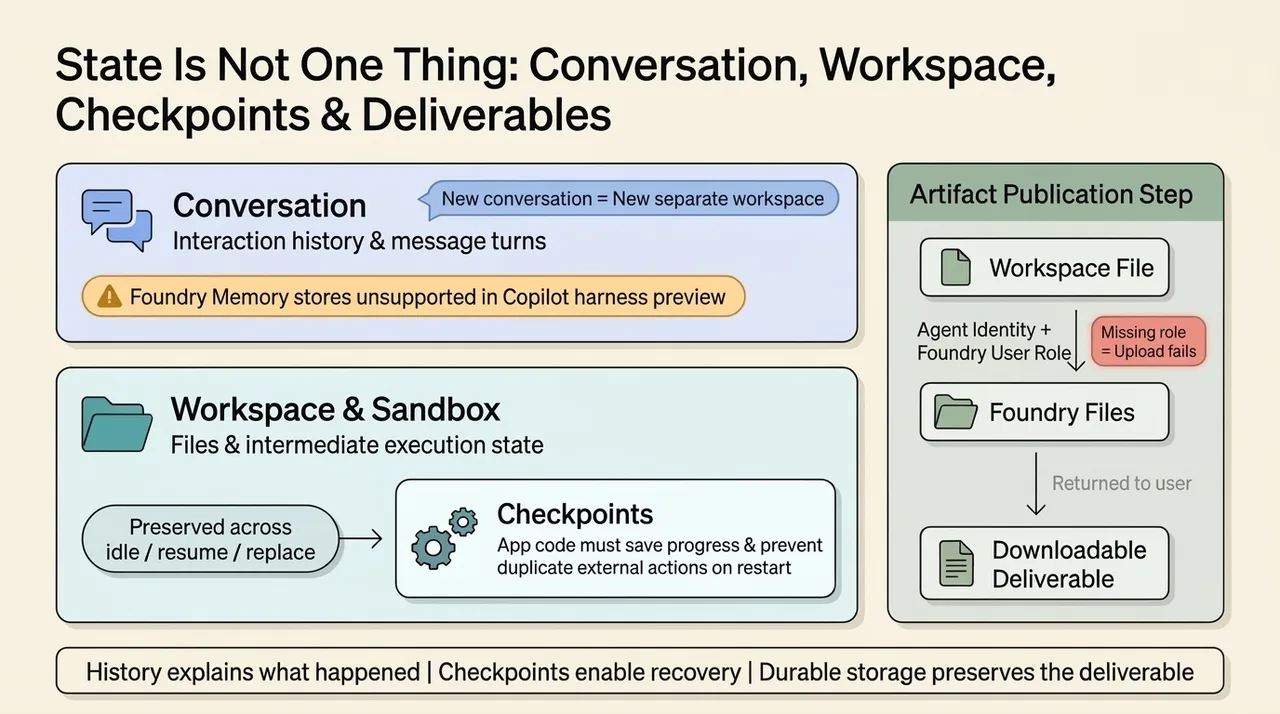
For the Copilot harness, Microsoft distinguishes a conversation, which preserves interaction history, from a workspace, which holds files and execution state for that conversation. Foundry can idle, resume, or replace the sandbox while preserving workspace state through normal lifecycle operations. A new conversation starts a separate workspace. See conversations, workspaces, and sandboxes.
That does not mean the preview supports a general-purpose long-term memory service. The current limits explicitly list Foundry Memory stores and memory tools as unsupported for the Copilot harness.
Hosted agents have their own state model. Each session runs in a virtual-machine-isolated sandbox, with persisted filesystem state that can be restored after idling. Conversation history and application state are separate concepts. The hosted-agent documentation explains those boundaries.
Even persistent state does not automatically make a workflow interruption-safe. Microsoft’s long-running resilience announcement explains that the platform can restart interrupted work, but application code must save progress and prevent duplicate external actions.
For example, a restarted report-generation workflow should not create a second report or submit the same transaction again simply because the first attempt’s response was lost.
The useful rule is: history explains what happened; checkpoints enable recovery; durable storage preserves the deliverable.
For harness-generated files, writing to the workspace is not the final publication step. Returning a downloadable artifact requires upload to Foundry Files using the agent identity, which needs the Foundry User role on the project. A missing assignment can produce an upload failure even when analysis and workspace file creation succeed. Microsoft documents this distinction under returning generated files.
Trust requires boundaries outside the model
The demonstration shows an agent attempting to access an unauthorized web endpoint and being denied. The interesting outcome is not that the model never tried an inappropriate action. It is that the infrastructure refused it while the agent continued its useful work.
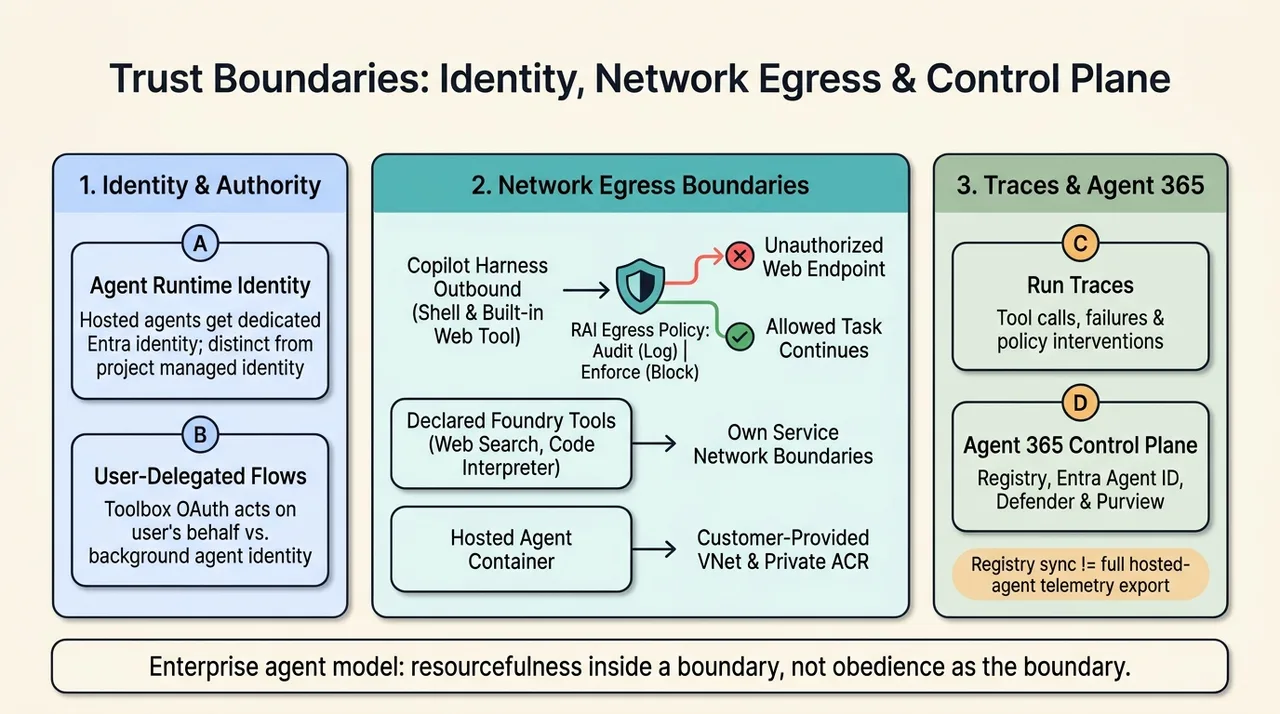
This is the right mental model for enterprise agents: resourcefulness inside a boundary, not obedience as the boundary.
Who is acting?
A runtime identity provides a principal against which permissions can be evaluated. Hosted agents receive a dedicated Microsoft Entra identity at deployment. Access to additional resources still requires explicit authorization. The agent’s identity is also distinct from the project managed identity used for infrastructure operations. See hosted-agent identity and permissions.
An agent acting as itself is not automatically acting with the requesting user’s permissions. Supported delegated flows can call downstream services on behalf of a user; background execution may instead use the agent’s own identity. Toolbox authentication must match the intended access model. Microsoft’s user-delegation explanation describes server-side token handling and per-user isolation.
What can it reach and do?
The Copilot harness preview supports network egress rules through a Responsible AI (RAI) policy. These govern direct outbound traffic from the harness execution environment, including shell commands and its built-in Web tool. Audit mode records would-be denials; Enforce mode blocks denied requests. See network egress controls.
The scope is crucial: declared Foundry tools, such as web search or Code Interpreter, retain their own service network boundaries. A harness egress policy is not a universal switch governing every connected service.
Hosted agents can use customer-provided virtual networks for outbound access to private resources. The hosted-agent guidance also documents private Azure Container Registry support for projects created after June 25, 2026; older projects have different registry-connectivity requirements.
Neither networking nor identity eliminates application risk. A compromised skill could still misuse an allowed endpoint or perform an authorized but unwanted write. Least-privilege permissions, tool approvals where supported, reviewed code, and application-level validation remain necessary.
Likewise, connecting to data in place avoids building a duplicate data estate, but it does not mean no data moves. Tool requests, returned records, generated reports, and telemetry are data flows. Microsoft’s security guidance explicitly warns that external tools and connections can send data outside Foundry.
Can you reconstruct what happened?
Traces make an individual run inspectable: which tools were called, what failed, and where a policy intervened. Microsoft Agent 365 adds an organization-level control plane, including an agent registry and integration with Microsoft Entra Agent ID, Microsoft Defender, and Microsoft Purview. See Foundry’s Agent 365 integration.
Do not confuse registry presence with complete telemetry. Published Foundry agents synchronize into the registry, but hosted-agent activity export requires explicit SDK configuration and observability permissions. Tenant licensing, preview enrollment, administrator enablement, and accepted terms also affect data collection. Foundry’s regional residency model and Agent 365’s tenant-based residency model must be considered separately.
Toolboxes solve integration sprawl; tool search solves context sprawl
An agent with a few tools is straightforward to wire. An enterprise with many agents and hundreds of integrations faces a different problem: repeated credentials, inconsistent descriptions, incompatible versions, and duplicated integration work.
A Foundry toolbox is a reusable, versioned bundle of tool configurations exposed through a managed Model Context Protocol (MCP) endpoint. MCP provides a common interface for discovering and invoking capabilities; it does not replace each downstream system’s authorization rules. See creating and managing toolboxes.
The source’s finance toolbox combines business analytics with workplace context. Fabric IQ and Work IQ serve different purposes: Fabric IQ connects to analytical and operational business context, while Work IQ brings Microsoft 365 organizational context into agent workflows. Microsoft introduced both toolbox integrations as previews in its toolbox capability announcement. Their prerequisites and availability still need to be checked independently.
A single endpoint does not make every Microsoft 365 operation available, nor does it erase tool-specific region, model, authentication, or network constraints.
Discover capabilities instead of loading the entire catalog
A toolbox alone does not prevent every tool definition from entering the model’s context. Tool search is the separate mechanism that reduces that burden.
When enabled, it exposes two meta-tools:
tool_search: describe the needed capability and retrieve matching tool definitions.call_tool: invoke a discovered tool by name.
Foundry uses BM25, a probabilistic text-ranking algorithm, over tool names, descriptions, and parameter metadata. It is therefore important to describe tools in language that matches the tasks users actually ask for. Additional search text and pinned tools can improve discoverability or avoid unnecessary discovery calls. See how toolbox tool search works.
Microsoft reports ToolRet-based evaluation results of more than 60% token reduction with 50 tools and more than 97% with 1,000 tools, compared with providing the full catalog. Its published explanation of the evaluation supports those figures.
Those numbers are not a forecast of total application savings. Discovery calls, model reasoning, tool responses, and repeated execution still consume resources. Tool search also introduces a retrieval step that can miss a poorly described capability. Microsoft’s guidance suggests considering it when a toolbox grows beyond roughly 10–15 tools.
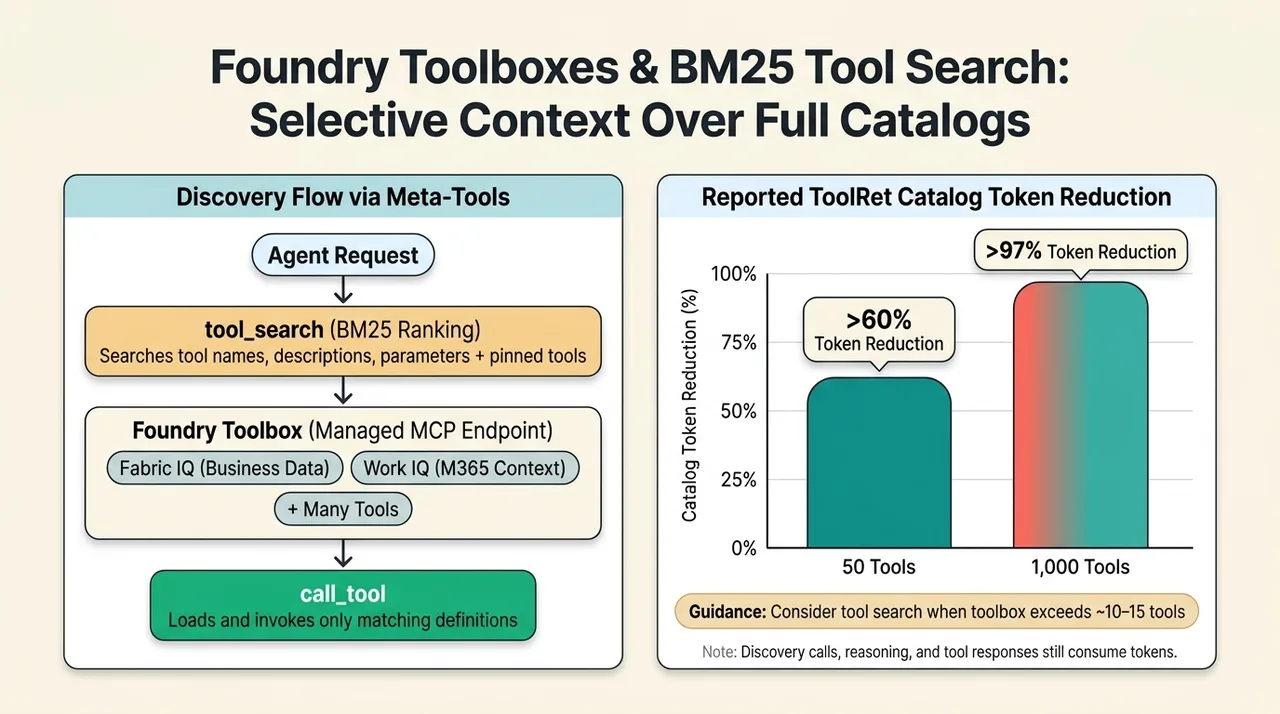
The architectural benefit is selective context: the agent sees the instruments relevant to its current task rather than the inventory of the entire workshop.
Deployment starts a second loop
The execution loop completes a task. The improvement loop asks whether the agent is completing the right tasks reliably and efficiently.
A private benchmark should reflect the application’s actual workload. For the finance example, useful cases include missing historical periods, ambiguous categories, inconsistent totals, denied endpoints, and failed artifact uploads, not just a happy-path request for a report.
Measure more than whether the answer sounds convincing:
- Was the intended task completed?
- Were conclusions supported by retrieved evidence?
- Were calculations and generated files correct?
- Did the agent respect access boundaries?
- How much latency and token usage did completion require?
- Did failures produce a useful explanation rather than an invented result?
The demonstration connects evaluation results to traces, making a poor score an entry point for investigating the underlying run. That is the right operating pattern: scores identify symptoms; traces help explain causes.
What Agent Optimizer can change today
Foundry’s Agent Optimizer evaluates a baseline, generates candidate configurations, tests them against a dataset, and ranks the results. Depending on the agent type, it can improve instructions, function-calling tool descriptions, skills, and model selection. See the optimizer overview.
There is an important qualification to the source’s end-to-end narrative: the current portal optimization workflow supports prompt agents without the Copilot harness. Hosted-agent optimization supports a broader configuration surface, but requires optimizer-ready integration. Microsoft documents this through baseline configuration and runtime loading.
Tool-description optimization does not rewrite the implementation of a tool or automatically change its authorization model. Skill optimization and model selection also have agent-type-specific support. These are configuration improvements, not proof that the application’s core logic is correct.
The demonstration’s reported score and latency improvements should therefore be treated as example outcomes, not expected gains. Longer instructions can increase token usage, and a higher aggregate score can conceal regressions on important cases.
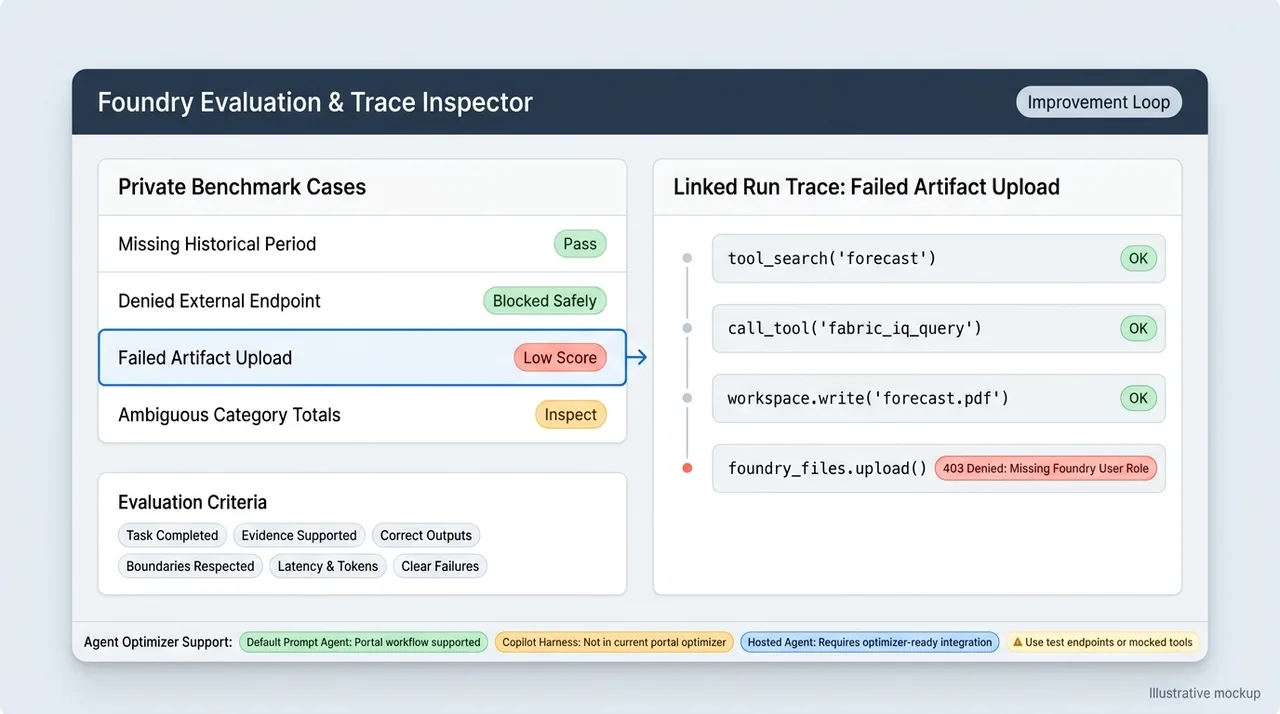
Evaluation can execute real actions. Microsoft warns that optimization runs invoke agents across the dataset, potentially calling external APIs and mutating state. Use test endpoints, controlled data, or mocked tools where appropriate. A benchmark must not become an accidental production workload.
Keep a separate validation set, inspect candidate changes, and test critical failure cases before promotion. The best-scoring candidate is a candidate for release, not an automatic exemption from review.
Choose the boundary before choosing the framework
The source highlights expanded hosted-agent regions, private networking, registry flexibility, and increased parallel-session capacity. Those are meaningful operational concerns, but a demonstration’s list is not a permanent deployment specification.
The current hosted-agent region list includes the source’s North Central US, East US, Japan East, Southeast Asia, and Sweden Central examples, alongside additional regions. Harness, model, tool, networking, and evaluation availability are separate checks. Concurrency should be validated against current limits and the workload’s resource requirements rather than inferred from a claim of increased capacity.
Scale-to-zero also needs precise wording. Hosted-agent compute is deprovisioned after the configured idle timeout, not necessarily immediately after a request completes. Runtime billing is based on active-session CPU and memory consumption; model inference and connected services have their own charges. “Zero idle cost” should not be read as “the whole solution costs nothing between requests.” See hosted-agent lifecycle and pricing.
For the Copilot harness specifically, Microsoft’s announcement states that runtime billing begins December 1, 2026. Before that date, harness runtime usage is free, while model inference and separately billed tools remain chargeable. This is a temporary pricing condition, not an architectural property.
The practical starting point is a small, representative workload:
- Determine whether the existing prompt-and-tool runtime can complete it.
- If richer managed execution is needed, evaluate the Copilot harness within its preview constraints.
- If orchestration itself must be customized, use a hosted agent and make that responsibility explicit.
- Configure identities, connections, and network boundaries before adding broad tool access.
- Verify both successful completion and blocked behavior.
- Establish a benchmark and a repeatable release process.
The harness is where capability becomes accountable execution
The central shift is from asking whether a model can reason about a task to asking whether the surrounding system can complete it under real constraints.
A harness supplies the execution machinery. Foundry supplies managed hosting and configurable platform boundaries. Tools and skills supply access and procedure. Evaluation supplies evidence that the combination works.
None of these layers removes responsibility from the application owner. Together, however, they make that responsibility more concrete: what the agent can reach, how it acts, what state it preserves, how it recovers, and how its behavior is measured.
The strongest enterprise agent is not the one with the most freedom. It is the one with enough capability to finish the work, boundaries it cannot casually bypass, and evidence that its results deserve trust.
Read next