The AI-Ready Workplace Is an Ecosystem, Not a Collection of Devices

Writer

An AI assistant can help you prepare for an executive briefing. It cannot, by that fact alone, make the room ready for it.
The agenda may be excellent while the microphones miss half the conversation, the display refuses to cooperate, and the room feels uncomfortable. Digital intelligence and physical experience are different problems. Connecting them is what turns a workplace from a collection of products into a coordinated environment.
That is the architectural question behind the connected workplace: how do collaboration software, audiovisual systems, building controls, and operational data work together without becoming another fragile chain of integrations?
Microsoft’s workplace tools and the Q-SYS audiovisual platform offer a useful lens for answering it. Their roles are complementary, not interchangeable. Microsoft’s Experience Center One provides a concrete example of platform-based audiovisual infrastructure at building scale. But the broader lesson is not to buy more devices. It is to design the relationships between them.
The Gap Between AI Ambition and Workplace Readiness
The physical workplace is not absent from the AI conversation. It is often simply behind the ambition.
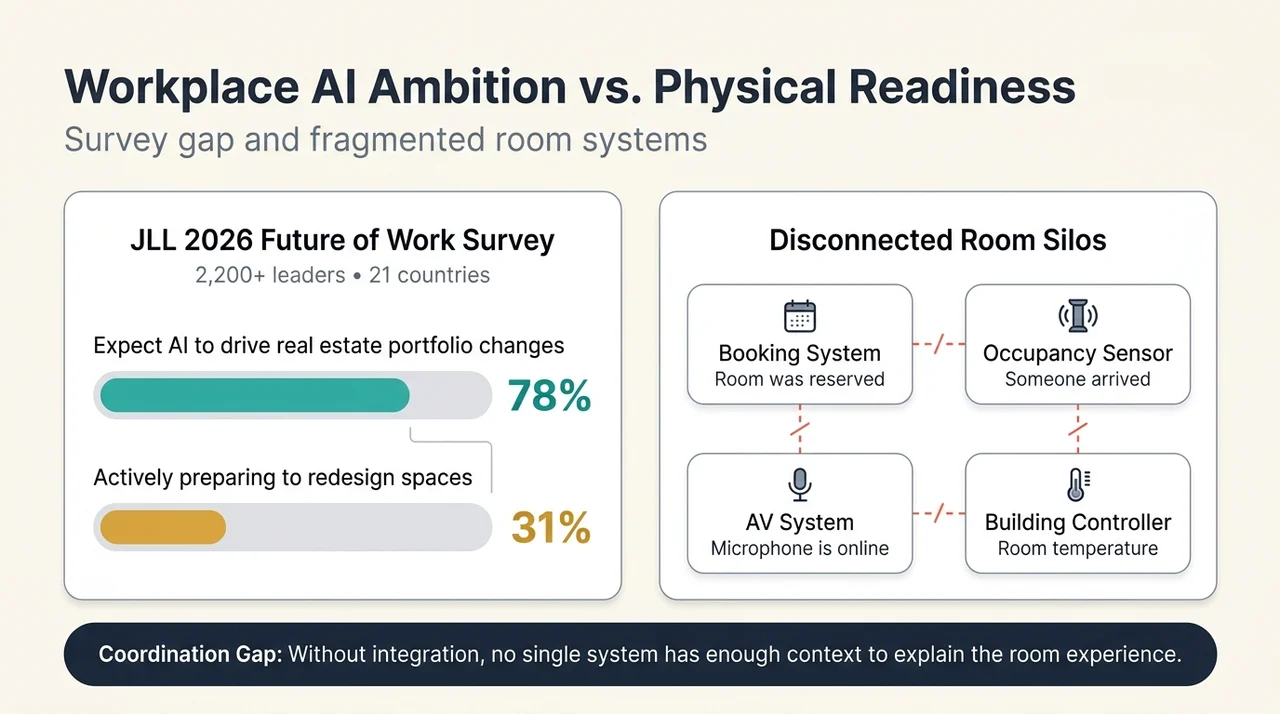
In its 2026 Future of Work Survey, JLL reported that 78% of respondents expected AI to drive significant changes to their real estate portfolio strategy. Only 31% were actively preparing to redesign spaces for human-AI collaboration. The survey covered more than 2,200 C-suite and corporate real estate leaders across 21 countries, with fieldwork conducted from January to April 2026.
The distinction matters. The 31% figure measures preparation to redesign spaces, not confidence that collaboration technology will work. Nor does the survey prove that any particular audiovisual platform improves productivity. It identifies a gap between expected change and practical preparation.
Closing that gap requires more than adding AI to an existing room. Many workplaces already have capable conferencing systems, sensors, scheduling tools, lighting controls, and management dashboards. Their weakness is that each system understands only part of the experience.
A booking system knows that a room was reserved. An occupancy sensor knows whether someone arrived. An audiovisual system knows whether a microphone is online. A building controller knows the temperature. Without meaningful integration, none has enough context to explain the whole situation.
The missing capability is often coordination, not another feature.
Three Layers of a Connected Workplace
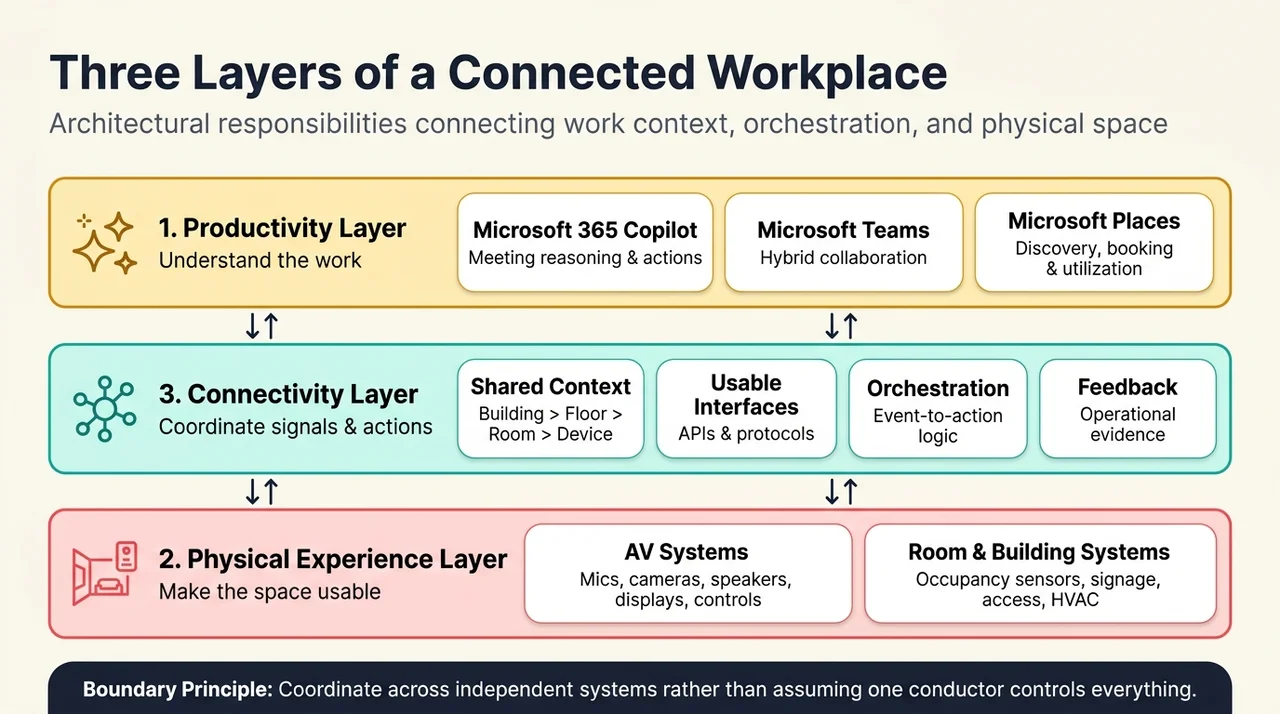
A useful mental model separates the workplace into three layers: productivity, physical experience, and connectivity.
These are architectural responsibilities, not necessarily three products or three independently deployed systems.
1. The productivity layer: understanding the work
This layer helps people decide what they need to do, who they need to collaborate with, and where that collaboration should happen.
Microsoft 365 Copilot, Teams, and Places contribute different pieces:
- Copilot helps reason over meeting content. Microsoft documents capabilities to summarize discussions, suggest action items, and answer questions during or after a meeting. Post-meeting access depends on transcription and the applicable meeting settings. See Microsoft’s guidance on Copilot in Teams meetings.
- Teams provides the digital collaboration environment connecting participants in the room with those joining remotely.
- Places supports workplace coordination, space discovery and booking, and utilization insights. Microsoft’s Places overview describes how it works across Teams and Outlook to connect work plans with physical locations.
These tools address the context of work. They do not automatically control every camera, lighting circuit, or heating system in a building.
That boundary is important. A strong digital productivity layer does not remove the need for a well-engineered physical environment.
2. The physical experience layer: making the space usable
This is where software meets the room.
It includes audiovisual, or AV, equipment such as microphones, loudspeakers, cameras, displays, projectors, and control interfaces. It also includes occupancy sensors, scheduling panels, signage, access systems, and heating, ventilation, and air conditioning, or HVAC.
Not all of these belong to one platform. They may be supplied and operated by different teams. What matters is whether they can contribute to a coherent experience.
Consider a well-configured home office. The displays are positioned correctly. The microphone works. Lighting is predictable. You know how to adjust the room. Technology recedes into the background because you are not continually negotiating with it.
A shared workplace should aim for the same low-friction experience, even though its users, meeting formats, and room configurations change throughout the day.
Meeting equity also belongs here. Remote participants need intelligible audio and useful camera views, but people physically present need to hear clearly, see shared content, and participate without fighting the room. Improving one end of a hybrid meeting does not automatically solve the other.
3. The connectivity layer: turning separate signals into coordinated behavior
Connectivity links collaboration context, AV infrastructure, building systems, monitoring tools, analytics, and enterprise workflows.
It is more than putting devices on a network. Network reachability does not tell a system which room a sensor serves, what its data means, or which actions it is allowed to trigger.
Useful connectivity requires:
- Shared context: consistent relationships between buildings, floors, rooms, devices, and sensors.
- Usable interfaces: supported protocols, application programming interfaces, or APIs, and integration tools.
- Orchestration: logic that translates events into coordinated actions.
- Feedback: operational data that helps teams understand whether the intended experience occurred.
Think of the workplace as an orchestra. The devices are instruments, collaboration software provides context for the performance, and orchestration coordinates the execution. The analogy has a limit: a building rarely has one conductor with unrestricted authority. Different systems retain their own responsibilities and control boundaries.
The objective is coordination across those boundaries, not pretending they no longer exist.
What a Full-Stack AV Platform Actually Provides
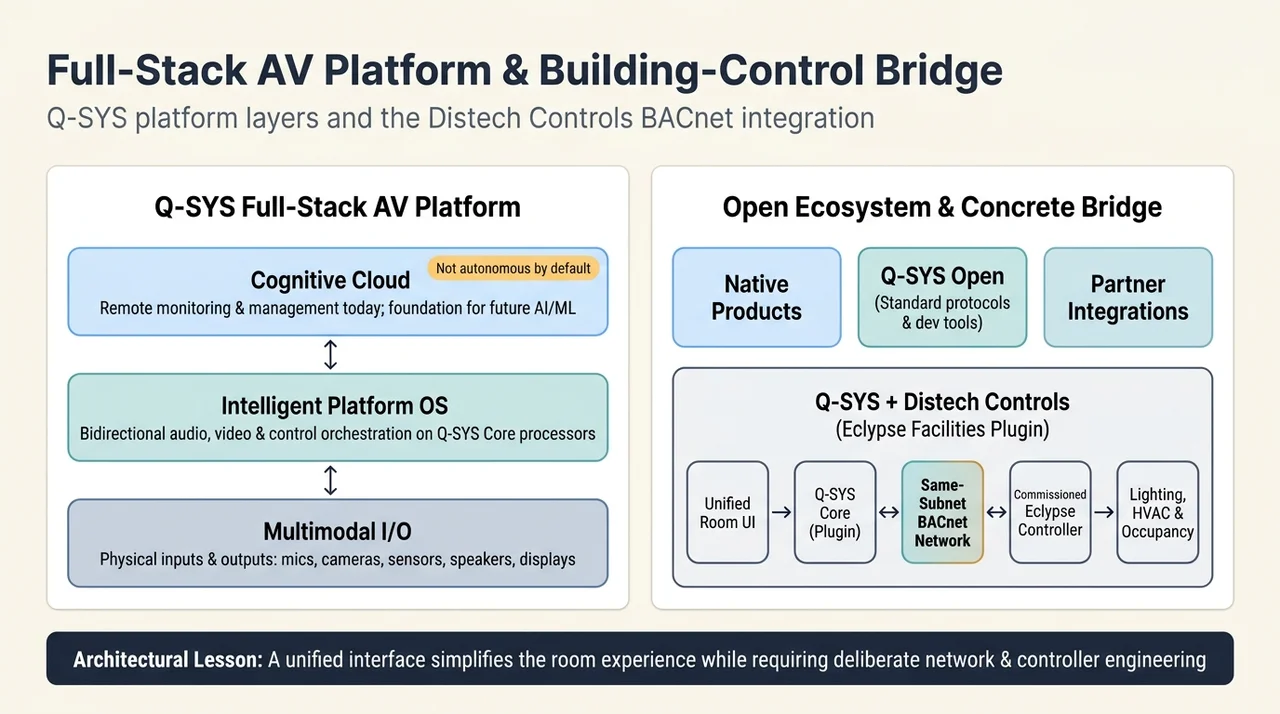
Q-SYS describes its offering as a full-stack AV platform: a software-based foundation connecting audio, video, control, devices, and cloud services. Its platform documentation identifies three integrated architectural elements.
Multimodal I/O: the connection to the physical world
Input/output, or I/O, connects the platform to devices and signals. In this context, multimodal refers to different forms of input and output, including audio, video, and device data.
Microphones capture sound. Cameras capture video. Sensors provide measurements. Loudspeakers, displays, and control interfaces deliver outputs or enable interaction.
The term should not be confused with a guarantee that a multimodal AI model is reasoning over every signal. It describes the platform’s connection to multiple kinds of physical input and output.
Intelligent Platform OS: the orchestration engine
The operating system, or OS, brings audio, video, and control into an integrated engine. Q-SYS describes it as moving data bidirectionally through the stack and orchestrating platform operation.
This is the distinction between installing devices and designing behavior. A microphone, camera, and display can be individually functional while the room remains awkward to use. Orchestration determines how those components work together.
Q-SYS also provides Core processors that run the platform. Software-based therefore does not mean hardware-free, and cloud-first does not mean every real-time room function executes in a remote cloud service. The platform includes processing infrastructure as well as cloud capabilities, as described in its May 2025 portfolio announcement.
Cognitive Cloud: management today, a foundation for further intelligence
The cloud layer extends visibility and management beyond an individual space. Q-SYS describes system-wide remote monitoring and management, alongside a foundation for future AI cognitive services and machine learning.
The wording deserves care. Remote monitoring is a documented capability. The broader prospect of cloud intelligence that continuously learns and adapts across an entire workplace should not be treated as proof that every such capability is available today.
A cloud-connected platform is not automatically an autonomous workplace. Monitoring, configured automation, AI-assisted interpretation, and agent-driven action are distinct capabilities.
Likewise, “connected” should not be read as “all raw audio and video is uploaded for AI training.” The data collected and transmitted depends on the specific service, configuration, and integration. An architectural label is not a data-flow specification.
Openness Matters Because No Platform Owns the Whole Building
A full-stack AV platform still operates within a larger ecosystem.
Q-SYS separates that ecosystem into native products, Q-SYS Open, and partner integrations. Native products include its hardware, software, and services. Q-SYS Open provides industry-standard protocols and published developer tools. Partners extend the platform with integrated devices, software, and services, including verified assets. These distinctions are described in the Q-SYS platform overview.
The practical value is extensibility. A room should not need a completely separate operating model whenever a new device or service is introduced.
But openness is not the same as automatic interoperability. A supported integration still has prerequisites, configuration requirements, and lifecycle dependencies. Verification reduces uncertainty about a particular asset; it does not certify every possible combination of firmware, network topology, and customer configuration.
A concrete example: AV and building controls
The Q-SYS and Distech Controls integration connects AV interaction with environmental controls through a unified interface. Its documented scope includes lighting, temperature, conferencing, and occupancy-informed environmental behavior.
That is a meaningful bridge between systems that users experience as one room but organizations often manage separately.
The integration is not magic. The Eclypse Facilities plugin documentation specifies a programmed controller configuration, a commissioned BACnet building-automation network, designated integration equipment groups, and a same-subnet requirement between the Q-SYS Core running the plugin and the Eclypse device.
The lesson is architectural: a shared interface can simplify the user experience while the underlying integration still requires deliberate engineering.
From Booking Data to Physical Evidence
One of the clearest examples of useful ecosystem integration is the difference between intended use and actual use.
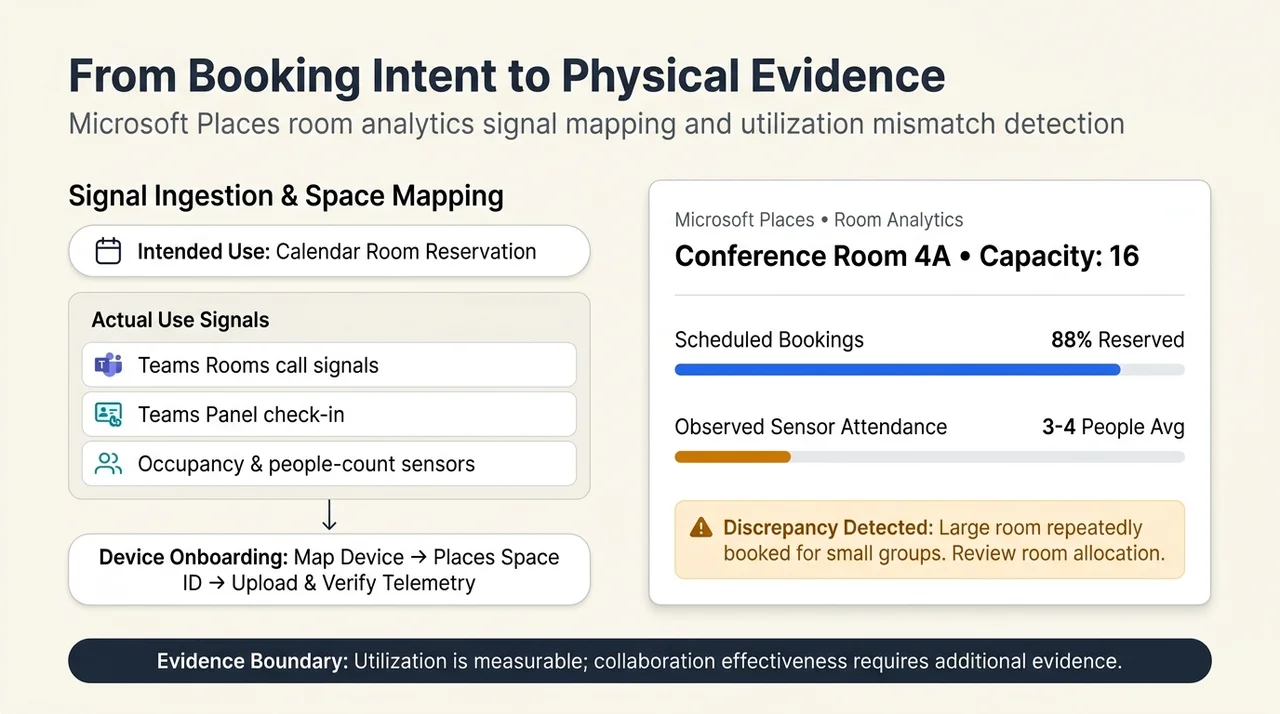
A reservation tells you someone planned to use a room. It does not prove they arrived, how many people attended, or whether the room worked well.
Microsoft’s Places room analytics documentation distinguishes reservation-based intent from occupancy signals. Supported sources include Teams Rooms meeting-call signals, Teams panels with check-in enabled, and integrated third-party occupancy or people-count sensors.
The same documentation describes onboarding devices, mapping them to a Places identifier, uploading telemetry, and verifying that the data appears in Places. That mapping is crucial: a sensor reading becomes useful workplace information only when the system knows which space it describes.
Different signals also have different meanings. A room joining a scheduled Teams meeting can support an occupancy inference. A people-count sensor provides a different kind of observation. Neither should be treated as an unrestricted measure of employee activity or meeting quality.
Consider an illustrative example: a large room is repeatedly booked, but sensor data suggests that only a few people attend. That discrepancy may justify investigating room allocation. It does not, by itself, establish that the meetings were ineffective.
Utilization is measurable. Collaboration effectiveness requires additional evidence.
An Executive Briefing as a Connected Experience
An executive briefing makes the architecture easier to picture.
The following is an illustrative scenario, not a claim that every step is a standard, turnkey Microsoft-to-Q-SYS workflow.
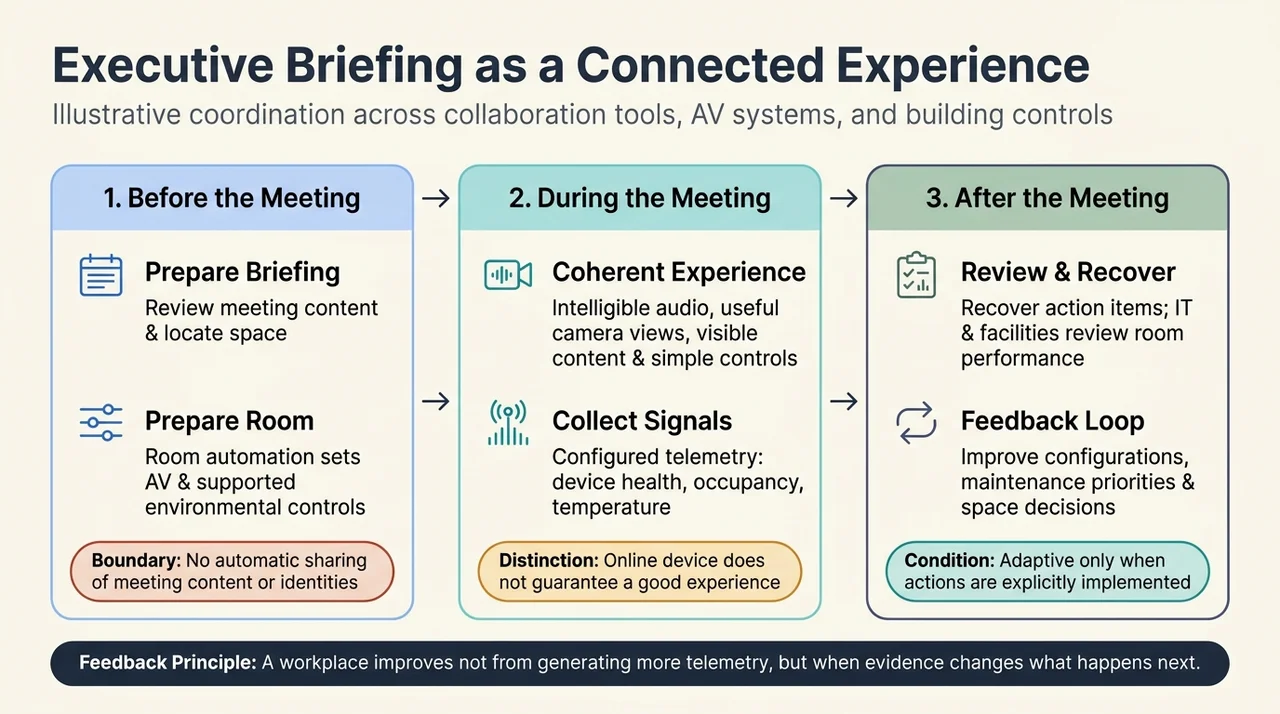
Before the meeting
The organizer uses available meeting content to prepare a briefing and identify outstanding actions. Workplace coordination tools help locate an appropriate space.
Configured room automation prepares the AV environment. Where supported building-control integrations are installed, environmental settings can be coordinated with room use.
These are related activities, but they do not imply that meeting content or participant identities are automatically shared with every physical system. Any such exchange needs an explicit, supported integration and an appropriate purpose.
During the meeting
The room delivers intelligible audio, useful camera views, visible content, and understandable controls. Participants should not need to know which subsystem performs each function.
Operational systems collect the signals they are configured to collect: device health, occupancy, or environmental measurements, for example.
The key distinction is between collecting data and interpreting it. A device can be online while producing a poor experience. A comfortable temperature reading does not prove every participant felt comfortable.
After the meeting
Meeting tools can help participants recover discussion points and action items. Facilities and technology teams can examine room use and system performance.
Over time, those observations can support better configurations, maintenance priorities, and space decisions. That is a feedback loop. It becomes adaptive automation only when the interpretation and subsequent actions are explicitly implemented.
The workplace does not improve merely because it generates more telemetry. It improves when useful evidence changes what happens next.
Experience Center One: A Platform Approach at Building Scale
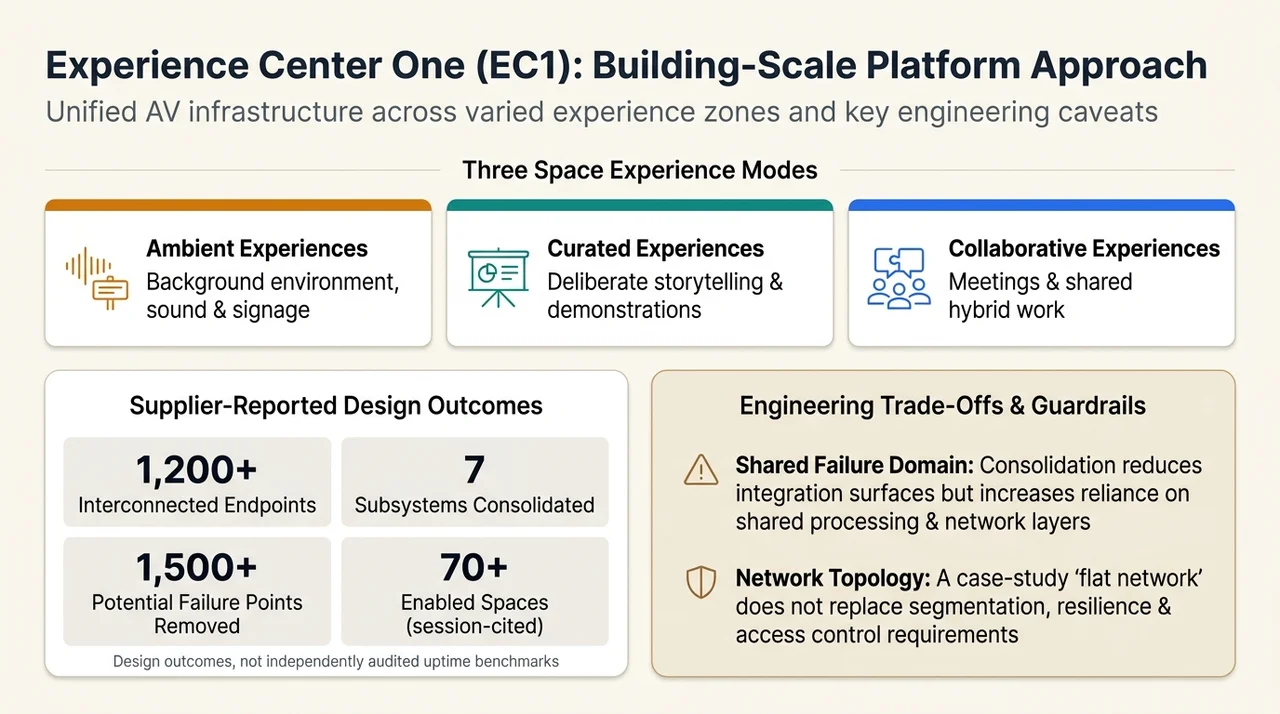
Microsoft’s Experience Center One, or EC1, in Redmond, Washington, offers a concrete example of the platform approach. Q-SYS describes it as a flagship briefing, demonstration, and executive-engagement facility with connected ambient, curated, and collaborative experiences. See the official EC1 case study page.
The distinction between those experiences is useful:
- Ambient experiences shape the background environment, such as sound and signage.
- Curated experiences support deliberate storytelling and demonstrations.
- Collaborative experiences support meetings and shared work.
A building-wide architecture must support all three without assuming that every space is simply another conference room.
In its published EC1 case study, Q-SYS reports more than 1,200 interconnected endpoints, consolidation of seven subsystems into one software-based platform, and removal of more than 1,500 potential points of failure.
These are supplier-reported design outcomes, not independently audited reliability benchmarks. “Potential points of failure removed” should not be interpreted as 1,500 observed incidents prevented, nor as a quantified improvement in uptime.
The accompanying session also cited more than 70 enabled spaces. That figure is best treated as a session-reported scale indicator rather than an independently established count.
What the evidence supports is a shift from isolated, single-purpose AV systems toward a centrally managed, network-first foundation. The architectural benefit is that devices and experiences can be organized around a common platform rather than repeatedly assembled as separate islands.
The session’s description of a “flat network” is not a universal deployment recommendation. A case-study topology does not replace an organization’s requirements for segmentation, resilience, capacity, or access control.
Similarly, one platform does not mean one failure domain has disappeared. Consolidation can reduce integration surfaces while increasing dependence on shared processing, networking, and management components. Those trade-offs still need to be engineered.
What AI Readiness Means Here
The phrase AI-ready workplace is useful only if it means something more specific than “a building with AI branding.”
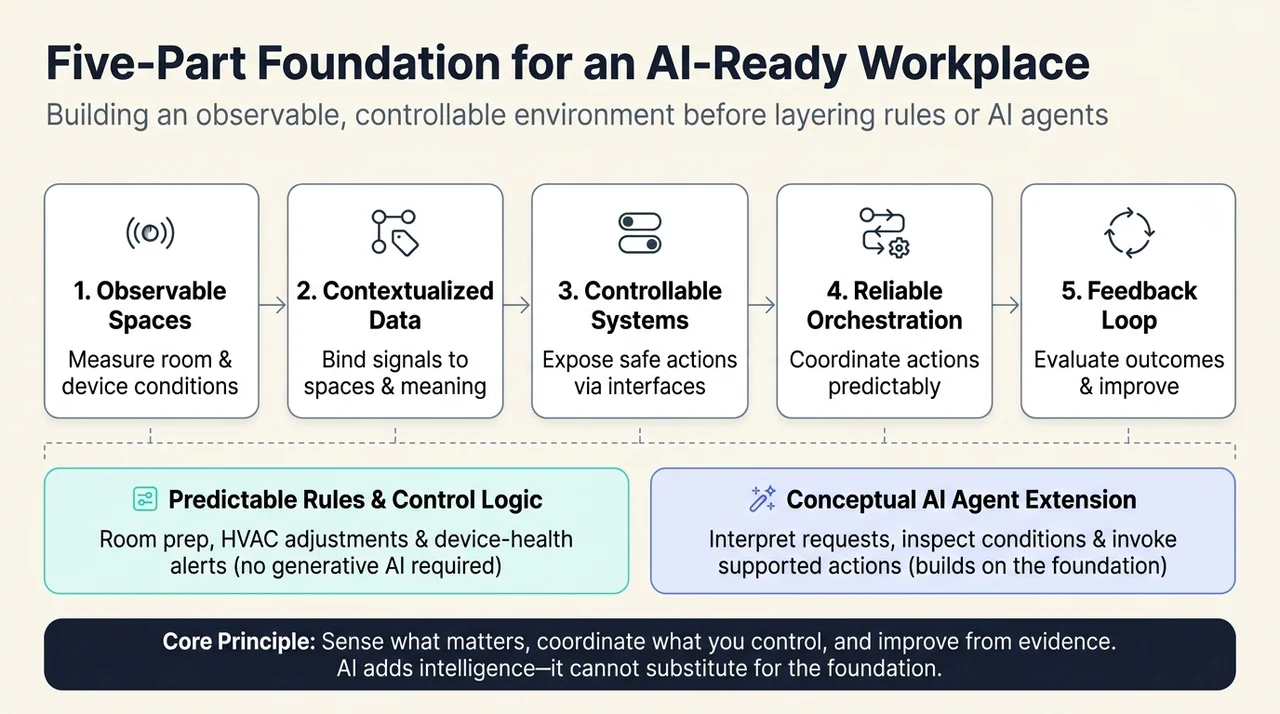
In this architecture, readiness means having a foundation that future intelligent workflows can actually use:
- Observable spaces: relevant room and device conditions can be measured.
- Contextualized data: signals are associated with the correct space and interpreted according to their meaning.
- Controllable systems: supported interfaces expose appropriate actions.
- Reliable orchestration: actions can be coordinated without making basic room operation unpredictable.
- A feedback loop: teams can evaluate outcomes and improve the experience.
An AI agent could eventually use such a foundation to interpret a request, inspect relevant conditions, and invoke supported actions. That is a conceptual extension, not evidence that an autonomous building agent is included in the documented platform.
Many valuable workplace behaviors do not require generative AI at all. Preparing a room, adjusting an environmental setting, or raising a device-health alert may be better served by predictable rules and established control logic.
The point is not to replace every rule with an agent. It is to make the environment understandable and actionable enough that the right form of automation can be applied.
Design the Connections, Not Just the Room
A high-performance workplace should make collaboration easier for the people inside it and easier to sustain for the teams operating it.
That requires an ecosystem-first approach: collaboration software supplies work context, physical systems deliver the experience, and integration connects the two without erasing their boundaries.
The Q-SYS architecture and Microsoft’s EC1 example show why the move from products to platforms matters. A common foundation can support varied spaces, simplify selected integrations, and make operational evidence more accessible. It does not automatically prove productivity gains, eliminate engineering complexity, or create an autonomous workplace.
The durable design principle is simpler: build a workplace that can sense what matters, coordinate what it controls, and improve from evidence.
AI can add intelligence to that foundation. It cannot substitute for it.
Read next