Copilot Code: From a Prompt to a Shared SharePoint App

Writer
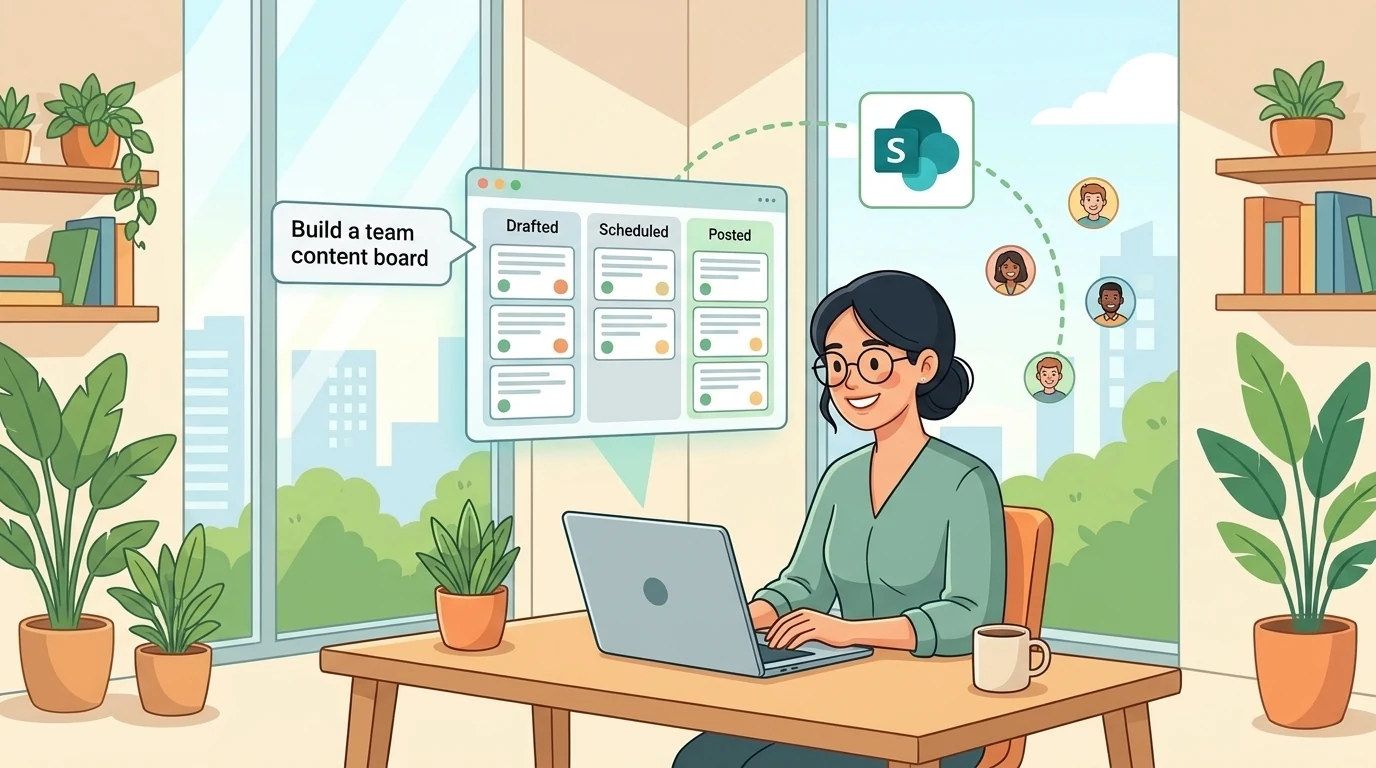
A character counter and a team content board can both begin with a sentence in Copilot. But they are not the same kind of application.
The character counter can work entirely with the text currently on screen. The content board needs durable records, shared access, reliable updates, and a data model that represents what users expect to do. Generating an attractive interface is only the beginning.
That distinction is the useful way to understand Copilot Code: not simply as a faster way to draw screens, but as an AI-assisted path from an idea to working software that can be published, connected to organizational data, and shared with colleagues. Microsoft documents the Code tab as a natural-language software-building experience with live previews and iterative refinement. Its shared applications can run on Microsoft Copilot Managed Runtime, the Microsoft-hosted platform for these apps. Copilot Code overview · Managed Runtime overview
The interesting question is what happens between “build me an app” and “my team can use it.” A journal-to-content-pipeline demonstration provides a useful architectural walkthrough, including a surprisingly instructive drag-and-drop limitation.
Availability matters. As verified on October 23, 2026, Copilot Code is a Frontier preview, and Copilot Managed Runtime is documented as a preview. Cowork for work or school accounts is generally available, but its App skill requires Frontier access. Availability of Cowork does not imply availability of every app-building capability. Copilot Code · Cowork overview · Managed Runtime overview
Separate the worker, the builder, and the host
The demonstration combines several experiences. They make more sense when their responsibilities are separated.
- Copilot Cowork performs work. It can carry out multi-step tasks across Microsoft 365, work with files, create documents, and run scheduled prompts. It also has a Frontier App skill for lightweight interactive apps. Cowork overview
- Copilot Code builds software. It generates applications and other software artifacts, presents a live preview, and accepts natural-language feedback. It supports local and cloud projects. Copilot Code overview
- Copilot Managed Runtime hosts published apps. It supplies Microsoft Entra authentication, connector integration, tenant-policy enforcement, and administrative visibility. Managed Runtime architecture
- SharePoint stores the business records in this example. The demonstrated content board reads and writes a SharePoint list. SharePoint is the chosen data source, not a mandatory backend for every generated app; the runtime also supports other connected sources. Managed Runtime SDK overview
Think of Cowork as the worker, Code as the builder, Managed Runtime as the building in which the app operates, and SharePoint as the filing system containing its records.
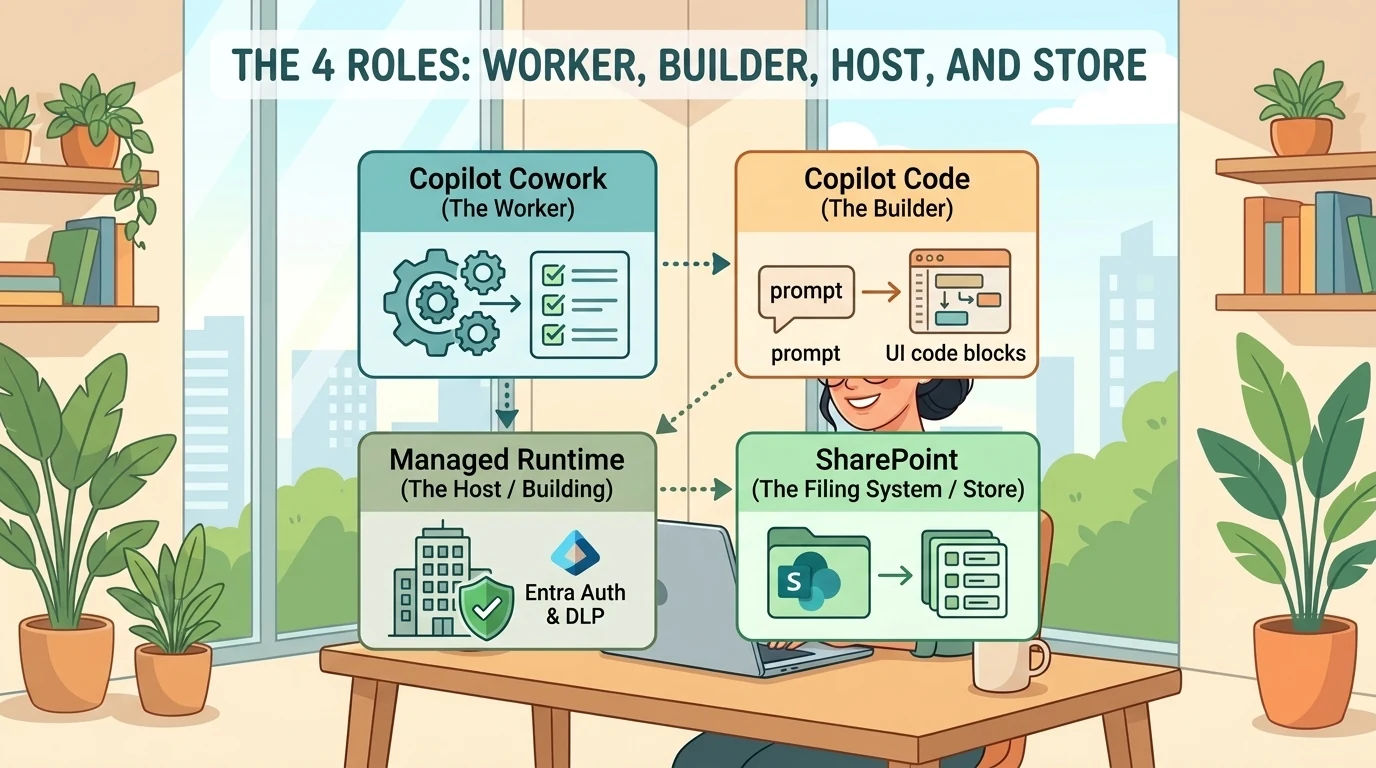
The analogy has a boundary: these are not completely separate product silos. Cowork can also build apps, and Microsoft documents multiple creation paths into the same runtime, including Copilot Studio and a software development kit (SDK). The important separation is between doing a task, generating an application, hosting it, and persisting its data. Managed Runtime creation paths
Start with the workflow, not the screen
The demonstrated scenario begins with a daily journal in OneDrive. The author wants promising ideas extracted into a SharePoint list, where a marketing team can turn them into LinkedIn posts.
That is a coherent pipeline:
- Capture unstructured ideas in a journal.
- Identify candidates worth developing.
- Store those candidates as structured records.
- Let a team manage them through a shared application.
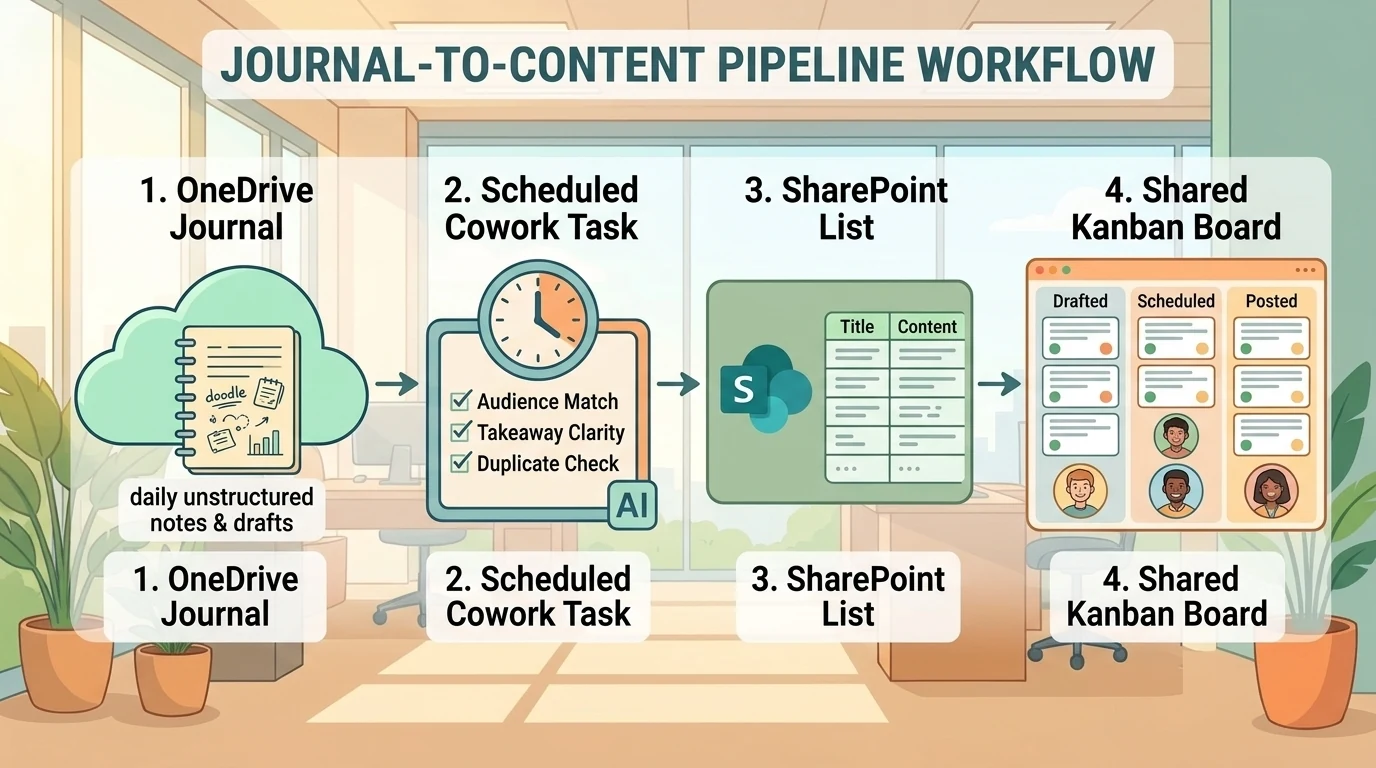
The demonstration configures a recurring Cowork task for the extraction step. Scheduled prompts are a documented capability: users describe the task and timing, approve the schedule, and can later edit, pause, or cancel it. The specific journal-to-list extraction is a demonstrated scenario, not a guaranteed turnkey template. Schedule prompts in Cowork
“The best ideas” needs a definition
The most consequential part of this workflow is not the schedule. It is the selection rule.
“Move the best ideas into SharePoint” leaves several questions unanswered:
- Best for which audience?
- Should incomplete thoughts be included?
- Should an idea already captured yesterday be added again?
- Should the journal remain unchanged?
- Should the task create candidates for review or treat them as approved content?
An illustrative instruction could be:
Every weekday morning, review new entries in the specified OneDrive journal. Identify ideas relevant to our technical audience that contain a clear topic and useful takeaway. Add candidates to the specified SharePoint list, retain a reference to the source entry, and flag uncertain candidates for review. Do not modify the journal. Check for existing candidates before adding another record.
This is a proposed specification, not a claim that duplicate prevention or review flags appear automatically. Those behaviors need to be supported by the available actions, represented in the data, and tested.
Cowork may remove the need to build a separate Power Automate flow for a particular task. That does not establish that it replaces every workflow requirement. A scheduled prompt still needs clear instructions, appropriate access, and validation of its behavior. Microsoft documents approval controls as part of Cowork, so scheduling should not be interpreted as permission to perform every future action without a checkpoint. Use Cowork
Two apps, two different persistence requirements
The demonstration first builds a LinkedIn character-counting utility, then a SharePoint-backed content board. Starting with the simpler app exposes an important distinction.
A self-contained utility
The character counter accepts text, calculates its length, and helps the user reason about edits. The demonstrated version has no persistent backend.
That is appropriate for a disposable utility: its purpose is to process the current input, not maintain a shared record of work. Copilot Code explicitly supports self-contained apps such as calculators, alongside connected applications. Build and publish apps with Code
But “no backend” should not become “no state.” An app can hold temporary input while it is open without saving it durably. The test is whether the information survives reopening and whether another user can retrieve it.
Also distinguish deterministic functionality from generated advice. A character count can be calculated locally. Suggestions about what to cut may use fixed rules, model inference, or another implementation. A polished preview alone does not establish which mechanism was generated or whether it creates additional runtime consumption.
A shared content board
The second app manages journal ideas through three demonstrated statuses: Drafted, Scheduled, and Posted. It supports searching, creating an idea, and moving cards between columns. The demonstration checks persistence by creating a record in the app and then finding it in the SharePoint list.
That is stronger evidence than a successful animation. It shows a write reaching the underlying store in that session. It does not prove every update path, permission scenario, or concurrent-edit case works correctly.
Nor does a column named “Scheduled” prove the app schedules a LinkedIn publication. In the demonstrated workflow, these are record statuses. External posting or scheduling would require additional supported integration and explicit validation.
The general pattern is nevertheless documented: Copilot Code can create lightweight trackers, kanban boards, forms, and dashboards, connect them to real data, and publish them for organizational use. Use Copilot Code
The drag-and-drop problem is really a data-model problem
The most educational moment arrives when a card can move into another status column but cannot stay beneath a particular card.
The demonstrated app explains that the list has no ordering field and the board is sorted by modification date. That means the data can answer one question:
Which stage is this idea in?
It cannot answer another:
Where should this idea appear within that stage?
These are different requirements.
Changing a status is a record update. Persisting a position requires a durable representation of order. Without it, the interface might temporarily display a card where it was dropped, only to rearrange the board when it reloads.
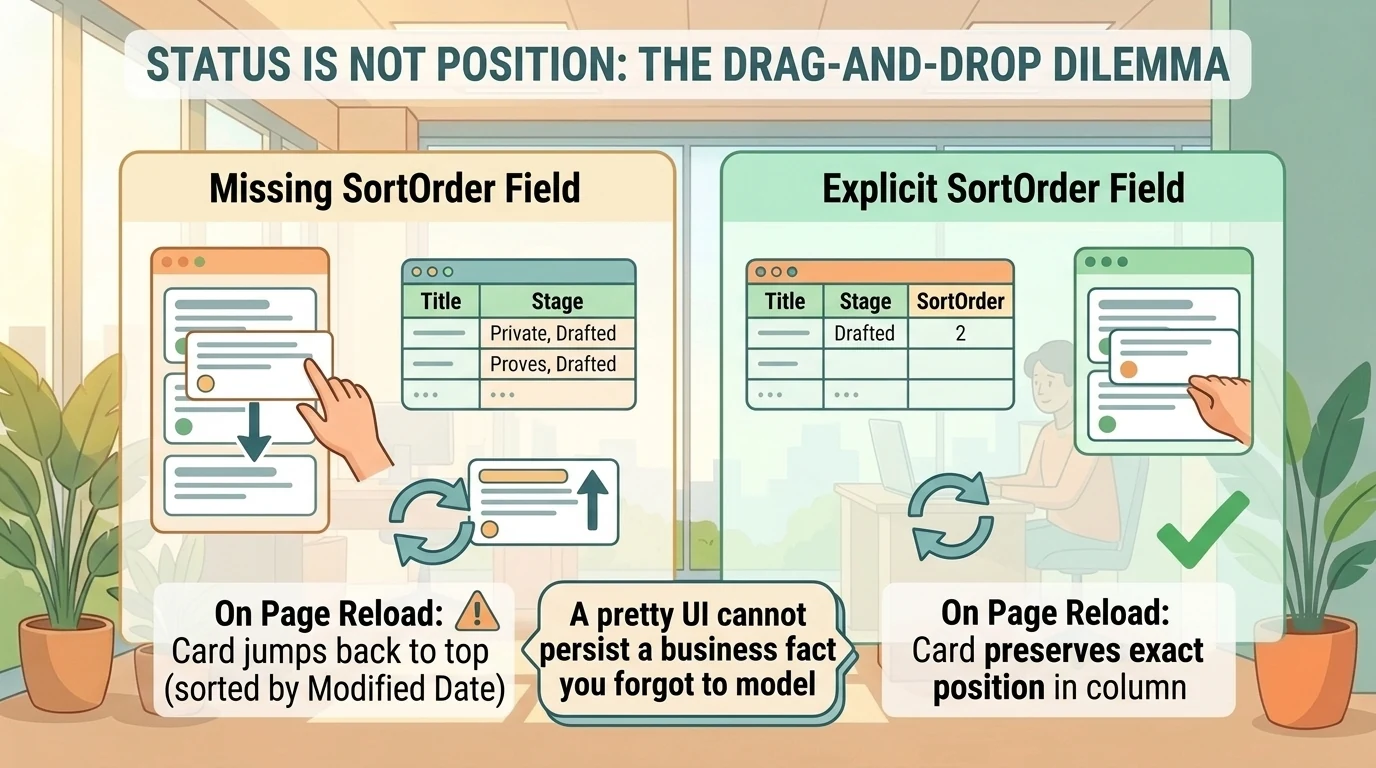
Status is not position
For an illustrative content-board design, the relevant fields might be:
| Field | Purpose |
|---|---|
| Title | Identifies the idea |
| Content | Stores the draft or supporting notes |
| Stage | Determines the board column |
| SortOrder | Represents position within a column |
| SourceReference | Links back to the journal entry |
Only the stage and absence of an ordering field are established by the demonstration. The remaining fields are design suggestions, not a reconstruction of its exact schema.
If persistent ordering is required, the application must update an ordering value when a card moves, sort consistently when loading records, and define how to handle ties or simultaneous edits. An integer position or a ranking scheme can represent order; the right choice depends on the application’s requirements.
Alternatively, the team can accept automatic sorting and avoid manual reordering entirely. That is what the demonstrator chooses.
A better model can generate better code. It cannot make an unstored business fact persist across sessions.
The lesson is not that the app failed. It is that the generated interface exposed a missing requirement. Natural-language development still involves data modeling, even when nobody writes the initial code by hand.
Model choice changes the build, not the business requirements
The demonstration selects an Opus model before building the applications. Microsoft confirms that Copilot Code allows users to choose a model or let the experience choose one. The transcript does not establish the exact Opus version, and its preference is not a controlled comparison of model quality. Copilot Code model selection
The useful interpretation is narrower: model selection is a lever in the authoring process. It is not a substitute for specifying persistence, permissions, or expected behavior.
A practical build loop is:
- Describe the smallest useful application and its audience.
- Identify whether it needs durable data.
- Preview and test the core behavior.
- Request one focused change at a time.
- Check that changes survive a reload.
- Publish only after the important behaviors work.
Microsoft documents live previews, iterative refinement, recovery attempts, and reverting to earlier versions. The demonstration’s initial connection failure followed by a successful retry fits that interaction model, but does not prove every connection failure is self-healing. Preview, iterate, and recover
Likewise, the reported roughly two-minute rendering time is one demonstration observation, not a benchmark or delivery commitment. A fast first preview says little about how long it takes to validate a shared application.
Publishing is separate from sharing, and sharing is separate from data access
The demonstration publishes the app and then shares it with a colleague. These are separate transitions.
Microsoft’s current guidance says that building does not publish an app. Publication creates a live version; subsequent changes must be published to become available to its users. After publication, the maker can share the app with people or groups in the organization. The exact buttons and prompts may differ from the recorded interface. Publish and share with Copilot Code
Most importantly, sharing the app does not share the underlying data. Recipients see only data they already have permission to access in connected sources, and may need to approve a connection on first use. App sharing and connected-source permissions
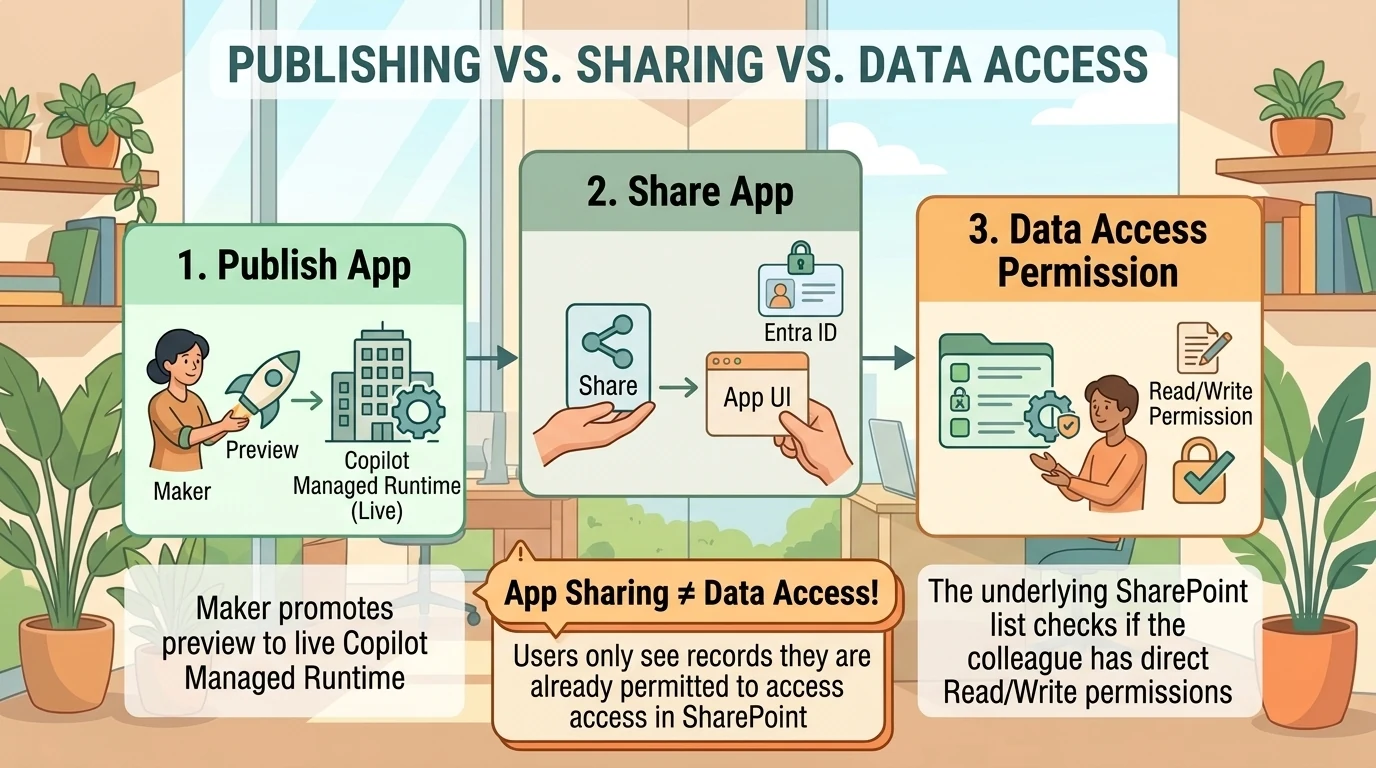
For the SharePoint board, there are at least three checks:
- Can the colleague open the published app?
- Can the colleague access the intended SharePoint list?
- Can the colleague perform the required operations on that list?
Read access is not equivalent to permission to create or update records. Testing only as the maker misses this distinction.
The demonstration’s sharing reminder is useful friction reduction. It does not eliminate the IT responsibility to design access, troubleshoot connections, or review the app’s behavior.
Managed hosting is not the same as a managed business process
Copilot Managed Runtime supplies a hosted environment with built-in Microsoft Entra authentication and governance integration. Its architecture separates application code, the SDK and generated connector services, and the runtime host. The host handles app loading, authentication, and enforcement of controls such as Conditional Access, data loss prevention (DLP), advanced connector policies, and sharing limits. Managed Runtime architecture
Administrators also receive centralized app inventory, usage analytics, operational-health information, and lifecycle-management capabilities in the Microsoft 365 admin center. Managed Runtime for administrators
Those capabilities are meaningful. They reduce the need for each maker to assemble identity, hosting, and inventory integration from scratch.
They do not prove that the generated business logic is correct. A governed app can still assign the wrong status, mishandle a failed save, or implement an ambiguous selection rule.
The demonstration also observes that its connector view identifies SharePoint without showing the specific site. That is a limitation of the recorded view, not a verified permanent limitation of every administrative experience. Connector-type visibility should not be confused with a complete map of data dependencies.
For a shared board, record the intended site and list, owner, audience, connection requirements, and support contact. Treat that as application documentation rather than assuming the inventory screen contains every operational detail.
What does “489 credits” actually tell you?
The demonstration reports 489 Copilot Credits in the administrative view and translates them into approximately $4.89.
The arithmetic is correct at the published pay-as-you-go rate of $0.01 per Copilot Credit:
489 × $0.01 = $4.89
That is a directional conversion in US dollars, not a universal price for building this application. Microsoft also offers pre-purchase arrangements, and its licensing guidance says pricing is subject to change. Copilot Credits licensing guidance
The attribution is less certain than the arithmetic. The supplied demonstration does not establish that the 489-credit figure excludes the earlier utility, scheduled work, retries, or other activity. It should be described as reported consumption in that session’s administrative view, not an independently measured per-app build cost.
Separate creation from operation
There are distinct consumption questions:
- What did generation and refinement consume?
- What does hosting and running the app consume?
- Does the running app call separately billed AI services?
Microsoft documents build consumption separately from runtime consumption. Build billing follows the creation experience; runtime credit coverage is managed for app users in the Microsoft 365 admin center. Users with Power Apps Premium have a runtime entitlement subject to applicable request limits, while separately billed services such as Work IQ APIs and usage beyond those limits can still consume credits. That entitlement does not remove build charges. Managed Runtime licensing and billing
The demonstrated change from 82% to 81% in a user-facing usage display is not sufficient to calculate an app’s cost. Nor is an empty usage chart evidence that no consumption occurred. Asking the generated app how many credits it used is also not a billing measurement unless it has access to authoritative metering data.
For a cleaner pilot measurement, isolate the workload, record the relevant consumption before and after it, allow for reporting latency, and check which activities the report includes. Keep recurring Cowork work, app creation, and app runtime separate where reporting allows. Microsoft documents Copilot > Cost management as the central experience for supported credit-consuming services, including Code and Managed Runtime. Usage-based billing overview
A small validation plan beats a spectacular preview
Before sharing this kind of app beyond its maker, test the behaviors that matter:
- Read: Confirm the board loads records from the intended list rather than sample data.
- Create: Add an idea and verify the saved record directly in SharePoint.
- Update: Move a card, reload the app, and confirm the stage persists.
- Order: If manual ordering is required, verify that it survives reopening. Otherwise, make automatic sorting explicit.
- Search: Check that filtering works and clearing the search restores the expected records.
- Access: Test with a colleague who has the intended permissions, then with an account that lacks list access.
- Failure: Check how the app communicates an unsuccessful save or unavailable connection.
- Publication: Verify that colleagues see the published version, not an unpublished refinement.
- Consumption: Confirm that the creator and intended runtime users have the required billing coverage.
This is a proposed validation checklist, not a claim that the demonstration completed all nine tests. It follows from the documented separation of preview, publication, source permissions, and runtime billing. Use Copilot Code · Managed Runtime billing
Documents and canvas apps: adjacent capabilities, not replacement evidence
The demonstration also shows a Word-document creation interaction from chat, including follow-up questions and an editable result. The exact @Word trigger and its availability are not established here as a universal interaction contract. What Microsoft does document is Cowork’s ability to create and edit Office files and preview documents. Cowork document capabilities · Use Cowork
The connection to app building is the interaction pattern: describe an outcome, resolve ambiguity, inspect the artifact, and refine it. A document and a connected application remain different deliverables with different validation needs.
The demonstration ends by asking what these capabilities mean for Power Apps canvas apps, but does not answer the question. Nothing in the supplied material establishes their retirement or wholesale replacement.
The defensible conclusion is that Microsoft has added another application-creation path. Managed Runtime documentation explicitly describes several paths into a shared host; it does not turn a successful generated board into evidence that every existing app should migrate. Managed Runtime creation paths
The interface is faster. The architecture still matters.
Copilot Code lowers the effort required to turn a useful idea into an interactive application. The journal-to-board scenario shows why that matters: recurring work can produce structured records, and a generated app can make those records usable by a team.
But the most revealing moment is not the first preview. It is the missing ordering field.
That small limitation exposes the enduring responsibilities behind any shared application: define the business facts, persist the right state, respect data access, test the live behavior, and understand what creation and operation consume.
Start with a narrow workflow and a clear data model. Let the builder accelerate implementation. Do not ask a beautiful interface to stand in for a finished system.
Read next