Power Platform Is Not Disappearing. The Boundary Around Building Is.

Writer

For years, choosing a Microsoft business application tool also meant choosing a way of working. Makers built in visual designers. Developers worked in code editors. Business users described requirements and waited for someone else to implement them.
That separation is becoming less useful.
The announcements surrounding the 2026 Power Platform Community Conference point toward a different model: describe an outcome in Copilot, refine the implementation in a visual designer or code editor, connect it to existing business data, and run it on a managed enterprise foundation. Agents can increasingly participate in the process as both builders and operators.
The important question is not whether Copilot will replace Power Platform. It is which boundaries are becoming more permeable, and which responsibilities still need to remain explicit.
Three changes explain the direction: the orchestration engine, the places where solutions are built, and the identity of the software doing the work.
Product names, availability, and licensing in this article reflect Microsoft documentation and announcements reviewed on November 10, 2026. Several capabilities are previews or require Frontier enrollment; they should not be treated as universally available production features.
A broader maker community is a signal, not a retirement notice
Microsoft’s Maker Community brings together four builder archetypes: IT Pro Makers, Platform Makers, AI-Native Makers, and Pro Dev Makers. Its website also promotes a shared community conference in 2027.
That framing matters. It describes people by how they approach building, rather than by the product portal they use.
An administrator might build an operational tool. A business user might start an application through a prompt. A Power Platform specialist might refine the data model. A developer might improve the generated code. These are increasingly stages of one delivery process, not mutually exclusive professions.
Still, community branding is not a product roadmap. It does not establish that Power Apps is being retired, that Microsoft 365 Copilot and Power Platform are becoming one licensed product, or that existing maker portals will disappear.
The stronger evidence is architectural: shared orchestration, more portable authoring, common business data, and managed application hosting.
1. The harness matters as much as the model
When an agent disappoints, the instinct is often to change its model. Sometimes that helps. But the model is only one part of the system.
An agent harness is the runtime machinery that turns model reasoning into execution. It determines when to invoke the model, what context and tools to provide, how to interpret the response, and how to continue after an action succeeds or fails.
A useful analogy is a capable specialist working inside an operating procedure. The model supplies judgment and language capabilities. The harness supplies the working environment, the sequence of interactions, and the mechanism for using tools.
The analogy has a limit: a harness is software, not a human supervisor. It does not make an incorrect model judgment correct simply by orchestrating it well.
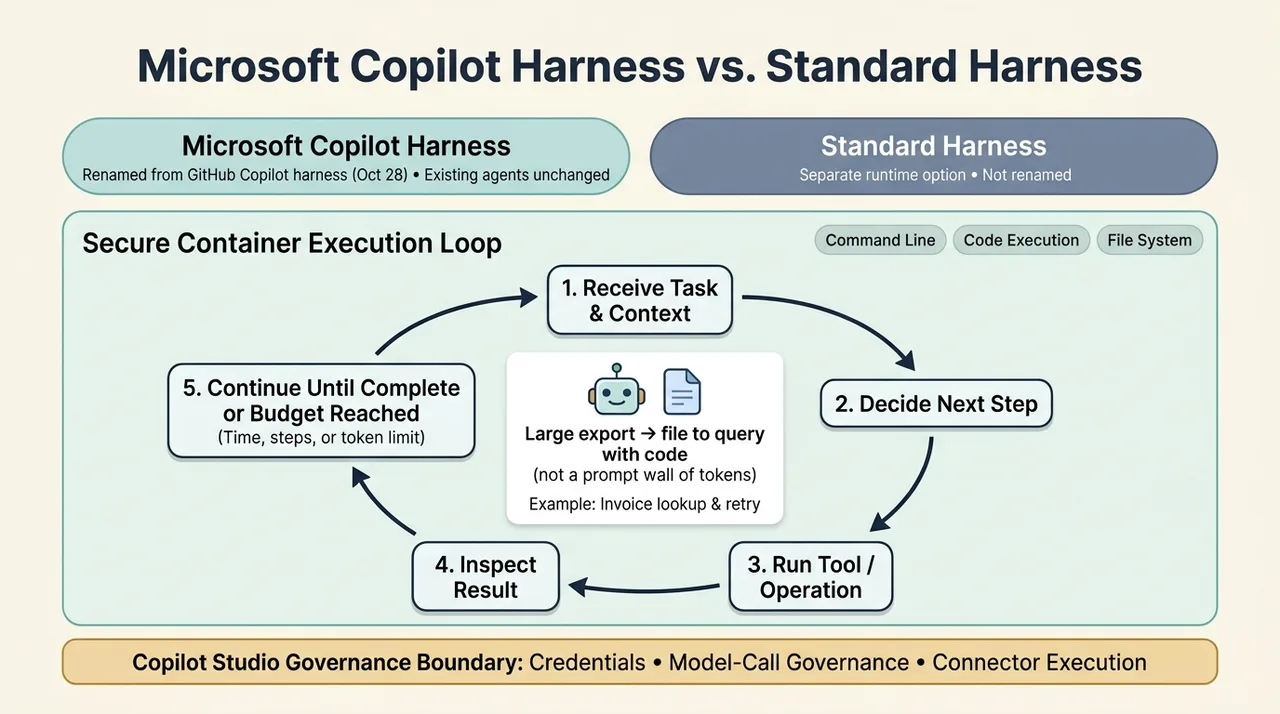
The rename does not erase the Standard harness
On October 28, Microsoft announced that the GitHub Copilot harness in Copilot Studio was being renamed the Microsoft Copilot harness. The announcement explicitly says existing agents continue working without changes to capabilities or billing caused by the rename. See Microsoft’s naming announcement.
This is not a rename to the Standard harness. The Standard harness remains a separate option. Older documentation may still use the GitHub Copilot name while terminology is updated.
Microsoft describes the newer harness as a shared foundational technology extending across Copilot experiences. That supports a convergence argument, but not the assumption that every product has identical tools, permissions, limits, or runtime behavior.
From answering a question to finishing a task
Microsoft’s November 9 technical explanation describes a continuous execution loop:
- Receive the task and its context.
- Decide on the next step.
- Use a tool or perform an operation.
- Inspect the result.
- Continue until the task is complete or a configured time, step, or token budget is exhausted.
The harness runs in a secure container with a command line, code execution, and a file system. This is a meaningful distinction from treating every task as text that must fit inside a prompt. A large export can become a file to query and analyze with code rather than a wall of tokens.
Copilot Studio remains responsible for credentials, model-call governance, and connector execution. The working environment gives the agent more room to act; it does not give it unrestricted access to enterprise systems.
For an illustrative invoice-reconciliation process, that means an agent can inspect invoices, look up purchase orders, analyze discrepancies, and recover from a failed lookup. The design still needs to define what happens when evidence is missing, a retry fails, or an approval is required.
What the evidence does and does not show
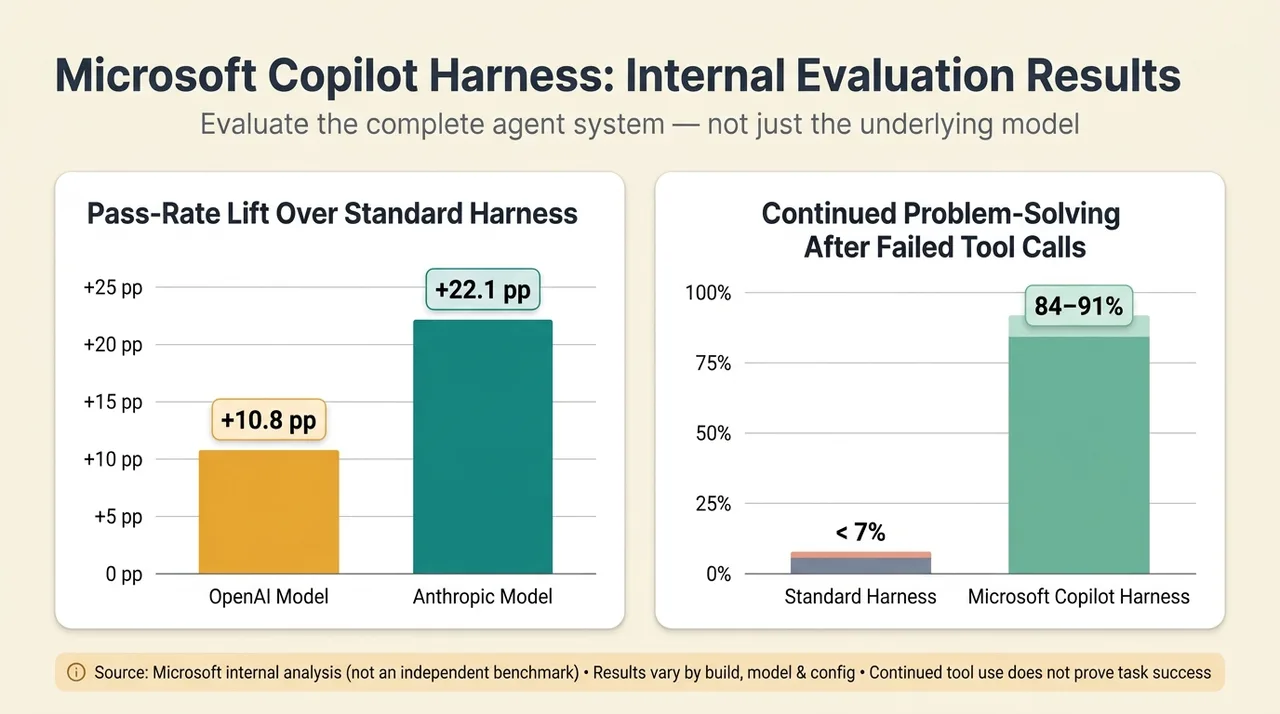
Microsoft reports internal evaluations in which the Microsoft Copilot harness improved pass rates over the Standard harness by 10.8 percentage points with an OpenAI model and 22.1 percentage points with an Anthropic model on equivalent tasks. It also reports continued problem-solving after failed tool calls in 84–91% of evaluated cases, compared with fewer than 7% for the Standard harness.
Those figures come from Microsoft’s internal analysis, not an independent benchmark. Microsoft cautions that results vary by build, model, configuration, and scenario. Continued tool use is also not proof that the overall task succeeded.
The architectural lesson is narrower and more useful than a universal performance claim: evaluate the complete agent system, not just its model. Context management, tool selection, recovery, and stopping conditions can materially change outcomes.
2. No-code and code are becoming connected authoring modes
“No-code is becoming code” captures part of the shift, but it is easy to misread.
Visual development is not suddenly invalid. Nor has AI eliminated the need to understand software. The change is that more builders can work on the same underlying solution through different interfaces.
A visual designer can remain the clearest way to inspect a workflow. A coding agent can be an efficient way to change its definition. Natural language can be the starting point for either.
Reasoning and workflows have different jobs
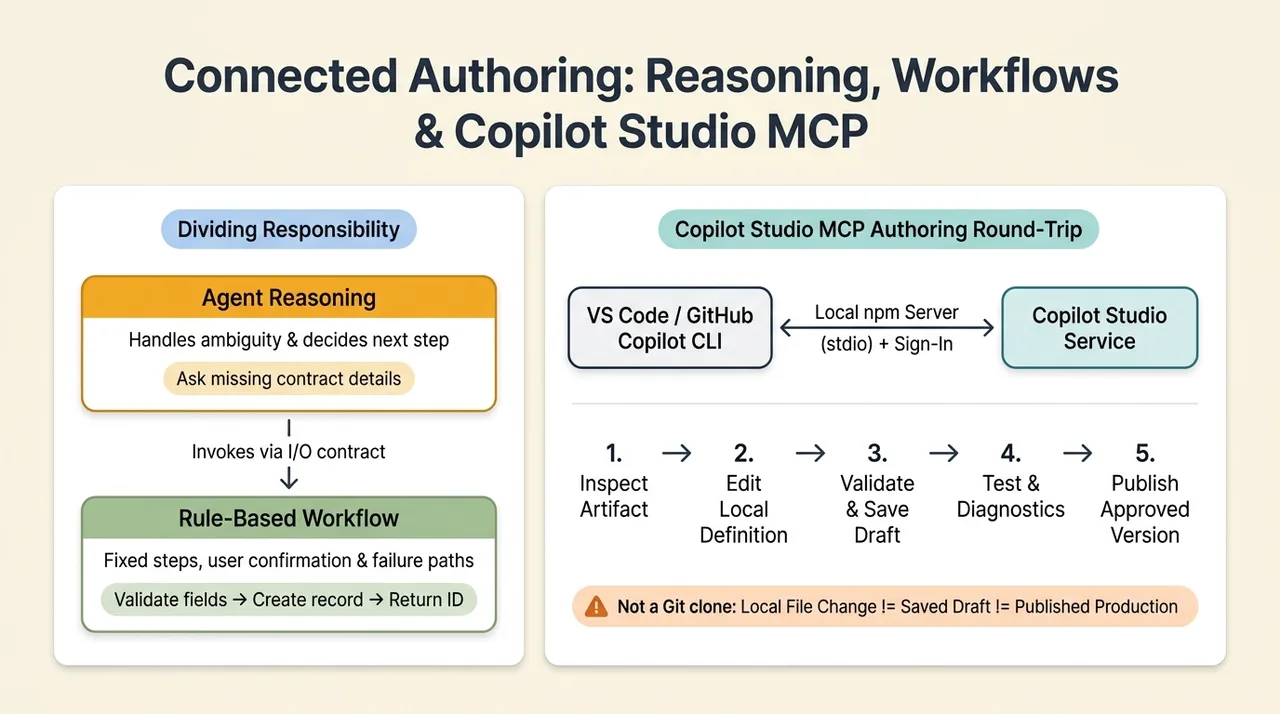
Copilot Studio workflows provide a rule-based execution path and can be exposed to an agent as a tool. Microsoft’s workflow training emphasizes explicit input/output contracts, end-user confirmation, and testing of success, missing-information, cancellation, and failure paths.
The distinction is straightforward:
- Agent reasoning handles interpretation, ambiguity, and deciding what to do next.
- A workflow defines the steps and branches for a known operation.
For example, an agent might interpret a request to log a contract and ask for missing details. A workflow can then validate required fields, create the record, and return its identifier.
“Deterministic” describes the controlled execution path. It should not be read as a guarantee that every result is identical: external data can change, services can fail, and AI actions embedded inside a workflow can introduce variability.
MCP connects the coding environment to the platform
Model Context Protocol (MCP) is an open standard for connecting applications to tools and context. It is not a replacement for every API, and it does not grant permissions by itself.
Copilot Studio MCP brings authoring and lifecycle tools into compatible development environments. Microsoft documents support for discovering and inspecting agents and workflows, creating or updating definitions, testing, publishing, and examining diagnostics, subject to the connected service’s available tools and the user’s permissions.
The Visual Studio Code and GitHub Copilot CLI integration uses a Microsoft-published npm package. The client launches it locally, communicates over standard input/output, and connects to Copilot Studio after sign-in and environment selection.
This makes a supported round trip possible: inspect a platform artifact, author its definition locally with a coding agent, validate and save it through the service, test it, and publish an approved version.
It is not necessarily a Git repository clone. Microsoft explicitly distinguishes local definition authoring from service-side validation and saving, and distinguishes a saved draft from publication.
That distinction prevents a dangerous shortcut in the mental model: “the coding agent changed the file” does not mean “the production workflow was updated successfully.”
Better tooling does not remove engineering judgment
The claim that virtually all developers use AI, or that language and framework knowledge are no longer necessary, is not needed to explain this transition.
AI can reduce the effort required to produce an implementation. It does not remove the need to judge that implementation.
Someone still needs to understand data relationships, failure handling, authorization, concurrency, maintainability, and the difference between a plausible demo and a reliable service. Managed hosting can reduce infrastructure work; it cannot prove that generated business logic is correct.
The practical opportunity is to learn enough about code editors, source control, and platform definitions to move comfortably between interfaces. The goal is not to abandon visual tools. It is to stop treating them as the only place a solution can be changed.
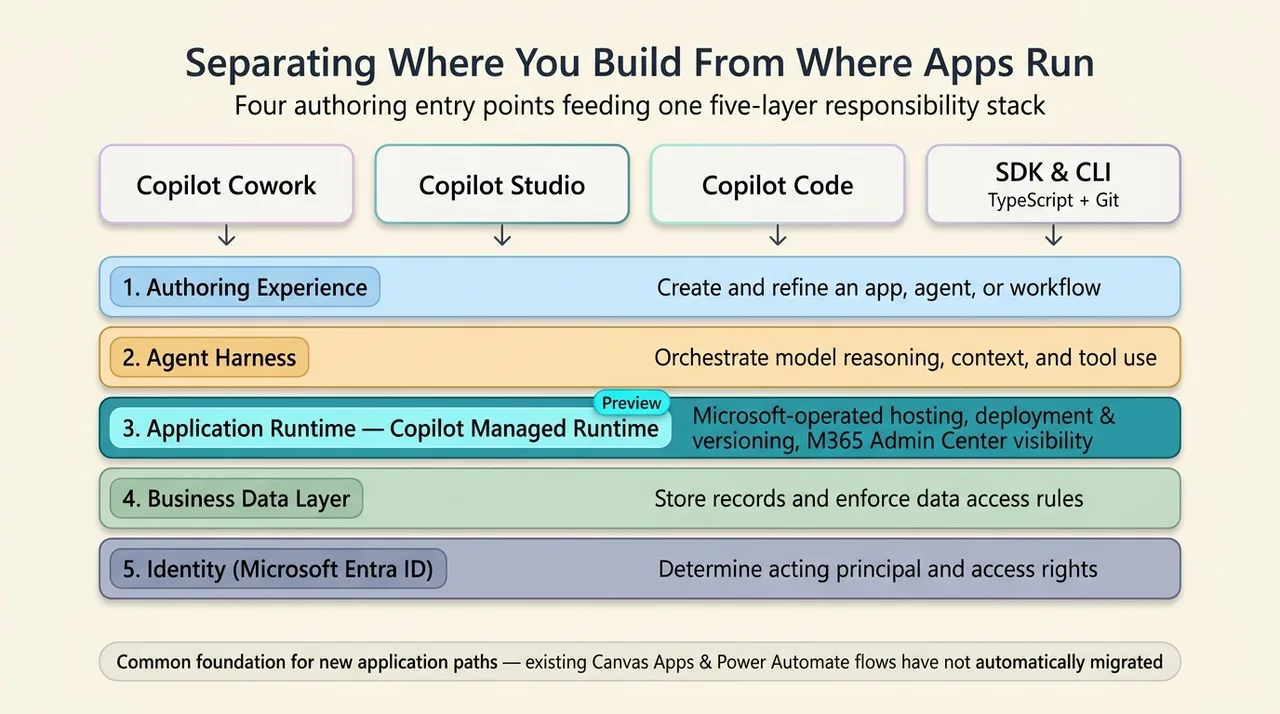
3. Separate where you build from where the application runs
The most consequential application-development announcement is not simply another prompt box. It is the separation between authoring experience and operating foundation.
Copilot Code is an AI coding experience for building and publishing applications, with cloud and local workflows. Microsoft Copilot Managed Runtime is the hosting and governance foundation for the resulting applications.
They are different layers, and neither should be confused with the agent harness.
| Layer | Main responsibility |
|---|---|
| Authoring experience | Create and refine an app, agent, or workflow |
| Agent harness | Orchestrate model reasoning, context, and tool use |
| Application runtime | Host and operate an application |
| Business data layer | Store records and enforce data access rules |
| Identity | Determine which principal is acting and what it can access |
Microsoft’s Managed Runtime overview documents four application entry points: Copilot Cowork, Copilot Studio, Copilot Code, and the Managed Runtime software development kit (SDK) and command-line interface (CLI).
A shared operating foundation, not unlimited deployment flexibility
Introduced in public preview on September 25, Copilot Managed Runtime combines Microsoft-operated hosting, Microsoft Entra identity, governed data access, deployment and versioning, and centralized application visibility in the Microsoft 365 admin center.
Its SDK and CLI support scaffolding, connector configuration, typed services for TypeScript, local preview, deployment, and versioning. Microsoft also describes Git-backed source control and support for SDK-compatible third-party authoring tools.
The model is compelling: builders can choose an appropriate creation experience while administrators retain a consistent operating foundation.
But “build where you want” does not mean arbitrary software can run unchanged. Applications still need to fit the supported runtime and SDK model. Preview availability and organizational policies remain relevant.
Nor is this evidence that existing canvas apps or Power Automate flows have automatically moved onto Managed Runtime. A common foundation for new application paths is not the same as a completed migration of established products.
Licensing: building and running are separate activities
The source material raises a genuine financial distinction, but “Premium users pay nothing extra” needs qualification.
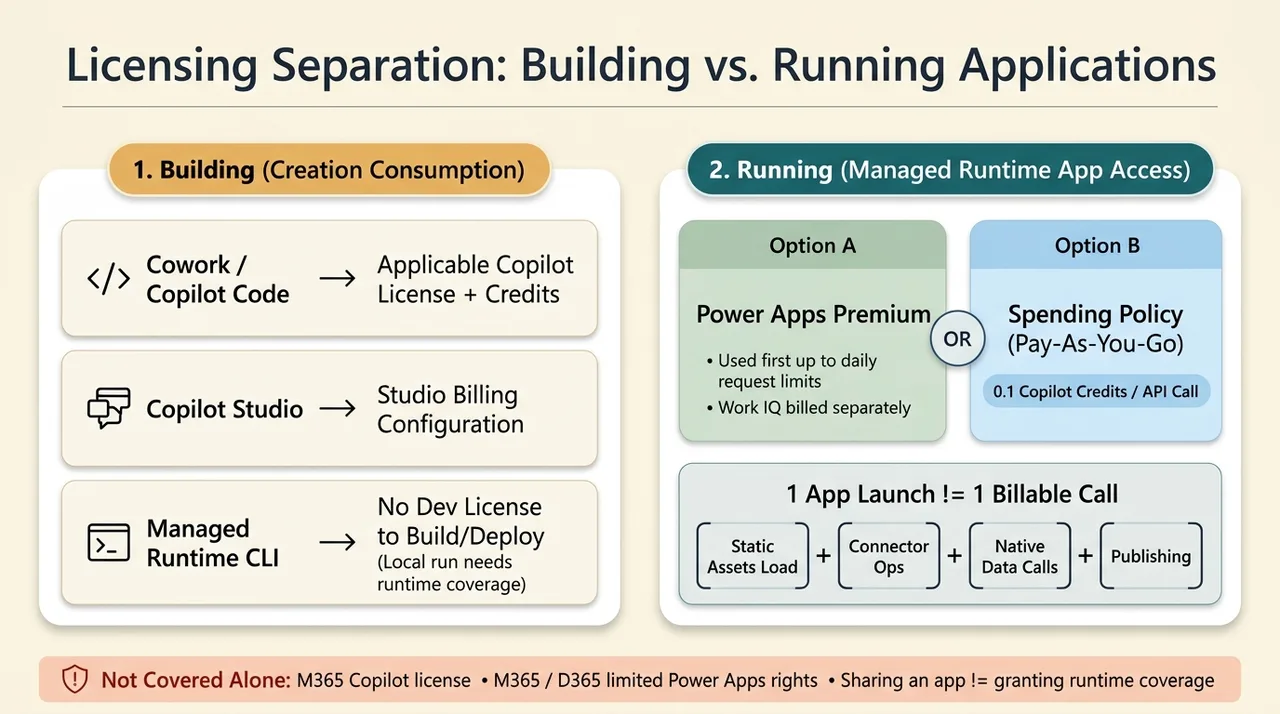
Microsoft’s current runtime licensing guidance separates application creation from runtime use:
- Building in Cowork or Copilot Code requires the applicable Copilot license and credit coverage.
- Building in Copilot Studio follows its applicable billing configuration.
- Creating, building, and deploying through the CLI do not require a development license; running the app locally still requires runtime coverage.
- Running an application requires Power Apps Premium or coverage through a spending policy that includes Copilot Managed Runtime.
For ordinary runtime use, Power Apps Premium is used before Copilot Credits. However, specialized services such as Work IQ remain separately charged, and usage above applicable daily Power Platform request limits can incur credit charges.
For consumption-covered users, Microsoft currently documents 0.1 Copilot Credits per API call. Calls can include static assets loaded at launch, connector operations, native data-source calls, and publishing. Consequently, a launch is not necessarily one billable call.
Microsoft 365 Copilot alone does not cover application runtime. Neither do the limited Power Apps use rights included with Microsoft 365 or Dynamics 365. Sharing an application also does not provide its recipients with runtime coverage.
This can make consumption attractive for occasional users, but there is no universal cheaper option. Compare the actual application’s call patterns, user population, existing entitlements, and specialized-service usage. The architectural shift does not establish that every Power Platform product will move to the same billing model.
4. Dataverse becomes accessible from more places without becoming a different database
Microsoft Dataverse is the business-data platform underneath many Power Apps and Dynamics 365 solutions. The important development is that its capabilities are reaching more authoring environments.
The Dataverse plugin for Copilot Cowork combines an environment connection with skills for data modeling, records, business logic, security, and solutions.
A skill provides reusable task guidance. The connection and available tools provide the ability to perform operations. Guidance and access are complementary; neither substitutes for the other.
A published demonstration shows the complete path
Microsoft’s demonstration builds a community event-registration application from a prompt. Cowork creates Event and Event Registration tables, connects registrations to the existing Contact table, seeds clearly marked sample records, and implements capacity and waitlist behavior.
It then builds the application, performs type checking, linting, a build, and visual review, and publishes it to Copilot Managed Runtime.
This is Microsoft’s documented demonstration, not a claim that every prompt will produce an equivalent result or that the article’s author performed the implementation.
The important architectural detail is that the records remain in Dataverse. There is no separate copy of the business database to synchronize. Other platform components can continue using those records.
Permissions and approvals are part of the mechanism
The plugin signs in as the user. Dataverse enforces that user’s security roles on the server, and the documented Cowork experience presents changes as approval cards before applying them.
That supports useful data and schema operations, but not unlimited authority. A request to update many records still needs an exact target set, understood business effects, and appropriate approval. Permission to write does not establish that a proposed write is correct.
The demonstration also includes a revealing failure-prevention step: when the default app-builder environment lacked a Dataverse database, Cowork asked for the correct environment rather than guessing.
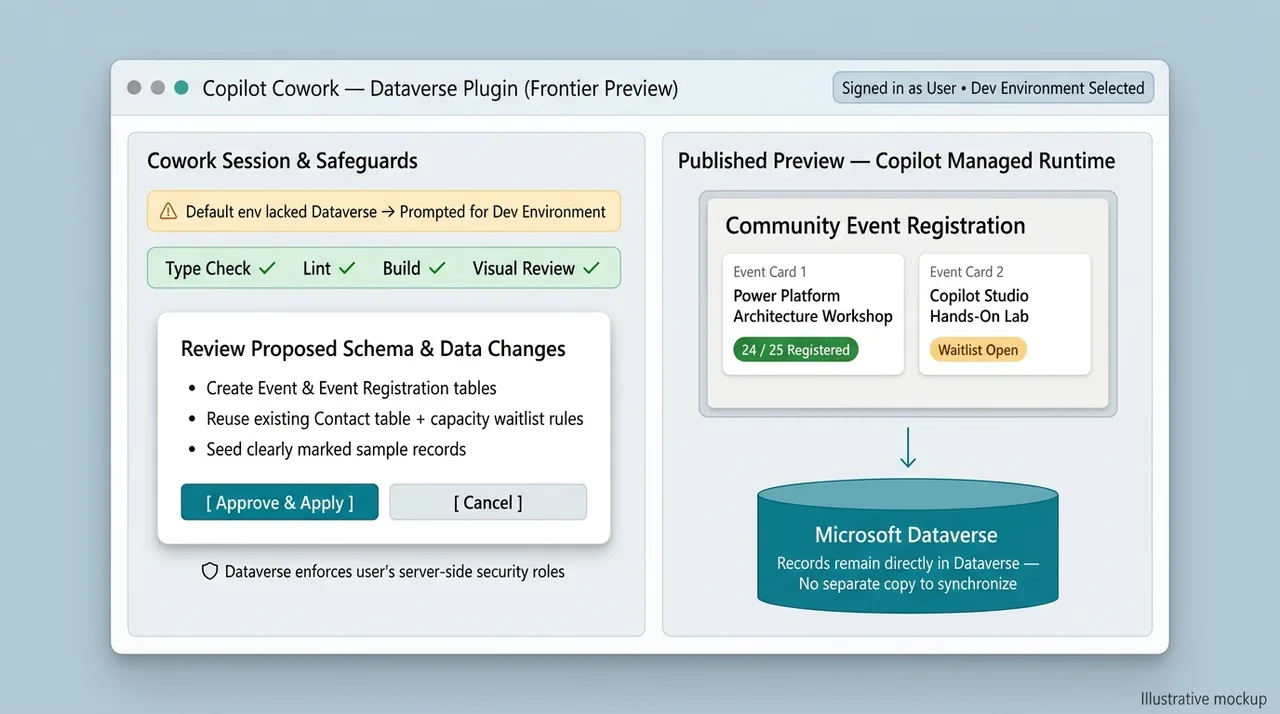
For experimentation, Microsoft recommends a developer environment and notes that app building in Cowork requires Frontier enrollment. Its cross-tool Dataverse announcement also documents support across multiple coding agents and automation tools.
The direction is not “move the data into Copilot.” It is bring governed access to the existing data into more places where work happens.
5. Power Apps is evolving alongside the new experiences
If Copilot-based application creation meant the end of canvas apps, continued investment in their authoring experience would be difficult to explain.
Two concrete improvements show a different story.
Agentic authoring inside canvas studio
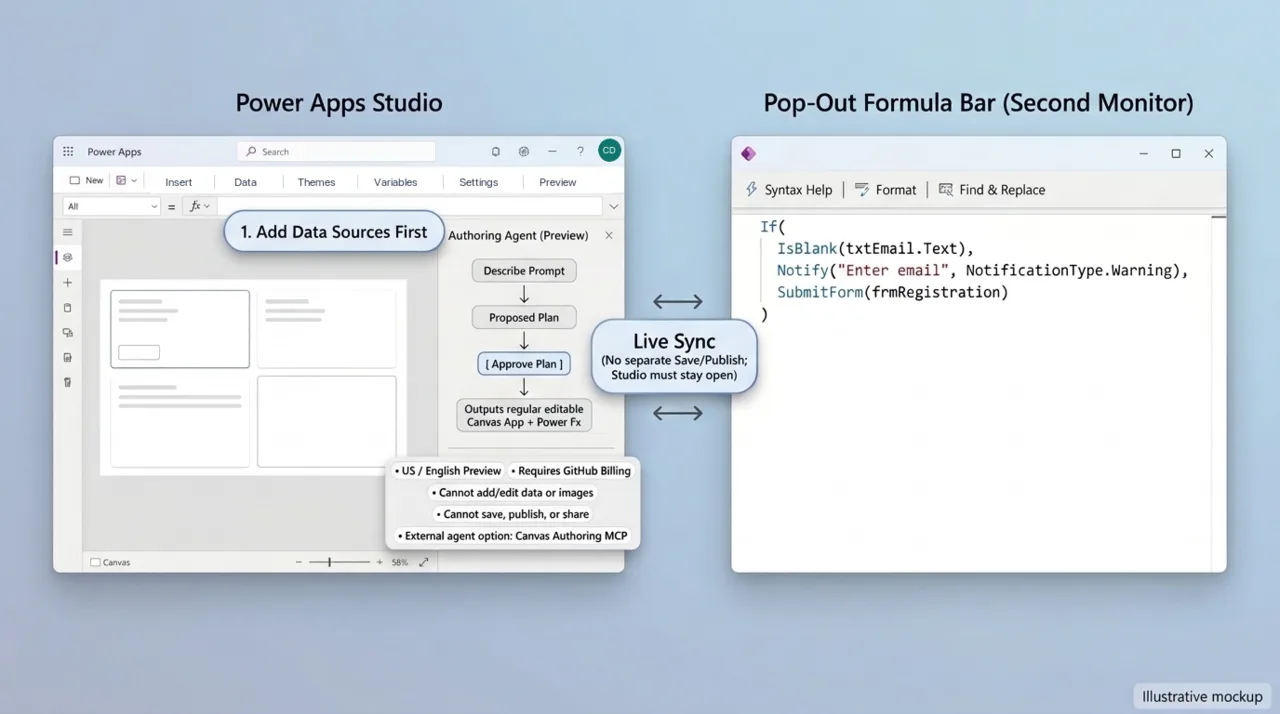
The Power Apps authoring agent builds and edits screens, controls, and Power Fx formulas from a natural-language description. It proposes a plan, waits for approval, and produces a regular canvas app that remains editable in Studio.
This is a preview, currently documented as United States-only and English-only. It requires administrator enablement and a connected GitHub account. GitHub bills the account for usage, and prompts and application context are processed under the applicable GitHub terms.
The limitations matter:
- Makers must add the required data sources first.
- The agent cannot add or edit app data, or add images.
- It cannot save, publish, or share the app.
- Makers cannot change the model used by the Studio integration.
- Generated output still needs review.
Microsoft distinguishes this integrated experience from the Canvas Authoring MCP plugin, which supports external coding agents. That is convergence in practice: agentic authoring can happen inside the familiar designer or through another development interface.
A better formula editor still matters
The pop-out formula bar opens the Power Fx editor in a separate browser window while remaining synchronized with Studio. It supports longer formulas, a second monitor, syntax assistance, formatting, and find-and-replace within the current formula.
It does not have separate save or publish controls, and Studio must remain open.
This is a small feature with a large implication: inspecting and refining formulas remains valuable even when AI writes the first version.
Canvas apps also retain a distinct licensing position. Eligible Microsoft 365 subscriptions include limited Power Apps rights for applications using standard connectors, as described in Microsoft’s licensing resources. “Free canvas apps” is therefore imprecise: the entitlement comes from an existing eligible license and has boundaries.
A redesigned or consolidated maker home would improve navigation, but it should not be confused with product retirement. The available evidence does not establish that the existing Power Apps and Power Automate maker portals are being discontinued.
6. Agents with accounts change the delegation model
An agent embedded in a chat channel and an agent with its own organizational account are not the same thing.
Copilot Studio’s agent accounts capability, part of the Frontier preview program, gives an agent its own Microsoft Entra account, mailbox, and supported Microsoft 365 presence. People can interact through supported email, Teams, and Office-comment scenarios.
That makes the agent a recognizable participant in a business process rather than only a conversational endpoint.
But an account is not a job description made executable. Instructions, triggers, tools, connections, consent, and scoped permissions still need configuration. An account does not automatically authorize every tool.
An agent account is not merely an Agent ID
Copilot Studio also provisions Microsoft Entra Agent IDs for governance and visibility. Microsoft’s documentation distinguishes these from the additional account that supplies mailbox and organizational presence.
Do not assume that an existing agent has a mailbox simply because it has an Agent ID.
The preview has substantive prerequisites: an early-release environment, administrator activation of the Copilot Studio agent template, environment-level enablement of agent accounts, authorized makers, Frontier enrollment, and the required maker and AI Teammates licenses. The account becomes active on successful publication. Account licensing and usage-based service charges are separate.
Persistent work introduces persistent information risks
An illustrative team-review agent could read an approved tracker on a configured schedule, identify missing updates, generate a new review document, and send it to internal reviewers. People would supply judgment and decide priorities.
That is a useful delegation pattern, but the current preview has important boundaries:
- The agent does not respond to external users.
- Office-comment interactions support limited scenarios, not targeted edits or co-authoring.
- Generating new documents is supported; co-authoring existing documents is not.
- Email conversations are limited to supported audiences of up to 250 people, with access verification also required.
- Not all Microsoft Graph operations or permission scopes are supported.
- Protected documents cannot be read by agents with accounts.
The most consequential caveat is shared memory. Microsoft documents one memory across the people who work with the agent, including one-to-one conversations. Summaries of shared files or chats may appear in responses to users who cannot access the original content. The preview has no opt-out and no privacy boundary between users in shared memory.
Scoped tool access and shared-memory privacy are different questions. Do not assume that source permissions prevent every later disclosure through the agent’s memory.
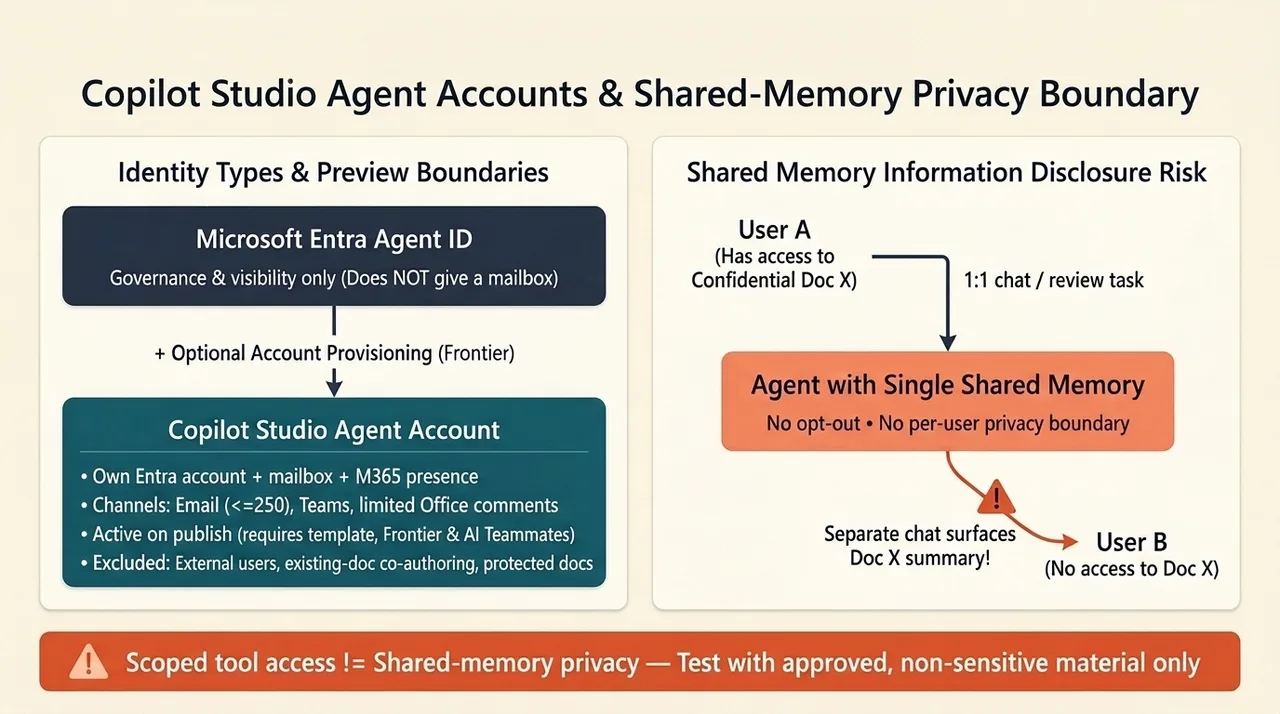
That does not invalidate persistent agents. It does mean that experimentation should use approved, non-sensitive material and a deliberately bounded process. Do not weaken document protection merely to make a test work.
The durable skill is knowing which layer owns the responsibility
The emerging Microsoft maker experience is not one interface replacing all others. It is a more connected set of interfaces over increasingly shared capabilities.
A prompt can initiate a solution. A coding agent can refine it. A visual designer can make it inspectable. Dataverse can preserve the business records. Managed Runtime can supply the operating foundation. An agent account can support ongoing participation in a process.
Those connections are valuable precisely because the responsibilities remain distinguishable.
The model reasons. The harness orchestrates. The workflow constrains execution. The runtime hosts. The data platform enforces record access. Identity determines who is acting. People remain responsible for whether the resulting behavior is acceptable.
For makers and architects, the next step is not to choose a side in a no-code-versus-code debate. It is to take one bounded scenario, use the authoring experience that fits it, and validate the complete path from intent to execution.
The boundary around who can build is shrinking. The need to understand what has been built is not.
Read next
Related articles

The Dataverse Plugin for Copilot Cowork Changes What Makers Build, Not What Architects Must Own
Copilot Code Explained: From a SharePoint List to a Managed Business App