Beyond Chat: Building Agentic Business Processes with Copilot Studio

Writer
A supplier sends a bid by email. Someone must find the attachments, compare the proposal with tender requirements, check the evidence, investigate gaps, and decide whether the submission should advance. A chatbot can help with individual questions. It does not, by itself, own that entire process.
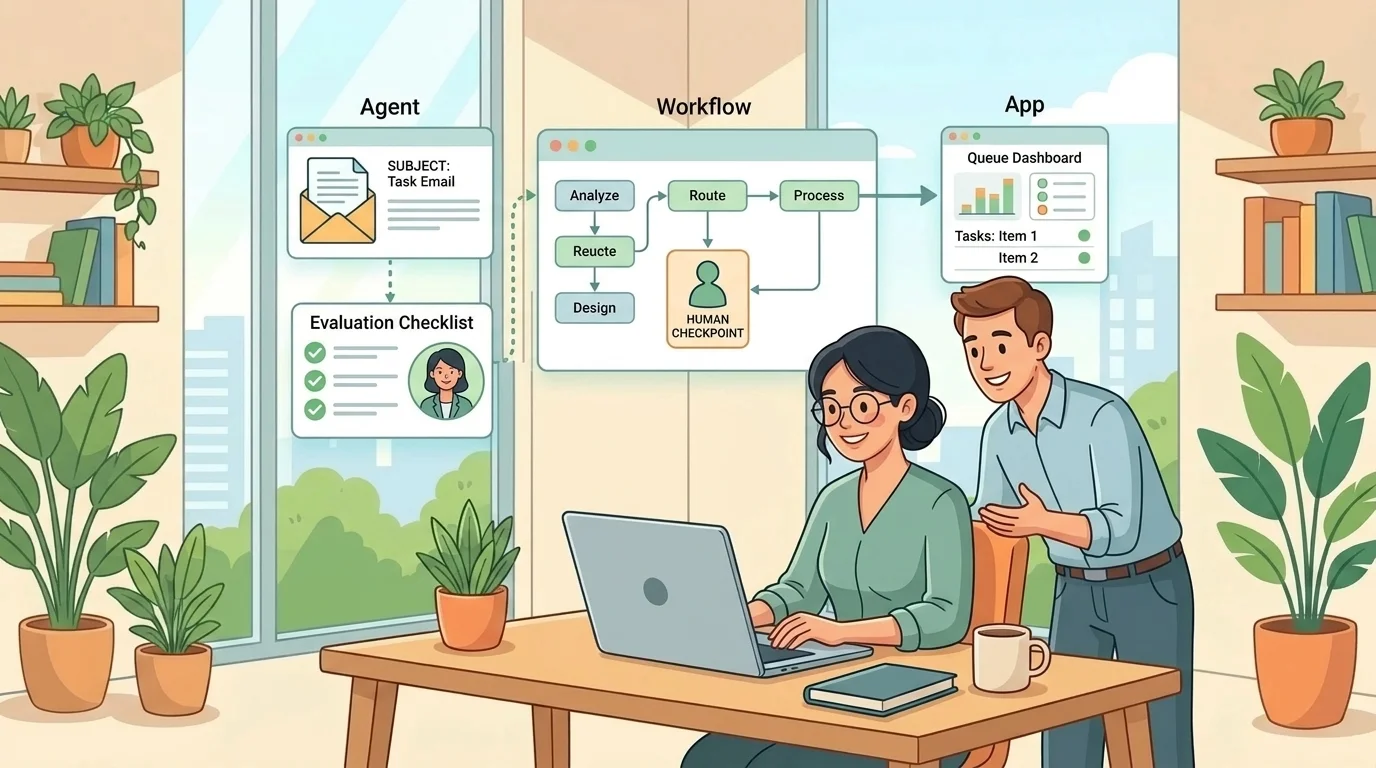
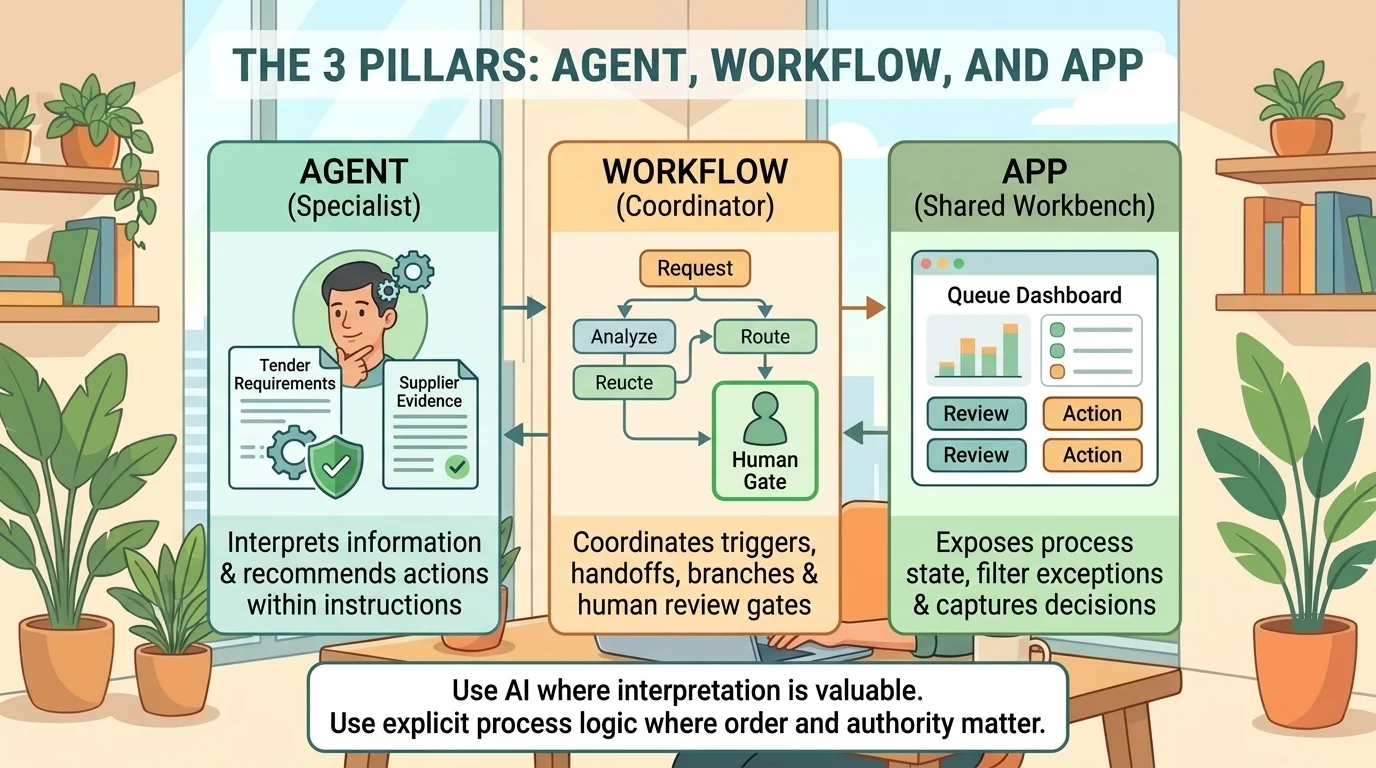
The more useful architecture separates three responsibilities: agents interpret and recommend, workflows coordinate execution, and apps give people a shared place to review and act. Copilot Studio brings these building blocks into one authoring environment, making it possible to assemble a process rather than merely publish a conversational assistant. Microsoft’s platform overview describes this combination explicitly.
A procurement demonstration from Microsoft Mechanics makes the pattern concrete. An incoming supplier email starts a workflow; a bid evaluation agent assesses the submission; specialist agents add context; human reviewers handle exceptions; and an app exposes the results. The demonstration is a useful architectural reference, not evidence of a deployed customer system or a production-readiness guarantee.
The architecture: judgment inside a controlled process
The central design question is not “How autonomous can the agent become?” It is “Which decisions need interpretation, and which transitions must remain explicit?”
Consider the three layers as a specialist, a process coordinator, and a shared workbench:
| Layer | Responsibility | Procurement example |
|---|---|---|
| Agent | Interpret information and choose appropriate actions within its instructions | Compare a supplier response with tender requirements and explain evidence gaps |
| Workflow | Coordinate triggers, handoffs, branches, and human input | Retrieve attachments, invoke evaluation, pause for review, and persist the result |
| App | Make process state and authorized actions accessible to people | Show the bid queue, filter exceptions, and capture decisions |
This is an architectural division of responsibility, not a claim that each layer is isolated. An agent can call tools or workflows, and a workflow can call an agent. Microsoft’s workflow FAQ documents both directions.
The distinction matters because predictable sequencing and predictable reasoning are different things. A workflow can reliably invoke evaluation before recommendation. That does not make the evaluation’s interpretation identical on every run. The workflow overview describes rule-based execution alongside actions that use large language models. Read its determinism claim as a description of process control, not a guarantee that every AI-generated result is invariant.
Use AI where interpretation is valuable. Use explicit process logic where order, prerequisites, and authority matter.
What the GitHub Copilot harness actually does
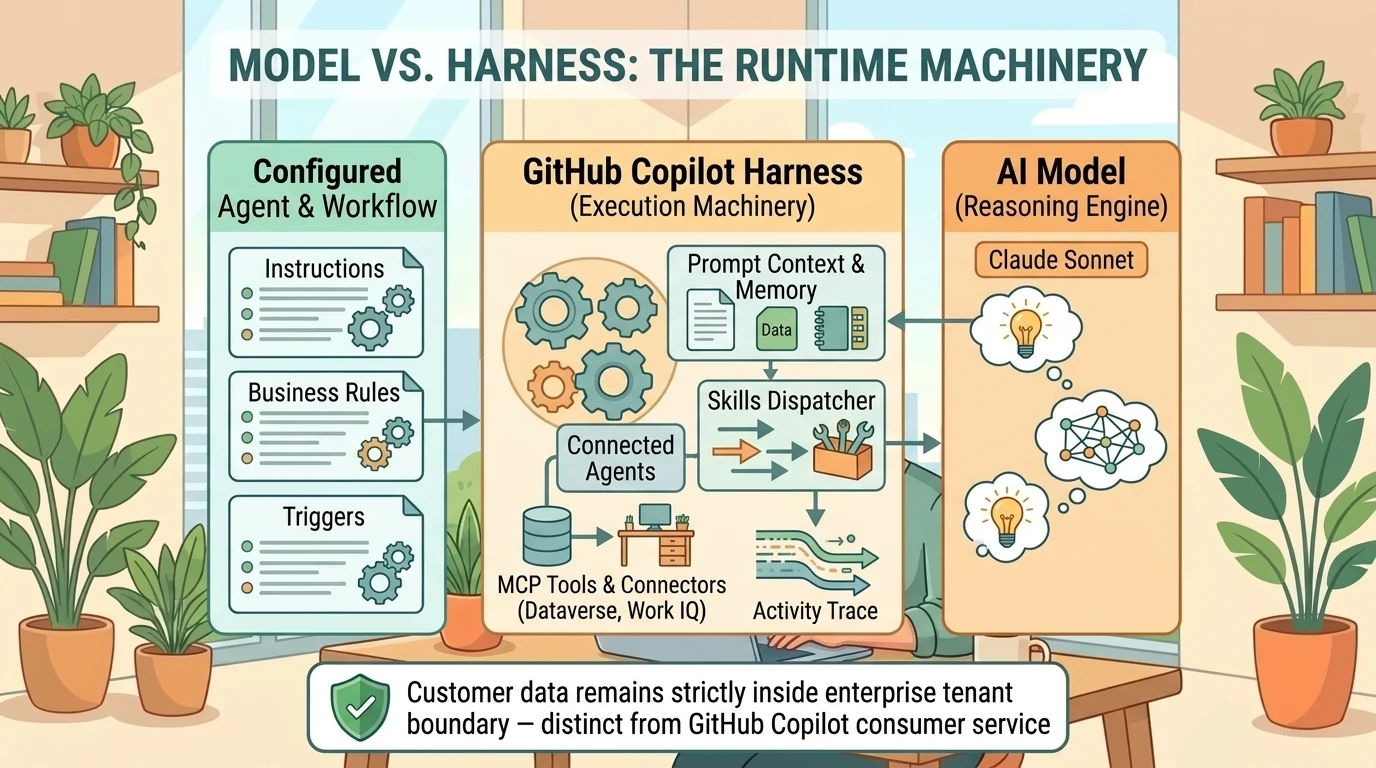
A model supplies reasoning and generation. It does not, on its own, define the complete execution environment for an agent.
A harness is the runtime between the configured agent or workflow and the model. It determines when to invoke the model, what context to provide, how to interpret the response, and which tools or connected agents to call. The GitHub Copilot harness supports reasoning-heavy, multistep work in which execution can adapt as new information arrives. Microsoft’s harness documentation explains this separation.
Think of the model as the reasoning engine and the harness as the machinery that turns reasoning into coordinated work. The analogy stops short of implying that the machinery guarantees correct judgment: the quality of instructions, evidence, tools, and evaluation still matters.
Two qualifications prevent common misunderstandings:
- This is not the GitHub Copilot service. Microsoft states that the Copilot Studio harness shares underlying technology and SDK components with GitHub Copilot, but customer data is not sent to or processed by the GitHub Copilot service when these agents run. See the agent overview.
- It does not replace every existing Copilot Studio agent. The standard harness remains supported alongside it, and agents cannot be transferred between these two harnesses. Their capabilities are not interchangeable. The same overview and comparison documents these boundaries.
Microsoft announced general availability of the GitHub Copilot harness on September 2, 2026. That announcement does not make every associated feature generally available.
Availability as of October 23, 2026: Natural-language agent authoring is still identified as preview in the agent documentation. GitHub-harness evaluations and memory are documented as production-ready previews. App creation is a separate preview, gradually rolling out, and its documentation says it is not intended for production use. Verify the specific feature, not just the harness’s release status. See the agent overview, evaluations, memory, and apps overview.
Build the evaluation agent around evidence, not a verdict
In the Mechanics demonstration, the maker describes a Bid Evaluation Agent in natural language: its procurement role, the request for proposal (RFP) it should assess, the comparison logic, and the live data it needs. Copilot Studio generates instructions and reusable skills, which the maker then inspects and extends. The demonstration shows this authoring sequence; the agent overview documents the configurable components.
The important work is specifying the evaluation contract. “Review this bid” is too vague to explain what a useful result looks like.
For this scenario, a stronger contract would require the agent to:
- Identify each relevant tender requirement.
- Locate the supplier’s corresponding claim and supporting evidence.
- Distinguish satisfied requirements from missing, conflicting, or insufficient evidence.
- Explain the significance of each gap.
- Produce a recommendation and an explicit indication of whether human review is needed.
These are design recommendations, not a claim that the demonstration implements every detail. They make the agent’s output inspectable rather than reducing a complex assessment to an unexplained pass or fail.
Instructions, skills, knowledge, and tools are different components
The demonstration combines several components that are easy to blur together:
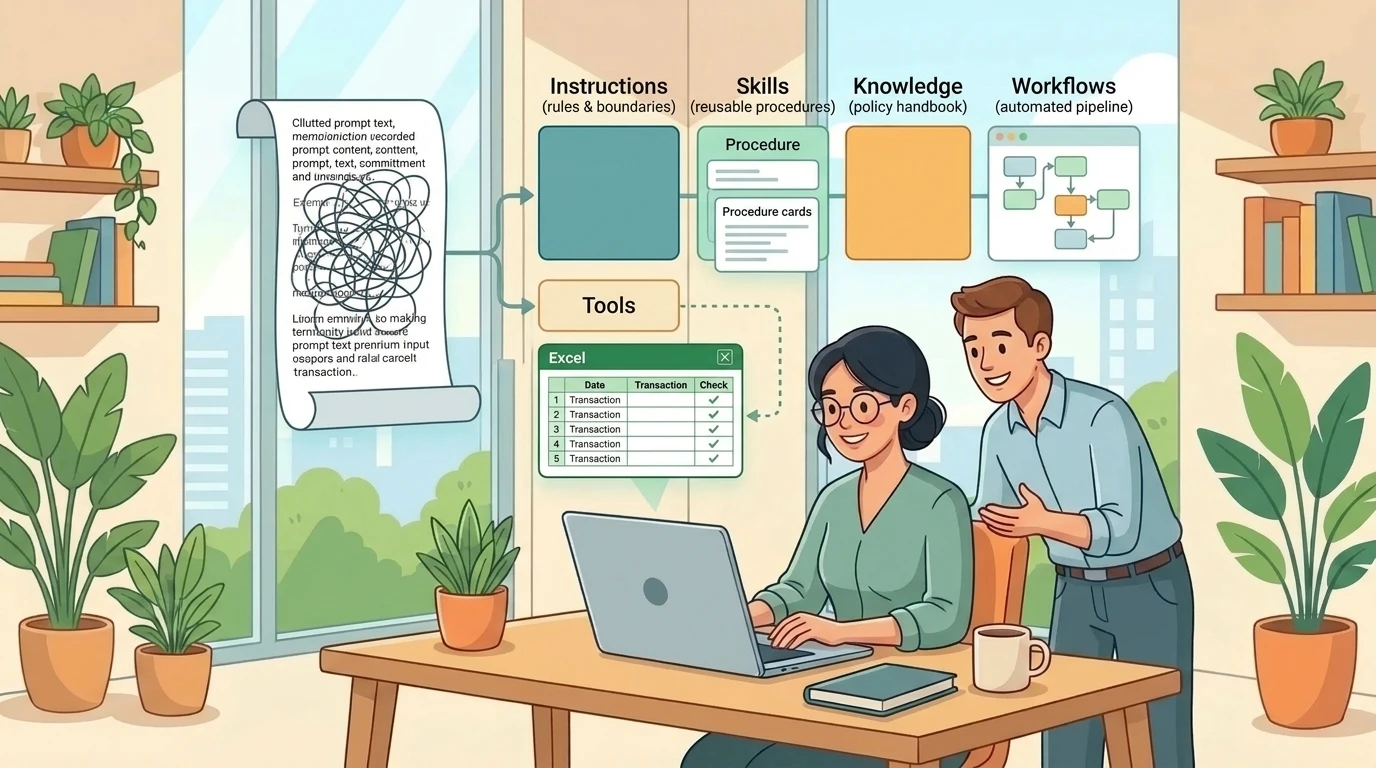
- Instructions define the agent’s overall role, scope, and behavioral boundaries.
- Skills package reusable task-specific procedures, such as requirement coverage and evidence verification.
- Knowledge supplies reference material, such as an example RFP PDF.
- Tools retrieve information or perform actions through connectors, application programming interfaces (APIs), or Model Context Protocol (MCP) servers.
- Connected agents provide delegated expertise, such as supplier-risk assessment.
Microsoft’s agent overview and skills documentation support these distinctions.
A useful shorthand is: knowledge supplies facts; skills describe methods; tools perform actions. A skill may tell the agent how to use a tool, but it does not replace that tool’s connection or permissions.
Skills can contain instructions, scripts, and resources, follow an open specification, and use progressive disclosure so the agent loads relevant context when needed. Makers can create, generate, upload, and reuse them across agents. Their descriptions help the runtime decide when to activate them. See Skills overview.
Reusability improves maintainability. It does not turn an instructions-based assessment into a deterministic validator. A shared evidence-verification skill still needs testing against difficult evidence.
Connect the right sources, then choose the model
The demonstrated agent uses Work IQ for supplier-submission emails, a Dataverse MCP connection for procurement and bid data, an uploaded RFP PDF, and a connected Supplier Risk agent. It uses Claude Sonnet for reasoning. These are the demonstration’s choices, not a universal configuration or a comparative model benchmark.
Model selection should follow the task: document interpretation, evidence comparison, response quality, and acceptable latency. Microsoft’s model-selection guidance identifies these trade-offs and explains that external-model access requires administrative enablement. Do not infer a particular Sonnet version or tenant-wide availability from the video’s generic model label.
An example RFP is useful background. It should not silently become the authority for every tender. In a real design, the evaluation must clearly identify which requirements apply to the current submission.
Memory is context, not the shared bid record
Memory can carry useful context into future interactions, but it is not the same thing as persistent business state.
For GitHub-harness agents, Microsoft documents memory as separate for each user and agent. Makers cannot inspect other users’ memories; inactivity for 28 days causes deletion; memory is disabled in group chats and Teams channels; and turning memory off prevents use without deleting stored memories. See Memory overview.
That makes memory unsuitable as the procurement team’s shared source of truth. Bid status, evidence references, recommendations, and reviewer decisions belong in the process’s explicit data store. Memory may assist an interaction; it should not determine which version of a tender the team believes it approved.
Wrap the agent in an event-driven workflow
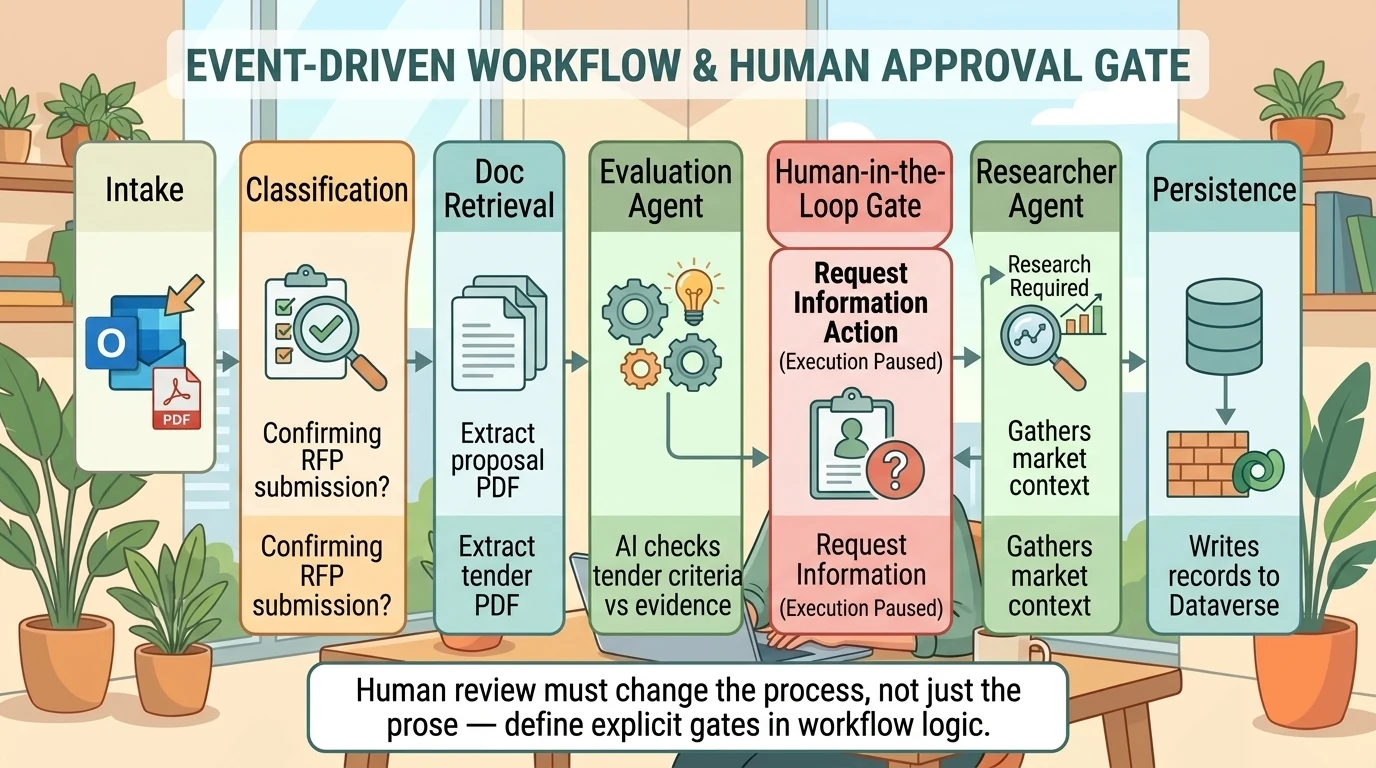
The demonstration’s process begins with an Outlook email trigger rather than a user opening chat. It classifies the email, retrieves its attachment, and invokes the Bid Evaluation Agent. The maker then adds branching, human review, research, recommendation, and a Dataverse write. The video shows the sequence; the workflow FAQ documents native agent, Copilot, and classification nodes.
The resulting architecture has seven responsibilities:
- Intake: Receive the supplier submission. The demonstration uses an individual mailbox; it also suggests a dedicated RFP intake mailbox.
- Classification: Identify whether the message belongs to the RFP path.
- Document retrieval: Obtain the attachment needed for assessment.
- Evaluation: Pass the submission to the bid agent.
- Exception handling: Pause for human input when the process requires it.
- Research and synthesis: Gather additional context and produce a final recommendation.
- Persistence: Write the result to Dataverse for the team-facing experience.
The value is not merely automation. It is making the handoffs visible.
Human review must change the process, not just the prose
In the preview example, the agent flags insufficient medicine-manufacturing certification, cold-chain handling gaps, and insurance below the tender’s minimum. It recommends human review and advises against shortlisting until those issues are addressed. These are demonstrated findings, not independently verified findings about an actual supplier.
There is a crucial difference between an agent writing “human review recommended” and a workflow actually stopping.
Copilot Studio’s Request information action can pause execution, collect input from designated reviewers, and make that input available to subsequent steps. The action documentation describes the mechanism, while Microsoft’s human-in-the-loop training explains explicit approval gates and branching on human decisions.
For a consequential process, define the gate in workflow logic. Do not rely solely on the agent deciding to request it. A recommendation is an assessment; approval is an exercise of authority.
Research adds context; it does not erase failed requirements
The demonstration brings in Researcher before a separate recommendation agent combines the findings. Microsoft’s Copilot-node documentation describes targeting Researcher or Analyst and passing dynamic content from earlier steps. It also states that the node runs on behalf of a Microsoft 365 user and grounds its response in that user’s accessible content.
Researcher is designed for deeper, multistep research across work content and the web, producing source-cited reports. See Microsoft’s Researcher overview.
Architecturally, research and evaluation should remain distinct. Additional context may explain a supplier’s circumstances or identify evidence worth checking. It should not silently override an unmet mandatory requirement. The recommendation should preserve which conclusions came from tender evidence, which came from research, and which reflect human judgment.
Test the judgment and the orchestration separately
A successful preview run proves that one path worked with one set of inputs. It does not establish reliable bid assessment.
Inspect the execution trace
The demonstration manually pastes an email and attaches a bid in Preview before examining the recommendation. Copilot Studio’s activity-trace documentation describes nodes for knowledge access, tools, connectors, skills, outputs, timing, and errors. Microsoft calls this a chain-of-thought view.
Treat that view as a debugging surface, not proof that a conclusion is correct or a guarantee of complete access to the model’s internal reasoning. The practical questions are concrete: Did it retrieve the right tender? Which evidence did it use? Did the tool succeed? Does the final recommendation follow from the returned information?
Read evaluation scores carefully
The video reports 18 test cases, run sequentially in just over 22 minutes, with 89% meeting its evaluation criteria. Those figures describe that demonstration, not a general performance benchmark, latency commitment, or measured procurement accuracy. See the Mechanics demonstration.
For GitHub-harness agents, the documented evaluation experience supports manual conversations, CSV import, and AI-generated conversation sets. The quick-generation option creates 10 conversations. See Create a test set.
The more important qualification is the scoring method: as of October 23, 2026, the evaluation overview documents General quality as the only available method. It assesses qualities such as relevance and completeness and does not compare responses with expected answers.
An articulate but incorrect recommendation can therefore require additional domain validation even if its general-quality score looks encouraging. Do not import evaluation capabilities documented for the standard harness into this experience without checking the harness-specific documentation.
For procurement, a useful test collection would include fully compliant bids, missing evidence, conflicting documents, expired certificates, insurance near the threshold, ambiguous requirements, and cases that must pause for review. These are suggested scenarios, not tests claimed to have been included in the video.
Validate the workflow independently
Node-level testing lets makers test individual actions as well as the complete workflow. The demonstration’s Activity view exposes step timing, the branch taken, and structured agent output; it also shows a run continuing after human review. See the workflow FAQ and demonstration.
Keep two questions separate:
- Was the assessment sound? Check evidence coverage, interpretation, and recommendation quality.
- Did the process behave correctly? Check classification, attachment handling, branch selection, pause/resume behavior, and the final data write.
For a real implementation, also test missing attachments, duplicate submissions, connector failures, and unresolved reviews. These are engineering validation recommendations, not assertions about built-in recovery behavior.
Give the team a shared workbench
The final layer turns background automation into a usable operational experience.
In the demonstration, the maker describes a Bid Management App connected to Dataverse, requests the screens, and refines the generated result through additional prompts, including branding changes. The app presents summary tiles, a bid queue, filters for human-review cases, bid details, and approval actions. See the video.
Microsoft’s apps overview documents natural-language generation of an app with a data model, logic, and interface, followed by interactive preview, refinement, publishing, and sharing. Approved data access uses the signed-in user’s existing permissions.
The architectural lesson is stronger than the visual polish: people need to see what is pending, understand why it is pending, and record what they decided.
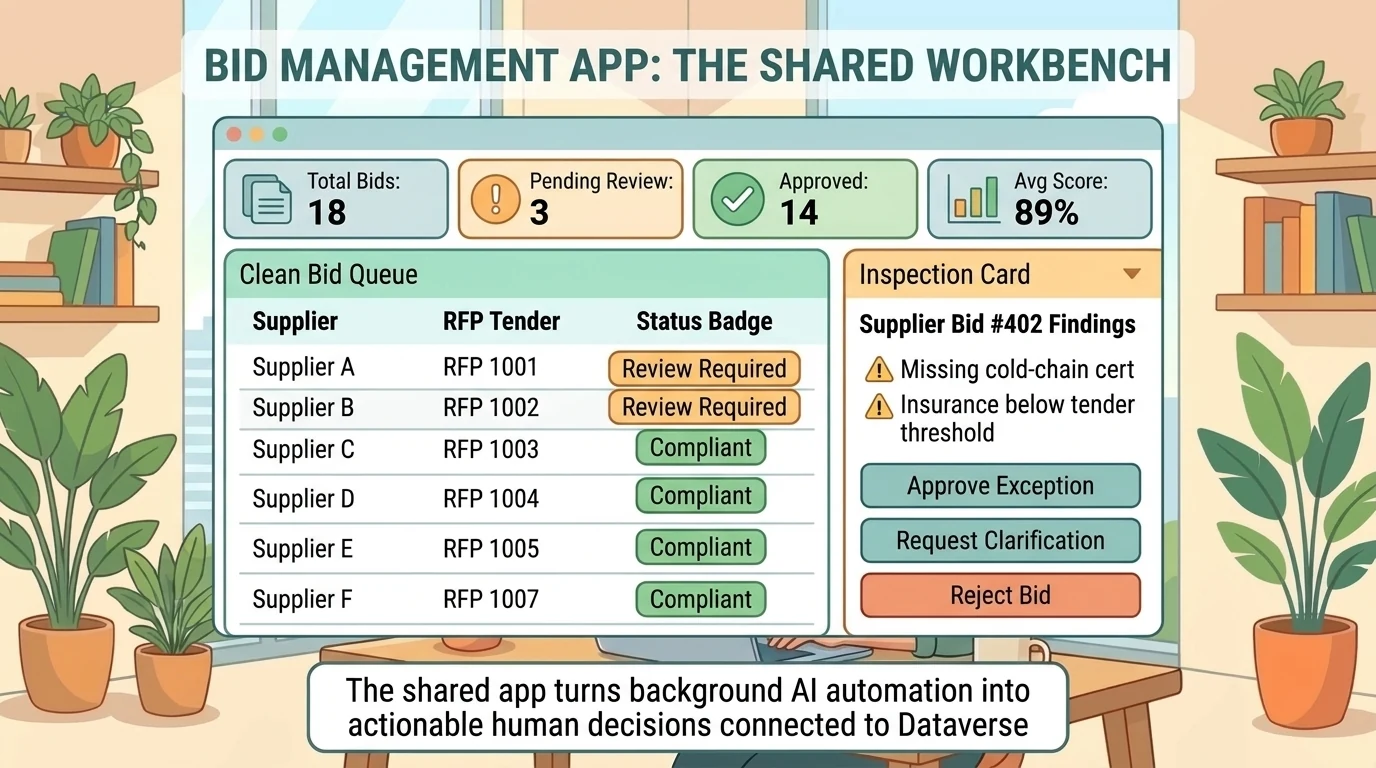
However, the video does not expose the complete data schema or prove that every app approval resumes a paused workflow. It shows workflow human review and app approval, but those interactions should not be assumed to be the same mechanism. In a real design, define explicitly how a saved decision updates process state and, where necessary, resumes execution.
A generated app is not automatically a production-ready app. As of October 23, 2026, app creation remains a gradually rolling-out preview that Microsoft says is not intended for production use. Access requires the new experience and the App (Preview) tile; administrators can disable creation. See Apps overview.
“No code” is best understood here as an authoring experience. It does not remove the need to validate connections, permissions, data relationships, generated behavior, or release status. Microsoft also notes that building, testing, evaluating, and using GitHub-harness experiences can consume Copilot Credits; a demonstration should not be treated as a free execution environment. See the agent overview and apps overview.
The real shift: from answers to accountable progression
The procurement example is compelling because it does not ask one agent to become the entire application.
The agent interprets the submission. The workflow determines how work progresses. Specialists contribute bounded expertise. People retain explicit decision points. The data store records shared state, and the app makes that state actionable.
That is the reusable pattern: put judgment inside a process that can be inspected, tested, and interrupted.
Start by defining the evidence contract and the human decision boundaries. Validate the agent’s assessment separately from the workflow’s execution. Then build the shared experience around explicit business state, checking each component’s availability before treating the solution as production-ready.
The goal is not an agent that never needs a person. It is a process in which the next action, its supporting evidence, and the person authorized to decide are all clear.
Read next