Mastering Copilot Cowork Cost Management & FinOps

Writer

Microsoft 365 Copilot is moving from help me draft to do this work for me. That shift changes the economics.
A fixed license is easy to budget. Agentic work is not. A user asking Copilot Cowork to summarize a message thread is one cost profile. A user asking it to search across SharePoint, compare documents, create a PowerPoint, schedule follow-ups, and draft stakeholder communications is a different animal completely.
That is why Copilot Credits matter.
Think of Copilot Credits as the fuel gauge for agentic work. Your Microsoft 365 Copilot license gives the user access to the car. Copilot Credits pay for how far the car drives, how steep the hill is, and how much equipment it carries along the way.
For IT leaders, FinOps practitioners, and tenant administrators, the question is no longer:
“Do we have enough Copilot licenses?”
The better question is:
“Do we know which AI workloads deserve unlimited runway, which ones need a speed limit, and which ones should never leave the parking lot?”
This guide is about building that operating model.
Executive Takeaways
| Takeaway | Why it matters |
|---|---|
| Copilot Credits are the common consumption currency for eligible usage-based Microsoft AI experiences. | You need a budget model, not just a license count. |
| Copilot Cowork requires Microsoft 365 Copilot as a prerequisite, but Cowork usage is billed separately through credits. | Do not assume the seat license includes unlimited agentic execution. |
| Work IQ APIs are billed through Copilot Credits when used by agents and AI solutions. | Custom agents can become a material consumption channel if left unmanaged. |
| The Microsoft 365 admin center Cost Management dashboard is the primary control plane for Cowork and Work IQ API usage-based billing. | Tenant administrators now have policy levers: scope, limits, alerts, billing method, and monitoring. |
| Hard caps are useful, but blunt. | Use caps to prevent financial damage, not as your only governance strategy. |
| FinOps for AI should route work to the right platform. | Not every task needs a high-power agentic workflow. Some work belongs in standard Microsoft 365 Copilot, some in Copilot Studio, some in Cowork, and some should not be automated at all. |
The New Mental Model: AI Work Has Weight
Traditional SaaS licensing feels like renting seats in a stadium. You pay for the seat, and whether the person watches quietly or cheers loudly, the price is mostly the same.
Agentic AI is closer to cloud compute.
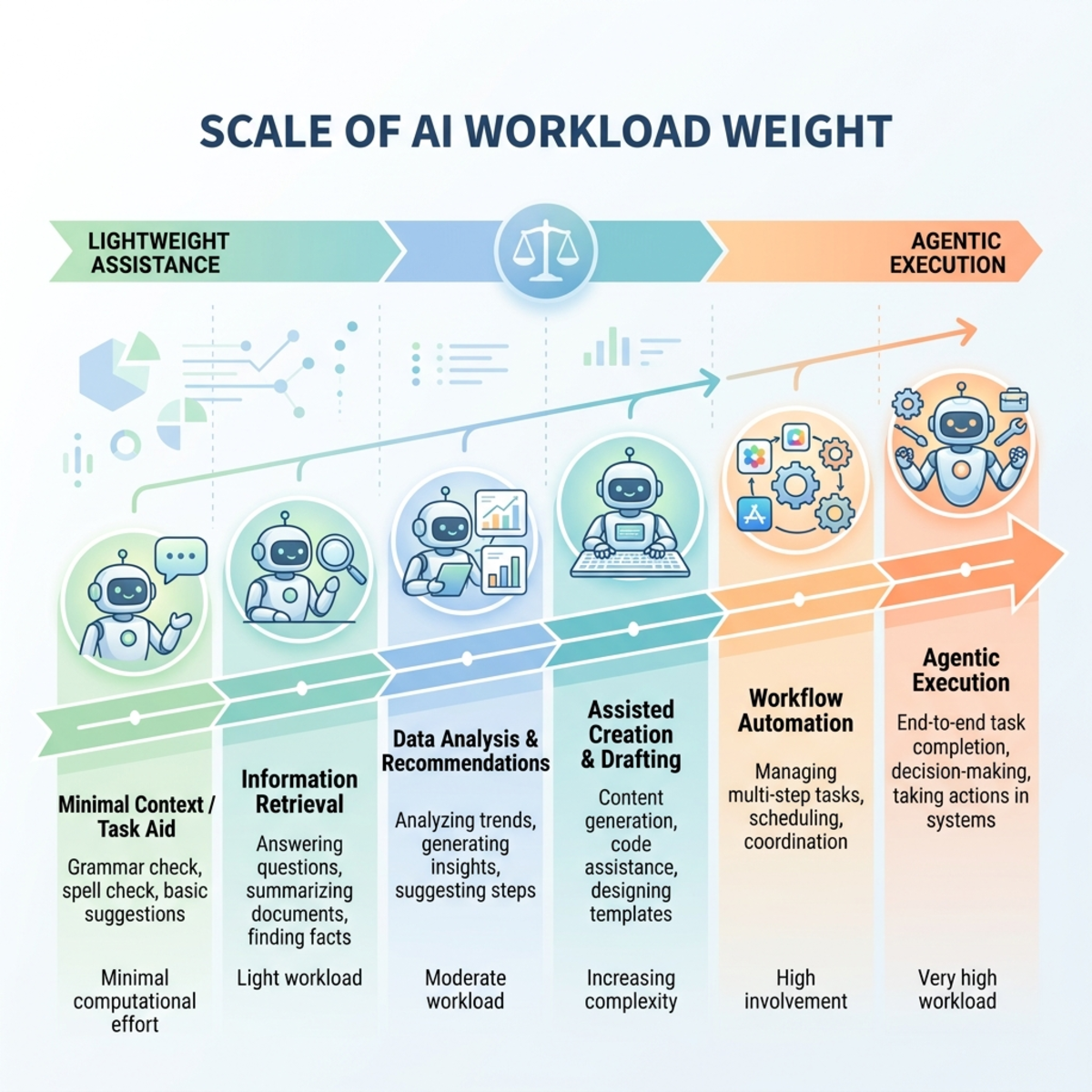
Every task has a workload weight:
| Workload type | Business example | Cost behavior | Governance posture |
|---|---|---|---|
| Lightweight assistance | Summarize a short email thread, draft a reply, rewrite a paragraph. | Predictable and usually low intensity. | Keep in standard Microsoft 365 Copilot where possible. |
| Multi-step productivity | Prepare a meeting recap, find related documents, draft follow-ups, create a short brief. | Moderate consumption because the agent retrieves context and performs several steps. | Allow for approved groups with sensible user limits. |
| Agentic execution | Compare many files, create deliverables, schedule meetings, send messages, run recurring prompts. | Higher and more variable consumption because the system plans, reasons, retrieves context, and uses tools. | Govern through targeted policies, alerts, and review. |
| Custom agent/API grounding | Third-party or internal agents calling Work IQ APIs for Microsoft 365 context. | Can scale quickly because usage may be driven by apps, not only humans. | Treat as product cost, not user convenience cost. Assign ownership and chargeback. |
This is the key FinOps idea: cost follows effort.
The more the agent has to reason, retrieve, orchestrate, and act, the more you should expect consumption to move.
What Are Copilot Credits?
Copilot Credits are Microsoft’s usage-based billing unit for eligible AI experiences. They complement fixed subscription licensing by charging based on actual usage and are used across scenarios such as Copilot Cowork, Work IQ APIs, Copilot Studio, and other supported Microsoft AI workloads.
The important point is not the name of the unit. The important point is that credits convert AI activity into a budgetable meter.
| Concept | Plain-English explanation |
|---|---|
| Microsoft 365 Copilot license | The user’s entry ticket for Microsoft 365 Copilot experiences. |
| Copilot Credits | The consumption currency for eligible usage-based AI work. |
| Spending policy | The rulebook that decides who can spend credits, how much they can spend, and which services they can spend on. |
| Billing method | The funding source: prepaid credits, existing eligible capacity, or pay-as-you-go via Azure. |
| Hard cap | The circuit breaker. When the limit is hit, the service can stop until the reset or until capacity is adjusted. |
| Alert threshold | The smoke alarm. It warns owners before the circuit breaker trips. |
Microsoft’s official Copilot Credits Guide states that pay-as-you-go pricing is $0.01 per Copilot Credit. Microsoft also offers a Copilot Credit Pre-Purchase Plan (P3), where annual prepaid commitments can provide discounts by tier. Pricing is in USD and subject to change, so treat this as a planning input and always validate against your agreement and Microsoft Product Terms before procurement.
Cowork vs. Work IQ API: Do Not Mix These Up
Cowork and Work IQ API are related, but they have different governance implications.
| Area | Copilot Cowork | Work IQ API |
|---|---|---|
| Primary audience | End users delegating work to an agent. | Developers, platform teams, ISVs, or internal product teams building agents and AI apps. |
| What it does | Executes multi-step work across Microsoft 365, such as drafting documents, managing files, scheduling meetings, posting in Teams, and preparing summaries. | Gives agents and AI solutions secure access to Microsoft 365 context, such as email, meetings, documents, Teams messages, people, Planner plans, and enterprise search results. |
| Licensing posture | Requires Microsoft 365 Copilot as a prerequisite for Cowork usage. Cowork itself consumes Copilot Credits based on usage. | Work IQ APIs are billed using Copilot Credits when invoked by agents and AI solutions. Microsoft 365 Copilot itself uses Work IQ natively without separate Work IQ API charges for built-in Copilot experiences. |
| Risk pattern | A power user or team can burn through credits with heavy workflows. | An app or agent can scale consumption across many users or repeated calls. |
| Governance owner | Tenant admin plus business owner. | Tenant admin plus platform owner, app owner, and FinOps. |
| Best control | Group-scoped policy with monthly budget, per-user limits, and alerts. | Service-specific policy, app ownership, monitoring by agent/service, and chargeback model. |
Here is the simplest way to remember it:
Cowork is the employee-facing agent. Work IQ API is the enterprise context engine your agents can call. Both need financial guardrails.
Directional Cost Intuition: How to Think About the Math
This section is intentionally directional. It is not a quote, not a price sheet, and not a substitute for the Microsoft Customer Cowork Estimator or your commercial agreement.
Use it to build intuition.
The Simple Formula
If pay-as-you-go is $0.01 per credit, then:
Again, this is a directional planning aid based on public pay-as-you-go pricing. Your real cost may differ because of prepaid credits, P3 discounts, agreement terms, region, taxes, currency, and actual workload behavior.
Example: The Innocent Pilot That Becomes a Budget Problem
Assume a pilot group of 250 users.
| Planning input | Example assumption |
|---|---|
| Pilot users | 250 |
| Active usage rate | 40% |
| Active users | 100 |
| Cowork tasks per active user per week | 5 |
| Weeks per month | 4.3 |
| Average credits per task | 50 |
| Pay-as-you-go planning rate | $0.01 per credit |
Directional math:
That sounds manageable.
Now change two assumptions:
- Adoption rises from 40% to 80%.
- The average task becomes heavier because teams start asking Cowork to create files, search across more content, and run recurring workflows.
| Planning input | Revised assumption |
|---|---|
| Pilot users | 250 |
| Active usage rate | 80% |
| Active users | 200 |
| Cowork tasks per active user per week | 8 |
| Weeks per month | 4.3 |
| Average credits per task | 150 |
| Pay-as-you-go planning rate | $0.01 per credit |
Directional math:
That is the FinOps lesson: usage-based AI cost can scale non-linearly because adoption and task complexity rise together.
The Three Budget Questions Every Tenant Admin Should Ask
Before you touch a setting, align with finance and business owners on three questions.
| Question | Why it matters | Example answer |
|---|---|---|
| Who is allowed to spend? | Prevents uncontrolled access. | Start with IT, finance operations, sales operations, and selected executive assistants. |
| What work is worth paying for? | Prevents paying premium agentic cost for low-value tasks. | Allow customer escalation summaries, meeting prep, contract comparison, and recurring operational reporting. Discourage novelty usage. |
| Who owns the bill? | Prevents AI from becoming an unallocated shared IT cost. | Department-level policy tied to an Azure subscription, cost center, or recharge model. |
If you cannot answer these questions, do not start with unlimited usage.
Configuring Cost Management in the Microsoft 365 Admin Center
The Cost Management dashboard in the Microsoft 365 admin center is the control plane for usage-based billing for Copilot Cowork and Work IQ API.
Navigate to:
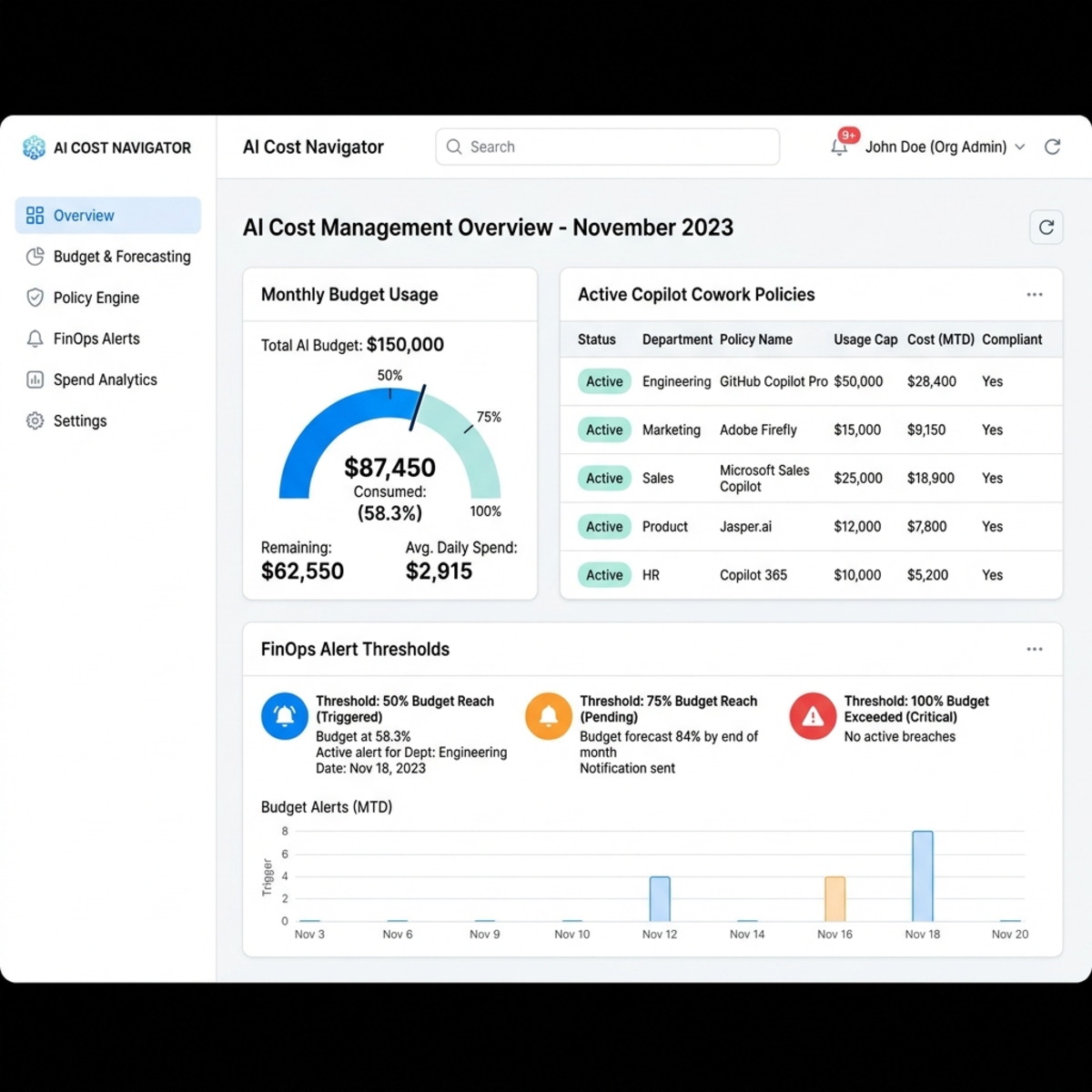
From there, your job is to build a layered policy model.
Step 1: Activate the Default Spending Policy
The default policy is your safety net. It applies broadly unless a more specific policy is used.
Do not think of this as a technical setup step. Think of it as your tenant-wide insurance policy.
Recommended baseline:
| Setting | Recommended approach | Why |
|---|---|---|
| Billing method | Use prepaid credits or a controlled Azure pay-as-you-go subscription. | Keeps funding explicit and traceable. |
| Monthly spending limit | Set a limit unless you have a mature monitoring and chargeback process. | Prevents surprise consumption. |
| Per-user monthly limit | Enable it for broad policies. | Prevents one user from draining the shared pool. |
| Alerts | Configure alerts to IT operations, FinOps, and service owners. | Gives teams time to react before a hard stop. |
| Services | Start with only the services you intend to govern. | Avoids accidental enablement. |
Rule of thumb:
Your default policy should be conservative. Your targeted policies should be intentional.
Step 2: Use Groups as Your Governance Boundary
At the time of writing, Microsoft documentation says specific users are supported through security groups for spending policies. In practice, that means your cleanest governance unit is an Entra ID security group.
Use groups that map to business intent, not random pilots.
| Group name example | Purpose |
|---|---|
AI-Cowork-Pilot-Standard | Standard pilot users with low monthly limits. |
AI-Cowork-PowerUsers-FinanceOps | Finance operations users with higher task volume. |
AI-WorkIQ-API-ApprovedApps | Internal apps or app owners approved to use Work IQ API. |
AI-Cowork-Executives-Assistants | Executive assistants and chiefs of staff handling high-value coordination work. |
Avoid this pattern:
If the group name cannot explain the business purpose, your future self will hate you.
Step 3: Create Targeted Spending Policies
The default policy is the guardrail. Targeted policies are where the real operating model happens.
| Policy pattern | Use when | Example control |
|---|---|---|
| Conservative pilot policy | You are learning usage behavior. | Low monthly pool, low per-user limit, alerts at 50% and 75%. |
| Department policy | A team has clear business value and budget ownership. | Monthly cap aligned to department forecast. Alerts to department owner and FinOps. |
| Power-user policy | A small set of users performs high-value, high-complexity work. | Higher per-user limit but active review of usage and outcomes. |
| API policy | Work IQ API is used by custom agents or third-party solutions. | Service-specific scope, app owner, chargeback tag/subscription, and tighter monitoring. |
| Executive continuity policy | Work stoppage would be more expensive than overage. | Higher cap, aggressive alerts, and explicit approval workflow. |
Do not give every team the same limit. That is not fairness. That is lazy governance.
The fair model is:
Step 4: Configure Limits Like Circuit Breakers
Hard caps are useful, but they are not subtle. Microsoft documentation states that when users hit a limited monthly budget, they can lose access to the governed agents and services for the rest of the month until credits reset on the first of the month.
That is exactly what you want for experiments.
It may be exactly what you do not want for executive operations, incident response, or month-end close.
| Limit strategy | Good for | Risk |
|---|---|---|
| Low hard cap | Early pilots, unknown usage, experimentation. | Users may be blocked mid-workflow. |
| Moderate cap with alerts | Departmental rollout. | Requires someone to monitor and respond. |
| High cap with chargeback | Mature business-owned adoption. | Can still create surprise spend if ownership is weak. |
| Unlimited with monitoring | Critical workloads with strong FinOps maturity. | Dangerous if you do not have reporting discipline. |
My opinionated guidance:
Never use unlimited because you forgot to choose a number. Use unlimited only because the business formally accepted the risk.
Step 5: Treat Alerts as Operational Signals, Not Noise
Alerts should not go only to the person who configured the tenant.
Send them to the people who can make a decision:
| Alert recipient | Why they need it |
|---|---|
| Tenant administrator | Can adjust policy configuration. |
| FinOps owner | Can assess budget impact and trend. |
| Business owner | Can approve more spend or reduce scope. |
| Service/app owner | Can tune prompts, workflows, or API behavior. |
Recommended alert pattern:
| Threshold | Action |
|---|---|
| 50% | Validate adoption is expected. Check for one-off spikes. |
| 70% | Review top users, services, agents, or groups. Microsoft also supports alerts when users approach 70% of a configured user limit. |
| 85% | Decide whether to increase budget, reduce access, or optimize workloads. |
| 100% | Treat as an operational event. Either users are blocked, or overage funding is being consumed. |
Billing Methods: Choose the Right Funding Model
Microsoft supports multiple ways to fund Copilot Credit consumption, including prepaid constructs and pay-as-you-go. The commercial details can change, so validate your final procurement path with Microsoft documentation, your account team, or your Microsoft partner.
| Funding model | Best for | Financial behavior | Watch out for |
|---|---|---|---|
| Pay-as-you-go | Pilots, variable demand, seasonal workloads, or continuity after prepaid credits are exhausted. | Flexible. Public guide lists $0.01 per Copilot Credit for pay-as-you-go. | Easy to start, easy to overspend without limits. |
| Copilot Credit Pre-Purchase Plan (P3) | Predictable annual consumption and committed programs. | Annual prepaid pool with tiered discounts. Unused credits expire at the end of the annual term. | Requires forecasting discipline. Overbuying can waste budget. |
| Existing eligible capacity packs | Organizations with already purchased capacity. | Can provide a controlled starting pool. | Confirm eligibility and how credits are applied in your tenant. |
Microsoft documentation also describes the billing drawdown order when multiple funding sources are involved:
- Capacity packs
- P3 prepaid credits
- Pay-as-you-go billing
That order matters because it lets you design a predictable funding stack:
Use prepaid credits for the expected floor. Use pay-as-you-go for controlled overflow. Use policies to stop bad behavior before overflow becomes the default.
P3 Discounts: Useful, but Only After You Understand Usage
The Copilot Credit Pre-Purchase Plan (P3) is attractive because larger annual commitments can unlock discounts compared with pay-as-you-go.
But do not confuse a discount with savings.
A discount on unused credits is not savings. It is prepaid waste.
| Maturity level | Recommended procurement posture |
|---|---|
| No usage history | Start small. Use pay-as-you-go with strict limits or a small prepaid allocation if already available. |
| 4 to 8 weeks of pilot data | Model baseline, spikes, and user personas. Identify real cost drivers. |
| Predictable production usage | Consider P3 sized to the reliable floor, not the fantasy peak. |
| Mature FinOps and chargeback | Use P3 plus pay-as-you-go overflow, with department policies and monthly reviews. |
Rule of thumb:
Prepay the floor. Meter the uncertainty. Govern the spikes.
Platform Routing: The Most Important Cost Lever
The cheapest credit is the one you never burn.
That does not mean blocking AI. It means routing work to the right execution path.
| User intent | Recommended route | Why |
|---|---|---|
| Draft, rewrite, summarize, brainstorm | Standard Microsoft 365 Copilot | Usually the right tool for lightweight knowledge work. |
| Multi-step work across Microsoft 365 with user approval | Copilot Cowork | Best when delegation and execution create clear time savings. |
| Custom business process agent | Copilot Studio or another approved agent platform | Better for repeatable workflows with clear ownership. |
| Agent needs Microsoft 365 grounding through APIs | Work IQ API | Useful when building agentic apps that need secure Microsoft 365 context. |
| High-volume repetitive lookup | Reconsider architecture before using agentic reasoning | A deterministic workflow, search index, report, or integration may be cheaper and more reliable. |
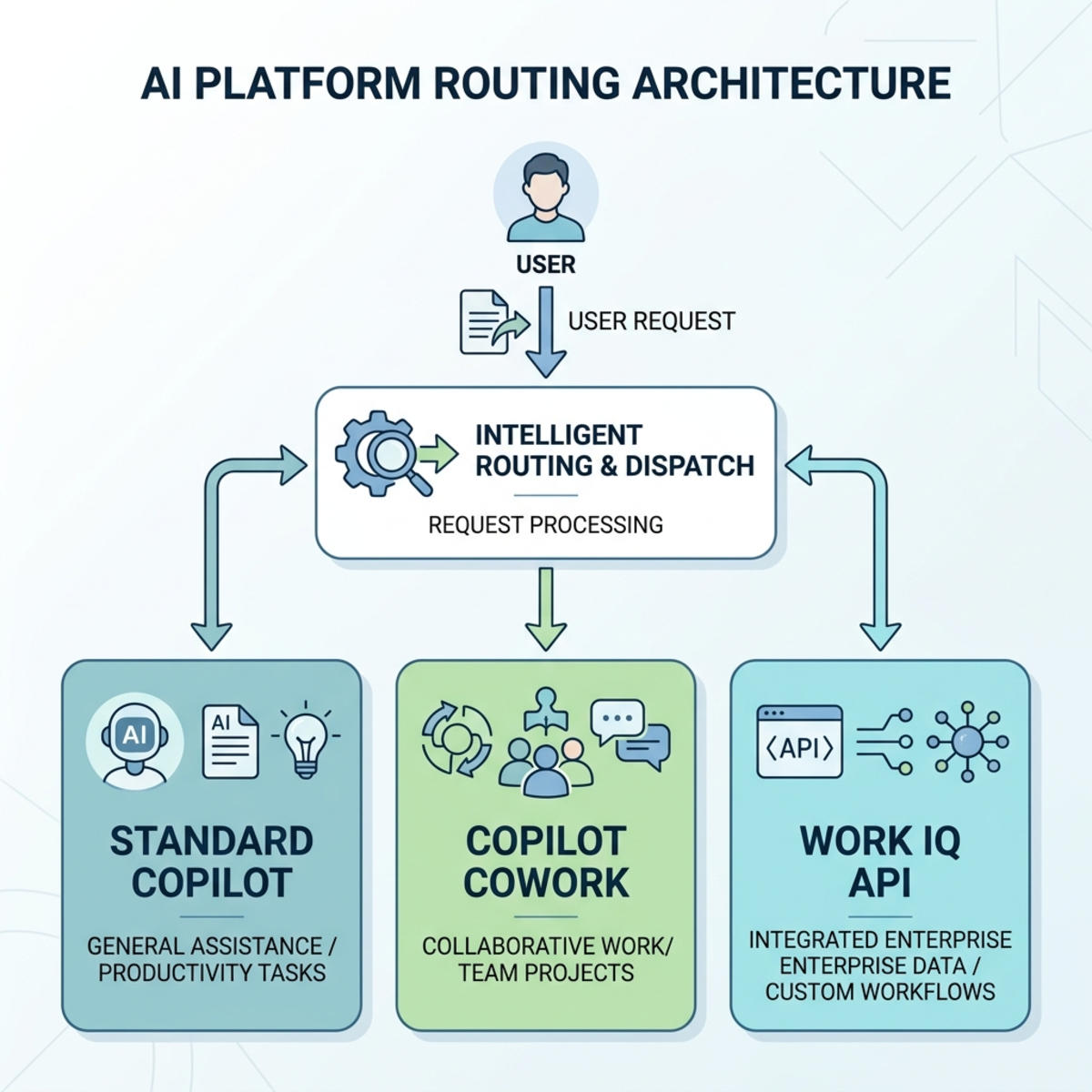
This is where IT leaders should be opinionated.
Do not let every business request become an agentic workflow. Some tasks need a bicycle, not a helicopter.
Practical Rollout Plan: Safe, Fast, and Financially Sane
Phase 1: Prepare the Operating Model
| Task | Owner | Output |
|---|---|---|
| Define approved personas | IT + business owners | Pilot group list. |
| Define success measures | Business owner + FinOps | Time saved, cycle time reduced, summaries created, escalations avoided. |
| Define budget envelope | Finance + IT | Monthly credit cap and alert thresholds. |
| Define escalation path | IT operations | Who approves more credits and when. |
| Define review cadence | FinOps | Weekly during pilot, monthly after stabilization. |
Phase 2: Configure Controls
- Go to Microsoft 365 admin center > Copilot > Cost Management.
- Activate the default spending policy.
- Set a conservative tenant-level monthly spending limit.
- Enable per-user monthly limits for broad access policies.
- Configure alerts for IT, FinOps, and business owners.
- Create security groups for scoped access.
- Create targeted policies for pilot groups.
- Select which services each policy applies to.
- Choose the billing method deliberately.
- Document who owns each policy and why it exists.
Phase 3: Monitor and Tune
Use the Cost Management dashboard’s Overview and Consumption views to answer four questions:
| Question | What to look for |
|---|---|
| Who is consuming credits? | Users, groups, departments, or agents with unusual usage. |
| Which services are consuming credits? | Cowork versus Work IQ API versus other eligible services as support expands. |
| Is usage tied to business value? | Compare consumption against outcomes, not just activity. |
| Are limits too tight or too loose? | Look for blocked high-value users and runaway low-value usage. |
Governance Anti-Patterns to Avoid
| Anti-pattern | Why it fails | Better approach |
|---|---|---|
| Turning on usage-based billing tenant-wide with no limits. | Creates budget exposure before you understand demand. | Start with scoped groups and conservative defaults. |
| Treating AI cost as a central IT tax. | Business units consume, IT gets blamed. | Assign service owners and budget accountability. |
| Using hard caps without alerts. | Users discover the budget problem only when work stops. | Alert early and route exceptions. |
| Giving developers unrestricted Work IQ API access. | API-driven consumption can scale faster than human usage. | Require app registration, ownership, monitoring, and policy scope. |
| Buying a large prepaid plan before observing usage. | Discounts can turn into waste if credits expire unused. | Measure first, prepay the predictable floor later. |
| Evaluating success only by credit consumption. | Low spend can mean low adoption. High spend can mean high value or waste. | Measure cost per business outcome. |
KPIs for AI FinOps
If you only track total credits, you are managing the fuel bill without knowing which trips mattered.
Use a balanced scorecard.
| KPI | What it tells you |
|---|---|
| Credits consumed by service | Whether spend is coming from Cowork, Work IQ API, or other supported services. |
| Credits consumed by group | Which departments or personas drive usage. |
| Credits per active user | Whether usage intensity is rising. |
| Credits per workflow category | Which business processes are expensive. |
| Blocked users or credit requests | Whether limits are too restrictive. |
| Cost per completed business outcome | Whether agentic work is worth the spend. |
| Prompt/workflow rework rate | Whether users are burning credits because instructions are poor. |
That last one matters. Bad prompts are not just a quality problem. In usage-based AI, bad prompts are a cost problem.
A Simple Decision Guide for Administrators
Use this when someone asks, “Can we enable this for my team?”
| If the request sounds like… | Ask… | Decision |
|---|---|---|
| ”We want to try Cowork.” | Which specific business process? Which users? What monthly budget? | Approve only as scoped pilot. |
| ”We need unlimited access.” | What breaks if users hit a cap? Who owns overage? | Approve only with business sign-off. |
| ”Our app needs Work IQ API.” | Who owns the app, budget, and monitoring? What is expected call volume? | Require API-specific policy and chargeback. |
| ”We ran out of credits.” | Was this expected adoption, a spike, or misuse? | Increase only after reviewing consumption. |
| ”P3 gives us a discount.” | What is our measured monthly floor? What expires unused? | Buy only against predictable demand. |
My Opinionated Baseline Configuration
If I were advising a tenant starting today, I would use this pattern:
| Layer | Configuration |
|---|---|
| Default tenant policy | Limited monthly budget, low per-user cap, alerts at 50%, 70%, and 85%. |
| Pilot Cowork policy | Specific security group, moderate shared pool, per-user cap, weekly review. |
| Power-user policy | Specific groups only, higher limit, named business owner, monthly value review. |
| Work IQ API policy | Separate policy, service-specific scope, app owner, Azure subscription mapped for cost tracking. |
| Procurement | Start with controlled pay-as-you-go or existing eligible prepaid capacity. Consider P3 only after usage patterns stabilize. |
| Review cadence | Weekly for first month, biweekly for next two months, monthly after steady state. |
The goal is not to make AI hard to use.
The goal is to make AI easy to scale without making finance nervous.
Final Thought: AI Governance Is Becoming Budget Governance
For years, tenant administrators governed identity, data access, devices, and compliance. AI adds a new control surface: autonomous effort.
Copilot Cowork and Work IQ API are powerful because they can do more than answer. They can plan, retrieve, create, schedule, and act. That is exactly why they need FinOps discipline.
The winning organizations will not be the ones that block usage-based AI.
They will be the ones that build the muscle to answer three questions quickly:
- Is this work valuable?
- Is this the right AI execution path?
- Is the budget control proportional to the risk?
If you can answer those questions, Copilot Credits stop feeling like a scary meter and start becoming what they should be: a practical way to fund business outcomes.
Sources and Validation Notes
This article was revised against current Microsoft public documentation available on July 7, 2026. Product behavior, pricing, and licensing can change, so always validate final procurement and tenant configuration decisions against Microsoft Product Terms, your Microsoft agreement, and your account team.
Read next