Agentic Loops for IT Leaders: Governance & Cost Control

Writer
Agentic Loops for IT Leaders: From AI Experiments to Governed Autonomous Systems
Most organizations are not really struggling with AI ideas anymore. They are struggling with AI operating models.
The first wave of generative AI was easy to sponsor: give employees a chat interface, measure adoption, celebrate productivity. The next wave is different. Agentic systems do not just answer questions. They wake up, inspect work, call tools, trigger workflows, and keep going until something tells them to stop.
That changes the conversation.
For developers, the question is: Can the agent complete the task?
For IT leaders, tenant administrators, and FinOps teams, the harder question is: Can the organization afford, govern, audit, and trust the agent when it runs repeatedly at scale?
That is why loop engineering matters. It is not simply a new developer technique. It is the management layer for autonomous work.
The Mental Model: An Agent Is Not an Employee. It Is a Cost-Amplifying Machine.
A prompt is a request. A workflow is a process. A loop is a process that can re-enter itself.
That last part is where the risk lives.
Think of a human employee making ten mistakes in an afternoon. Annoying, but bounded. Now imagine a loop making the same mistake every five minutes across twenty environments, calling premium models, grounding against enterprise data, and triggering external tools. That is not an AI demo anymore. That is an operational risk with a meter attached.
The right mental model is not “chatbot.” It is factory line.
| Concept | Simple analogy | Leadership question |
|---|---|---|
| Prompt | A written instruction | Is the request clear? |
| Context | The documents and systems the worker can see | Is the data scoped correctly? |
| Tool call | A machine the worker can operate | Is the action safe and authorized? |
| Harness | The factory workstation | Can the task run reliably? |
| Loop | The assembly line that keeps feeding work | What stops it, who supervises it, and what does it cost? |
| Evaluator | Quality inspection | Who proves the output is acceptable? |
| Observability | Control room dashboard | Can we see cost, failures, and drift fast enough? |
My opinionated take: If you cannot explain the stopping condition, the budget boundary, and the escalation path, you are not ready to run the agent unattended.
The Evolution: From Prompt Engineering to Loop Engineering
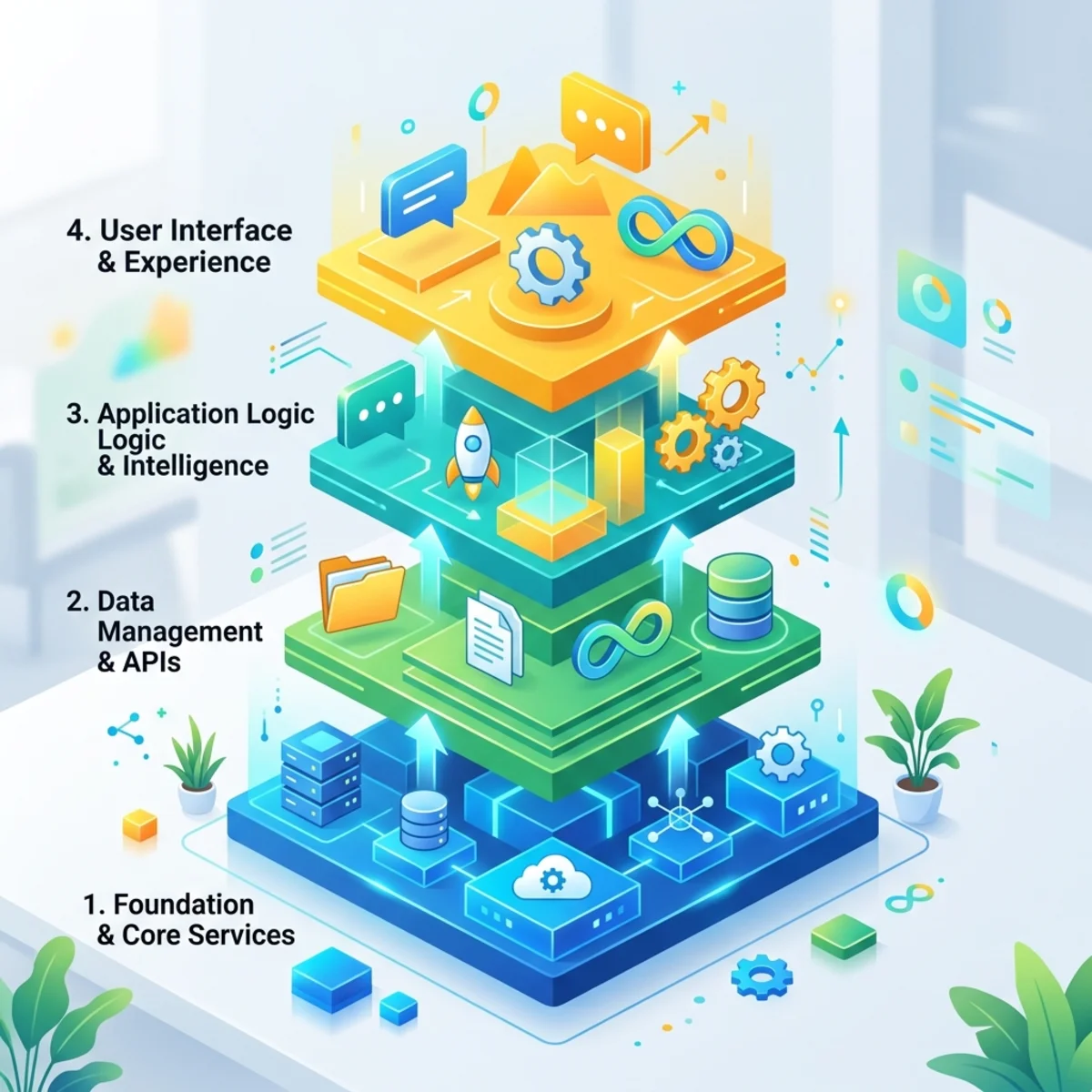
Layer 1: Prompt Engineering
Prompt engineering is the baseline. You instruct the model directly:
“You are a helpful support assistant. Answer politely and summarize the customer request.”
This works for bounded, low-risk tasks. It is human-guided and usually single-turn or short-session. The model relies on its pre-trained knowledge and whatever sits in the immediate context window. That is fine for a throwaway question, even a silly one like “calculate the distance to the moon in cheeseburgers.” The cost is relatively easy to reason about because a human is still pacing the work.
The governance risk is modest. The model can still be wrong, but it is not usually acting on its own.
Layer 2: Context Engineering
Prompting breaks down when the model needs fresh information or business-specific data. Context engineering gives the agent access to relevant knowledge and tools.
This is where standards such as the Model Context Protocol (MCP) become important. MCP is described as an open protocol for connecting AI applications to external systems, tools, data sources, and workflows. Microsoft also documents MCP patterns for Azure and Windows, including MCP servers, clients, tool discovery, and admin/user controls in certain environments. 1 2 3
Instead of a user manually pasting data into a prompt, an agent can request the context it needs: a document from a file store, a row from a database, a web search result, a ticket from a service desk, or an approved enterprise tool. The old pattern was “human gathers context, model answers.” The new pattern is “agent gathers approved context, then reasons.” That is powerful, but it shifts governance from prompt wording to tool exposure.
For leaders, MCP is not just a developer convenience. It is a governance boundary.
A connector answers three business questions:
- What can the agent see?
- What can the agent do?
- Who approved that access?
If those answers are fuzzy, the agent will eventually surprise you.
Layer 3: Harness Engineering
Context engineering helps the model see. Harness engineering helps the model work.
A harness is the runtime wrapper around the agent. It manages task plans, files, retries, logs, state, and execution boundaries. It prevents the agent from treating a long-running activity as one giant conversation that eventually gets compressed, forgotten, or derailed.
This is where the context limit problem shows up. On tasks longer than a few minutes, the agent may start summarizing its own history to stay inside the context window. Each summary drops detail. That creates a “leaky memory” effect: the agent still sounds confident, but it has lost execution-critical facts. Ask it to clone a large NASA-style website, migrate a messy knowledge base, or coordinate several parallel changes, and the problem becomes obvious.
For IT leaders, the harness is the difference between an AI assistant and an operational system.
| Without a harness | With a harness |
|---|---|
| Long task lives inside one fragile conversation | Plan and state are persisted outside the model context |
| Failures are buried in chat history | Failures are captured as events, logs, and artifacts |
| Agent decides when it is “done” | Verifiers and supervisors decide when work is accepted |
| Cost is hard to attribute | Cost can be tagged by task, user, model, and environment |
A useful analogy: the model is the engine, but the harness is the vehicle. Nobody buys an engine and calls it a fleet strategy.
Bridging the Compute Gap: Scaling the Runtime
Before true autonomy becomes practical, there is also a physical bottleneck: compute. A local lab is great for learning, testing small models, running local inference with tools such as llama.cpp, or keeping background AI services alive with a process manager such as PM2. But heavy multi-agent work eventually runs into the hard limits of local VRAM, throughput, storage, and interconnect.
That is the moment the architecture conversation stops being only about prompts and starts being about infrastructure. Purpose-built AI clouds and GPU platforms matter because agentic workloads are bursty, parallel, and memory-hungry. One publicly verifiable example is Verda, which describes a full-stack AI cloud with self-service GPU clusters, InfiniBand interconnect, serverless containers, confidential computing, and GB300 options with NVLink-based rack-scale configurations. 4 5
Treat exact GPU SKUs, historical availability such as V100-class capacity, NVMe storage characteristics, regional availability, and confidential-computing support as procurement-time validation items. The strategic lesson is the important part: local experimentation is not the same thing as an enterprise runtime. If the loop is business-critical, the runtime needs capacity planning, security review, cost controls, and operational support.
Layer 4: Loop Engineering
Loop engineering moves the human out of the repetitive prompting seat.
Instead of a person manually asking “what next?” the system wakes the agent, gives it scoped work, checks the result, records state, and decides whether to continue, retry, escalate, or stop.
Addy Osmani framed this shift as designing systems that prompt agents rather than prompting agents yourself. His loop engineering model describes building blocks such as automations, worktrees, skills, plugins/connectors, sub-agents, and memory. 6
This is a meaningful shift for IT and FinOps because loops convert AI from interactive usage into recurring consumption.
Recurring consumption is where governance matters.
The Six Loop Components in One Business Example
Imagine an AI system responsible for building and maintaining a live World Cup scoring website. It does not wait for a human to say “check scores again.” It wakes up, checks the latest approved source, updates the site, verifies the output, and logs what happened.
| Loop component | Function in the architecture | World Cup scoring example |
|---|---|---|
| Automation | Scheduled tasks and event triggers wake the system | Check for score updates every hour or when a match event arrives |
| State | External memory tracks what has already happened | Store processed matches and update timestamps to avoid duplicate work |
| Sub-agents | Separate maker and checker roles | One agent updates the site, another verifies the score and layout |
| Worktree | Isolated branches prevent parallel work from colliding | Fix two user-reported bugs at the same time without contaminating runtime state |
| Skills | Codified project knowledge reduces repeated explanation | Soccer scoring rules, brand guidelines, deployment checklist, and site layout rules |
| Plugins and connectors | Approved integrations connect the loop to external systems | Use an approved MCP connector or API action to retrieve scores and publish verified changes |
The architecture stacks rather than replaces earlier layers. The agent still needs precise prompts. It still needs context tools to read the environment. It still needs a harness to survive long tasks. Loop engineering adds the scaffolding that decides when work should happen and whether it should happen again.
Directional Cost Intuition: Why Loops Change the Bill
Pricing changes often, varies by region, and depends heavily on commercial agreements. Treat the following numbers as directional planning aids, not quotes. Always verify with your current pricing calculator, contract, and product documentation before budgeting.
A simple one-off prompt has three obvious cost drivers:
- Input tokens
- Output tokens
- Any tools or services called
A loop adds more multipliers:
- Number of attempts
- Number of agents or sub-agents
- Evaluator calls
- Retrieval and grounding calls
- Tool actions
- Observability and storage
- Retry overhead
- Idle or hosted runtime costs
The dangerous formula is not complex:
That “attempts per task” factor is what surprises people.
A Directional Example
Imagine an internal agent that reviews HR policy questions and drafts answers. It runs 10,000 user interactions per month.
| Design choice | Directional impact |
|---|---|
| One model call per interaction | Lowest cost, weakest verification |
| Add retrieval/grounding | Better answers, more tokens and search/tool cost |
| Add an evaluator call | Higher quality, roughly another model pass |
| Add retries when verifier fails | Better reliability, but failures become cost multipliers |
| Add autonomous scheduled checks | Cost continues even when users are not actively chatting |
For Azure OpenAI, Microsoft describes Standard deployments as pay-as-you-go for input and output tokens, and Provisioned deployments as allocated throughput with predictable costs and reservations available. Batch API can also return completions within 24 hours at a discount for supported scenarios. 7
For Azure AI Foundry Agent Service, Microsoft states that there is no additional charge for creating or running Foundry-native agents using prompts and workflows, but customers incur charges for model tokens and separate charges/licenses for tools, connections, hosted-agent compute, and memory capabilities. 8
For Copilot Studio, Microsoft documents Copilot Credits as the unit used to measure agent usage, with different consumption rates depending on features such as classic answers, generative answers, agent actions, tenant graph grounding, agent flow actions, AI tools, content processing, and voice. Microsoft also documents capacity management in the Power Platform admin center, including prepaid and pay-as-you-go capacity views. 9 10
The practical takeaway is simple: model tokens are only one line item. Agentic systems also spend money through tools, grounding, memory, hosting, retries, and operational overhead.
What Changes for FinOps
Traditional cloud FinOps is usually built around compute, storage, network, and reserved capacity. Agentic FinOps adds a new problem: intent-driven spend.
A server runs because someone deployed it. An agent spends because it reasons that another step is needed.
That does not make agentic AI unmanageable. It means you need different unit economics.
Track these from day one:
| Metric | Why it matters |
|---|---|
| Cost per successful task | Tells you whether automation is economically viable |
| Attempts per successful task | Reveals loops that are thrashing |
| Evaluator failure rate | Indicates quality gaps or unclear goals |
| Tool calls per task | Identifies expensive integrations or overuse |
| Average input/output tokens | Shows prompt bloat and excessive context retrieval |
| Cost by environment | Separates experimentation from production spend |
| Cost by business process | Enables showback or chargeback tied to value |
| Human escalations avoided | Connects spend to business outcome |
A loop that costs $0.20 per successful claim triage may be brilliant if it avoids five minutes of manual work. A loop that costs $4.00 to draft a low-value email summary may be theater.
FinOps for AI should not ask, “How do we make every call cheaper?”
It should ask, “Which autonomous work is worth repeating?”
The Seven Components of a Governed Agentic System
The hype says agents can run for hours or days. The reality is harsher: an agent left alone will eventually drift, stall, over-spend, or confidently declare victory too early.
Reliable autonomy needs a system around the model.
1. The Goal: The Contract
A long-running agent needs a contract, not a wish.
Bad goal:
“Improve our support knowledge base.”
Better goal:
“Review the top 50 unresolved support tickets from the last 30 days, identify missing knowledge articles, draft no more than 10 proposed articles, cite ticket evidence, and stop for human approval before publishing.”
The contract should define:
| Contract element | Example |
|---|---|
| Success criteria | 10 draft articles with cited ticket evidence |
| Constraints | No publishing without approval |
| Data scope | Only tickets from approved support queues |
| Budget | Maximum 3 attempts per article and a daily spend cap |
| Timebox | Stop after 90 minutes or when queue is complete |
| Escalation | Route ambiguous cases to knowledge manager |
Rule of thumb: If the goal cannot be verified, it cannot be safely automated.
2. The Evaluator: The Independent Judge
The executor should not grade its own homework.
Use a separate evaluator path wherever possible. That evaluator might be deterministic tests, policy checks, human review, or another model with a narrower instruction set.
For business processes, evaluation should include:
- Did the output satisfy the original goal?
- Did it stay within policy, budget, and data boundaries?
- Did it cite evidence or produce an auditable trail?
- Did it require human approval before irreversible action?
- Was the evaluator isolated from the executor’s working context so it can compare the original specification against the final output without inheriting the executor’s bias?
This is not bureaucracy. It is quality control.
3. Verifiers: The Climbing Anchors
An agent saying “done” is not proof.
Verifiers are the climbing anchors that stop the whole system from falling when the model gets overconfident.
| Verifier type | Low-cost example | Higher-assurance example |
|---|---|---|
| Format | JSON schema validation | Contract test suite |
| Code health | Compile/type check and baseline tests | Benchmark runs and regression suites |
| Business rule | Required fields present | Policy engine or approval workflow |
| Security | Permission check | Privileged action review |
| Quality | Rubric score | Independent evaluator, screenshot comparisons, and held-out evaluation datasets |
| Financial | Per-run cost threshold | Monthly budget plus automated disablement |
Use cheap verifiers early. Use expensive verifiers only when the task value justifies it.
4. The Outer Loop: The Supervisor
The outer loop is the manager that keeps the agent honest.
It checks state against the goal. It decides whether to continue, retry, escalate, or stop. It should not be emotionally impressed by the model’s confidence.
A good supervisor has simple rules:
- Wake the agent up only when there is work, a schedule, or a failed verifier that justifies another attempt.
- Continue only if progress is measurable.
- Retry only when the failure is understood.
- Escalate when the same failure repeats.
- Stop when the budget, timebox, or risk threshold is reached.
The supervisor is where governance becomes executable.
5. Orchestration and Routing: Stop Using the Most Expensive Brain for Every Step
Not every task deserves the strongest model.
Think of model routing like staffing:
| Role | What it does | Recommended model posture |
|---|---|---|
| Planner | Breaks goal into tasks | Stronger model, more oversight |
| Executor | Performs bounded work | Cost-effective model where possible |
| Evaluator | Judges final output | Strong model or deterministic tests |
| Summarizer | Compresses logs and state | Smaller model if quality is sufficient |
| Escalation analyst | Explains failure to human | Strong model with evidence access |
This is one of the most practical FinOps levers. Use your expensive reasoning capacity where judgment matters. Use cheaper execution where the task is constrained and verifiable.
6. Observability: The Control Surface
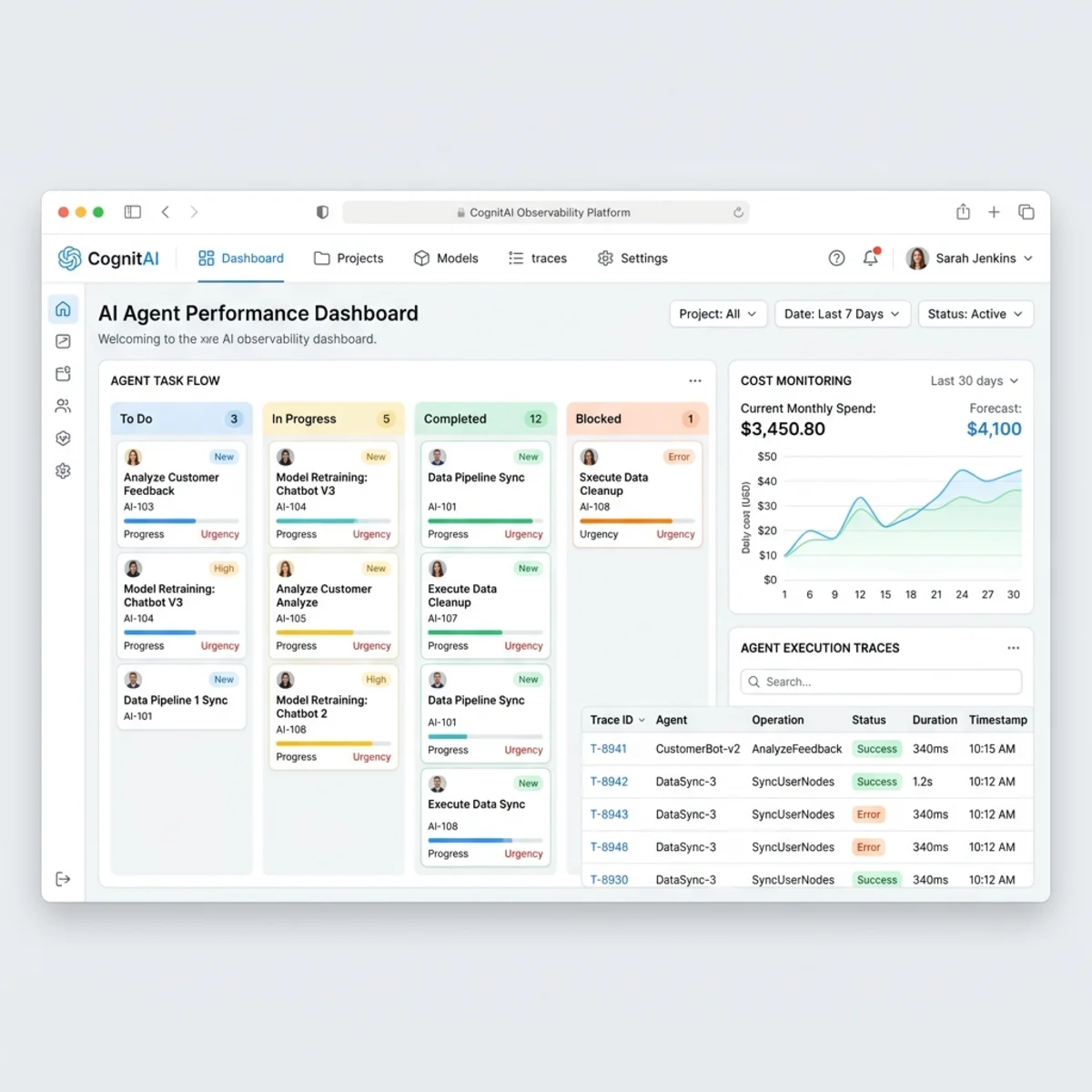
If a loop runs for six hours, nobody should be reading raw transcripts like a detective novel.
You need a control surface that shows:
- Current tasks
- Run status
- Failed verifiers
- Attempt counts
- Token and tool cost
- Model routing decisions
- Human approvals
- Screenshots or artifacts where relevant
- Execution branches in a readable Kanban-style view
- Final outcome and business value
Agent observability tools are emerging quickly. Latitude, for example, describes an open-source AI agent monitoring platform that captures agent trajectories, discovers behavior patterns, supports semantic trace search, and exposes an MCP server for working with projects, traces, annotations, scores, searches, issues, datasets, members, and keys from coding agents. Public reporting also described Latitude as MIT-licensed and positioned around clustering failures, turning production traces into evals, and pulling real traces back into the developer workflow. 11 12
The broader lesson is vendor-neutral: you cannot govern what you cannot see.
7. Memory: Turn Failures Into Policy
Session logs are not trash. They are operational intelligence.
Mine failed runs for repeated patterns:
- The agent keeps using the wrong system.
- The evaluator rejects the same missing evidence.
- The loop retries after policy failures it should escalate.
- The model uses too much context for simple tasks.
- The workflow succeeds but costs more than the manual process.
Then convert those findings into durable rules:
- Updated
agent.md,prompt.md, or system instructions - Tool access policies
- Evaluation datasets
- Approval workflows
- Prompt templates
- Budget caps
- Environment-specific routing rules
The goal is not to make the agent “remember everything.” The goal is to make the organization learn from every run.
The Governance Levers That Actually Matter
Governance fails when it is abstract. “Use AI responsibly” is not a control. “Disable external actions for unapproved agents” is a control.
Here are the levers that matter most.
Lever 1: Access and Distribution Controls
Microsoft documents that agents for Microsoft 365 Copilot can be managed through the Microsoft 365 admin center and related admin experiences, including managing organizational access, reviewing and approving agents submitted to the organizational catalog, and monitoring agents shared across the organization. The same documentation notes that different agent types may be managed through different admin centers and app management surfaces. 13
Practical rollout pattern:
- Start with a private pilot group.
- Publish only to a controlled security group.
- Require owner, purpose, data scope, and support contact for every agent.
- Review tool/action permissions before broad release.
- Move to organization-wide availability only after usage and risk are understood.
Lever 2: Data and Privacy Boundaries
Microsoft’s extensibility guidance notes that when extending Microsoft 365 Copilot with agents, the agent can use prompts, conversation history, and Microsoft 365 data to generate responses or complete commands. It also notes that external data used by synced Microsoft 365 Copilot connectors is ingested into Microsoft Graph and remains in the tenant, while external data used through agent actions may stay within the external app depending on the design. 14
That distinction matters.
| Extension pattern | Governance question |
|---|---|
| Connector-based knowledge | What data is indexed and who can retrieve it? |
| Agent action/API plugin | What external action can be performed on behalf of a user? |
| MCP tool | Which tools are exposed, and how are they approved? |
| Custom engine agent | Who owns identity, logging, compliance, and runtime security? |
Rule of thumb: The more action-capable the agent is, the tighter the approval path should be.
Lever 3: Environment-Level Capacity and Billing Controls
For Copilot Studio, Microsoft documents administrative experiences in the Power Platform admin center for viewing prepaid and pay-as-you-go Copilot Studio credit consumption, assigning capacity to environments, and reviewing daily and monthly consumption. 10
Treat environments like financial containers:
| Environment | Purpose | Suggested posture |
|---|---|---|
| Sandbox | Experimentation | Low capacity, no production connectors |
| Pilot | Business validation | Limited audience, monitored PAYG or assigned credits |
| Production | Approved use cases | Budget alerts, owner, support model, lifecycle policy |
| High-risk | Regulated workflows | Separate approval, stricter logging, human-in-loop gates |
Do not let every project team build autonomous agents in the same environment with the same billing pool. That is how showback becomes archaeology.
Lever 4: Model and Tool Routing
Routing is governance and cost control at the same time.
A practical routing policy might look like this:
| Scenario | Default routing |
|---|---|
| Low-risk classification | Small, low-cost model |
| User-facing answer with enterprise grounding | Standard model plus retrieval guardrails |
| Regulated decision support | Strong model, citations, human review |
| Autonomous write action | Strong evaluator plus approval before commit |
| High-volume batch summarization | Batch or asynchronous route if latency allows |
Azure OpenAI pricing documentation describes multiple deployment options, including Standard pay-as-you-go, Provisioned throughput for predictable capacity, and Batch API for supported workloads that can tolerate delayed completion. 7
That gives FinOps a simple decision rule:
- Sporadic or exploratory usage: pay-as-you-go is usually easier.
- Sustained and predictable usage: evaluate provisioned options.
- Non-urgent bulk workloads: evaluate batch patterns where supported.
Lever 5: Kill Switches and Escalation
Every autonomous system needs a kill switch.
Minimum controls:
- Per-run cost cap
- Daily or monthly budget alert
- Maximum retry count
- Maximum tool calls per run
- Human approval before irreversible actions
- Automatic disablement on repeated verifier failure
- Owner notification on abnormal spend
A loop without a kill switch is not innovative. It is unmanaged automation.
Legacy Automation vs. Agentic Loops
Agentic loops do not replace every workflow engine. Sometimes deterministic automation is better, cheaper, and safer.
| Use case | Traditional automation | Agentic loop |
|---|---|---|
| Stable invoice approval route | Better fit | Overkill |
| Password reset workflow | Better fit | Usually unnecessary |
| Investigating ambiguous support tickets | Limited | Strong fit |
| Summarizing changing customer context | Limited | Strong fit |
| Updating a production system | Safe only with strict rules | Requires human approval and verifiers |
| Web task automation with changing UI | Often brittle | Potentially strong if script-based and verifiable |
Microsoft Research’s Webwright is a useful example of a more engineering-oriented agent pattern for browser tasks. Instead of predicting one browser action at a time, Webwright gives the model a terminal and enables it to write reusable Playwright scripts, with Microsoft describing the result as a minimal terminal-based setup for web agents. 15
The leadership lesson is bigger than Webwright: prefer artifacts you can inspect, rerun, test, and govern.
Implementation Playbook: Map Failure Modes to Controls
Start small. Prove the architecture on a task you can verify in minutes before you scale to hours. Expect the model to fail, then make sure the system catches the failure cleanly.
| When the agent… | Rely on this component |
|---|---|
| Takes shortcuts | Two-tier verifiers: cheap deterministic checks first, expensive checks when justified |
| Stops early | Outer loop supervisor to wake it up and demand completion evidence |
| Writes weak plans | Strong planner model plus human-in-the-loop review before execution |
| Overfits to visible examples | Held-out evaluations and independent judging |
| Operates on stale context | Memory mining and updated agent.md, prompt.md, or system configuration |
| Spends too much | Budget caps, model routing, tool limits, and cost-per-success tracking |
A Safe Rollout Playbook
If you are moving from AI experiments to governed agentic systems, use this sequence.
Step 1: Pick a Bounded Business Process
Choose a process where:
- The input is available.
- The output can be verified.
- The risk of a wrong answer is manageable.
- The business value is measurable.
- The agent can stop before irreversible action.
Good first candidates:
- Drafting knowledge articles from support tickets
- Summarizing project status from approved sources
- Triage recommendations for internal requests
- Policy Q&A with citations and human escalation
- Cost anomaly explanations for cloud spend
Bad first candidates:
- Unsupervised production changes
- Legal, medical, or financial determinations without expert review
- Cross-system write actions with weak identity boundaries
- Anything where nobody can define “done”
Step 2: Define the Unit Economics Before the Pilot
Before you launch, write down the expected value equation.
You do not need perfect math. You need directional discipline.
Example:
| Assumption | Directional value |
|---|---|
| 2,000 requests/month | Workload volume |
| 4 minutes saved/request | 133 hours/month avoided |
| $60 fully loaded hourly cost | About $8,000/month labor capacity equivalent |
| $1,500/month AI and platform cost | Directional planning estimate |
| Net value | Worth piloting if quality is acceptable |
Again, this is not a quote. It is a financial intuition builder.
Step 3: Start With Human-in-the-Loop
The first production version should usually recommend, draft, or prepare. It should not independently commit high-impact changes.
A sensible maturity curve:
| Stage | Agent autonomy | Human role |
|---|---|---|
| Assist | Agent drafts | Human reviews everything |
| Recommend | Agent suggests actions | Human approves selected actions |
| Execute with approval | Agent performs after approval | Human approves before commit |
| Execute with exception handling | Agent handles low-risk cases | Human reviews exceptions |
| Autonomous | Agent acts within strict boundaries | Human audits and tunes controls |
If you skip stages, your incident review will be very educational.
Step 4: Tag Everything
Every agent run should be attributable.
At minimum, capture:
- Agent name
- Owner
- Business process
- Environment
- User or service initiator
- Model route
- Tool calls
- Cost estimate
- Outcome
- Failure reason
This is what turns AI spend from “mysterious platform usage” into manageable unit economics.
Step 5: Review Failures Weekly
Early agent programs need a weekly failure review.
Ask:
- Which failures repeated?
- Which verifiers caught real issues?
- Which costs were higher than expected?
- Which tools were overused?
- Which prompts or policies need to become durable rules?
- Which use cases should be stopped?
Stopping the wrong use case is a governance win, not a failure.
Quick Decision Guide: Should This Be an Agentic Loop?
Use this as a practical filter.
| Question | If yes | If no |
|---|---|---|
| Does the task repeat often? | Candidate for automation | Keep manual or ad hoc |
| Is the input variable or ambiguous? | Agent may help | Deterministic workflow may be better |
| Can success be verified? | Proceed to pilot | Do not automate yet |
| Can the agent stop before harm? | Safer candidate | Require redesign |
| Is the value higher than the expected run cost? | Worth piloting | Deprioritize |
| Can IT govern data and actions? | Proceed with controls | Block or contain |
| Can FinOps attribute spend? | Scale responsibly | Fix tagging first |
My rule of thumb: Agentic loops are best for repeated knowledge work with variable inputs, verifiable outputs, and clear escalation paths.
The Practical Architecture
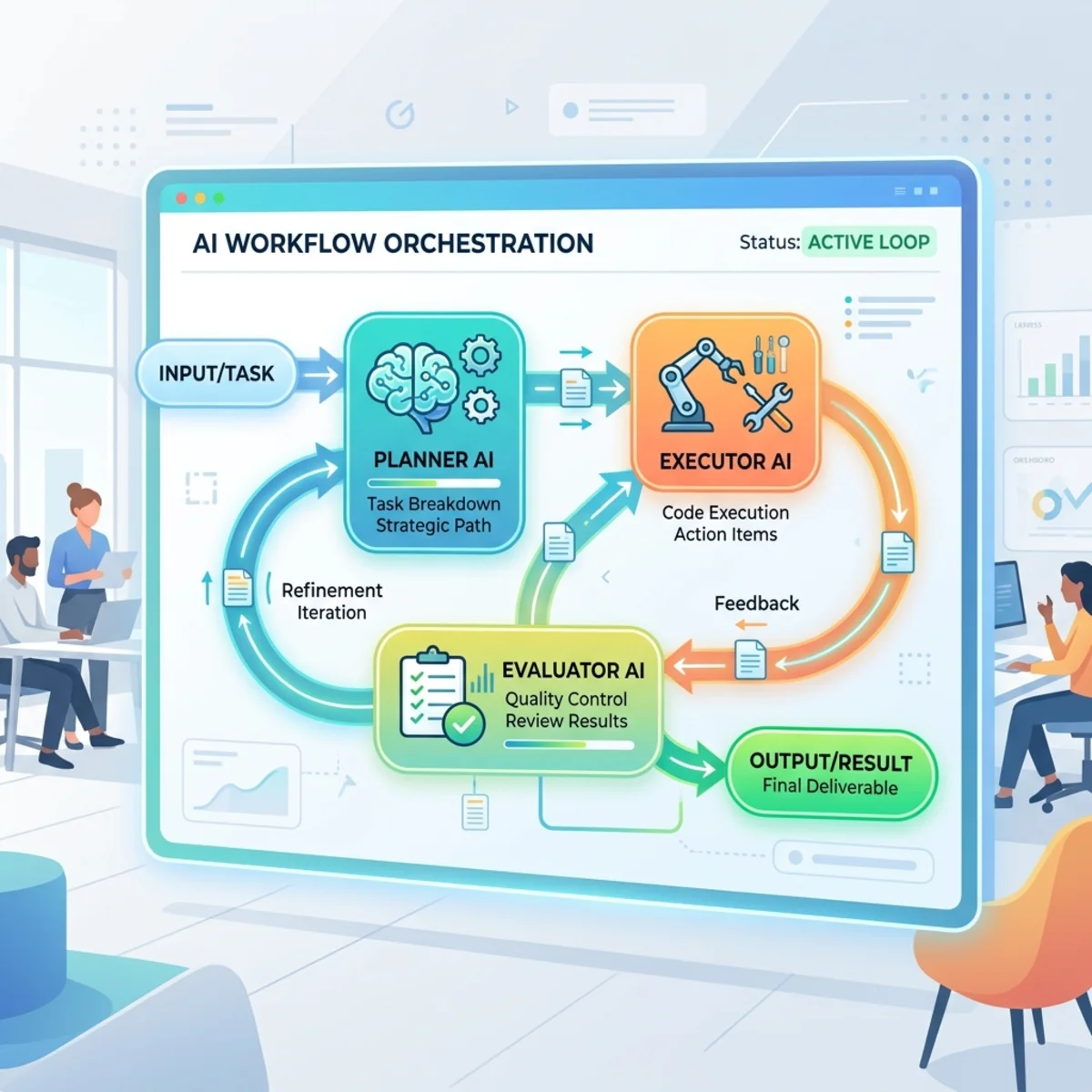
A governed agentic architecture should be boring in the best possible way.
The model is only one box. The control system is the architecture.
Key Takeaways
- Prompt engineering is not enough for autonomous systems. Once AI starts waking itself up and repeating work, you need loop-level governance.
- The biggest cost risk is not one expensive model call. It is retries, evaluators, grounding, tools, hosted runtime, and autonomous schedules multiplying quietly.
- FinOps needs unit economics, not just token dashboards. Track cost per successful task, attempts per task, and business value per process.
- Tenant admins need distribution, access, and capacity controls. Agents should have owners, environments, approval paths, and scoped audiences.
- Verifiers are not optional. The agent’s confidence is not evidence.
- Start with human-in-the-loop. Autonomy is earned through reliability, not granted through enthusiasm.
- Observability is the control surface. If you cannot see failures, cost, and drift, you cannot safely scale.
Final Thought
The next competitive advantage is not having the most agents. It is having the most governable agents.
The winners will not be the organizations that let AI run everywhere. They will be the organizations that know exactly where AI should run, what it is allowed to touch, how much it is allowed to spend, when it must stop, and how quickly humans can intervene when reality disagrees with the plan.
Autonomy without governance is just automation debt with a better demo.
Validation Sources
Footnotes
-
Model Context Protocol documentation, “What is the Model Context Protocol?” https://modelcontextprotocol.io/docs/getting-started/intro ↩
-
Microsoft Learn, “Build Agents using Model Context Protocol on Azure.” https://learn.microsoft.com/en-us/azure/developer/ai/intro-agents-mcp ↩
-
Microsoft Learn, “Model Context Protocol (MCP) on Windows overview.” https://learn.microsoft.com/en-us/windows/ai/mcp/overview ↩
-
Verda, “The full-stack AI Cloud of tomorrow.” https://verda.com/ ↩
-
Verda, “GB300 NVL72.” https://verda.com/gb300 ↩
-
Addy Osmani, “Loop Engineering.” https://addyosmani.com/blog/loop-engineering/ ↩
-
Microsoft Azure pricing, “Azure OpenAI Service pricing.” https://azure.microsoft.com/en-us/pricing/details/azure-openai/ ↩ ↩2
-
Microsoft Azure pricing, “Foundry Agent Service pricing.” https://azure.microsoft.com/en-us/pricing/details/foundry-agent-service/ ↩
-
Microsoft Learn, “Billing rates and management - Microsoft Copilot Studio.” https://learn.microsoft.com/en-us/microsoft-copilot-studio/requirements-messages-management ↩
-
Microsoft Learn, “Manage Copilot Studio credits and capacity.” https://learn.microsoft.com/en-us/power-platform/admin/manage-copilot-studio-messages-capacity ↩ ↩2
-
Latitude, “AI Agent Observability & Monitoring.” https://latitude.so/ ↩
-
TestingCatalog, “Latitude launches open-source platform to monitor AI agents.” https://www.testingcatalog.com/latitude-launches-open-source-platform-to-monitor-ai-agents/ ↩
-
Microsoft Learn, “Manage agents for Microsoft 365 Copilot.” https://learn.microsoft.com/en-us/microsoft-365/copilot/extensibility/manage ↩
-
Microsoft Learn, “Data, privacy, and security considerations for extending Microsoft 365 Copilot.” https://learn.microsoft.com/en-us/microsoft-365/copilot/extensibility/data-privacy-security ↩
-
Microsoft Research, “Webwright: A Terminal Is All You Need For Web Agents.” https://www.microsoft.com/en-us/research/articles/webwright-a-terminal-is-all-you-need-for-web-agents/ ↩
Read next