Mastering the Teams Developer Portal Architecture

Writer
The Microsoft Teams ecosystem has evolved from a simple collaboration client into a robust enterprise application platform. For architects and developers looking to build, configure, and distribute custom extensions, bots, and agentic solutions, the Developer Portal for Teams (formerly known as App Studio) serves as the primary control plane.
This technical guide breaks down the current state of the Developer Portal, maps out the architecture of its tools, and details how to utilize both its legacy and modern iterations effectively.
The Dual-Portal Architecture: Navigating the Transition
Microsoft is currently transitioning between two deployment footprints for the Developer Portal. While parity is being established, developers can seamlessly pivot between the two environments using the UI switch toggle at the top of the interface.
| Feature / Attribute | Old Developer Portal | New Developer Portal |
|---|---|---|
| Primary URL | dev.teams.cloud.microsoft/home | dev.teams.microsoft.com |
| Status | Deprecated (Scheduled for future retirement) | Active / Production Standard |
| Exclusive Features | Comprehensive App Change Log | Agent Identity Blueprints |
| Core Navigation UI | Home, Apps, Tools, Change Log | Home, Apps, Tools |
App Management & Lifecycle Operations
The portal serves as the definitive registry for any application package running within an M365 tenant ecosystem, supporting development phases from local experimentation and testing to full production rollouts.
Creating and Importing Manifests
When registering a new application, developers can specify the target manifest version. The portal supports selecting the Latest Stable release or opting into the Public Developer Version (Dev Preview) to explore cutting-edge capabilities. Application packages can be cleanly imported or exported using standard .zip or .json manifest schemas.
[!IMPORTANT] Governance Tip: Tenant Admin Ownership Recovery A common enterprise challenge occurs when an application developer leaves an organization, leaving a custom app unmanaged. Tenant Administrators can leverage the Take Ownership feature within the portal. By supplying the specific application ID (formatted as a standard GUID) and clicking Recover, an administrator can claim control and update the app’s configuration metadata.
Deep Dive: The Developer Portal Toolset
The Tools section contains the core infrastructure required to manage application behavior, design layouts, and configure secure authentication hooks.
1. Advanced Bot Management
Bots within Teams function as conversational applications designed to execute specific workflows. Registering a bot within the portal establishes the reference foundation required for custom bot frameworks or code-based implementations.
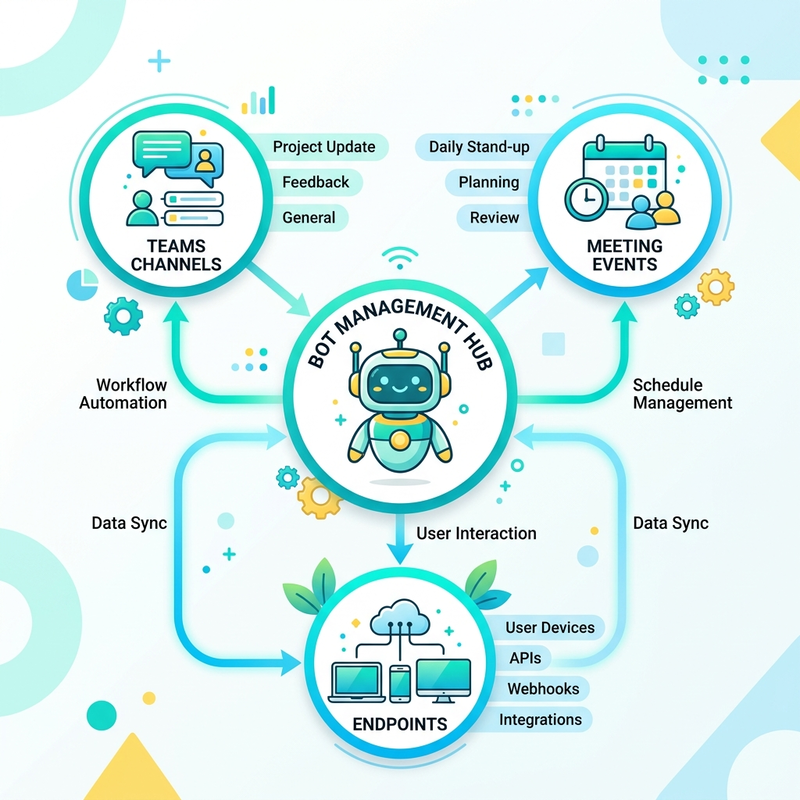
- Endpoint Configuration: Explicitly define the logic URL where the bot receives incoming payloads.
- Channel Scoping: Restrict or expand the bot’s execution scope across standard Microsoft Teams channels or broader Microsoft 365 extensions.
- Meeting Event Subscriptions: For deep meeting integration, you can configure the bot to listen to transactional meeting events, such as Participant Join or Participant Leave.
- Credentials: Direct provisioning of client secrets to secure bot-to-tenant communications. (e.g., Bot 2025 example).
2. Adaptive Cards Editor
For apps requiring structured UI elements or data collection forms, the portal embeds a fully realized Adaptive Cards Designer.
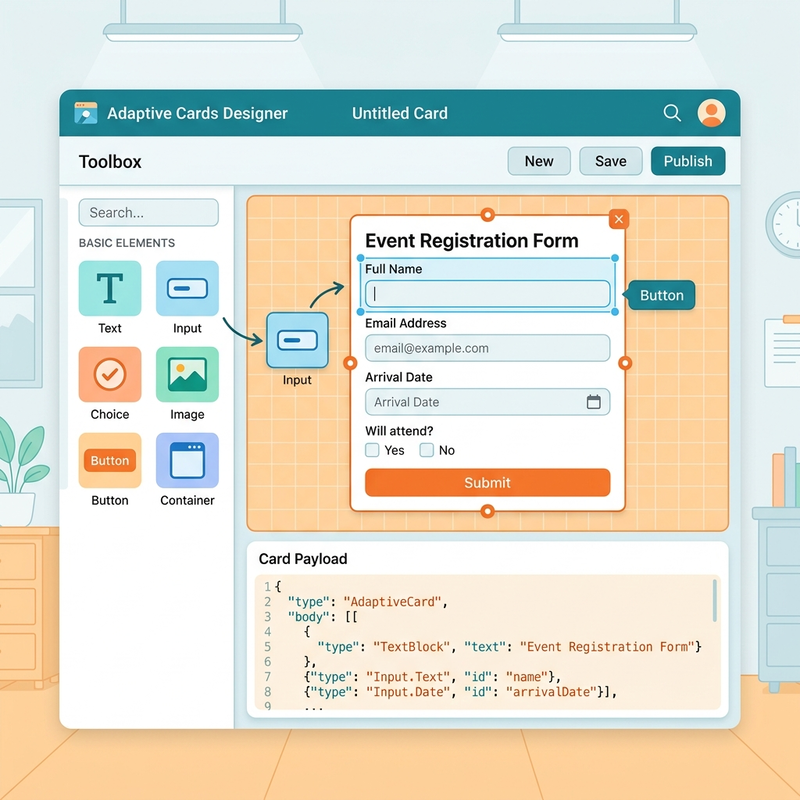
- Workflow: Developers can start with an empty canvas or select pre-configured structural templates / empty starting points.
- Payload Syncing: Dragging and dropping structural components automatically mutates the layout in the Card Payload Editor below the canvas.
- Form Factors: Once configurations are saved, developers can instantly preview how the card renders across different client screens and multi-device form factors before deploying it.
3. Scene Studio
Scene Studio allows developers to build custom visual environments for Microsoft Teams Together Mode.
- Canvas Interactions: Offers precise canvas control through zoom utilities and exact custom percentages.
- Element Manipulation: Items on the canvas can be locked or unlocked. Unlocking a participant slot allows for precise resizing and custom positioning/layering using Bring Forward and Send Backward controls.
- Role Mapping: Individual slots on a template (such as the built-in Halloween Haunted theme) can be explicitly mapped to organizational roles like Meeting Organizer or Presenter.
- Asset Management: Scenes can be compiled using customizable templates, direct file uploads, or manual drawings, and can be organized via a standard table or list view management for rapid searchability.
Identity, Authentication, and Security Registrations
Securing message extensions, copilot plug-ins, and automated workflows requires distinct authentication profiles. The Developer Portal centralizes these settings into four discrete engines.
OAuth Client Registration
Essential for authenticating API-based message extensions and custom Microsoft Copilot plug-ins. The configuration mirrors the enterprise application setup found in the Azure Portal (portal.azure.com). Developers must explicitly define:
- Registration Name
- Base URL
- Client ID & Client Secret
- Authorization Endpoints
Microsoft Entra SSO Client ID Registration
This represents a streamlined, simplified interface and a low-privilege variant of the OAuth screen. It is tailored strictly for setting up Single Sign-On (SSO) for API message-based extensions. Because it focuses strictly on user-identity token exchange, it does not expose or request client secrets, asking only for the application Client ID, base URL, deployment name, and usage scope.
API Key Registration
When apps rely on direct API keys rather than full identity tokens, developers can manage them through this interface by targeting a specific tenant and Teams app ID. They define the Key name and Base URL.
Security Guardrail: When generating an API secret, the ephemeral plaintext token visibility rule ensures it is displayed only once upon creation. It must be copied immediately; subsequent visits to the portal will obscure the secret entirely to prevent data exposure.
Identity Platform Management
For complex application registrations requiring advanced permission scopes, graph API delegations, or enterprise app roles, this utility acts as a direct bridge, automatically redirecting the developer to the core Microsoft Entra ID engine (portal.azure.com) within the main Azure Portal.
Compliance: Team Store App Validation
Before an application can be published globally or submitted to the Microsoft Partner Center, it must pass rigorous validation.
The Team Store App Validation tool allows developers to upload their compiled .zip or .json application packages directly. The portal executes an automated suite of checks against live Microsoft test cases prior to Partner Center submission, ensuring that manifests, semantic descriptions, icon assets, and endpoint configurations comply completely with commercial marketplace guidelines.
Feature Spotlight: Portal-Exclusive Capabilities
Old Portal Exclusive: App Change Log
For auditing historical deployments, the legacy portal tracks exact manifest adjustments over time. This includes explicit version increments (e.g., updating a manifest to v1.17) and structural updates like the addition of a semantic description field tracking, ensuring developers can debug configuration drift via historical update logs.
New Portal Exclusive: Agent Identity Blueprints
As part of the shift toward agentic AI workflows, the new portal introduces Agent Identity Blueprints. These blueprints allow developers to pre-configure and template identity properties for autonomous agents operating inside the M365 ecosystem (e.g., May 2026 blueprint).
- Automatic Provisioning: When an agent is spawned from a blueprint, specific environment settings and notification rules are applied automatically and managed under the hood by Microsoft services.
- Agent Scoping: Blueprints can be configured and designated as either standard Bot-based or API-based agent types architectures.
- Tenant Governance: Agent identity blueprints are instantly visible tenant-wide to all users via a tenant-wide visibility rule, creating a shared catalog of agent capabilities. However, to prevent configuration tampering, only the designated owners of the blueprint possess ownership-based mutation permissions to edit or delete the underlying asset. These blueprints can also be synchronized, verified, and managed in the Azure Portal under the dedicated Agent ID configuration node.
Read next