The Era of 1-Bit LLMs: Running Massive AI Locally with Prism ML's Bonsai

Writer

Running a Large Language Model (LLM) locally on your own hardware unlocks incredible privacy, zero-latency chatting, and limitless agentic workflows. But for most enthusiasts, the dream of local AI quickly hits a hard hardware wall: Video RAM (VRAM).
Loading a 31-billion parameter model at full precision requires roughly 65GB of VRAM. Even if you heavily compress the model using 4-bit quantization (like Q4KM), you are still looking at nearly 20GB just to load the model weights into memory. Factor in the context window—the memory required for the AI to remember the ongoing conversation or ingested documents—and you need 24GB to 32GB of VRAM for a smooth experience. For the average consumer, this simply isn’t feasible.
But a fundamental shift is happening in AI architecture. Enter the 1-bit large language model.
What is a 1-Bit LLM?
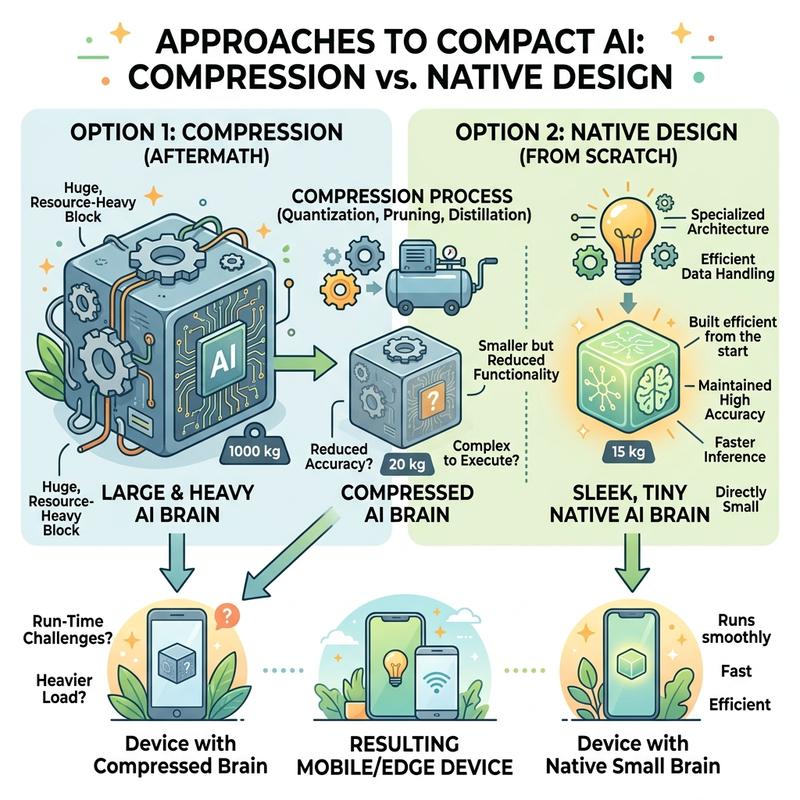
Traditionally, compressing a model meant taking a massive, fully trained neural network and squashing its weights down using post-training quantization. The 1-bit paradigm is entirely different.
These models are not compressed after the fact; they are trained from the ground up at 1-bit precision (Native Precision Training). By fundamentally changing how the network learns and stores data, 1-bit models achieve a footprint that is 14 times smaller than their full-precision counterparts (compared to 4-bit quantization, which is only about 4 times smaller).
Meet Bonsai by Prism ML
The pioneer in this new space is Bonsai, developed by the startup Prism ML. It stands as the first commercially viable 1-bit LLM.
Bonsai comes in three specific parameter sizes: 8B, 4B, and 1.7B. Because of the 1-bit architecture, the model boasts an insane “intelligence density.” To put this into perspective, the 8B parameter Bonsai model is only 1GB in size. Despite this tiny footprint, it punches far above its weight class, benchmarking on par with traditional 14GB to 18GB models and going toe-to-toe with established open-source giants like Mistral, Llama, and Guanaco 3.
Unprecedented Benchmarks
Because the memory footprint is so small, data moves through the GPU/CPU pipelines at blistering speeds:
- M4 Pro Mac: 130 tokens per second
- RTX 4090: 360+ tokens per second
- iPhone: 44 tokens per second
Generating 44 tokens per second for an 8B model natively on a smartphone is a massive leap forward; standard models usually struggle to output 10 to 20 tokens per second on edge devices.

How to Run Bonsai Locally
Bonsai is already integrated into the broader open-source ecosystem. It uses the llama.cpp engine, making it instantly compatible with popular UI wrappers like LM Studio.
Step-by-Step Setup:
- Open LM Studio and navigate to the Model Search tab.
- Search for
Bonsaiand look for the repository maintained by Prism ML. - Download the 8B parameter version. Even if you are running a 15-year-old PC with only 1GB or 2GB of VRAM, your hardware will handle this gracefully.
Tip for precision: If you have a bit more VRAM to spare, look for Ternary Bonsai. This is a 2-bit variation that doubles the file size (around 2GB) but noticeably improves response quality and accuracy.
When setting your inference parameters, you can safely maximize your context length. Because the model weights take up almost no space, you can dedicate your remaining VRAM entirely to document ingestion.
In real-world testing on an RTX 5060 Ti 16GB, the model easily ingests heavy files (like IPO data sheets) and spits out precise, bulleted summaries at 80 to 100+ tokens per second—even with heavy multitasking and background processes running (like recording software). It excels at fast document summarization.
Limitations and the Tool Calling Caveat
While Bonsai is a marvel of efficiency, it is important to set realistic expectations regarding its capabilities at this precision level.
- Hallucinations: 1-bit precision inherently limits the nuance the model can capture, making it slightly more prone to hallucinating facts compared to its 16-bit equivalents.
- Tool Calling: In LM Studio, you will notice the model lacks the “hammer icon” denoting native tool-calling support. Bonsai’s architecture is based on Qwen, which does support tool calling, but getting it to work is currently inconsistent.
- Agentic Workflows: If you attempt to use Bonsai for agentic tasks (like web searching or file management) inside environments like Anything LLM, it will occasionally trigger the tools successfully, but it is not reliable enough for production-level automation.
Currently, Bonsai is best utilized as a hyper-fast conversationalist and a rapid document summarizer.
The Future: 120B Models on Consumer GPUs
Bonsai is more than just a novelty; it is a proof of concept for the future of open-source AI. It proves that capable, locally hosted AI does not require thousands of dollars in server-grade GPUs.
If this 1-bit training methodology scales successfully, the implications are staggering. A massive 120-billion parameter model—approaching GPT-level reasoning—trained at 1-bit precision would only require about 15GB of VRAM. That places frontier-level artificial intelligence comfortably inside the hardware constraints of a modern, standard consumer gaming PC.
Read next