5 Wrong Reasons to Build an MCP Server (And How to Do It)

Writer
5 Wrong Reasons to Build an MCP Server — and How to Build One Right
The agentic AI era is here. Whether your stack runs on Java, Python, JavaScript, or even COBOL, the mandate is the same: make AI models smarter, more autonomous, and capable of executing real-world tasks.
Enter the Model Context Protocol (MCP). In late 2024, Anthropic introduced MCP, and the ecosystem exploded — from a few dozen reference servers to thousands in barely a year. Suddenly every vendor and cloud provider ships an MCP server as the “standard” way to connect AI agents to their tools.
But here is the uncomfortable truth: a standard is not automatically the right architectural choice. MCP is genuinely useful — and a lot of teams are building MCP servers for entirely the wrong reasons.
This post is a practical decision guide: why you might say “no” to that new MCP server request, the architectural traps to avoid, and a checklist for when MCP is actually the right tool — followed by a hands-on build you can run yourself on the Microsoft stack.
The one-line takeaway: Default to direct function calling. Reach for MCP only when you can check at least three of the five boxes in the evaluation checkpoint below.
The Transport Layer Reality
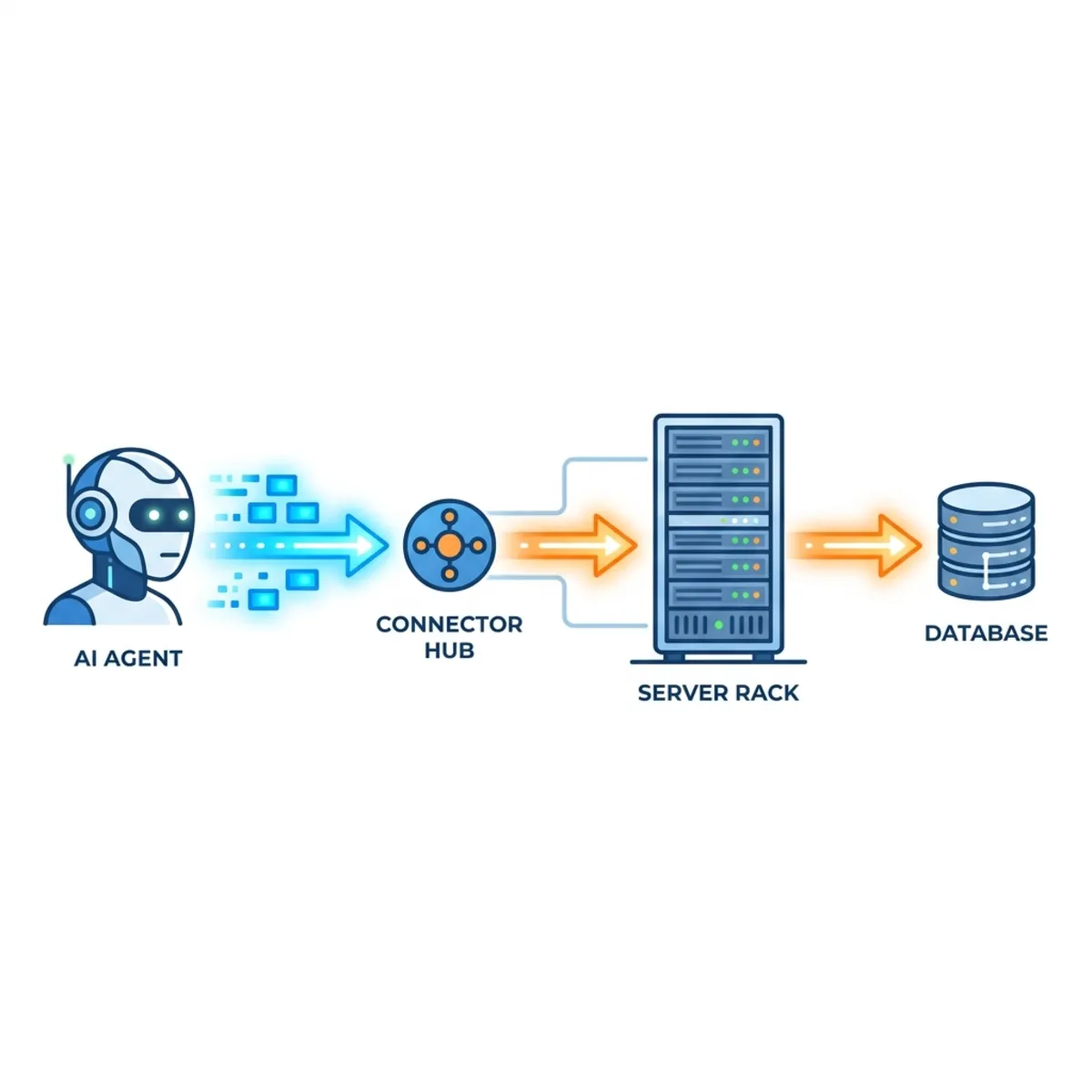
To see why MCP is not a silver bullet, look at what it actually is. MCP is a protocol layer built on JSON-RPC 2.0. It standardizes how an agent discovers and calls a server’s capabilities, and it defines three kinds of capability the server can expose: tools (functions the model can invoke), resources (read-only data the model can pull in), and prompts (reusable templates the server offers). The request flows from the agent, through an MCP client, to an MCP server, and finally to your underlying tool or API.
What MCP deliberately does not do is solve your non-functional requirements. Adopting MCP does not hand you enterprise-grade security, high performance, or low-maintenance operations. Those are still your job. If you push those responsibilities onto the protocol itself, your architecture pays for it. MCP is the wiring standard — not the building.
The 5 Wrong Reasons to Build an MCP Server
If you are evaluating your agentic architecture, watch for these five pitfalls.
1. The Single Consumer Trap
Early in your agentic journey you usually have a narrow use case: one or two new agents that need one or two internal tools. You do not have a sprawling multi-agent system yet.
If your AI library — LangChain, Microsoft Semantic Kernel, or the Microsoft Agent Framework — already supports direct function calling to your tools (a database, an SSO service), use it. MCP adds a transport layer that costs time, effort, and money to operate. When you already know exactly where the tool lives and what it does, you do not need MCP’s discoverability layer.
A direct function tool is just a local method handed to the agent — no server, no JSON-RPC, no network hop:
That is the entire integration. Compare it to standing up, deploying, securing, and monitoring a separate MCP service for the same one method.
Litmus test: Are exactly one or two agents, owned by your own team, calling this tool?
Do this instead: Register it as an in-process function tool in your agent framework (AIFunctionFactory.Create(...) in .NET, an @Tool in LangChain/Java) and call it directly. You can always promote it to an MCP server later, once a second team needs it.
2. Performance Degradation & Observability Blind Spots
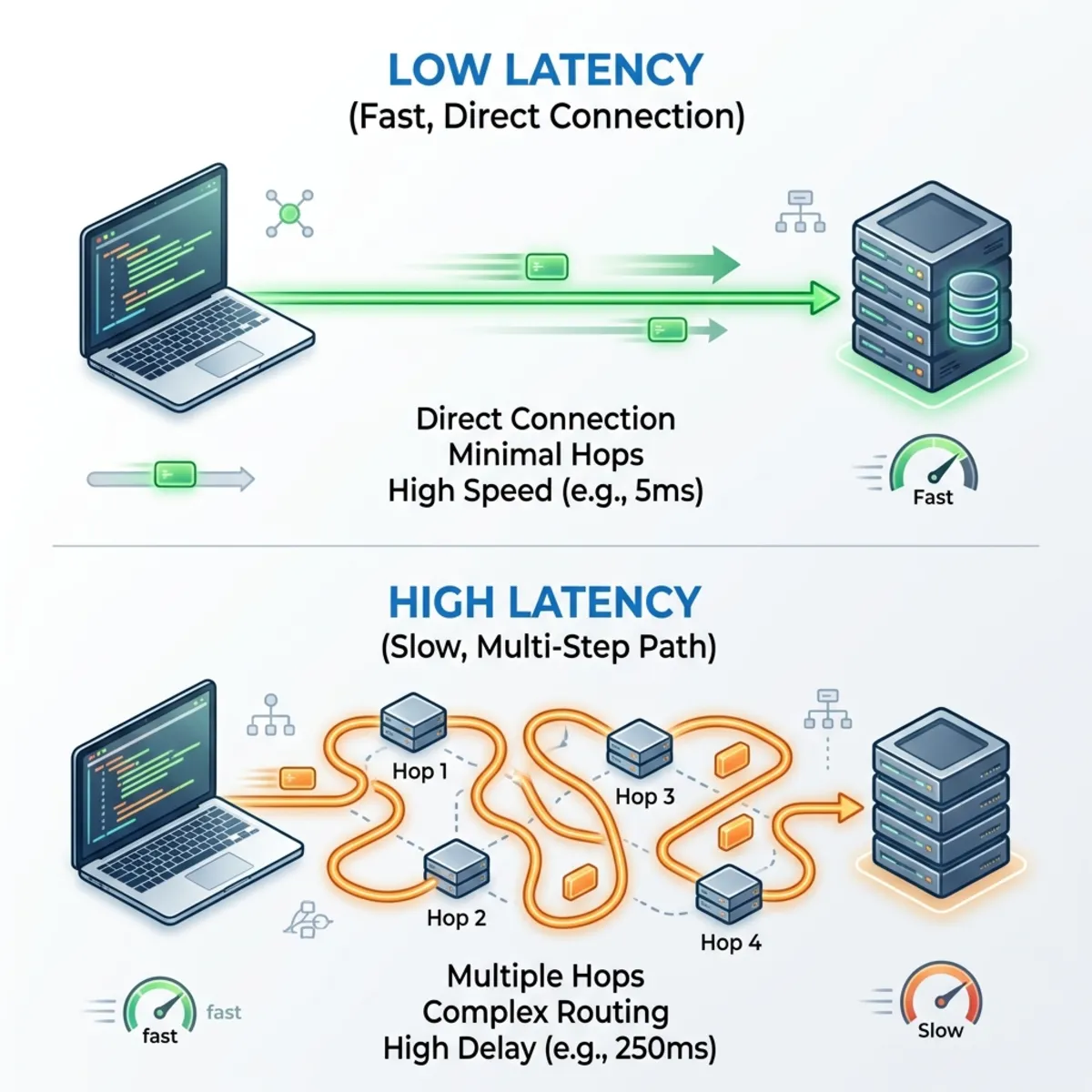
Every hop adds latency and a place for things to break. An in-process function call resolves in low-single-digit milliseconds. Route that same request through an MCP client, serialize it as JSON-RPC, ship it across a process or network boundary, deserialize it on the server, execute it, and serialize the response back — and you have added real overhead at every step. In chatty, multi-tool flows the end-to-end latency can balloon several-fold (think up to ~10x in the worst illustrative case), because the model also takes extra reasoning round-trips to pick and chain tools.
Worse, when something fails, observability becomes a guessing game. Did it break in the MCP client? A transport timeout? The server? The downstream API? An LLM hallucination that called the wrong tool with the wrong arguments? Multi-hop AI architectures only stay debuggable if you instrument every layer — which, ironically, adds even more overhead.
Do this instead: If you go multi-hop, make it traceable from day one using the OpenTelemetry (OTel) standard. The Microsoft Agent Framework already emits OpenTelemetry GenAI semantic-convention spans for every model call, token usage metric, and tool invocation — you don’t have to hand-roll the instrumentation. Under .NET Aspire (used in the hands-on below) those traces flow to the local dashboard automatically, so you can see the full agent → MCP → database path on day one. For production, add an Azure Monitor exporter so the same spans land in Application Insights, and propagate a correlation/trace ID from the agent through the client to the server so every boundary stitches into one trace.
3. Over-Engineering Security at the Wrong Layer
In classic web architecture we put authentication, authorization, and rate limiting at an API Gateway. The agentic world is now introducing the GenAI Gateway to play the same role for AI-to-tool traffic — for example, Azure API Management (APIM) has evolved to act natively as an MCP gateway, allowing you to secure, govern, and monitor MCP servers centrally.
The common mistake is cramming zero-trust authentication and heavy validation into the MCP server itself. Because the protocol was not designed to be a policy engine, this bloats the server and turns a lightweight transport into an unmanageable bottleneck. (Yes, MCP now has an OAuth 2.1-based authorization spec — but “the protocol supports auth” is not a license to re-implement your entire identity and policy stack inside every server you ship.)
Do this instead — keep policy where it belongs:
- Terminate authn/z at the Agent Gateway; pass a scoped token or signed identity header down to the server.
- Use input/output guardrails in the agent application (such as Azure AI Content Safety) to catch prompt injection and unsafe outputs.
- If a specific tool genuinely needs a check, enforce it narrowly (for example,
[Authorize(Roles = "Admin")]on that one method via Microsoft Entra ID) — do not turn the whole server into a firewall.
4. The Clean Schema Paradox (Garbage In, Garbage Out)
MCP leans heavily on clear names, good descriptions, and clean JSON schemas so the LLM can figure out which tool to call and how. If your existing APIs are messy, undocumented, or built on unstructured payloads, wrapping them in MCP does not fix anything — you have just standardized the garbage. The model still can’t tell doStuff(data) from processV2(payload).
Remember: the model selects tools largely from the description text and parameter schema. That metadata is the product.
Litmus test: Could a new engineer call this API correctly from the docs alone, without reading the source?
Do this instead — write tool definitions for the model, not for yourself:
If the API isn’t ready for clean, self-explanatory consumption, it isn’t ready for MCP.
5. Reinventing the Wheel for Existing CRUD APIs
The most common AI-tool use case is querying internal databases. If your organization already has robust, well-optimized REST APIs or gRPC endpoints for CRUD (Create, Read, Update, Delete), do not build an MCP server purely to “use MCP.”
A clarification worth making: a model can’t magically call arbitrary REST URLs — it needs some tool binding. But if you already have a typed client or SDK for those endpoints, the cheapest binding is to expose it as a direct function call in your agent framework, not a brand-new MCP layer in front of infrastructure that is already fast and battle-tested.
Do this instead: Wrap the existing client method as a function tool and call it directly. Only graduate to MCP when a second consumer outside your codebase needs the same capability.
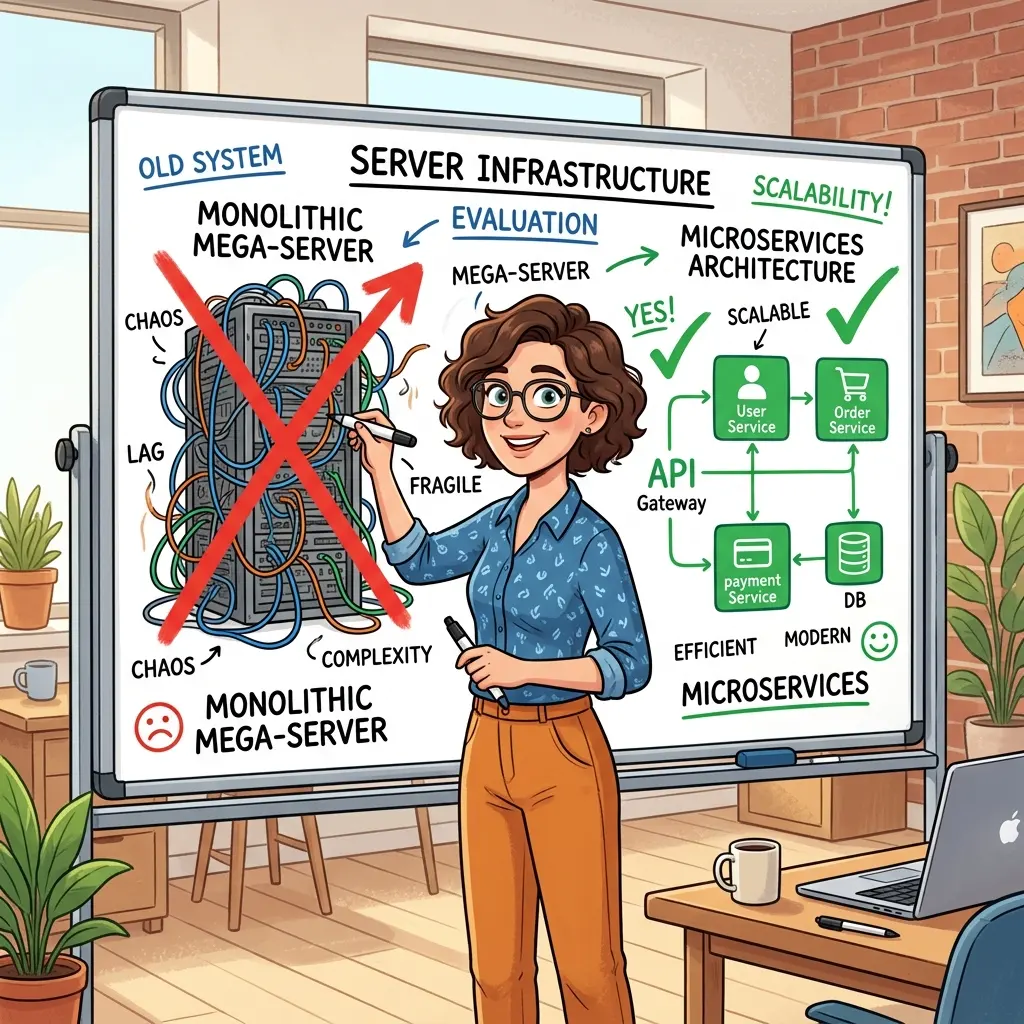
The Architectural Pitfall: The Mega-Server Trap
As teams scale from one agent to dozens across departments (Java teams, Python teams, Node teams), a dangerous antipattern emerges: the Mega-Server.
To “simplify maintenance,” teams bundle every tool and every routing concern into one giant MCP server. This is the monolith we fought a decade ago, wearing a new hat. If your Mega-Server goes down, every agent in the organization goes down with it — and every tool’s schema is loaded into context on every call, even tools an agent will never use.
The fix: treat MCP servers like microservices. Build small, loosely coupled, independently deployable Micro-MCP servers. This isolates failures, keeps each context window lean, and lets teams own their own tooling lifecycle.
How to draw the boundaries:
- By bounded context / domain —
helpdesk,billing,inventory— never one server for all three. - By data source — one server per database or system of record it fronts.
- By ownership — the team that owns the data owns the server.
An agent can still compose several Micro-MCP servers at once (the demo below builds a helpdesk server; another team could expose accounts the same way, and one agent could talk to both). Loose coupling at the server layer, composition at the agent layer.
Token Economics: The Hidden Cost of MCP
Before the model even reads your user prompt, an MCP server spends tokens advertising its capabilities. Every exposed tool’s name, description, and full JSON schema is injected into the model’s context on tool-selection turns. Expose 50 tools and you pay that tax on every single call.
| Invocation type | Est. tokens before your prompt runs | When it fits |
|---|---|---|
| Direct function call | Under ~50 | Single client, known tool, latency-sensitive |
| Simple MCP tool | ~500–1,500 | A handful of clients sharing one tool |
| Complex MCP resource | Over ~2,000 | Deeply nested data, many tools, rich discovery |
(Figures are illustrative — actual cost scales with the number of tools, schema depth, and the model’s tokenizer.)
Keep the bill down:
- Expose few, well-scoped tools per server (this is the Micro-MCP payoff showing up on your invoice).
- Write concise descriptions and schemas — every extra adjective is tokens on every call.
- Where your framework supports it, filter or lazily load tools so an agent only sees the ones relevant to its task.
The 5-Point Evaluation Checkpoint
So when should you build an MCP server? Run the project through this checklist. Green-light MCP only if you can honestly check at least three boxes:
- Distributed multi-agent access: Will multiple distinct agentic applications hit this same tool?
- High discoverability needs: Does the tool navigate complex relational data or deep file structures where the AI needs a curated map rather than ad-hoc access?
- Multi-team / multi-language ecosystem: Is it consumed by the Java team, the Python team, and the JavaScript team at once?
- Context-window optimization: Do you have a concrete architectural reason to offload tool/context management to a dedicated server?
- Pristine API design: Do you already have a well-documented, strictly typed API ready to export?
Score it honestly. Three or more checks → build the MCP server. Fewer than three → push MCP to the next sprint and ship direct function calling now.
A worked example. A two-person team adds a “look up a customer’s last order” tool used only by their own support bot. That’s one box (maybe). → Direct function call. Six months later, the billing team, the retention team, and a partner-facing Node bot all need the same lookup, and it has a clean typed contract. That’s three boxes. → Now it earns an MCP server.
Hands-On: Build a Micro-MCP Server with .NET and Azure
Enough theory. Let’s build the smallest useful thing: a custom, lightweight Micro-MCP server for an IT helpdesk, plus an agent that triages tickets through it — entirely on the Microsoft stack.
Here’s the mapping we’ll use:
| Concern | What we’ll use |
|---|---|
| MCP server | MCP C# SDK (ModelContextProtocol.AspNetCore) on ASP.NET Core — the official SDK, maintained in collaboration with Microsoft |
| Data access | Entity Framework Core + Npgsql (PostgreSQL provider) |
| Database | PostgreSQL locally → Azure HorizonDB in the cloud |
| Local dev loop | .NET Aspire — spins up the database container and a dashboard |
| Agent / MCP client | Microsoft Agent Framework |
| Model | Azure OpenAI (gpt-4o-mini) in Azure AI Foundry |
| Agent gateway (prod) | Azure API Management |
| Hosting (prod) | Azure Container Apps |
Before you start — prerequisites. Have these installed and ready, or the steps below won’t run:
- .NET 10 SDK (the Agent Framework and
Microsoft.Extensions.AI10.x line target .NET 10; .NET 9 also works for the Aspire and MCP pieces). - .NET Aspire templates:
dotnet new install Aspire.ProjectTemplates(needed fordotnet new aspire-apphost). - Docker Desktop or Podman, running — Aspire launches PostgreSQL in a throwaway container.
- An Azure subscription with an Azure AI Foundry project and a chat model deployment (we use a deployment named
gpt-4o-mini). - Azure CLI (
az login) soDefaultAzureCredentialcan authenticate locally.
Version note (June 2026):
- Microsoft Agent Framework (MAF) reached GA (v1.0) on April 2, 2026 for both .NET and Python. Its core .NET packages are stable on the 1.x line.
- Package rename: The Azure AI Foundry connector is now
Microsoft.Agents.AI.Foundry(renamed from the pre-GAMicrosoft.Agents.AI.AzureAI). Update your using statements if copying older samples. - MCP C# SDK: Ships as
ModelContextProtocol.Core,ModelContextProtocol, andModelContextProtocol.AspNetCore. It is actively iterating in collaboration with Microsoft — pin your versions and verify the current API surface on Microsoft Learn. - Azure HorizonDB: Entered public preview at Microsoft Build 2026. This is a new PostgreSQL-17-compatible scale-out service, not a rename of Azure Database for PostgreSQL. It shares the same wire protocol, so your local container and production database use the exact same EF Core code.
Step 1 — Scaffold the solution
One solution, two apps, and an Aspire AppHost to orchestrate them locally:
Add the server’s packages — the MCP server (HTTP transport) and the Aspire EF Core PostgreSQL integration that injects the connection string and registers the DbContext:
Step 2 — Model the data
A plain EF Core entity and DbContext. Both go in the Helpdesk.Mcp project (e.g. Ticket.cs and HelpdeskDbContext.cs):
Step 3 — Expose the tools
This is the whole point of MCP: a couple of annotated methods become callable tools. The [McpServerTool] and [Description] text is what the model reads to decide when and how to call them — so write it well (see Wrong Reason #4). Services like the DbContext are injected into the tool method straight from DI. Add TicketTools.cs to the Helpdesk.Mcp project:
Wire it up in the server’s Program.cs. AddMcpServer().WithHttpTransport().WithToolsFromAssembly() registers the server and auto-discovers every [McpServerTool] in the assembly; MapMcp() exposes the MCP endpoint over Streamable HTTP (with SSE for compatibility). We set Stateless = true because this server only answers tool calls — it never needs to call back to the client — which also makes it safe to run behind multiple replicas in Step 7:
Step 4 — Spin up the local loop with .NET Aspire
You don’t wire up a database container or connection strings by hand. The AppHost needs the PostgreSQL hosting integration and a reference to the server project so Aspire can generate the strongly-typed Projects.Helpdesk_Mcp handle (note: Aspire turns the dots in the project name into underscores):
In the AppHost, declare a PostgreSQL resource and reference it from the server — Aspire runs a throwaway Postgres container, injects the connection string, and gives you a live dashboard:
The dashboard lists the running services, streams logs, and — because Aspire wires OpenTelemetry through everything — shows distributed traces for each call. The .WithHttpEndpoint(port: 5180) line keeps the helpdesk-mcp URL stable at http://localhost:5180, which the agent needs next. (Skip the pin and the port is assigned dynamically — then copy the live URL from the dashboard instead.)
Step 5 — Build the triage agent
The agent is a separate console app using the Microsoft Agent Framework as the MCP client and Azure OpenAI (gpt-4o-mini, deployed in an Azure AI Foundry project) as the model:
The flow is three moves: connect to the MCP server, list its tools (they arrive as AIFunction/AITool objects), and hand them to the agent at creation time. Replace the agent’s Program.cs with:
Step 6 — Run it and watch the agent reason
With the AppHost still running from Step 4, open a second terminal, sign in to Azure (for the model), and run the agent:
Under the hood the agent calls ListPendingTickets over MCP, compares the candidates — a VPN login failure for one user versus a slow production orders database — and flags the production DB issue as the highest priority. Expect output along these lines (the exact wording is the model’s, so yours will differ):
Because the instructions ask it to recommend escalation before acting, you get a natural human-in-the-loop checkpoint: the agent proposes, a human approves, and only then does a follow-up tool like SetPriority (or a real paging integration) fire. Flip back to the Aspire dashboard and you can see the whole agent → MCP → database trace that produced the answer.
That’s a complete Micro-MCP loop: one bounded domain, one small server, one agent — exactly the shape the Mega-Server section argued for.
If it doesn’t run — quick triage:
- Aspire can’t start Postgres / “cannot connect to Docker”: Docker Desktop or Podman isn’t running. Start it, then
dotnet runthe AppHost again. - Agent gets a connection refused or 404: the MCP URL is wrong. Confirm the
helpdesk-mcpURL in the Aspire dashboard matches theEndpointin Step 5 (and that you pinned port 5180). DefaultAzureCredentialfailed / no token: runaz login(add--tenant <id>if you belong to several tenants) and confirm your account can open the Foundry project.DeploymentNotFound/ model error: the string inGetChatClient("...")must match the deployment name in your Foundry project, not the base model name.- “Address already in use” on 5180: another process holds the port — change the pinned port in the AppHost and the
Endpointin the agent to match.
Step 7 — Take it to the cloud
Nothing about the code changes when you go to production — only where each piece runs:
- Data → Azure HorizonDB. Provision a HorizonDB instance and point the server’s connection string at it, authenticating with Microsoft Entra ID so there are no passwords in config. Because HorizonDB is PostgreSQL wire-compatible, your EF Core / Npgsql code is untouched. (HorizonDB is in preview; if you need a GA service today, swap in Azure Database for PostgreSQL — same connection string story, same code.)
- Server → Azure Container Apps. Containerize the ASP.NET Core MCP server and deploy it. Aspire can generate the deployment assets for you —
azd upprovisions the resources and ships the container. (Because the server is stateless from Step 3, it scales out cleanly across replicas.) - Gateway → Azure API Management. This is the Agent Gateway from Wrong Reason #3 made real. API Management natively fronts an MCP server and applies authentication, rate-limiting, and request/response logging as gateway policies — so the server stays a thin transport and policy lives at the edge. Point the agent’s MCP client at the API Management URL instead of the container directly.
- Model → Azure OpenAI in Azure AI Foundry. Already used above. For production, swap
DefaultAzureCredentialfor aManagedIdentityCredentialto avoid credential-probing latency.
Visually, the production topology looks like this:
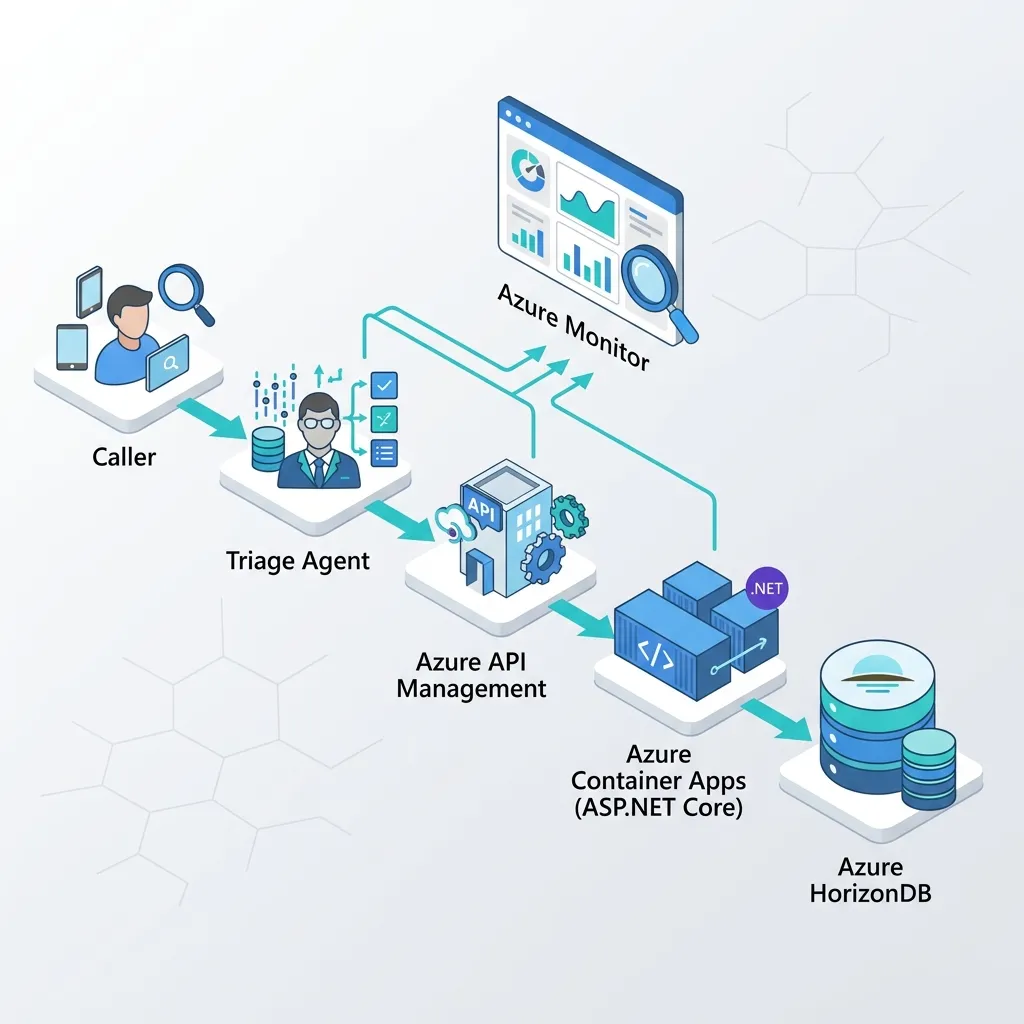
The result is the same Micro-MCP loop, now governed and observable end to end: Agent Framework → API Management (gateway) → Container Apps (MCP server) → HorizonDB, with traces flowing to Azure Monitor.
Conclusion: The Sunset Strategy
One last piece of advice for agentic architecture: plan for obsolescence. The AI tooling landscape moves fast. The day you design an MCP server, sketch the conditions under which you’ll retire it. As native orchestration improves and models get better at direct integration, today’s middleware can quietly become tomorrow’s legacy overhead.
Make “sunset” a real, lightweight practice rather than a vague intention:
- Set a review checkpoint (e.g. each quarter), not an arbitrary expiry date — re-run the 5-point checkpoint and confirm the server still earns its keep.
- Version your tools and instrument usage. A tool nobody has called in 60 days is a retirement candidate.
- Keep servers behind a gateway so you can swap or remove an implementation without breaking every agent at once.
- Signal deprecation in the tool description itself so the model (and your teammates) stop reaching for it.
Build smart, keep it decoupled, and don’t be afraid to say “no” to the MCP hype when a simple function call will do the job.
Read next