Architecting Enterprise-Ready AI Agents

Writer

Agent development is moving at a breakneck pace. The raw velocity of building autonomous tools is exciting, but it often results in teams optimizing for speed over scale, reusability, or security. Without a standardized approach, organizations end up with isolated development silos, ungoverned access to underlying models, and inconsistent identity management.
To accelerate development without bypassing critical security controls, enterprises need a structured pattern that lets decentralized teams build quickly while central IT keeps the guardrails on. This article walks through that pattern across the Microsoft stack — and, just as importantly, shows the concrete steps, commands, and policies you use to actually stand it up.
Here is the mental model we will build, layer by layer:
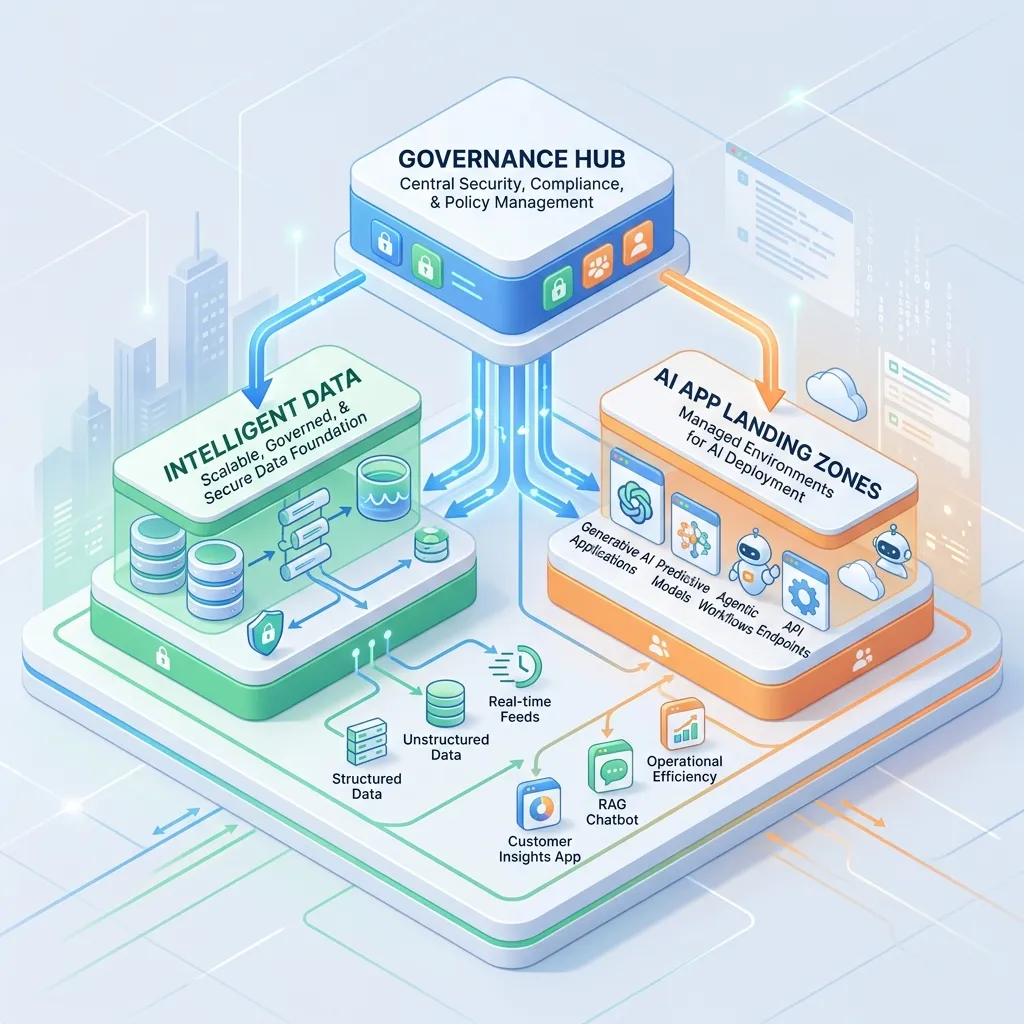
The hub is built once by the platform team. The spokes are stamped out many times by product teams using shared templates. Let’s go through each layer and how you implement it.
1. The Governance Hub: Centralizing the Platform Landing Zone
The foundation of secure agent scaling is a centralized catalog of shared services. The Governance Hub prevents teams from reinventing the wheel and ensures every agent operates under a unified security umbrella.
- AI and MCP Gateways: The AI Gateway (powered by Azure API Management) enforces traffic policies and provides per-workload cost attribution. The same gateway also brokers your Model Context Protocol (MCP) servers — the standard way agents discover and call external tools and APIs — so you can expose existing REST APIs as MCP servers or proxy third-party ones, all behind one governed endpoint.
- Agent 365: Operating within the Microsoft 365 admin center, this provides a unified control plane for visibility across your entire agent fleet — registration, ownership, lifecycle, and blast-radius reporting.
- Security and Identity: Microsoft Entra Agent ID gives every agent a first-class workload identity, so you can apply Conditional Access and least-privilege scopes to a bot the same way you would to a human. Microsoft Defender handles runtime protection and end-to-end activity tracing, while Microsoft Purview monitors interactions to prevent sensitive-data leaks (DLP, sensitivity labels, and audit).
- Infrastructure Management: Azure Policy, Azure Arc (for multi-cloud or on-premises components), and Azure Monitor handle unified reporting of infrastructure health and token consumption.
Hands-on: the four AI Gateway policies you will use constantly
The AI Gateway is just Azure API Management with a set of LLM-aware policies layered on top — it is not a separate product, so any APIM tier can host it. Four policies do most of the governance work. Drop these into your <inbound> (or <outbound>) policy section per API:
a) Cap token spend per consumer so one runaway agent can’t drain the whole TPM quota:
b) Emit per-consumer token metrics so Finance can do real chargeback in Azure Monitor:
c) Cut cost and latency with semantic caching (backed by Azure Managed Redis) — repeated, semantically-similar prompts are served from cache instead of re-billing the model: pair llm-semantic-cache-store with llm-semantic-cache-lookup.
d) Moderate prompts by wiring the content-safety policy to Azure AI Content Safety, so jailbreak and harmful-content checks run before the request reaches the model.
For authentication, point the gateway’s backend at the model using a managed identity rather than an API key, and balance across multiple Foundry deployments with the built-in backend load balancer (round-robin, weighted, or priority-based for your PTU endpoints) plus circuit breakers. A starting point for the whole gateway pattern is the AI hub gateway landing zone accelerator.
2. The Intelligent Data Platform: Grounding with Trusted Context
Agents are only as effective as the data they reason over. The Intelligent Data Platform supplies the managed data backends required for accurate, grounded generation.
- Work IQ: Connects agents to the daily flow of work by securely surfacing context from emails, calendars, Teams, and files. It is available as a tool for Microsoft Foundry agents (currently in preview), and it honors the invoking user’s existing Microsoft 365 permissions — an agent only sees what that user is already allowed to see.
- Foundry IQ: Aggregates both structured databases and unstructured cloud stores into a cohesive knowledge source that agents can retrieve over without you hand-building a RAG pipeline for each one.
- Fabric IQ: Adds deep business context over operational data — logistics, customer records, inventory — using explicit, machine-readable ontologies so the agent reasons in your business vocabulary, not generic embeddings.
Security Tip: When you build an automated evaluation harness for enterprise agents, wire the Work IQ MCP server to strict Entra ID authentication and pass the end user’s token through. This guarantees the agent only retrieves context the invoking user is explicitly authorized to access — preventing the classic “the eval bot can read everyone’s mailbox” leak.
Hands-on: ground without copying data
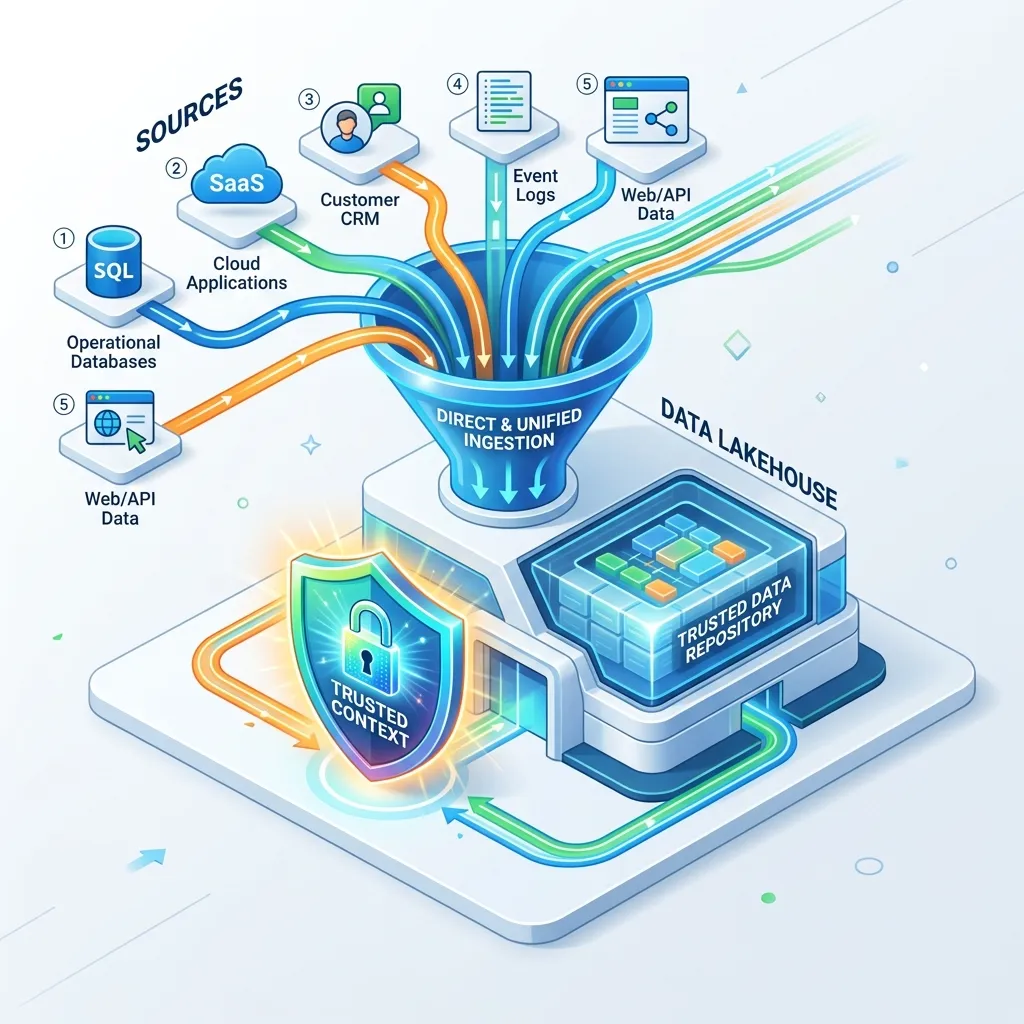
Underpinning this layer is Microsoft Fabric and OneLake. The pattern that saves you the most pain is querying data in place instead of building brittle copy pipelines. Two mechanisms do this:
- Shortcuts — create a virtual reference to data living in Databricks, Snowflake, Amazon S3, or ADLS Gen2. The data never moves; OneLake reads it where it sits.
- Database mirroring — keep a near-real-time read replica of an operational database (e.g., Azure SQL, Cosmos DB) inside OneLake as Delta tables, refreshed continuously.
A typical setup: land continuous feeds as Delta files in OneLake, expose external warehouses via shortcuts, then point Foundry IQ at the lakehouse. Your agents now query across all of it through one knowledge source — no ETL sprawl, one permission model.
Rule of thumb: if you find yourself writing a nightly job to copy rows into the agent’s store, stop and ask whether a shortcut or mirror removes the copy entirely. Less movement = fewer stale answers and a smaller attack surface.
3. AI Application Landing Zones: Securing the Application Plane
Not all agents require the same access or resources. AI Application Landing Zones establish dedicated spoke subscription boundaries for individual agents or related projects. This structure mirrors how enterprises actually operate: central IT enforces the baseline platform controls (the hub), while decentralized project teams own solution delivery (the spokes).
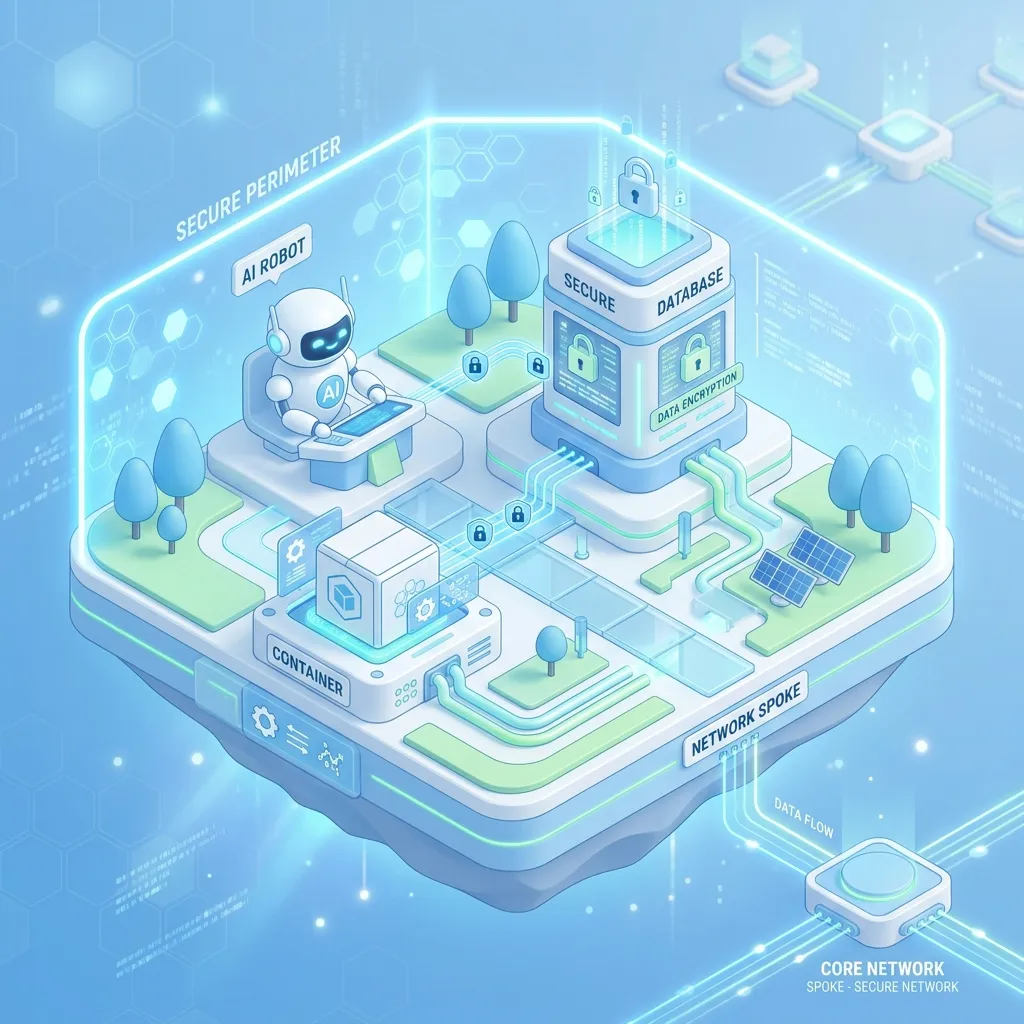
- Network Isolation: Each zone gets its own private networking — private endpoints, NSGs, and private DNS — eliminating public ingress paths between agents and retrieval stores. Model and data traffic stays on the Microsoft backbone.
- Access Boundaries: Everything is grouped into Azure Resource Groups with scoped Role-Based Access Control (RBAC), so a team can manage its own agent without touching anyone else’s.
- Standardized Observability: Built-in OpenTelemetry pipelines ensure traces and metrics correlate across every agent — one schema, one query language, fleet-wide.
Hands-on: scope an agent’s identity to exactly one knowledge store
The single most common mistake is over-granting the agent’s identity. Bind the agent’s managed identity to only the resource it needs, at the narrowest built-in role:
Then verify there is no public path to the retrieval store — the private endpoint should be the only way in:
If that returns anything other than Disabled, you have a public ingress path that defeats the network isolation the landing zone is supposed to give you.
4. Selecting the Right Agent Runtime
Enterprise scenarios demand different trade-offs between convenience and control. The Application Plane supports three primary hosting formats. Use this table to choose quickly:
| Runtime | Build style | Best for | Trade-off |
|---|---|---|---|
| No-code / low-code — Copilot Studio, Foundry Agent Service | Prompt + visual workflow | Simple, fast-to-ship tasks; business-team ownership | Limited custom logic and error handling |
| Hosted container — fully managed in Microsoft Foundry | Code, Microsoft-hosted | Complex logic without owning infrastructure | Less control over the host environment |
| Custom container-hosted — Azure Container Apps, AKS, or non-Azure (e.g., EKS) | Code, you own the host | Maximum control, existing CI/CD, multi-cloud | You operate the runtime |
The detail that makes “custom” enterprise-safe: even an agent running in EKS still authenticates through the central Governance Hub to consume mediated models. It never holds a hardcoded model key — it gets a token from Entra and calls the gateway, so the same throttling, content-safety, and cost policies apply no matter where the code runs.
Architecture Tip: For serious enterprise automation — complex branching logic, dynamic path resolution, rigorous error handling — code-centric container agents beat manual low-code interfaces. They run robust routines while still inheriting centrally-applied guardrails like prompt-injection protection and conversation-history storage. A practical heuristic: prototype in Copilot Studio to prove the workflow, then graduate the proven flow to a container agent once it needs real error handling or unit tests.
5. Automating Deployment and Scaling Safely
You do not need to build this infrastructure from scratch. The AI Landing Zone Accelerator provides an enterprise-scale, production-ready reference architecture with Bicep, Terraform, and Portal implementations under an MIT license — VNets, container infrastructure, Cosmos DB, and monitoring workspaces included.
Hands-on: from clone to running landing zone
The fastest path is the Azure Developer CLI (azd), which provisions and configures the whole reference architecture in one flow:
Prefer infrastructure-as-code you manage yourself? The same repo ships Terraform:
Always run azd provision --preview or terraform plan and read the diff before applying — these templates create network and identity resources you don’t want to discover by surprise.
Identity Best Practice: The accelerator configures managed agent identities as the default mechanism for service-to-service access, entirely bypassing the risks of distributing and rotating secrets. If your deployment plan still contains a connection string or API key for model access, treat it as a bug — there is almost always a managed-identity path instead.
The five principles that keep a growing fleet safe
As your agent fleet proliferates, scaling safely comes down to a short, enforceable checklist:
- Unique identity per agent — every agent gets its own Entra Agent ID; no shared service principals.
- Shared policy guardrails — token limits, content safety, and DLP applied centrally at the gateway, not re-implemented per team.
- Mandatory OpenTelemetry — no agent ships without traces and metrics flowing to the shared workspace.
- Reusable code templates — developers start from proven landing-zone templates, not a blank
main.bicep. - Ground in place, not by copy — prefer OneLake shortcuts and mirroring over data-movement pipelines.
Get these five right and the hard part — governance — scales automatically with the fleet, instead of becoming the thing that breaks first.
Read next