Architecting a Change Impact Command Center

Writer

Large transformation programs rarely suffer from a shortage of meetings. They suffer from a shortage of usable change intelligence.
A design workshop may contain dozens of signals about how work will change: a manual approval disappears, responsibilities move to another role, a spreadsheet becomes a system workflow, or a familiar exception path no longer exists. Those signals are buried in hours of discussion, scattered across workstreams, and often captured inconsistently.
The Change Impact Command Center is a practical response to that problem. In this article, we will explore a solution that began with a simple prompt and matured into an enterprise-grade architecture used by consulting teams. The architecture uses Microsoft Copilot Studio, Power Automate, and SharePoint to convert raw meeting transcripts into a reviewed registry of change impacts and then turn that registry into stakeholder-level insights and communications.
This is not an autonomous change manager. It is an AI-assisted change-analysis pipeline: the model performs the first pass, automation moves and structures the data, and a consultant remains accountable for validation and action.
The real bottleneck: turning discovery into decisions
In a multi-year ERP, HCM, finance, or legacy-modernization program, a change impact is the meaningful difference between today’s way of working and the future state. It might affect a process, role, policy, system, control, skill, behavior, or user experience.
Finding these impacts early matters because a technically successful deployment can still fail operationally when people do not understand, support, or know how to perform the new way of working. A memorable analogy for this is investing years in planning a wedding but forgetting to send the invitations. Building the future-state system is only part of the transformation; people must also be prepared to participate in it.
Change teams usually discover impacts by attending design sessions, interviewing subject-matter experts, and reviewing project artifacts. At scale, that model develops three predictable bottlenecks:
- Coverage: A small change team cannot attend every technical workshop across every workstream.
- Translation across disciplines: Change consultants may not have the same deep functional expertise as the teams designing the solution, which can make it difficult to interpret technical decisions as people, role, policy, and process impacts.
- Consistency: When change consultants cannot attend, functional teams may be asked to identify impacts even though their primary expertise is solution design rather than change analysis. Important impacts can therefore be described inconsistently or missed.
- Processing time: Each candidate impact must be dispositioned, normalized, prioritized, mapped to affected groups, reviewed, and connected to an intervention such as communication, training, enablement sessions, workshops, coaching, or reinforcement.
- Stakeholder analysis: Teams must determine which groups are experiencing the most change so that attention and interventions can be targeted rather than distributed evenly.
The Command Center aims to accelerate the first two-thirds of that cycle: collection, extraction, and initial analysis. The time it saves should be reinvested in the work AI cannot own—stakeholder engagement, judgment, resistance management, and adoption.
Mental model: a change-intelligence supply chain Think of meeting transcripts as raw material rather than finished knowledge. The extraction stage identifies candidate impacts. The registry provides quality control and traceability. The insight stage assembles validated records into decisions and interventions. Skipping the registry is like shipping uninspected parts directly from the factory floor.
Architecture at a glance
The design separates responsibilities instead of asking one oversized agent to ingest transcripts, interpret a methodology, update records, analyze the portfolio, and write communications in a single prompt.
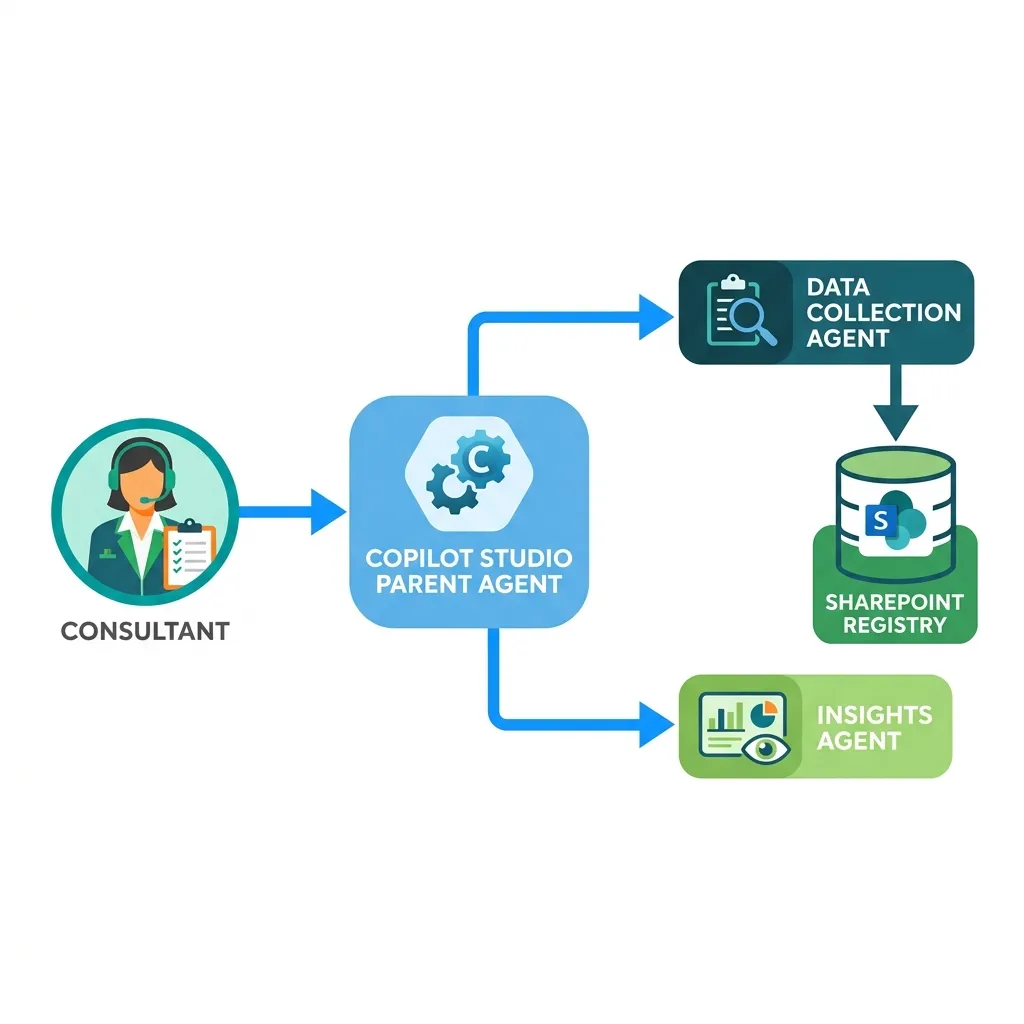
Microsoft describes a Copilot Studio child agent as a lightweight agent within the context of a parent agent. It can have focused instructions, tools, and knowledge for a particular intent or task. Current Microsoft guidance recommends keeping these agents focused on a single responsibility. That supports the architectural choice here, but it does not guarantee accuracy by itself.12
The important boundary is not simply “agent one” versus “agent two.” It is the boundary between:
- Unstructured evidence — what participants said in a meeting.
- Proposed structured facts — what AI inferred from that evidence.
- Validated records — what a human reviewer accepted or corrected.
- Derived outputs — patterns, recommendations, and communications created from the reviewed data.
That separation makes the solution easier to test, reason about, and improve.
Component 1: the parent agent and specialized child agents
The parent agent owns the user experience and decides which capability should handle the request. The child agents own narrower tasks.
Collection child agent
The Collection agent accepts meeting context and transcript text, then proposes structured change-impact records. Its job is extraction, not polished communication.
A useful output contract might include:
| Field | Purpose |
|---|---|
| Workstream | Connects the impact to the relevant project area |
| Meeting title and date | Preserves source context |
| Impact description | States what is changing and why it matters |
| Current state | Describes how work is performed today |
| Future state | Describes the intended way of working |
| Affected stakeholder groups | Identifies roles or populations likely to experience the change |
| Change dimension | Classifies the impact, such as process, role, system, policy, skill, or behavior |
| ADKAR relevance | Identifies which individual-change outcomes may require attention |
| Suggested intervention | Proposes communication, training, coaching, reinforcement, or further discovery |
| Priority and confidence | Supports triage without pretending the inference is certain |
| Evidence excerpt or source reference | Gives the reviewer traceability back to the transcript |
| Recommended action details | Adds practical next steps beyond the intervention category |
| Review status | Distinguishes proposed, validated, rejected, and revised records |
Evidence and confidence fields are important additions. Without them, the registry can look authoritative while hiding the fact that its contents began as model-generated interpretations.
Insights child agent
The Insights agent works across the reviewed registry. It can:
- summarize high-priority impacts and group them by ADKAR outcome, stakeholder group, or workstream;
- count impacts within those groupings and surface key themes;
- show which roles face the greatest volume or concentration of change;
- identify recurring themes across multiple sessions;
- surface missing information or contradictory records;
- recommend intervention types; and
- draft stakeholder-specific communications using the accumulated project context.
This division resembles a data platform: one workload performs ingestion and normalization; another performs analysis and presentation. The shared registry is the contract between them.
Why specialization helps Focused agents reduce instruction competition and make evaluation more precise. You can test extraction quality independently from communication quality. However, specialization also introduces routing, handoff, permission, and monitoring considerations. A multi-agent design is useful when the responsibilities are genuinely distinct—not because “more agents” automatically means a better solution.2
Component 2: deterministic automation around probabilistic AI
The original solution uses Power Automate to orchestrate the heavier processing: passing dynamic project context into a prompt, invoking the model, transforming the response, and writing records to SharePoint.
This is a strong architectural pattern because it separates two different kinds of work:
- Probabilistic work: interpreting ambiguous transcript language and proposing impacts.
- Deterministic work: validating required fields, branching on conditions, recording timestamps, writing list items, returning links, and handling failures.
Power Automate can run AI Builder prompts as flow actions and pass their output to downstream actions. Microsoft also explicitly documents adding human review after prompt execution.3 In newer Copilot Studio designs, agent flows can be added as tools that the orchestrator calls at runtime; Power Automate cloud flows remain another valid integration option.4
The prompt should receive at least two context layers:
Method context
Define what counts as a change impact, how current and future states should be expressed, which fields are required, and what the agent must not infer without evidence.
ADKAR can inform the analysis, but it should be applied carefully. The Prosci ADKAR model describes five outcomes required for individual change: Awareness, Desire, Knowledge, Ability, and Reinforcement.5 These are outcomes for people moving through change—not merely five labels to attach mechanically to every transcript sentence.
For example:
- A new policy that employees do not understand may point to an Awareness gap.
- Skepticism about losing local control may indicate a Desire barrier.
- A new system procedure may create a Knowledge need.
- Knowing the procedure but being unable to perform it in the live environment may indicate an Ability gap.
- A risk of returning to spreadsheets after go-live may require Reinforcement.
A transcript often provides incomplete evidence about these outcomes. The safer instruction is therefore: identify likely ADKAR implications and explain the evidence, rather than assign an ADKAR stage as fact.
Project context
Provide the workstream, transformation type, process scope, terminology, known stakeholder groups, and any relevant design decisions. Context helps the model interpret domain language, but it can also bias extraction. If the prompt says “expect major role changes,” the model may begin finding them everywhere.
The practical rule is simple: use project context to disambiguate evidence, not to manufacture it.
Component 3: SharePoint as the system of record for review
A SharePoint list acts as the centralized change-impact registry and can be surfaced from the project’s Microsoft Teams workspace. It stores candidate records, review status, priority, stakeholder groups, recommended interventions, and source metadata.
SharePoint works well for this pattern when the data model is modest and the project team benefits from familiar list views, permissions, filters, and links. Copilot Studio can interact with SharePoint through supported connectors and tools, while SharePoint lists can also be configured as knowledge sources for retrieval scenarios.67 Those are different patterns:
- Use a connector or flow action when the agent must create or update a record.
- Use a knowledge source when the agent must retrieve grounded information from records the user is permitted to access.
Do not blur the two. Retrieval grounding is not the same as transactional record management.
The registry also creates a valuable audit boundary. Every generated output should be traceable to records with a source meeting, reviewer, review status, and last-updated timestamp.
The end-to-end experience
Step 1: guide the user before asking for data
When consultants open the agent, conversation starters can advertise the supported jobs:
- Ingest a meeting transcript and identify candidate change impacts.
- Log extracted impacts in the project registry.
- Summarize and prioritize impacts.
- Show high-priority impacts by ADKAR outcome or stakeholder group.
- Identify workstreams with unresolved impacts.
- Draft a communication for a selected audience.
This reduces the “blank chat box” problem and establishes the agent’s operating boundaries.
Step 2: capture structured metadata with an Adaptive Card
For transcript intake, a form is often better than a conversation. An Adaptive Card can collect the workstream, meeting title, date, and transcript in one interaction. Copilot Studio supports interactive Adaptive Cards with form inputs whose submitted values can be stored in variables for later use.8
This is not merely a cosmetic improvement. Structured controls reduce ambiguity before the model sees the data. The model may be able to parse messy transcript text, but meeting metadata should not be left to inference when the user can provide it directly.
Design rule: Use chat for intent and explanation. Use forms for required, repeatable fields. Use automation for state changes.
The phrase format-agnostic needs qualification. Language models can tolerate varied transcript formats, speaker labels, and imperfect punctuation, but input length, transcription quality, language, missing context, and contradictory statements still affect extraction. Very long transcripts may need to be segmented, with results reconciled before records are written.
Step 3: extract candidates, then require review
After submission, the Collection agent and flow:
- validate the metadata;
- send the transcript and project context to the extraction prompt;
- parse the structured response;
- reject or quarantine malformed records;
- write candidate impacts to the SharePoint list; and
- return a direct link to a filtered review view.
The reviewer then accepts, edits, rejects, or merges candidates.
The human-in-the-loop step is only “mandatory” if the workflow actually enforces it—for example, by marking new records as Proposed and configuring the Insights agent to use only Validated records for downstream communications. A link alone encourages review; a status gate enforces it.
This distinction matters. Human review should be an architectural state transition, not a paragraph in the solution description.
Step 4: analyze the validated portfolio
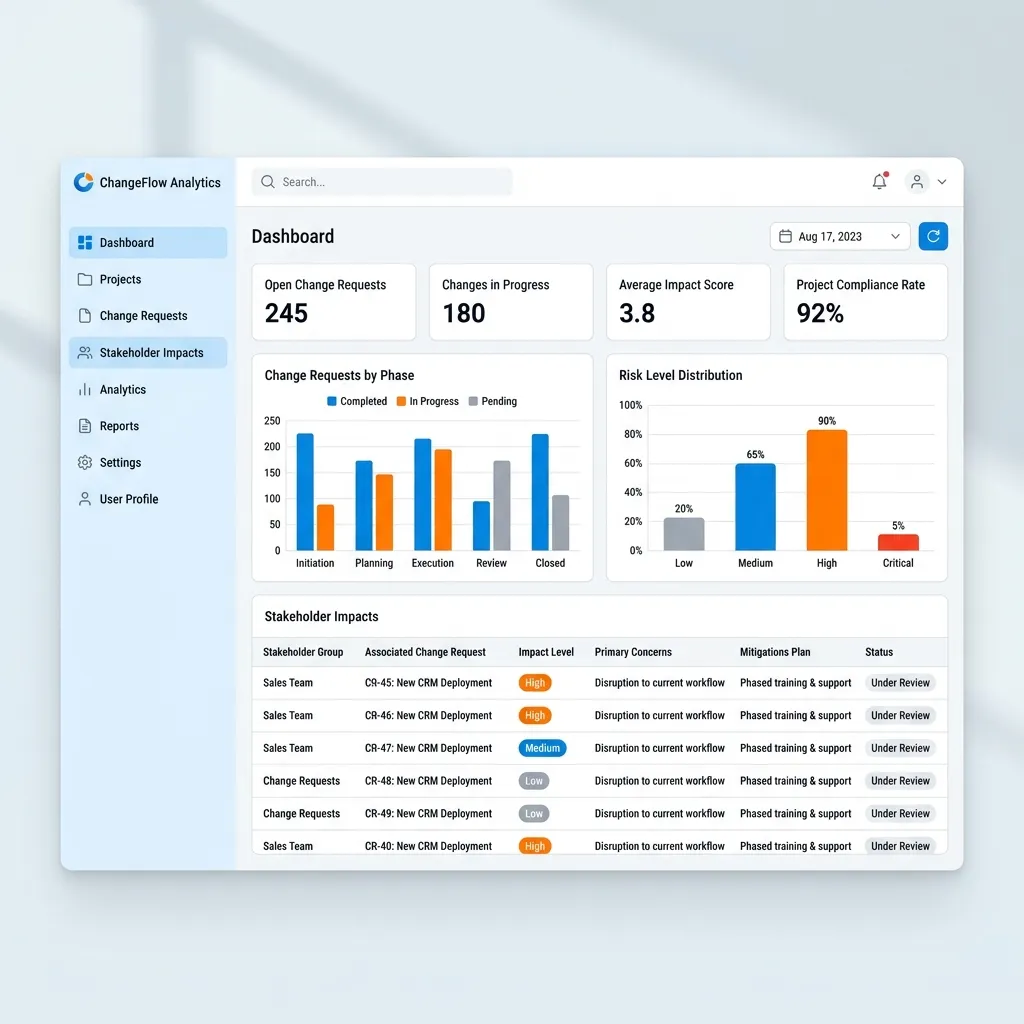
Once records are reviewed, the Insights agent can answer higher-order questions:
- Which stakeholder groups have the most high-priority impacts?
- Which impacts lack an intervention owner?
- Where are several workstreams changing the same role?
- Are communications being proposed where training or manager coaching is more appropriate?
- Which current-to-future-state descriptions remain too vague to act on?
Suppose AP clerks appear in twelve validated impacts across invoice entry, approval routing, exception handling, and reporting. The useful conclusion is not simply “AP clerks have twelve impacts.” The agent should synthesize the shape of the change: what tasks disappear, what new behaviors are expected, what knowledge is needed, and whether the impacts arrive at the same time.
Volume is a signal—not a complete measure of change severity.
The same conversation can continue from analysis into action. A consultant can filter the registry to impacts whose recommended intervention is Communication, review that subset, and ask the agent to draft an announcement for a specific audience. In the demonstration, the agent also suggested this likely next step after returning the communication-related impacts. That kind of conversational continuity reduces friction, but the user should remain in control of whether a recommendation becomes an action.
Step 5: generate targeted communications from reviewed facts
The agent can draft an announcement for payroll, accounts payable, or another stakeholder group using relevant records across multiple sessions. Persona instructions such as “think like a change management consultant” can shape tone and structure, but the data contract should do the factual work.
A useful communication pattern includes:
- why the change is happening;
- what is changing;
- the old process versus the new process;
- when the change takes effect;
- what the audience needs to do;
- where to get help; and
- “what’s in it for me?” where the evidence supports a credible answer.
The last qualifier matters. WIIFM should not become invented marketing language. If the registry does not contain a verified benefit for the audience, the draft should request one rather than fabricate it. The resulting draft can then be adapted into an email, flyer, or another delivery format. This serves as a near-finished starting point that typically needs only targeted human edits—not as content that should be distributed without review.
What the extraction layer should—and should not—do
A well-designed extraction prompt can propose:
- impact descriptions;
- current and future states;
- stakeholder groups;
- likely ADKAR implications;
- change dimensions;
- priority and confidence;
- intervention types; and
- evidence references.
It can also normalize similar phrases across meetings and flag potential duplicates.
It should not independently decide that an impact is approved, that a stakeholder group has agreed to a change, or that a communication is ready to send. Those are workflow states and accountable decisions, not text-generation tasks.
Practical build lessons
1. Design the schema before the prompt
The registry schema is the architecture’s backbone. If “priority,” “impact,” or “stakeholder group” means something different in every workstream, the model will reproduce that ambiguity at scale.
Define field meanings, allowed values, required evidence, and review states first. Then build the prompt to populate that contract.
2. Ask for structured output
Avoid asking the model for a beautiful narrative and then trying to parse it. Request a predictable structure, validate it in the flow, and handle missing or invalid fields explicitly.
3. Keep extraction and generation separate
Extraction should favor fidelity, evidence, and uncertainty. Communication generation should favor audience, clarity, and action. Combining them makes it harder to determine whether a bad email came from poor writing or incorrect source facts.
4. Make review visible and enforceable
Use statuses such as Proposed, In review, Validated, Rejected, and Superseded. Record the reviewer and timestamp. Configure downstream analysis to exclude unvalidated records by default.
5. Evaluate by task, not by demo quality
A fluent response can still miss the most important impact in a transcript. Build a representative test set and measure at least:
- how many known impacts were found;
- how many proposed impacts were unsupported;
- field-level accuracy for stakeholder, current state, and future state;
- duplicate rate;
- reviewer correction rate; and
- whether generated communications remain faithful to validated records.
6. Treat permissions and transcript handling as design inputs
Meeting transcripts may contain sensitive employee, customer, or project information. Apply least-privilege access to the registry, ensure users can retrieve only content they are authorized to access, and avoid copying more transcript content into downstream records than reviewers need. Copilot Studio’s SharePoint grounding respects the accessing user’s permissions, but solution designers must still configure authentication, list permissions, flows, and agent tools correctly.6
Limitations to plan for
This architecture is powerful, but its boundaries should be explicit:
- Transcripts are incomplete evidence. Decisions may occur in chat, documents, or follow-up conversations.
- Speech-to-text errors become model input. Names, acronyms, and negation are common failure points.
- ADKAR inference is not an assessment. A meeting transcript rarely proves an individual’s awareness, desire, knowledge, ability, or reinforcement status.
- Large inputs require strategy. Long transcripts may need segmentation, deduplication, and cross-segment reconciliation.
- A SharePoint list has a practical complexity ceiling. As relationships, lifecycle rules, analytics, or integration needs grow, a more structured data platform may become appropriate.
- Multi-agent designs add operational complexity. Routing criteria, tool overlap, handoffs, permissions, latency, and testing all need attention.2
- Generated recommendations remain proposals. Change professionals own the interpretation and intervention decision.
The broader lesson
The most interesting part of the Change Impact Command Center is not that an LLM can summarize a transcript. That is the easy demo.
The architectural value comes from turning a fuzzy activity into a controlled pipeline:
- Capture context with low-friction structured input.
- Use a focused agent to extract candidate impacts.
- Place deterministic automation around the model.
- Store results in a reviewable registry.
- Require human validation before reuse.
- Let a separate agent synthesize validated records into insights and communications.
That is how grassroots automation matures into an enterprise-grade solution: not by removing people from the process, but by engineering the handoffs between human judgment, probabilistic AI, deterministic workflows, and shared data.
The result is not merely faster transcript processing. It is a reusable change-intelligence layer that helps a small team see across a large transformation—and spend more of its time managing change with people rather than mining meeting notes for clues.
Initial deployments of this pattern have shown significant promise, particularly reducing manual effort in collecting and organizing impacts. That is useful practitioner evidence, although it is not a controlled measurement of accuracy, adoption, or time saved. The next maturity step would be to quantify those outcomes with the evaluation measures described above.
Sources
Footnotes
-
Microsoft Learn, Add a child agent. ↩
-
Microsoft Learn, Multi-agent orchestration patterns and best practices. ↩ ↩2 ↩3
-
Microsoft Learn, Use your prompt in Power Automate. ↩
-
Microsoft Learn, Use agent flows with your agent. ↩
-
Prosci, The Prosci ADKAR Model. ↩
-
Microsoft Learn, Add SharePoint as a knowledge source. ↩ ↩2
-
Microsoft Learn, Use Power Platform connectors as tools. ↩
-
Microsoft Learn, Ask with Adaptive Cards. ↩
Read next