Automating Native Word Redlines with Copilot Studio

Writer

If you work with contracts, Statements of Work, or other controlled Word templates, you know the failure mode: a clean baseline goes out, a revised copy comes back, and nobody can say with confidence what changed.
Microsoft Word already has a capable Compare feature. It can compare an original and a revised document, preserve both inputs, and produce a third document containing revision marks. The automation opportunity is not to replace that review model. It is to make the same kind of reviewable output available through an agent-driven workflow.
This article shows how to design that workflow in the new Microsoft Copilot Studio experience: use an Agent Skill to package stable instructions and Python resources, use code interpreter to process the files, and return a .docx whose changes can be accepted or rejected in Word.
Status note: The new Copilot Studio skills experience described here is preview functionality as of July 14, 2026. Microsoft describes the new agent experience as a production-ready preview, while related workflows remain in public preview. Preview behavior, packaging, and limits can change.
What the original demonstration proved
The source demonstration used a deliberately simple office-policy scenario. A baseline agreement governed use of the third-floor microwave; a revised copy introduced new language about chocolate, along with several other edits. The point was not the policy itself. It was that searching for an expected word such as chocolate would still miss substitutions, related terms such as cocoa or milk, deleted language, and unrelated edits elsewhere in the document. A document comparison must detect the complete change set rather than validate a reviewer’s guesses.
The demonstration then exercised the same redlining capability in three ways:
- A baseline packaged with the skill. The original document was stored as
template.docxin the skill’sassetsdirectory, while the revised document was uploaded by the user. - Two user-supplied documents. The instructions required the agent to ask which document was the template whenever their roles were unclear.
- A baseline stored in SharePoint. A separate policy template was added as a SharePoint knowledge source. In the recorded test, the agent located the differently named template, copied the uploaded revision into its workspace, and ran the comparison against the SharePoint-backed baseline.
The first test reported 189 inserted words and returned a document whose revisions could be navigated, accepted, or rejected in Word. A second test changed only a small phrase and reported two inserted words. The presenter also tested the approach with a document exceeding 100 pages. These are useful proof-of-concept observations, but they are results from the presenter’s environment—not published Copilot Studio performance or scale guarantees.
The source also showed the rough edges rather than hiding them. In one run, no revised document had been uploaded, so the agent had to detect the missing input. That behavior is important: a trustworthy redlining agent should fail visibly, request the missing file, and never imply that a comparison occurred when it did not.
The architecture in one sentence
Treat the agent as an orchestrator, not as the comparison engine.
The agent identifies the two documents and their roles. The skill provides the procedure and reusable code. The Python runtime performs the deterministic package manipulation. Word remains the review surface.

That separation matters. Language models are useful for intent recognition and workflow routing; document comparison is better handled by explicit code whose behavior can be tested.
A .docx file is a package, not a page
A Word document looks like pages and paragraphs in the application, but a .docx file is an Open Packaging Convention container—effectively a ZIP package containing XML parts, relationships, media, styles, numbering, comments, headers, footers, and other resources.
The main body is represented in WordprocessingML. Its hierarchy includes documents, paragraphs, runs, and text nodes. Microsoft’s Open XML documentation describes a paragraph as one or more runs, with each run holding text that shares formatting properties.
Tracked revisions are also represented in WordprocessingML. Inserted content is wrapped in w:ins; deleted content uses revision markup such as w:del. Revision elements can carry metadata such as an ID, author, and timestamp. Word can then present those revisions through its normal review experience.
A simplified insertion looks like this:
This is the key mental model: the redline is not painted onto the document. It is encoded as semantic revision markup that Word understands.
The hard part is not ZIP manipulation
Unzipping and rezipping a .docx is easy. Producing a correct redline is not.
A naive implementation extracts all text, runs a string diff, and writes w:ins and w:del around the differences. That may work for a controlled proof of concept, but real documents contain structures that a flat-text diff cannot safely preserve:
- text split across multiple runs because of formatting;
- tables, list numbering, fields, hyperlinks, and content controls;
- headers, footers, footnotes, endnotes, and comments;
- paragraph-property and formatting changes;
- moved content rather than simple insertion and deletion;
- existing tracked revisions;
- relationships to images and embedded objects.
Tracked revisions extend well beyond two tags; the Open XML revision model includes numerous elements with distinct semantics. The practical lesson is simple: define the supported document profile and test against it.
A safer comparison pipeline
A production-minded skill should guide the runtime through explicit stages:
- Validate the inputs. Confirm that both files are readable
.docxpackages and reject encrypted, corrupted, or unsupported documents. - Establish roles. Identify one file as the baseline and the other as the revised copy. Never guess when the filenames or conversation are ambiguous.
- Normalize for comparison. Build a logical representation of paragraphs, runs, tables, and other structures without destroying the original package.
- Compute differences. Use an algorithm appropriate to the unit being compared—characters, words, runs, paragraphs, or structural nodes.
- Map differences back to WordprocessingML. Preserve unaffected formatting and relationships while adding valid revision elements and metadata.
- Rebuild and validate the package. Use a new output filename, leave both source files untouched, and verify that Word can open the result.
- Return a review summary. Report the output file, the assumed baseline, counts of detected changes, and any unsupported structures or warnings.

Rule of thumb: If your comparison model cannot explain what happens inside a table cell, hyperlink, field, or previously revised paragraph, it is not yet a general-purpose Word redlining engine.
Why Copilot Studio fits this workflow
Copilot Studio’s code interpreter can generate and execute Python in a sandbox and can process Word, Excel, PowerPoint, and PDF files. It can accept files and return modified files, which makes document transformation a natural use case. Microsoft also documents important constraints, including session timeouts, restricted external network access, and limitations around protected files.
The benefit is not that an LLM invents comparison code on every run. The stronger pattern is to provide tested scripts and precise instructions as a reusable skill.
Package the capability as an Agent Skill
In the new Copilot Studio experience, a skill can be uploaded as a Markdown file or as a ZIP package containing a required SKILL.md file and optional supporting scripts, templates, and references.
A practical package might look like this:
The open Agent Skills structure uses a required SKILL.md plus optional scripts, references, and assets directories. Microsoft recommends keeping the primary skill concise and moving detailed material into supporting files that can be loaded when needed.
A strong SKILL.md should specify:
- when the redlining skill should activate;
- the accepted file types and size assumptions;
- how to identify baseline and revised documents;
- which script to run and with which parameters;
- the supported document structures;
- the output naming convention;
- validation and failure behavior;
- when to stop and request clarification;
- what must be reported to the user.
In the source implementation, the ZIP contained the main skill file, two conditional reference files, a commented Python redlining script, and an assets folder. The Copilot Studio interface did not visibly list that assets folder in the demonstration, although the packaged resource remained available to the skill. Treat that UI behavior as an observation from the preview experience rather than a permanent contract.
The demonstration also showed an out-of-the-box DOCX capability being used alongside the custom redlining skill. Keep the responsibilities distinct: the built-in document capability can help the agent work with the file, while the custom skill supplies the scenario-specific comparison procedure and reusable Python implementation.
Comments in the Python code help maintainers, but comments are not a substitute for a stable interface. The skill should call a predictable entry point rather than asking the model to infer how several scripts fit together.
Resolve the baseline deliberately
The most dangerous error in document comparison is not a failed script. It is comparing in the wrong direction.
Use a clear precedence model for locating the baseline:
- Explicit user designation. If the user says “use
Master-SOW.docxas the original,” honor it. - Two uploaded files with clear roles. Use unambiguous filenames or accompanying instructions.
- A packaged asset. Use a template included with the skill when the workflow is intentionally tied to that fixed baseline.
- An approved repository. Retrieve the baseline through a configured tool or workflow designed to return the actual file.
- Otherwise, stop and ask. Do not infer document roles from modification time alone.
SharePoint can be valuable here, but distinguish knowledge grounding from binary file retrieval. A knowledge source may help the agent find or reason over content; the redlining script still needs access to the actual baseline .docx. Design and test that handoff explicitly rather than assuming that natural-language retrieval automatically supplies the binary file to Python.
Progressive disclosure: load the playbook only when needed
As agents gain capabilities, their instructions tend to become a junk drawer: redlining rules, PDF handling, comment insertion, SharePoint conventions, naming policies, and error recovery all compete for attention.
Agent Skills address this with progressive disclosure. Microsoft defines skills as portable packages whose context is loaded only as needed. At discovery time, the agent can use compact metadata; when the skill is chosen, it loads the instructions; supporting references and resources can remain separate until the task requires them.
For this solution, think in three layers:
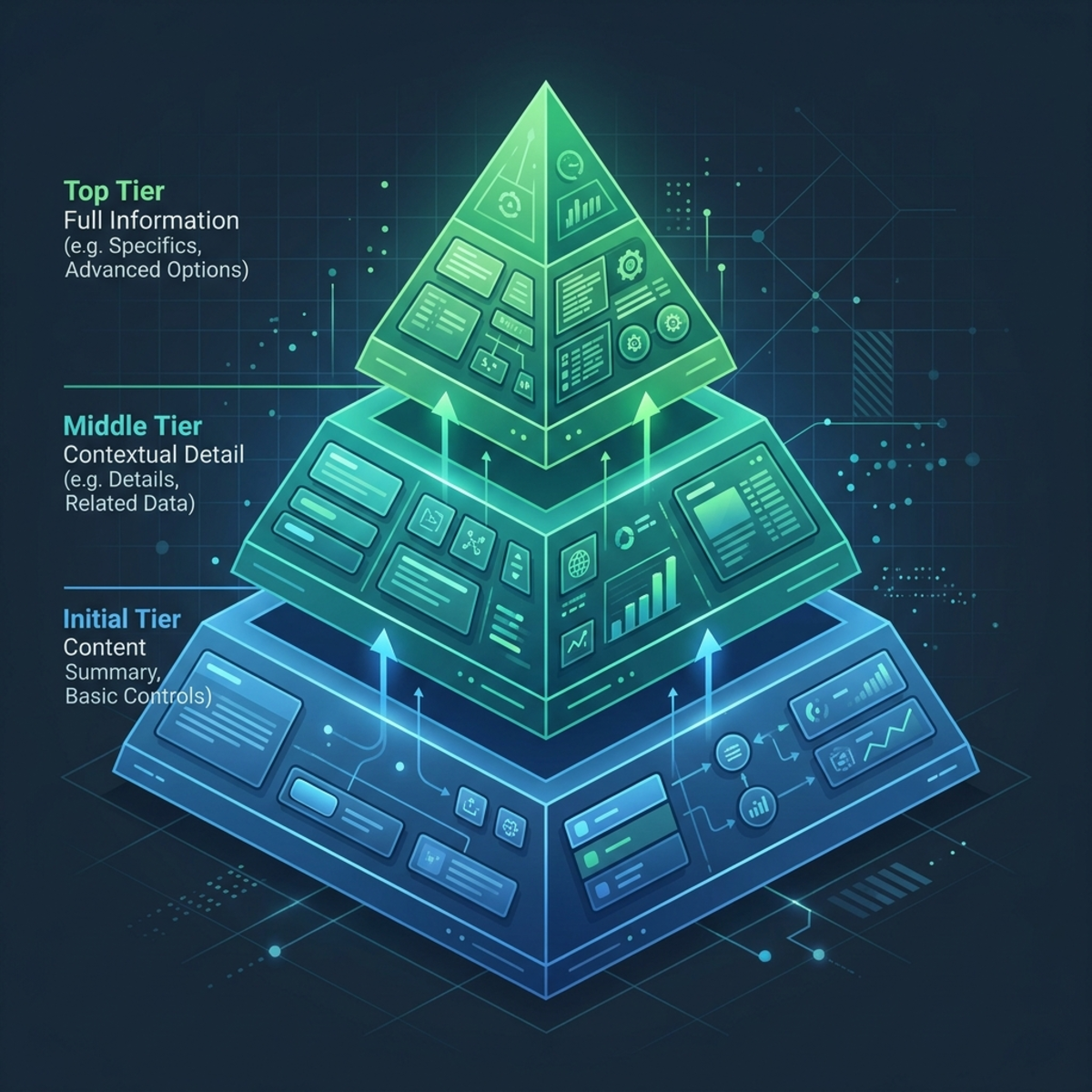
Layer 1: discovery metadata
The agent sees the skill name and description. These must be specific enough to distinguish redline two Word documents from summarize a document or insert comments.
Layer 2: task instructions
When the user asks for a redline, the orchestrator activates the skill and loads the procedure in SKILL.md: resolve file roles, run the comparison, validate the result, and return the output.
Layer 3: conditional resources
The skill loads detailed references or scripts only when applicable. Table-handling guidance is irrelevant to a document with no tables. PDF instructions should not enter a Word-only workflow. A fixed template asset should be used only for the workflow that owns it.
The source proposed a separate future commenting skill as an example of this modularity. A user might invoke redlining, commenting, both in sequence, or neither; the agent should load only the capability relevant to the current request. Likewise, its DOCX and PDF references were separated so that a Word task would not load PDF-specific guidance, and vice versa.
Progressive disclosure primarily improves context discipline, modularity, and maintainability. It may also reduce unnecessary context consumption, but do not promise a specific cost or latency reduction without measuring your own agent, model, document sizes, and billing configuration.
Native output is the real user-experience win
A successful output is not a PDF screenshot or a color-coded HTML diff. It is a valid Word document containing reviewable revisions.
When the file is opened in Word, reviewers should be able to:
- inspect insertions and deletions in the Review experience;
- accept or reject individual changes;
- filter or inspect markup;
- see the revision author supplied by the transformation;
- continue editing without leaving Microsoft 365.
Word’s comparison workflow similarly creates a new document based on the original and shows differences as revision marks while leaving the source documents unchanged. That is the behavioral contract an automated implementation should emulate.
Author attribution is produced from the metadata your code writes; it is not proof that a specific human made the underlying edit. Choose a label such as Copilot Studio AI or Automated comparison so reviewers can distinguish generated revision markup from human editing history.
Performance: benchmark, do not advertise a universal number
For a controlled document set, a warm execution may complete in seconds. That is a useful test result—not a platform guarantee.
In the original demonstration, the first skill-driven comparison completed in under 15 seconds, while a second, small comparison in the same active context completed in under roughly five seconds. The skill itself was reported as loading in about 73 milliseconds during another run. The presenter contrasted this with earlier experiments that reportedly took up to ten minutes without the packaged skill and 15–30 minutes in a PDF-to-DOCX/Azure Functions path. Those figures are anecdotal and the compared pipelines were not equivalent, so they should be presented as motivation for benchmarking—not as evidence that one platform is universally faster.
End-to-end latency depends on:
- document size and structural complexity;
- whether the execution context is warm;
- the comparison algorithm;
- package validation and repair work;
- upload and download time;
- service load and preview behavior.
If your prototype completes in under 15 seconds, publish the result with its conditions: file sizes, page counts, complexity, sample count, warm versus cold execution, and the percentile reported. Replace “runs in under 15 seconds” with “completed in under 15 seconds in our controlled test set” unless you have broader evidence.
Validation checklist
Before letting users rely on generated redlines, test the workflow against a representative corpus.
Document integrity
- Both source documents remain unchanged.
- The output opens in desktop Word and Word for the web where required.
- Relationships, media, styles, numbering, and section settings remain intact.
- The package passes your chosen Open XML validation checks.
Comparison quality
- Insertions and deletions are correctly oriented.
- Repeated text does not cause unstable matching.
- Tables, lists, headers, footers, fields, and hyperlinks behave as documented.
- Existing revisions are rejected, normalized, preserved, or surfaced according to an explicit policy.
- Formatting-only changes are either supported or clearly excluded.
Agent behavior
- The skill activates only for appropriate requests.
- Ambiguous baselines trigger a question rather than a guess.
- Unsupported files fail safely with a useful explanation.
- The response names the baseline, revised file, and generated output.
- The agent never describes a failed or partially validated file as complete.
What this pattern does—and does not—solve
This architecture is strong when you need a repeatable way to turn two controlled Word documents into a native review artifact. It combines conversational routing with deterministic document processing and keeps specialized instructions out of the agent’s permanent context.
It does not make document comparison infallible. It does not replace legal review. It does not guarantee that every Word feature can be reconstructed from a text diff. And while the Copilot Studio skill experience remains in preview, it should not be presented as an immutable production interface.
The design principle is broader than redlining:
Use the model to understand the request. Use a skill to reveal the right procedure. Use deterministic code to transform the file. Return the result in the format professionals already know how to review.
That is how an agent moves from “chat with a document” to dependable document automation.
Sources
- Agent Skills — Microsoft Learn.
- Skills overview for agents in Copilot Studio — Microsoft Learn.
- Add an existing skill to an agent — Microsoft Learn.
- Use code interpreter in a prompt — Microsoft Learn.
- FAQ for code interpreter — Microsoft Learn.
- WordprocessingML revisions — Microsoft Learn.
- Compare and merge two versions of a document — Microsoft Support.
Read next