Copilot Studio Architecture: When to Use Agents, Workflows, or Both

Writer
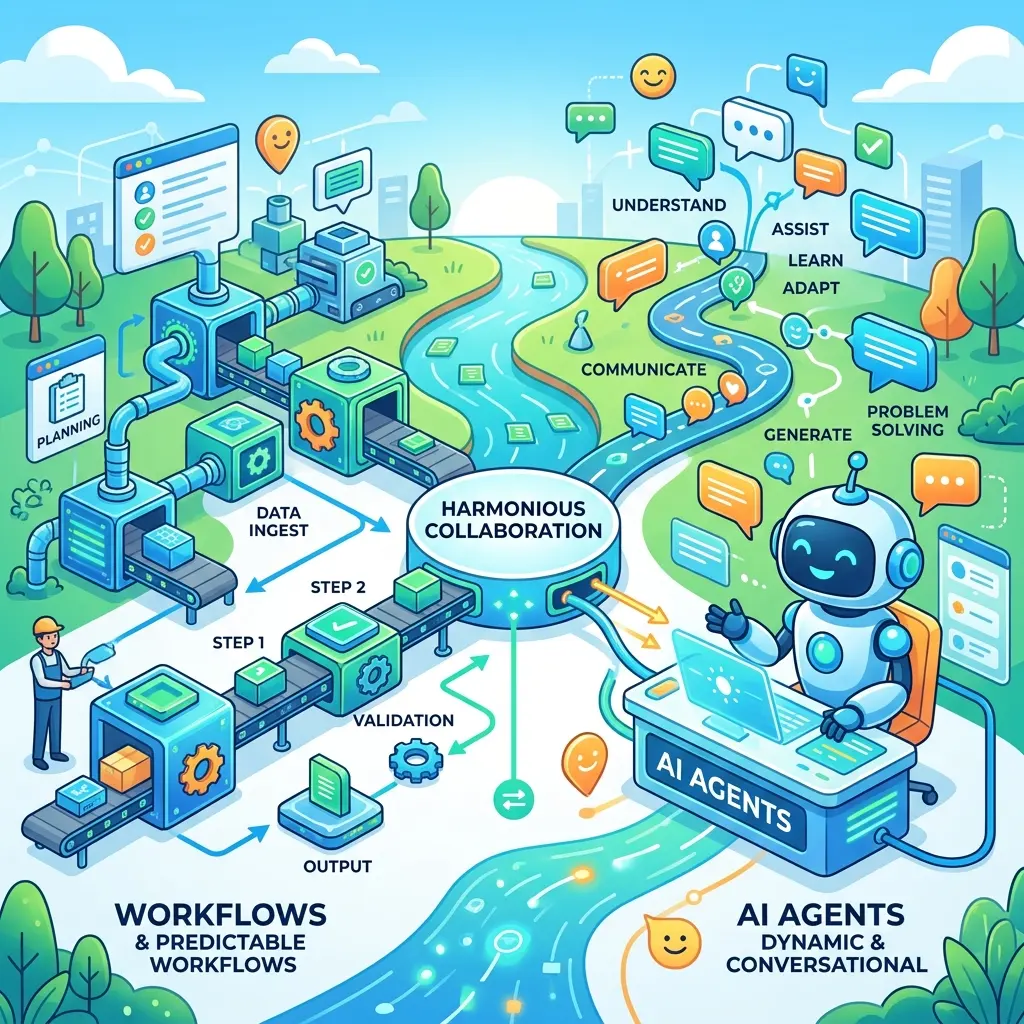
Microsoft Copilot Studio now presents agents and workflows as separate but complementary building blocks. That distinction is more than a navigation change. It gives architects a clearer way to decide where a solution should adapt at runtime and where it should follow an explicit process.
The simplest mental model is this:
An agent chooses what to do next. A workflow executes steps you defined in advance.
That rule is intentionally simple, not absolute. Agents can call structured tools. Workflows can contain AI actions and can even call agents. The real architectural question is therefore not AI or automation? It is:
Where should the system be allowed to make a probabilistic judgment, and where must control return to deterministic process logic?
This article explains that boundary, corrects a few common misconceptions, and shows how to combine both models without confusing flexibility with reliability.
Availability note — July 17, 2026: Microsoft documents the new Copilot Studio agent experience as a production-ready preview and the new workflows experience as a public preview. Preview capabilities can change, might have limitations, and are not automatically equivalent to the classic experience. Agents and workflows created in the new experience cannot currently be converted to the classic experience, or vice versa. Validate current status before making a production architecture decision.
The architectural split: adaptive control and defined control
Traditional workflow automation assumes that the designer can describe the process in advance:
- An event starts the process.
- Each step performs a known action.
- Conditions select among predefined branches.
- The process finishes in a known state or follows a defined error path.
Agents operate differently. They receive a goal, instructions, context, knowledge, and tools. At runtime, the orchestration layer determines how to respond and which available capability to use. The path can vary because the decision is influenced by natural-language interpretation, the available context, model behavior, and tool results.
Think of a workflow as a railway and an agent as a driver navigating a road network:
- The railway can branch, but only at switches that were installed beforehand.
- The driver can choose a route based on current conditions, but that flexibility also creates more possible outcomes.

Neither model is universally better. A railway is excellent when repeatability matters. A driver is valuable when the route cannot be fully predicted before the journey begins.
This separation also clears up older terminology. Earlier Copilot Studio discussions could blur conversational agents, autonomous behavior, topics, Power Automate-style flows, and what Microsoft later called agent flows. In the new experience, Workflows is the dedicated automation surface, while the classic experience continues to use agent flows for its automation model. It is therefore safer to treat “workflows replace autonomous agents” as a conceptual simplification—not as a literal one-to-one product rename.
What an agent is good at
A Copilot Studio agent is an AI system that coordinates instructions, context, knowledge, tools, topics or skills, and language models to answer questions or complete tasks. In the new experience, Microsoft emphasizes natural-language configuration and an enhanced orchestration model rather than requiring every conversational path to be authored as explicit branches.
An agent is a strong fit when the solution must:
- interpret ambiguous or unstructured requests;
- conduct a multi-turn conversation;
- select among tools based on the user’s intent;
- synthesize information from several sources;
- adapt its next action to results received at runtime;
- or handle meaningful variation that would make a fixed decision tree impractical.
A better model than “Think, Plan, Act”
It is useful to picture agent behavior as a loop:
- Interpret the goal and current context.
- Select an appropriate response, knowledge source, topic, skill, or tool.
- Act by generating a response or invoking the selected capability.
- Observe the result.
- Continue, stop, or escalate according to the updated context.

This is a conceptual model—not a guarantee that Copilot Studio exposes a literal five-stage loop for every execution. It helps explain why an agent’s path is adaptive without pretending that we can inspect an internal chain of thought.
Tools, skills, topics, and classic agents
Do not let component names obscure the architectural point. In the new experience, tools let an agent act through connectors, APIs, MCP servers, and workflows. Skills are reusable, task-specific packages of instructions and logic that the orchestrator activates when a request matches their purpose. Knowledge supplies information the agent can reference.
Classic agents still matter. They use the classic orchestration and topic-based authoring experience, while the new experience uses an enhanced orchestration runtime and a different authoring model. A topic-driven classic agent is still an agent; it simply has a more explicitly authored conversational structure. New-experience agents and classic agents cannot currently be converted into one another, so this distinction matters when selecting an authoring experience.
Non-deterministic does not mean random
Calling agents non-deterministic can sound as if they behave arbitrarily. That is the wrong conclusion.
Instructions, tool descriptions, knowledge grounding, authentication, permissions, connector configuration, policies, and the surrounding application design all constrain behavior. Testing and evaluation can improve consistency. Even so, an agent that relies on a language model may produce different wording, interpretations, tool choices, or outcomes when context changes—or sometimes when a similar request is repeated.
This is why an agent should not be treated as the sole enforcement mechanism for a business invariant. Instructions can guide behavior, but a rule such as “never approve a discount above 15% without authorization” is safer when it is also enforced in deterministic logic or in the system of record.
What a workflow is good at
A Copilot Studio workflow is a trigger-and-action automation built on a visual canvas. A workflow can start manually, on a schedule, after an event, or when called by an agent. Its control flow—actions, conditions, loops, and handoffs—is defined by the maker.
A workflow is a strong fit when the process must:
- execute a repeatable sequence;
- apply explicit business rules;
- update systems of record consistently;
- expose a visible process path;
- pause at a defined human-review point;
- handle retries and exceptions through designed branches;
- or return data in a known contract to another component.
Deterministic shell, potentially probabilistic nodes
Microsoft describes workflows as deterministic because they follow a rule-based path. That is directionally useful, but architects should apply one important nuance:
The workflow’s control structure can be deterministic even when an individual AI action is probabilistic.
For example, a workflow may always execute these steps:
- Receive a document.
- Run an AI extraction action.
- Validate the returned fields.
- Route low-quality or incomplete results to a reviewer.
- Write approved data to a system of record.
The sequence is designed in advance. The AI extraction result is not guaranteed to be identical on every run. Reliability comes from placing validation, thresholds, schema checks, exception paths, and human review around the probabilistic step—not from assuming that putting an LLM inside a workflow makes the LLM deterministic.
Agents and workflows compared
| Design question | Agent | Workflow |
|---|---|---|
| Primary strength | Interpretation, adaptation, and runtime tool selection | Repeatable process execution and explicit control flow |
| Best problem shape | Open-ended or context-dependent | Predictable, rules-driven, and repeatable |
| Path selection | Orchestrator selects the next action at runtime | Maker defines actions, branches, and loops in advance |
| Typical entry point | User interaction or another configured trigger | Manual, scheduled, event-based, API-based, or agent invocation |
| Output shape | Often conversational or context-dependent | Commonly structured, though AI actions can still vary |
| Main control mechanism | Instructions, grounding, tool boundaries, identity, permissions, and platform policies | Explicit process logic, connectors, validations, conditions, and review steps |
| Human involvement | Designed escalation or handoff based on explicit logic and available capabilities | A defined approval, information request, or review action in the process |
| Failure mode to watch | Incorrect interpretation or inappropriate tool selection | Brittle logic, unhandled exceptions, or probabilistic AI output treated as certain |
The distinction is not “smart versus simple.” A workflow may contain sophisticated logic and AI actions. An agent may invoke a narrowly defined workflow. The important difference is who controls the next step: the runtime orchestrator or the authored process.
Cost and observability are consequences, not selection criteria
A fixed workflow path is generally easier to inspect and estimate because its actions and branches are visible on the canvas. An agent’s runtime path can vary: it may select different tools, require more turns, or stop at different points. That makes consumption analysis less straightforward.
However, “workflow” does not automatically mean fixed cost. Branches, loops, connector behavior, retries, AI actions, and agent handoffs can all change the work performed. In the new workflows experience, Microsoft currently meters each executed workflow action against Copilot Studio capacity. Treat the designed path as a better planning baseline—not as a guaranteed invoice.
Do not choose a workflow merely because it appears easier to cost if the problem genuinely requires adaptive reasoning. Choose the correct execution model first, and then constrain, test, monitor, and budget that design appropriately.
A practical decision framework
Start with four questions.
1. Can the path be described before execution?
If the meaningful branches are known and testable, start with a workflow. If the system must interpret intent or choose a path from changing context, an agent may be the better entry point.
2. Is the task primarily judgment or transaction?
Use an agent for interpretation, synthesis, and contextual judgment. Use a workflow for the transaction: create the record, apply the policy check, request approval, send the notification, and record the outcome.
3. What must never be left to model judgment?
Identify invariants such as authorization boundaries, maximum discounts, mandatory approvals, data validation, and write permissions. Enforce them outside free-form model reasoning—preferably in workflow logic, APIs, policies, or the target system itself.
4. What happens when confidence is insufficient?
Do not assume that an agent exposes a universal, reliable confidence score that can simply be compared with a threshold. Instead, design observable escalation criteria. Examples include missing required fields, conflicting source data, tool failure, a high-risk category, or an explicit user request for a person.
Two contrasting examples
Expense approval: workflow-first
An expense approval has a known process spine: receive the claim, validate required data, compare it with policy, route it to the correct approver, record the decision, and update the relevant system. AI can classify the expense or identify a possible policy exception, but the approval path remains explicit. The workflow should validate any AI-produced judgment before it changes a financial record.
Patient intake: agent-first, with careful boundaries
A multi-turn intake conversation is harder to script because each answer can change the next relevant question. That makes an agent suitable for gathering information and navigating the dialogue. It does not make the agent a substitute for a clinician or an appropriate place to make unsupervised medical decisions. Structured validation, privacy controls, escalation, and qualified human review remain essential.
These examples expose the real test: the expense process is predominantly repeatable, while the intake conversation is predominantly contextual. Both can still contain deterministic and probabilistic substeps.
Pattern 1: An agent calls a workflow
This is the most intuitive hybrid pattern.
Imagine a sales assistant helping a seller prepare a quote. The conversation is fluid: the agent identifies the customer, gathers requirements, retrieves relevant information, and explains options. When the seller says, “Create the quote,” the architecture crosses a boundary.
The agent invokes a workflow that:
- validates required inputs;
- retrieves approved pricing;
- applies deterministic discount rules;
- requests approval when a threshold is exceeded;
- creates the quote in the system of record;
- and returns a structured result to the agent.
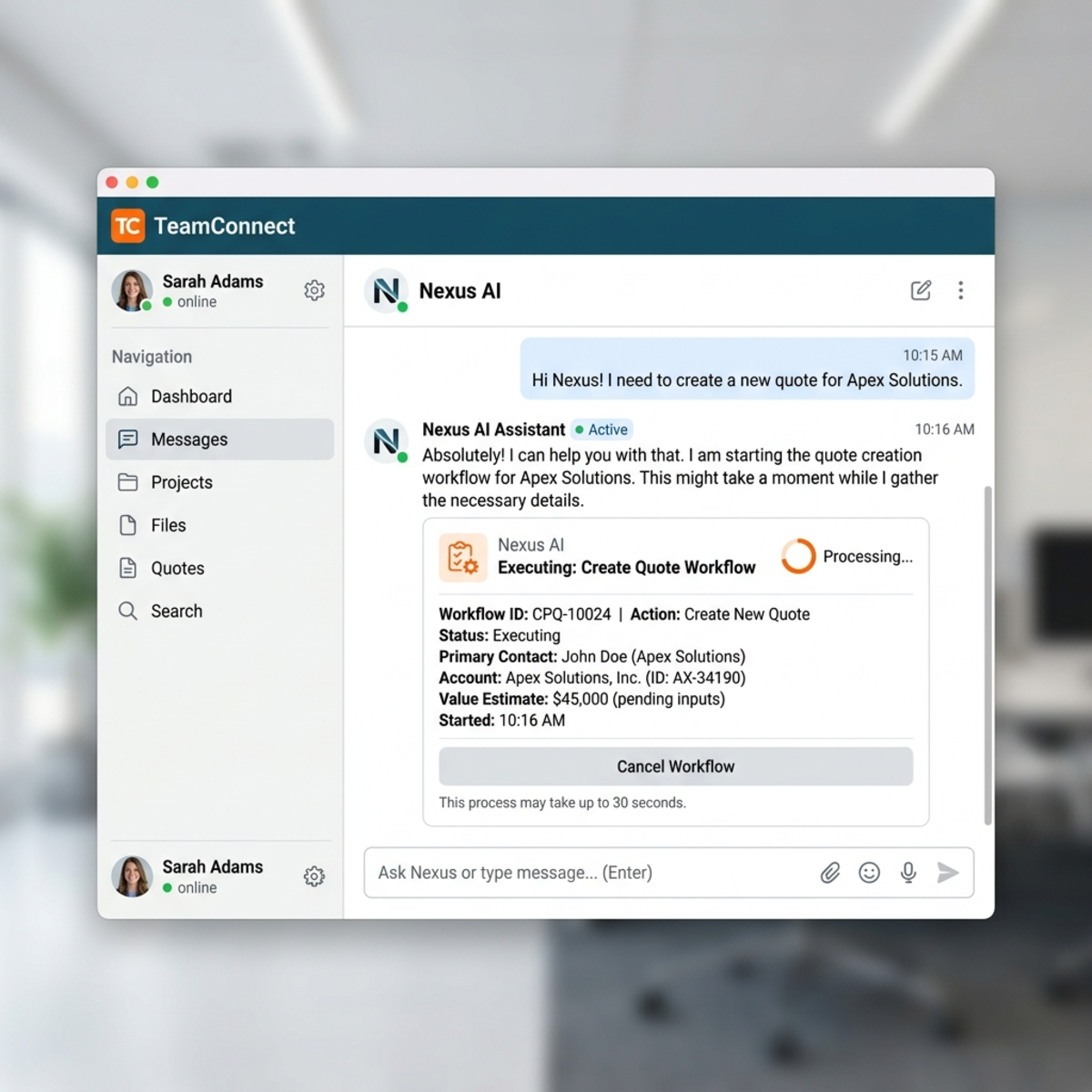
The agent owns the conversation. The workflow owns the transaction.
In the new Copilot Studio experience, a workflow can be added as an agent-level tool when it uses the When an agent calls the flow trigger and a Respond to the agent action. Microsoft also documents several current requirements: the workflow must be published, must respond synchronously, and should complete within the documented 100-second action limit.
A clear tool description matters because the orchestrator uses the workflow’s purpose, inputs, and outputs to decide when and how to call it.
Pattern 2: A workflow calls an agent
The inverse pattern starts with a structured process and delegates one ambiguous step.
Consider a contract-intake workflow:
- A contract upload triggers the workflow.
- The workflow records the file and checks required metadata.
- An agent interprets non-standard clauses or synthesizes findings from the document.
- The workflow validates the returned structure.
- A reviewer handles exceptions or high-risk results.
- The workflow updates downstream systems and preserves the process trail.
Here, the workflow remains the process spine. The agent is a specialist called for judgment where fixed rules would be too brittle. Microsoft documents native AI actions and agent handoffs in the new workflows experience, which supports this architecture while keeping the surrounding process explicit.
Pattern 3: AI inside a workflow without a full agent handoff
Not every intelligent step needs an agent.
If a process only needs bounded AI—for example, classify an email, extract fields from a document, summarize a case, or produce a JSON-shaped response—an AI action inside the workflow may be sufficient.
This creates a useful spectrum:
- Pure workflow logic for fully specified rules.
- Workflow plus AI action for one bounded probabilistic task.
- Workflow calling an agent for a more contextual or multi-step judgment.
- Agent calling workflows when adaptive interaction leads to controlled transactions.
Choose the least autonomous design that can handle the uncertainty in the task. More autonomy is not automatically more advanced; it creates a larger outcome space that must be tested and governed.
Human-in-the-loop: two different design styles
Both architectures can involve people, but “human in the loop” should be an explicit system behavior—not a hopeful instruction.
Workflow-controlled review
A workflow can include a defined approval or information-request action. Execution pauses at a known point and resumes through an authored branch. This is appropriate when review is mandatory because of value, risk, policy, or data quality.
Examples include:
- a discount exceeds the approved threshold;
- required contract fields are missing;
- extracted data fails validation;
- or a financial transaction requires separation of duties.
Agent-initiated escalation
An agent can hand off or invoke an escalation capability when the design makes that option available. The trigger should be grounded in observable conditions: unresolved ambiguity, conflicting sources, policy-defined risk, failed tools, or a direct request for human assistance.
Instructions alone are not a complete safety mechanism. The escalation path, permissions, tool availability, downstream checks, and target-system controls must all support the intended behavior.
Reconstructing the source demo as an architecture walkthrough
The original demonstration used two scenarios to make the distinction tangible.
Sales account assistant: adaptive agent behavior
The sales assistant was configured with agent instructions, organizational policies and customer-care knowledge, plus tools such as weather data, Dataverse, an order-management system, and a warehouse MCP server. It handled two open-ended requests:
- determine whether weather might delay an order that was out for delivery;
- determine whether a defective product was still within the return window and suggest escalation when it was not.
The important lesson is not the specific weather or warranty answer. It is that the agent selected the information and tools it needed from the conversational context. Different order data, weather, dates, or policies could produce a different path. Tool consent, authentication, and permissions are also part of the runtime behavior—not incidental setup details.
Microsoft To Do time-blocking: workflow-to-agent orchestration
The second demonstration started with a deterministic trigger: a new item in a designated Microsoft To Do list. The workflow then invoked an agent configured for that workflow. The agent was instructed to:
- find an appropriate slot within the next few business days;
- stay inside normal working hours;
- create a calendar block with a reasonable duration;
- enrich the To Do item with useful notes and suggestions;
- and format the resulting content for readability.
Calendar and To Do capabilities gave the agent permission to inspect availability and update work data, while web search could supply external context when needed. The workflow’s Activity view provided run-level visibility. After completion, the To Do item contained richer metadata and the calendar contained the selected time block.
This is a useful demonstration of a workflow-owned trigger with agent-owned execution choices. It is also deliberately permissive. A production design could add a classification step before the handoff, restrict which tasks qualify, require confirmation before writing to the calendar, validate working-hour boundaries after the agent returns, and define an exception route for missing or conflicting information.
The source described this as an in-memory agent created as part of the workflow rather than a reusable existing agent. Because the workflows experience remains in public preview, treat the precise designer labels and lifecycle semantics as preview behavior and verify them in the current tenant and documentation.
Hands-on architecture exercise
A useful way to apply the model is to decompose one business scenario into four layers.
Scenario: service-return assistant
Layer 1 — Conversation: An agent understands the customer’s request, asks for missing details, and explains the return policy in natural language.
Layer 2 — Grounding and tools: The agent retrieves the order, warranty terms, and product information through authorized tools.
Layer 3 — Transaction workflow: After the user agrees to proceed, a workflow validates eligibility, creates the return authorization, updates the order system, and sends the confirmation.
Layer 4 — Exception handling: A workflow branch requests human review when the item value exceeds a threshold, the order data conflicts, or required evidence is missing.
Then test each boundary:
- Can the agent call only the tools it needs?
- Are validated inputs required before the transaction starts?
- Does the workflow re-check critical rules rather than trusting the conversation?
- Are AI-generated fields validated before use?
- Is there an explicit timeout and error path?
- Can a person review high-risk exceptions?
- Are writes performed under an identity with appropriate permissions?
This exercise turns “agent versus workflow” from a product comparison into a concrete architecture decision.
Common design mistakes
Mistake 1: Encoding hard policy only in agent instructions
Instructions shape behavior; they are not equivalent to a transaction rule enforced by code, workflow logic, policy, or the target system.
Mistake 2: Assuming workflow means every output is deterministic
A workflow can reliably follow the same path while an embedded AI action still returns variable content. Validate probabilistic output before it drives consequential actions.
Mistake 3: Using an agent where ordinary branching is enough
If every branch can be enumerated and maintained, a workflow is usually easier to test and reason about.
Mistake 4: Creating one giant agent for the entire process
Keep agent responsibilities bounded. Move repeatable transactions into workflows and expose them as clearly described tools.
Mistake 5: Ignoring preview boundaries
The new agent and workflow experiences have different preview designations and do not have full feature parity with the classic experience. Treat current documentation and tenant behavior as part of the architecture baseline.
The central design principle
The strongest Copilot Studio architectures do not ask agents to imitate workflows or workflows to imitate agents. They put each type of control where it belongs:
- Agents at the adaptive edge, where language, ambiguity, context, and tool choice matter.
- Workflows at the deterministic core, where validation, policy, transaction integrity, and repeatable execution matter.
- Humans at explicit decision points, where risk, uncertainty, or accountability requires review.
That is the real value of the architectural separation. It is not a contest between two product features. It is a way to draw a deliberate boundary between probabilistic judgment and controlled execution—and to reconnect them only through well-defined contracts.
Sources
- Microsoft Learn: Copilot Studio overview
- Microsoft Learn: Agents overview in the new experience
- Microsoft Learn: Skills overview for agents
- Microsoft Learn: Classic versus new agent experience
- Microsoft Learn: Workflows overview in the new experience
- Microsoft Learn: Add a workflow as a tool to an agent
- Microsoft Learn: Agent flows overview in the classic experience
- Microsoft Copilot Blog: Automate business processes with agents plus workflows
Read next