Dataverse Table Ownership: User or Team vs. Organization

Writer
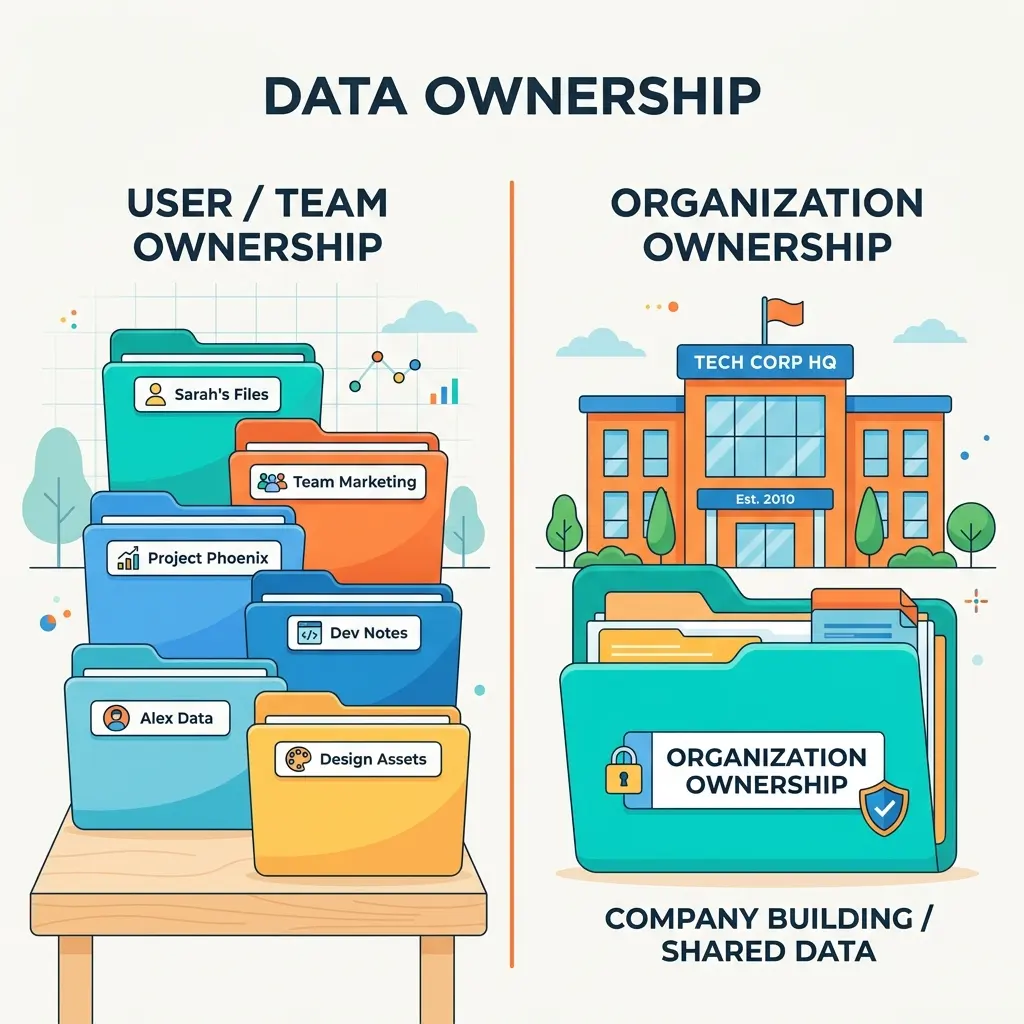
A table’s ownership type looks like a small setting in Microsoft Dataverse. Architecturally, it is anything but small.
Ownership determines whether rows have individual owners, which security-role access levels are meaningful, whether records can be assigned or shared, and which system columns Dataverse adds to the table. It therefore shapes the security model before the first row is created.
For custom tables, the practical choice is between two models:
- User or Team owned: each row has an owner, enabling owner-, team-, business-unit-, hierarchy-, and organization-scoped access.
- Organization owned: rows do not have individual owners; access is granted for the table across the environment rather than scoped through row ownership.
This is a design-time decision. In the table designer, the Record ownership selector appears under the table’s advanced properties when you create the table. User or Team is the default for a standard custom table; Organization must be selected deliberately. Dataverse does not provide a supported switch that converts an existing custom table from one ownership model to the other. If the requirement changes later, the normal path is to create a replacement table, migrate the data, and update the solution components that depend on it.
Architecture rule: Choose ownership from the required access model before saving the table—not from the table’s name or whether its data feels “important.” Ask who should be able to act on which rows.
A useful mental model: case files versus a shared dictionary
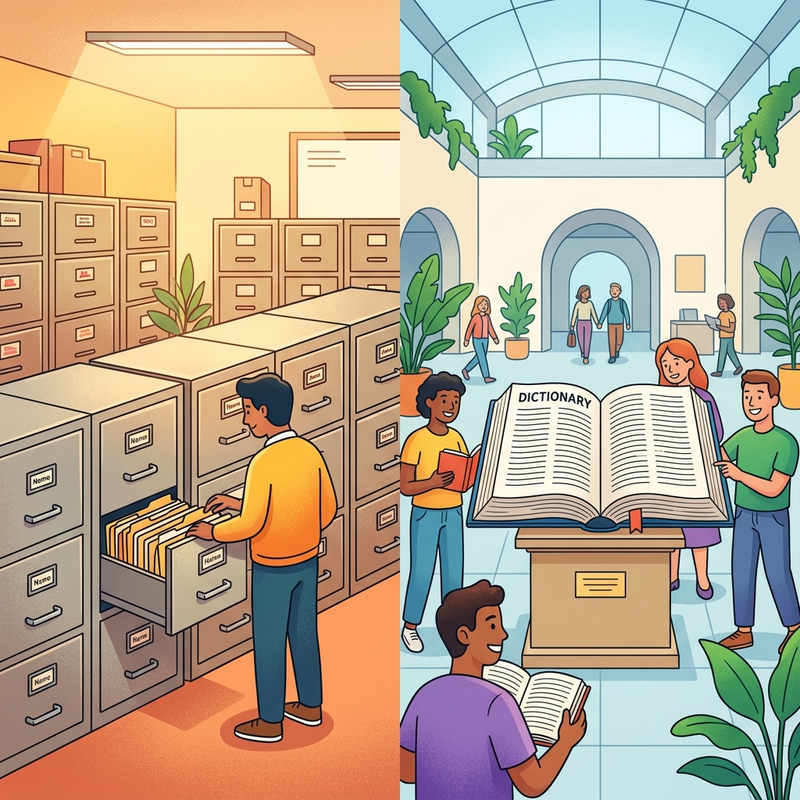
Think of the two ownership models as different kinds of information storage.
A User or Team-owned table behaves like a room full of case files. Every file is assigned to a person or team. Security can follow that responsibility: my files, my team’s files, files in my business unit, or all files.
An Organization-owned table behaves like a shared dictionary mounted on the wall. A person is either allowed to use or maintain that dictionary, or they are not. Individual entries are not assigned to different employees.
The distinction is not “private data versus public data.” Organization-owned data is not automatically available to everyone. Users still require the appropriate table privileges through security roles. The difference is the depth at which those privileges can be applied.
What ownership changes
| Design dimension | User or Team owned | Organization owned |
|---|---|---|
| Row owner | A user or owner team | No individual row owner |
| Row-level access through ownership | Supported | Not supported |
| Security-role access levels | User, Business Unit, Parent: Child Business Units, Organization, or None, where applicable | Organization or None, where applicable |
| Assignment | Rows can be reassigned to another eligible user or owner team | Not applicable |
| Record sharing | Supported for individual rows | Not based on individual row ownership |
| Typical fit | Work items, cases, requests, opportunities, or other records with responsibility and visibility boundaries | Shared reference, configuration, or catalog data that should have the same table-wide access boundary |
| Schema signal | Includes ownership-related columns such as ownerid | Does not include ownerid; organization-owned tables commonly include organizationid |
The phrase where applicable matters. Not every privilege appears for every table, and ownership does not override other Dataverse security mechanisms. Effective access can also be influenced by multiple security roles, team membership, sharing, business units, hierarchy features, and column-level security.
User or Team-owned tables
User or Team ownership is the natural fit when a row represents work, responsibility, or information that different groups should access differently.
Each row is associated with an owner through the ownerid lookup. The owner can be:
- a Dataverse user; or
- an owner team, which can own rows and have security roles assigned.
An access team is different: it can receive access to a row, but it does not own the row and does not have security roles assigned in the same way as an owner team.
Why this model is flexible
For an owned table, a security role combines two ideas:
- Privilege — what operation is allowed, such as Read, Write, Delete, Append, or Append To.
- Access level — how far that privilege reaches, such as the user’s rows, the business unit’s rows, child business units, or the entire environment.
That separation makes asymmetric policies possible. A service agent might be allowed to:
- create records they own;
- read records across their business unit;
- update only records they own; and
- have no delete privilege.
Ownership does not mean that only the owner can ever access a row. It gives Dataverse an anchor from which security roles, teams, business units, sharing, and related mechanisms can calculate access.
When to choose it
Use User or Team ownership when one or more of these statements are true:
- A record must be assigned to a person or team.
- Users should see different subsets of the same table.
- Access should follow business-unit boundaries or a business-unit hierarchy.
- Individual records may need to be reassigned or shared.
- Reporting or process logic depends on who owns the work.
Typical examples include service requests, sales opportunities, inspections, approvals, or project work items. The deciding factor is not the industry label; it is the need for ownership-aware row security.
Organization-owned tables
An Organization-owned table removes the concept of a per-row user or team owner. Its rows belong to the environment’s organization, so security-role privileges for the table are effectively table-wide.
A user with Organization-level Read access can read all rows in that table. A user without Read access cannot read its rows through that role. There is no intermediate “my rows” or “my business unit’s rows” level because there is no row owner from which Dataverse could calculate those scopes.
What “organization-wide” does—and does not—mean
Organization-owned does not mean:
- anonymous access;
- automatic access for every environment user; or
- unrestricted write access.
Users still need privileges. You can, for example, grant broad Read access to a reference table while limiting Create, Write, and Delete to a smaller administrative role. The boundary is table-wide, but the permitted operations can still differ by role.
Assign and Share are not meaningful in the same way for Organization-owned rows because those operations depend on individual ownership or record-level grants. Do not describe the model as providing all eight common table privileges with only a binary depth; the available privileges depend on the table, and ownership-specific operations do not apply as they do for User or Team-owned records.
When to choose it
Organization ownership is a strong fit when:
- every authorized reader should see the same rows;
- records do not move through an owner-based lifecycle;
- business-unit scoping is unnecessary; and
- table-wide permissions are sufficient.
Common patterns include application configuration, controlled reference data, classification lists, or shared catalogs. A country reference table used by forms is a classic example: if every authorized user should see the complete list, row ownership adds no value. A shared product catalog can fit the same pattern when it is truly global.
Do not confuse a Dataverse Choice column with a reference table. Values such as Active, Closed, or Inactive may be modeled as Choice options rather than rows in a custom table. If those values are stored as records because they need metadata, relationships, localization, or independent lifecycle management, then the ownership decision applies to that reference table.
Even for reference or product data, avoid deciding by category alone. A catalog might be global in one solution but segmented by region in another. The required security boundary—not the word “catalog”—should decide the model.
The schema tells the story
Ownership is not just a security-role setting. It is represented in table metadata and system columns.
User or Team-owned schema
A User or Team-owned table includes ownership-related columns, most visibly:
- Owner (
ownerid) — a polymorphic lookup that identifies the owning user or team. - ownership-related business-unit information used by the platform’s security model.
Changing a row’s owner updates the security context around that row and can also trigger cascading behavior on related records, depending on relationship configuration.
Organization-owned schema
An Organization-owned table does not contain ownerid, because no user or team owns an individual row. Instead, it is associated with the Dataverse organization, commonly through organizationid.
This is why ownership cannot be treated as a cosmetic option. Moving between the models would require more than showing or hiding an Owner field; it would change metadata, security semantics, supported operations, and dependencies across the solution.
How security-role depth differs
The familiar Dataverse privilege set commonly includes Create, Read, Write, Delete, Append, Append To, Assign, and Share. Privilege availability varies by table, while access levels define the set of rows to which an applicable privilege extends.
| Access level | Practical meaning for User or Team-owned rows | Organization-owned rows |
|---|---|---|
| None | The role does not grant the privilege | The role does not grant the privilege |
| User (Basic) | Rows owned by the user, plus access derived through relevant team behavior | Not available as an ownership depth |
| Business Unit (Local) | Rows owned within the user’s business unit | Not available |
| Parent: Child Business Units (Deep) | Rows in the user’s business unit and subordinate business units | Not available |
| Organization (Global) | All rows in the environment | The applicable privilege covers all rows in the table |
Security-role grants are cumulative. If one assigned role grants Organization-level Read access, another more restrictive role cannot reduce that access. This is a crucial troubleshooting rule: Dataverse combines grants; it does not use a “most restrictive role wins” model.
The current Power Platform admin center path is generally:
Manage → Environments → select an environment → Settings → Users + permissions → Security roles
The interface may evolve, but the architectural distinction remains: owned tables expose meaningful row-scoped access levels; Organization-owned tables do not.
Verify the difference in the product
A short hands-on comparison makes the architecture tangible. Use disposable custom tables in a development environment rather than production data.
1. Create one table of each type
In the Power Apps maker experience:
- Create a custom table and open its advanced properties.
- Leave Record ownership set to the default, User or Team, and save it.
- Create a second custom table, set Record ownership to Organization, and save it.
The exact labels and navigation can change as the maker experience evolves, but ownership must be selected during table creation.
2. Compare the columns
Open the columns for both tables and search for Owner:
- The User or Team-owned table includes the Owner column (
ownerid). When you create a row, Dataverse associates it with a user or owner team. - The Organization-owned table has no Owner column. Its system columns include organization-related metadata instead, commonly
organizationid.
This reproduces the most visible schema difference from the source demonstration.
3. Compare security-role access levels
In the Power Platform admin center, select the environment, open Settings → Users + permissions → Security roles, and edit a test role. If necessary, show all tables or filter for the two custom tables.
For the User or Team-owned table, applicable privileges can expose multiple access levels: User, Business Unit, Parent: Child Business Units, and Organization. These levels can be configured independently—for example, User-level Create, Business Unit-level Read, and no Delete privilege.
For the Organization-owned table, applicable privileges are effectively toggled between None and Organization. You cannot grant User- or Business Unit-scoped Read because its rows have no individual owner. Depending on the current interface, the privilege icons may appear as selectable depth indicators for the owned table and as a simple off/on state for the Organization-owned table.
Some role editors also offer convenience actions such as copying table permissions. Those UI actions speed configuration but do not change the ownership semantics described here.
A practical decision process
Before creating the table, walk through these questions in order.
1. Does each row need an accountable owner?
If a business process assigns records to people or teams, choose User or Team owned.
2. Should authorized users see different row sets?
If visibility must vary by owner, team, business unit, or hierarchy, choose User or Team owned.
3. Will records need assignment or individual sharing?
If yes, choose User or Team owned. Confirm whether the collaboration model requires owner teams, access teams, direct sharing, or a combination.
4. Is a table-wide security boundary enough?
If every user with Read privilege should see every row—and the same principle applies independently to Write and Delete—Organization owned may be the cleaner model.
5. Are you calling something “reference data” without testing the security requirement?
Pause. Reference data is often organization-owned, but not always. If regions, subsidiaries, or business units require different subsets, User or Team ownership—or a different data design—may be more appropriate.
Rule of thumb: If you can imagine a credible future requirement phrased as “these users should see these rows, but not those rows,” User or Team ownership gives you the necessary ownership-based security vocabulary.
What happens if the choice is wrong?
Changing the requirement later is a migration exercise, not a metadata edit. A typical remediation involves:
- Creating a replacement table with the correct ownership type.
- Recreating columns, keys, relationships, forms, views, business rules, and other table-dependent components.
- Updating apps, flows, plug-ins, integrations, queries, and environment variables that reference the original table.
- Migrating rows while establishing valid new owners when moving to User or Team ownership.
- Rebuilding and testing security roles.
- Validating auditing, automation, cascading behavior, reporting, and downstream integrations.
- Retiring the original table after reconciliation.
The exact work depends on solution complexity, but the architectural lesson is consistent: ownership should be decided during data and security modeling, not after the application has been built.
Final guidance
Choose User or Team owned when rows represent work or responsibility, users require different views of the dataset, or assignment and record-level collaboration matter.
Choose Organization owned when authorized users can operate against the same complete dataset and no per-row owner is required.
The shortest reliable test is this:
Does access need to follow individual rows, or is permission to the entire table sufficient?
Answer that before creating the table. Dataverse will build a substantial part of your future security architecture around the choice.
Sources
Read next