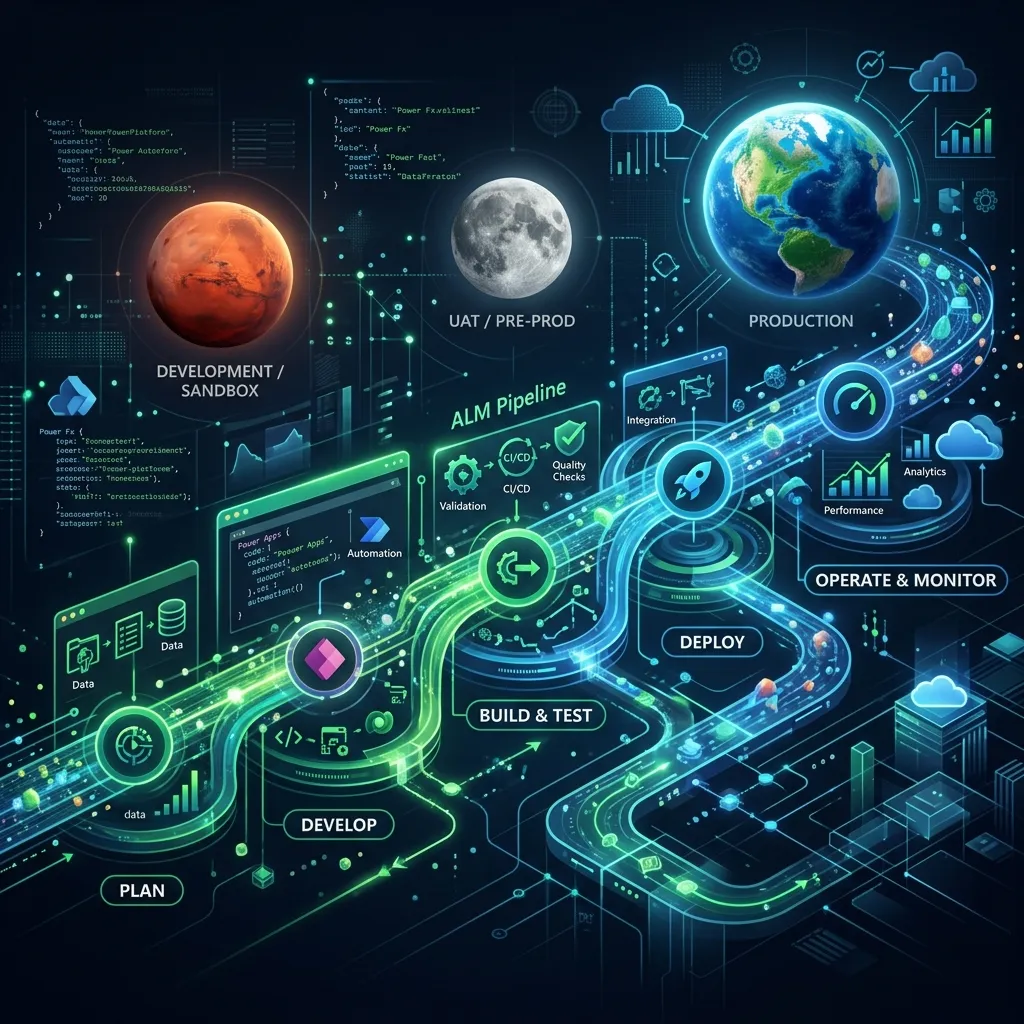
A complete, parameter-level reference for the Microsoft Power Platform CLI (pac), with plain-language parameter explanations and multiple real-world examples per command. Covers Dataverse, Power Platform administration, Copilot Studio, Power Pages, code components, and ALM. Reflects CLI v2.8.1. Parameters drift between versions — pac <group> <command> --help is always authoritative for your installed version.
What is the PAC CLI?
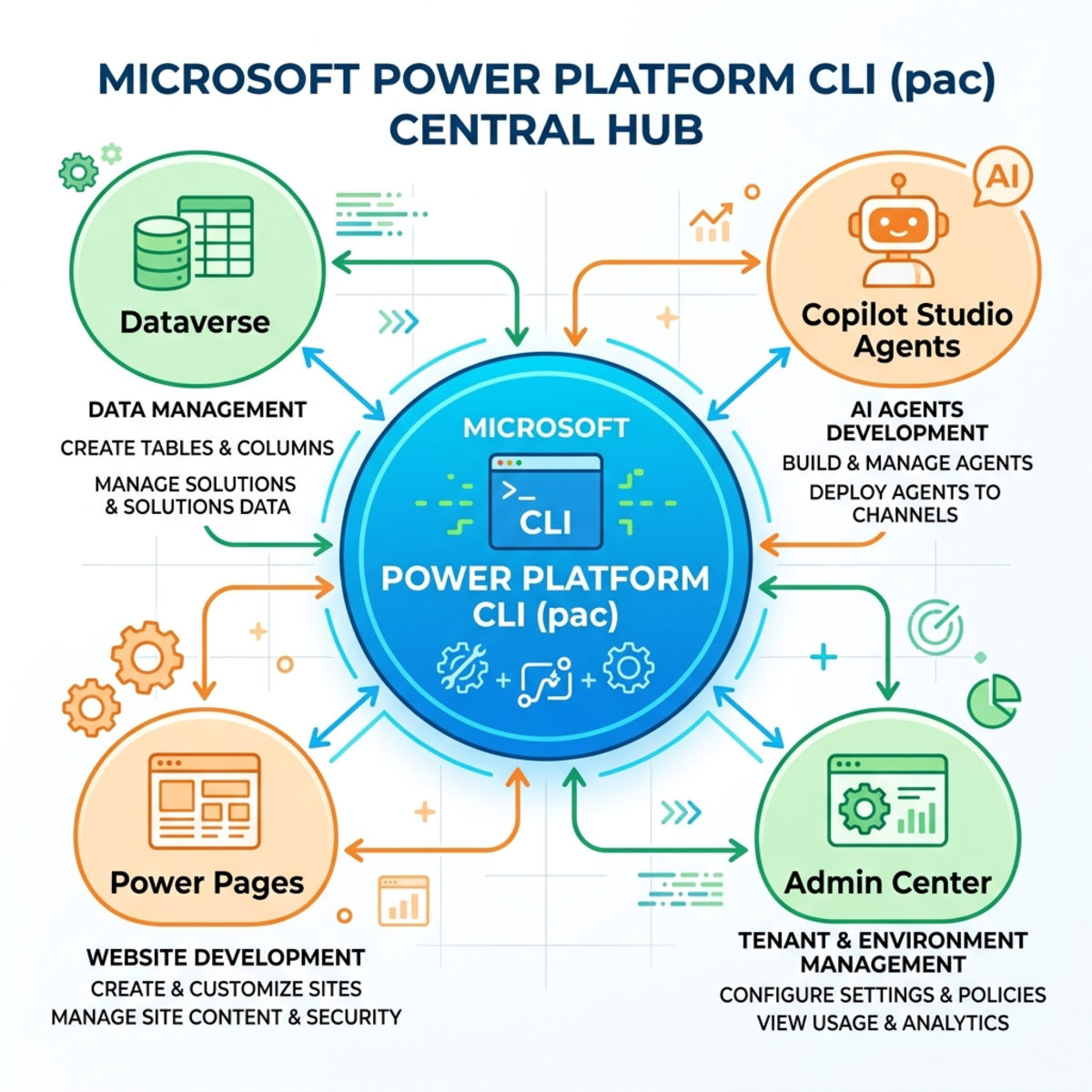
The Microsoft Power Platform CLI (pac) is Microsoft’s single, official command-line tool for developers and ISVs. It covers environment lifecycle, authentication, Dataverse, solutions/ALM, Power Pages, code components, and Copilot Studio.
Where each product fits:
| Product | CLI coverage |
|---|
| Dataverse | pac data, pac env, pac solution, pac connection, pac plugin, pac model, pac managed-identity |
| Power Platform (admin) | pac admin, pac auth, pac pipeline, pac connector, pac catalog, pac tool |
| Copilot Studio | pac copilot |
| Power Automate | No dedicated group — via pac solution, pac connection/pac connector, Build Tools, desktop Run URLs, or community CLIs (see Appendix A) |
Key concepts
Before the commands, here are the core Power Platform building blocks the CLI works with.
Tenant — Your whole organization in Microsoft’s cloud (one Microsoft Entra / Azure AD directory). A tenant contains all your environments. pac auth logs you into a tenant; pac admin operates across it.
Environment — A container in Power Platform where your apps, flows, agents, and data actually live and run. You typically have several (Dev, Test, Prod); each has its own URL and usually its own Dataverse database. Think of it as a workspace in the cloud that you point commands at with --environment.
Dataverse — The underlying database/data platform behind it all. Environments store their tables and records in Dataverse, and most pac commands ultimately read/write there.
Solution — A package of customizations inside an environment — tables, apps, flows, agents, connectors, etc. — grouped so you can move them between environments as a unit (the way you promote work Dev → Test → Prod). Two flavors: unmanaged (editable, for Dev) and managed (locked, for Test/Prod).
Package — A bigger bundle that wraps multiple solutions together, plus optional reference data, an install order, and custom C# deployment logic. A solution moves one thing; a package orchestrates installing several solutions (and extras) in sequence — used for product/environment setup scenarios. Built with pac package.
Project — A folder on your local computer containing the source files for something you’re building, set up for editing and source control (Git). It’s the developer/offline representation, as opposed to the live thing in the environment. Examples: pac solution init → a solution project (.cdsproj); pac plugin init → a plug-in project; pac pcf init → a code-component project.
Project vs. solution — the key distinction: a project is what you edit on disk; a solution is what exists in the environment. You pack/push a project up into the environment, and unpack/clone an environment’s solution down into a project.
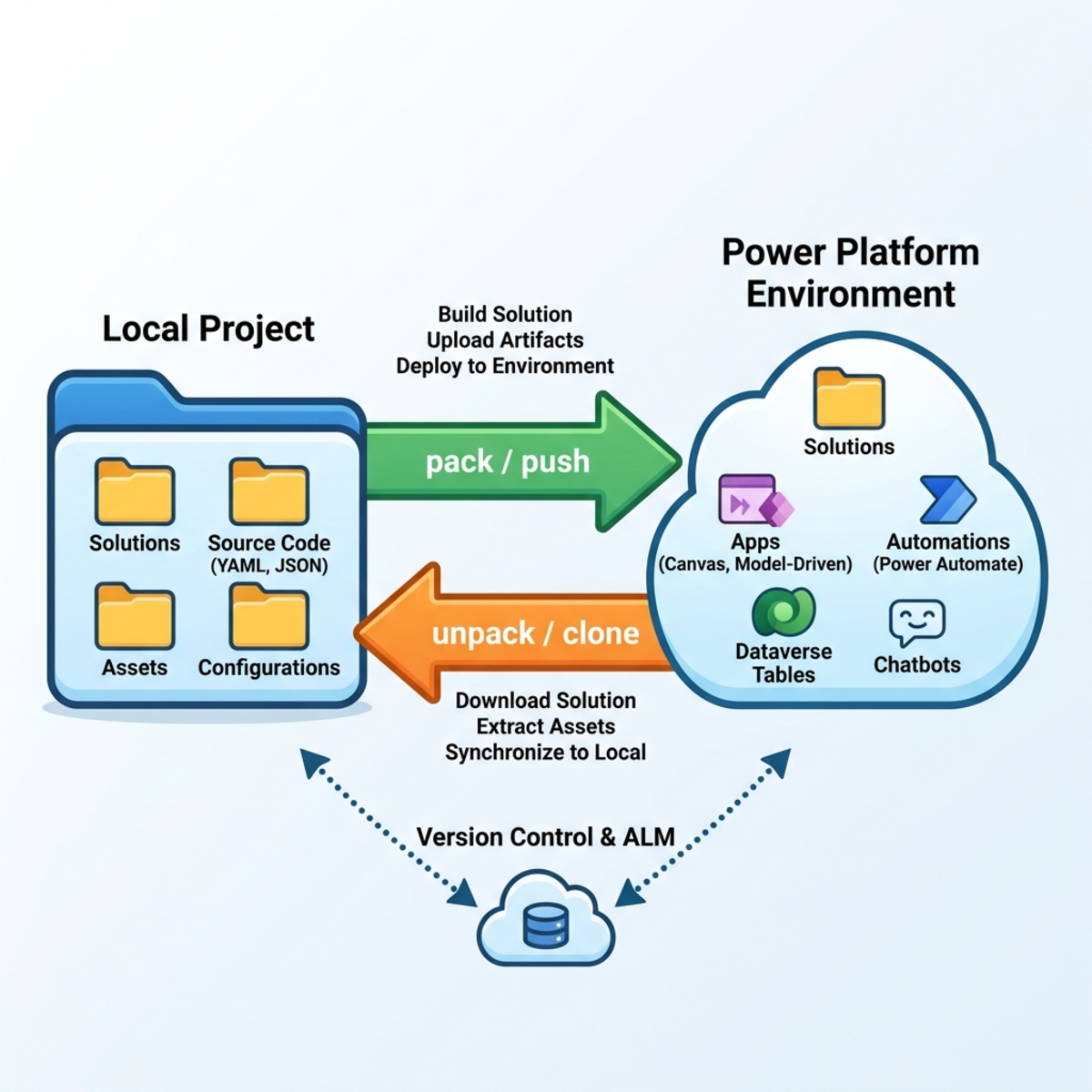
Publisher (and prefix) — The identity that “owns” a solution’s components. It carries a short customization prefix (e.g. con_) stamped onto everything you create (con_order) so it never collides with other vendors’ components. That’s why pac solution init requires --publisher-prefix.
Component — A single customizable item inside a solution: a table, column, app, flow, agent, security role, web resource, etc. A solution is essentially a collection of components.
Connector vs Connection — A connector is the definition of how to talk to a service (the API + auth shape, e.g. the “SQL Server connector”). A connection is an actual authenticated instance of that connector with real credentials. One connector → many connections.
Connection reference & Environment variable — Indirection layers that make solutions portable. A connection reference lets a flow point at “whatever connection this environment provides” instead of a hard-coded one; an environment variable holds a value (URL, key, etc.) that differs per environment. You supply these per environment via a settings file at import time (pac solution import --settings-file).
Installation
| Method | OS | Notes |
|---|
| .NET tool | Win/Linux/macOS | dotnet tool install --global Microsoft.PowerApps.CLI.Tool. Does not enable pac data or pac package deploy/show. |
| VS Code extension | Win/Linux/macOS | Runs in the VS Code terminal. |
| Windows MSI | Windows only | Lets you manage installed versions. |
dotnet tool install   --global Microsoft.PowerApps.CLI.Tool
dotnet tool update    --global Microsoft.PowerApps.CLI.Tool
dotnet tool uninstall --global Microsoft.PowerApps.CLI.Tool
pac            # prints the version banner
These are Windows-only and unavailable on a .NET-tool install on macOS/Linux:
pac data (entire group)pac package deploy, pac package showpac tool (entire group — launches Windows desktop tools)
Everything else is cross-platform.
Authentication (do this first)
Every environment-scoped command needs an auth profile. Without one you get Error: No profiles were found on this computer.
pac auth create                                              # interactive, default env
pac auth create --environment "https://yourorg.crm.dynamics.com"
pac auth create --deviceCode                                 # headless / SSH / WSL2 / Mac
pac auth create --name "Contoso-Dev" --environment "Contoso Dev"
pac auth who          # confirm who/where you are
pac auth list         # all profiles (Index column)
pac auth select --index 2
📌Sovereign clouds (--cloud): GCC→UsGov, GCC High→UsGovHigh, DoD→UsGovDod,
plus Public, China.
Self-discovery — the version-proof technique
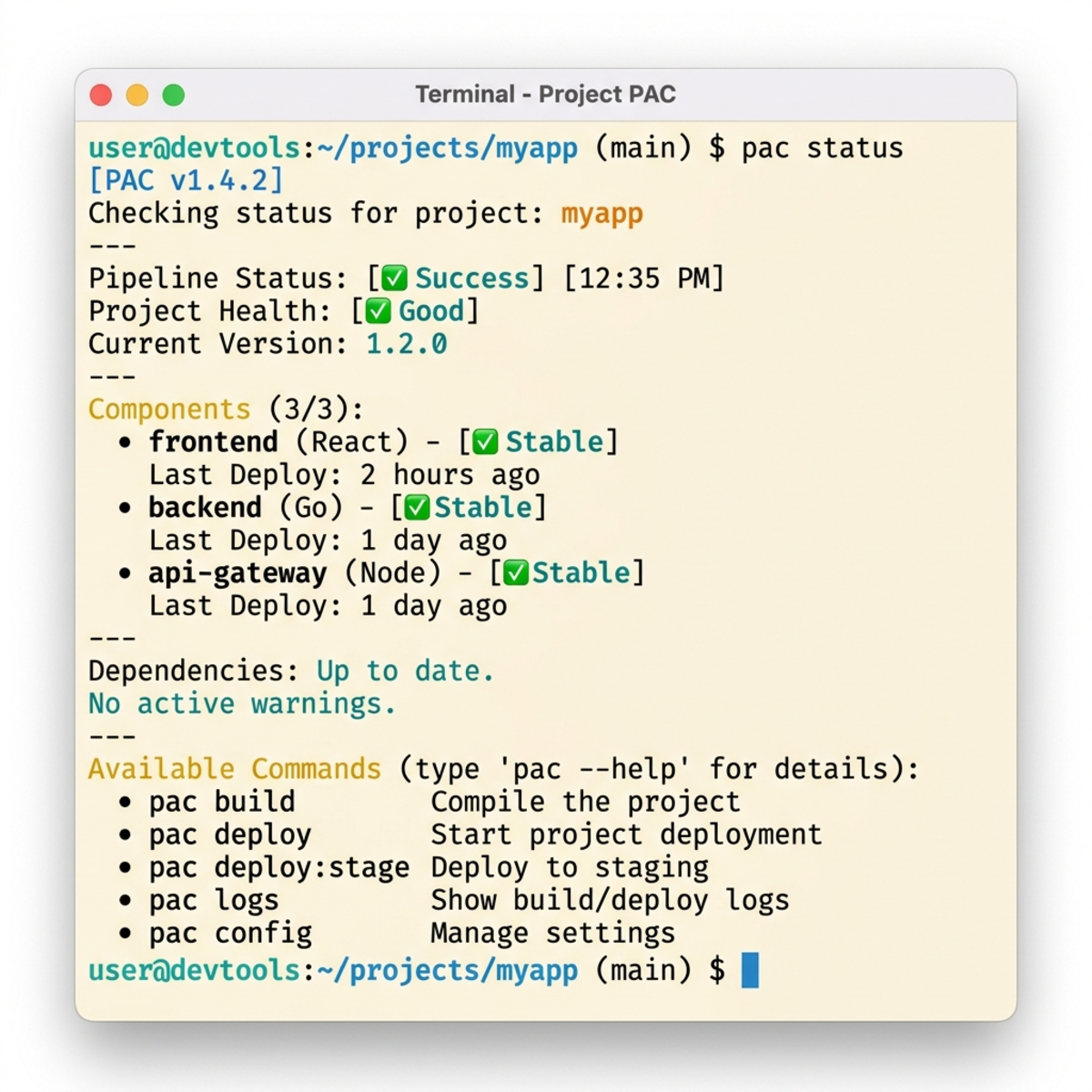
The CLI is self-documenting and always authoritative for your installed version:
pac help                       # all command groups
pac <group> help               # sub-commands in a group
pac <group> <command> --help   # full parameter list for one command
💡When this document and --help disagree, trust --help.
Global conventions
--environment / -env is on nearly every environment-scoped command. When omitted, the active auth profile’s selected org is used.- Every parameter has a long form and a short alias — e.g.
--pipeline and -p are the same parameter, not two different ones.
- Switches (e.g.
--managed, --async, --overwrite) take no value — their presence sets them true.
--json is available on many read commands for machine-readable output.- (Preview) / (Deprecated) tags mark groups/commands that are not yet GA or are being retired.
Part 1 — pac auth (Authentication)
What this group is for: Before any pac command can touch an environment, you have to log in and save that login as an auth profile on your machine. You can store several profiles (Dev, Prod, per-customer) and switch between them.
Typical first-run flow:
pac auth create            # 1. log in
pac auth who               # 2. confirm who/where you are
pac auth list              # 3. see all saved logins
pac auth select --index 2  # 4. switch to a different one
pac auth create — log in and save a profile
| Parameter | Long / short | Required? | What it’s for |
|---|
| Name | --name / -n | Optional | A friendly label (max 30 chars). |
| Environment | --environment / -env | Optional | Which environment to connect to (ID, URL, unique/partial name). |
| Device code | --deviceCode / -dc | Optional (switch) | Log in via a code pasted into a browser on any device — for headless/SSH/WSL2/Mac. |
| Application ID | --applicationId / -id | Optional | App (client) ID for service-principal logins. |
| Client secret | --clientSecret / -cs | Optional | Secret that pairs with the application ID. |
| Tenant | --tenant / -t | Optional | Tenant (directory) ID — required with app ID + secret/cert. |
| Cloud | --cloud / -ci | Optional | Public (default), UsGov, UsGovHigh, UsGovDod, China. |
| Managed identity | --managedIdentity / -mi | Optional (switch) | Log in using an Azure managed identity. |
| Certificate path / password | --certificateDiskPath / -cdp, --certificatePassword / -cp | Optional | Certificate-based service-principal auth. |
# Scenario 1 — simplest: browser sign-in to your default env
pac auth create

# Scenario 2 — connect straight to an environment by URL
pac auth create --environment https://contoso-dev.crm.dynamics.com

# Scenario 3 — connect by environment ID and name the profile
pac auth create --name "Contoso-Dev" --environment 00000000-0000-0000-0000-000000000000

# Scenario 4 — headless / browser won't open: device code
pac auth create --deviceCode

# Scenario 5 — unattended automation login with a service principal
pac auth create --name "Contoso-CI" \
  --applicationId 11111111-1111-1111-1111-111111111111 \
  --clientSecret  $CLIENT_SECRET \
  --tenant        22222222-2222-2222-2222-222222222222
pac auth who — confirm who/where you are
No parameters (accepts an optional --environment). Prints the active profile’s user and target environment.
pac auth who
pac auth who --environment https://contoso-prod.crm.dynamics.com
pac auth list — see all saved profiles
No parameters. Lists every profile with an Index number; an asterisk marks the active one.
pac auth select — switch the active profile
| Parameter | Long / short | Required? | What it’s for |
|---|
| Index | --index / -i | Optional | Profile number from pac auth list. |
| Name | --name / -n | Optional | Profile name (instead of the index). |
pac auth select --index 2
pac auth select --name "Contoso-Prod"
pac auth name — rename a profile
| Parameter | Long / short | Required? | What it’s for |
|---|
| Index | --index / -i | Required | Which profile to rename. |
| Name | --name / -n | Required | The new label (max 30 chars). |
pac auth name --index 1 --name "Contoso Dev"
pac auth update — repoint a profile (or rename it)
| Parameter | Long / short | Required? | What it’s for |
|---|
| Index | --index / -i | Required | Which profile to update. |
| Environment | --environment / -env | Optional | New target environment. |
| Name | --name / -n | Optional | New label. |
pac auth update --index 1 --environment https://contosodev.crm.dynamics.com
pac auth update --index 1 --name "Contoso Dev" --environment 00000000-0000-0000-0000-000000000000
pac auth delete — remove one profile
| Parameter | Long / short | Required? | What it’s for |
|---|
| Index | --index / -i | Optional | Profile number to delete. |
| Name | --name / -n | Optional | Profile name to delete. |
pac auth delete --index 2
pac auth delete --name "Contoso-Prod"
pac auth clear — wipe all profiles
No parameters. Removes every stored profile from the machine.
Part 2 — pac env
What this group is for: Once you’re logged in, pac env lets you see which environments you can reach, pick a default one for your active profile, query data with FetchXML, and read/update environment-level settings. (Formerly pac org — that spelling still works.)
pac env list — see the environments you can reach
| Parameter | Long / short | Required? | What it’s for |
|---|
| Filter | --filter / -f | Optional | A regex filter on environment name. |
pac env list
pac env list --filter dev
pac env list --filter "^Contoso"
pac env select — set the default environment
| Parameter | Long / short | Required? | What it’s for |
|---|
| Environment | --environment / -env | Optional | Which environment to make default (ID, URL, unique/partial name). |
pac env select --environment https://contosotest.crm.dynamics.com
pac env select --environment 00000000-0000-0000-0000-000000000000
pac env select --environment "Contoso Test"
pac env who — show the current environment
| Parameter | Long / short | Required? | What it’s for |
|---|
| Environment | --environment / -env | Optional | Check a specific environment instead of the active one. |
| JSON | --json | Optional (switch) | Machine-readable output. |
pac env who
pac env who --environment https://contoso-prod.crm.dynamics.com
pac env who --json
pac env fetch — run a FetchXML query
| Parameter | Long / short | Required? | What it’s for |
|---|
| XML | --xml / -x | Optional* | FetchXML query as an inline string. |
| XML file | --xmlFile / -xf | Optional* | Path to a file containing the FetchXML. |
| Environment | --environment / -env | Optional | Which environment to query. |
*Supply one of --xml or --xmlFile.
pac env fetch --xml "<fetch top='5'><entity name='account'><attribute name='name'/></entity></fetch>"
pac env fetch --xmlFile ./queries/active-contacts.xml
pac env fetch --xmlFile ./queries/active-contacts.xml --environment https://contoso-prod.crm.dynamics.com
pac env list-settings — read environment settings
| Parameter | Long / short | Required? | What it’s for |
|---|
| Filter | --filter / -f | Optional | Show only settings whose name contains this text. |
| Environment | --environment / -env | Optional | Which environment to read. |
pac env list-settings
pac env list-settings --filter number
pac env list-settings --filter currency --environment https://contoso-prod.crm.dynamics.com
pac env update-settings — change an environment setting
| Parameter | Long / short | Required? | What it’s for |
|---|
| Name | --name / -n | Required | The exact setting name (from list-settings). |
| Value | --value / -v | Optional | The new value. |
| Environment | --environment / -env | Optional | Which environment to update. |
pac env update-settings --name showweeknumber --value true
pac env update-settings --name numberformat --value en
pac env update-settings --name showweeknumber --value true --environment https://contoso-test.crm.dynamics.com
Part 3 — pac solution (Solutions & ALM)
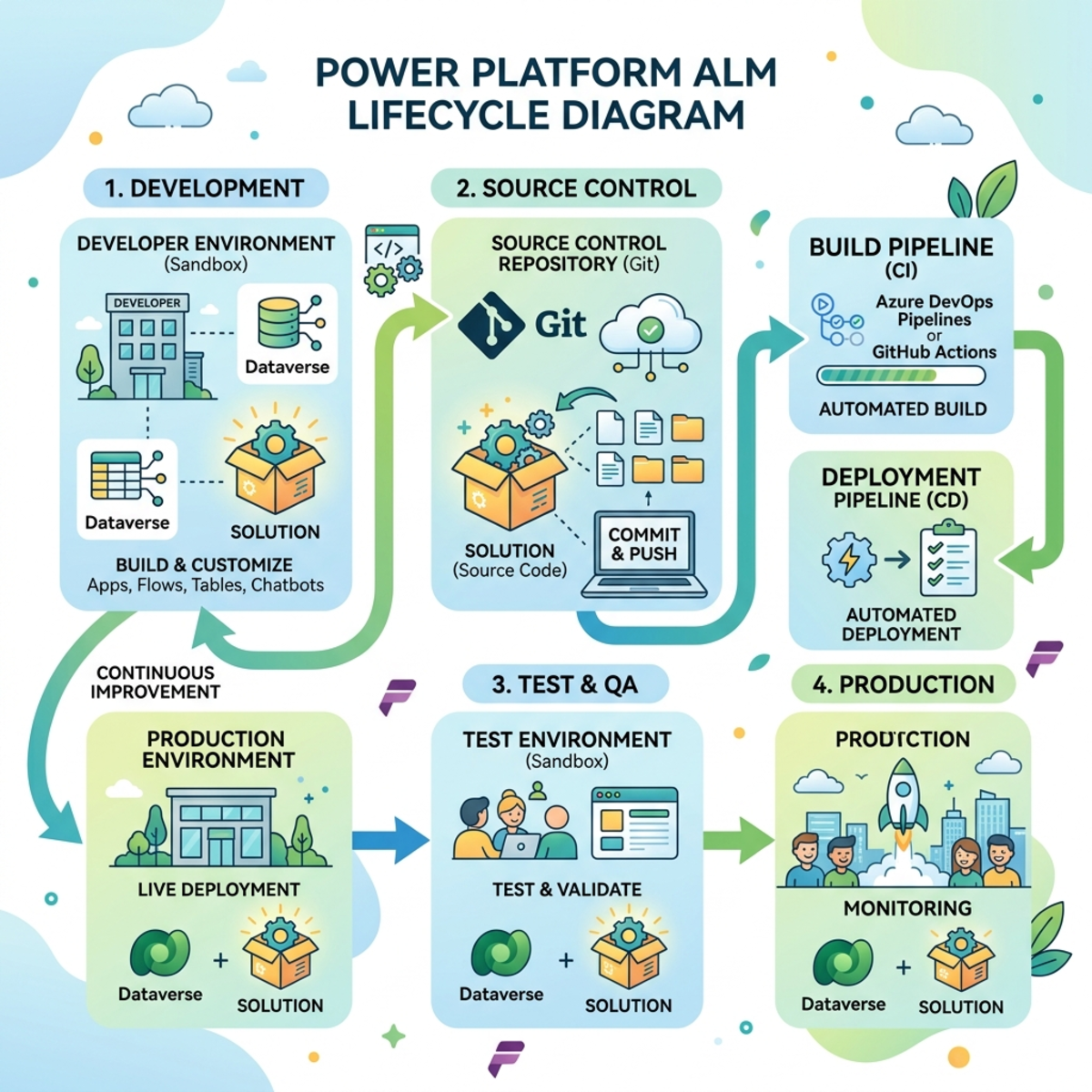
What this group is for: Solutions package and move customizations between environments. Two models: environment ↔ environment (export/import) and environment ↔ source control (unpack/pack, automated by clone/sync). Unmanaged = editable, for Dev; Managed = locked, for Test/Prod.
The two common loops:
# Quick promote: Dev → Prod
pac solution export --name MySolution --managed --path ./MySolution.zip
pac auth select --index 2
pac solution import --path ./MySolution.zip

# Source control round-trip
pac solution export --name MySolution --path ./MySolution.zip
pac solution unpack --zipfile ./MySolution.zip --folder ./src/MySolution
pac solution pack   --zipfile ./MySolution.zip --folder ./src/MySolution
pac solution init — start a new solution project
| Parameter | Long / short | Required? | What it’s for |
|---|
| Publisher name | --publisher-name / -pn | Required | Publisher’s unique name (letters/digits/underscore; starts with letter/underscore). |
| Publisher prefix | --publisher-prefix / -pp | Required | 2–8 char prefix stamped on components; starts with a letter, not mscrm. |
| Output directory | --outputDirectory / -o | Optional | Where to create the project. |
pac solution init --publisher-name contoso --publisher-prefix con
pac solution init --publisher-name contoso --publisher-prefix con --outputDirectory ./solutions/Core
pac solution clone — pull an existing solution into a project
| Parameter | Long / short | Required? | What it’s for |
|---|
| Name | --name / -n | Required | The solution to pull down. |
| Include | --include / -i | Optional | Extra settings to bring along (comma-separated). |
| Package type | --packagetype / -p | Optional | Unmanaged, Managed, or Both (default Both). |
| Output directory | --outputDirectory / -o | Optional | Where to create the project. |
| Async | --async / -a | Optional (switch) | Run the export asynchronously. |
| Environment | --environment / -env | Optional | Source environment. |
pac solution clone --name ContosoCore
pac solution clone --name ContosoCore --include general,autonumbering
pac solution clone --name ContosoCore --packagetype Unmanaged --async --outputDirectory ./src/ContosoCore
pac solution sync — refresh your project from the environment
| Parameter | Long / short | Required? | What it’s for |
|---|
| Package type | --packagetype / -p | Optional | Unmanaged, Managed, or Both. |
| Async | --async / -a | Optional (switch) | Run asynchronously. |
| Environment | --environment / -env | Optional | Source environment. |
Confirm exact flags with pac solution sync --help on v2.8.1.
pac solution sync
pac solution sync --packagetype Unmanaged
pac solution export — download a solution as a zip
| Parameter | Long / short | Required? | What it’s for |
|---|
| Name | --name / -n | Required | The solution to export. |
| Path | --path / -p | Optional | Where to write the zip. |
| Managed | --managed / -m | Optional (switch) | Export as managed (for Test/Prod). |
| Include | --include / -i | Optional | Extra settings to export (comma-separated). |
| Overwrite | --overwrite / -ow | Optional (switch) | Allow overwriting an existing zip. |
| Async | --async / -a | Optional (switch) | Export asynchronously. |
| Max wait | --max-async-wait-time / -wt | Optional | Max minutes to wait (default 60). |
| Environment | --environment / -env | Optional | Source environment. |
pac solution export --name ContosoCore --path ./ContosoCore.zip
pac solution export --name ContosoCore --managed --path ./ContosoCore_managed.zip --overwrite
pac solution export --name ContosoCore --path ./ContosoCore.zip --async --environment https://contoso-dev.crm.dynamics.com
pac solution import — upload a solution zip
| Parameter | Long / short | Required? | What it’s for |
|---|
| Path | --path / -p | Optional | The zip to import (assumes a .cdsproj if omitted). |
| Activate plug-ins | --activate-plugins / -ap | Optional (switch) | Turn on plug-ins/flows after import. |
| Force overwrite | --force-overwrite / -f | Optional (switch) | Overwrite unmanaged customizations. |
| Publish changes | --publish-changes / -pc | Optional (switch) | Publish right after import. |
| Import as holding | --import-as-holding / -h | Optional (switch) | Stage a managed upgrade (pairs with upgrade). |
| Stage and upgrade | --stage-and-upgrade / -up | Optional (switch) | Import and apply the upgrade in one step. |
| Skip lower version | --skip-lower-version / -slv | Optional (switch) | Skip if same/higher version present. |
| Skip dependency check | --skip-dependency-check / -s | Optional (switch) | Skip the product-update dependency check. |
| Settings file | --settings-file | Optional | JSON of connection-reference + env-variable values. |
| Async | --async / -a | Optional (switch) | Import asynchronously. |
| Max wait | --max-async-wait-time / -wt | Optional | Max minutes to wait (default 60). |
| Environment | --environment / -env | Optional | Target environment. |
pac solution import --path ./ContosoCore_managed.zip
pac solution import --path ./ContosoCore_managed.zip --activate-plugins --publish-changes
pac solution import --path ./ContosoCore_managed.zip \
  --settings-file ./deploy/prod.settings.json --skip-lower-version --async \
  --environment https://contoso.crm.dynamics.com
pac solution pack — build editable files into a zip
| Parameter | Long / short | Required? | What it’s for |
|---|
| Zip file | --zipfile / -z | Required | Output zip path. |
| Folder | --folder / -f | Optional | Source folder to read from. |
| Package type | --packagetype / -p | Optional | Unmanaged (default), Managed, Both. |
| Localize | --localize / -loc | Optional (switch) | Merge translated strings from .resx. |
| Single component | --singleComponent / -sc | Optional | WebResource, Plugin, Workflow, or None. |
| Map | --map / -m | Optional | Mapping XML controlling what gets packed. |
| Error level | --errorlevel / -e | Optional | Verbose, Info (default), Warning, Error, Off. |
| (advanced) | --allowDelete / -ad, --allowWrite / -aw, --clobber / -c, --log / -l, --useLcid / -lcid | Optional | Fine-grained file/logging control. |
YAML source-control folder format requires CLI ≥ 2.4.1 (supported on 2.8.1).
pac solution pack --zipfile ./ContosoCore.zip --folder ./src/ContosoCore
pac solution pack --zipfile ./ContosoCore_managed.zip --folder ./src/ContosoCore --packagetype Managed
pac solution pack --zipfile ./ContosoCore.zip --folder ./src/ContosoCore --localize
pac solution unpack — explode a zip into editable files
Shares pack’s full parameter set.
| Parameter | Long / short | Required? | What it’s for |
|---|
| Zip file | --zipfile / -z | Required | The zip to unpack. |
| Folder | --folder / -f | Optional | Destination folder. |
| Package type | --packagetype / -p | Optional | Unmanaged, Managed, Both. |
| (advanced flags) | — | Optional | --localize, --map, --singleComponent, --errorlevel, etc. |
pac solution unpack --zipfile ./ContosoCore.zip --folder ./src/ContosoCore
pac solution unpack --zipfile ./ContosoCore.zip --folder ./src/ContosoCore --packagetype Both
pac solution list — list solutions in the environment
| Parameter | Long / short | Required? | What it’s for |
|---|
| Include system | --includeSystemSolutions | Optional (switch) | Also show Microsoft/system solutions. |
| JSON | --json | Optional (switch) | Machine-readable output. |
| Environment | --environment / -env | Optional | Which environment. |
pac solution list
pac solution list --includeSystemSolutions --json
pac solution delete — remove a solution
| Parameter | Long / short | Required? | What it’s for |
|---|
| Solution name | --solution-name / -sn | Required | The solution to delete. |
| Environment | --environment / -env | Optional | Which environment. |
pac solution delete --solution-name ContosoCore
pac solution delete --solution-name ContosoCore --environment https://contoso-test.crm.dynamics.com
pac solution publish — publish all customizations
| Parameter | Long / short | Required? | What it’s for |
|---|
| Async | --async / -a | Optional (switch) | Publish asynchronously. |
| Environment | --environment / -env | Optional | Which environment. |
pac solution publish
pac solution publish --async --environment https://contoso-dev.crm.dynamics.com
pac solution version — bump the version number
| Parameter | Long / short | Required? | What it’s for |
|---|
| Build version | --buildversion / -bv | Optional | Sets the build number (integer ≥ 0). |
| Revision version | --revisionversion / -rv | Optional | Sets the revision number. |
| Solution name | --solution-name / -sn | Optional | Which solution. |
| Environment | --environment / -env | Optional | Which environment. |
pac solution version --solution-name ContosoCore --buildversion 5
pac solution version --solution-name ContosoCore --buildversion 5 --revisionversion 2
pac solution online-version — read/set the version in Dataverse
| Parameter | Long / short | Required? | What it’s for |
|---|
| Solution name | --solution-name / -sn | Required | Which solution. |
| Solution version | --solution-version / -sv | Optional | Version to set (omit to read current). |
| Environment | --environment / -env | Optional | Which environment. |
pac solution online-version --solution-name ContosoCore
pac solution online-version --solution-name ContosoCore --solution-version 1.0.0.2
pac solution upgrade — apply a staged managed upgrade
| Parameter | Long / short | Required? | What it’s for |
|---|
| Solution name | --solution-name / -sn | Required | The solution to upgrade. |
| Async | --async / -a | Optional (switch) | Run asynchronously. |
| Environment | --environment / -env | Optional | Which environment. |
pac solution upgrade --solution-name ContosoCore
pac solution upgrade --solution-name ContosoCore --async --environment https://contoso.crm.dynamics.com
pac solution check — run the solution checker
| Parameter | Long / short | Required? | What it’s for |
|---|
| Path | --path / -p | Optional | Path to solution file(s) (wildcards allowed). |
| Solution URL | --solutionUrl / -u | Optional | SAS URL to a solution.zip. |
| Geo | --geo / -g | Optional | Checker geo (UnitedStates, Europe, Asia, …). |
| Rule set | --ruleSet / -rs | Optional | Solution Checker (default), AppSource Certification, or a GUID. |
| Output directory | --outputDirectory / -o | Optional | Where to write results. |
| Save results | --saveResults / -sav | Optional (switch) | Store results in Solution Health Hub. |
| Environment | --environment / -env | Optional | Which environment. |
pac solution check --path ./ContosoCore.zip --outputDirectory ./checker-results --geo UnitedStates
pac solution check --path ./ContosoCore.zip --ruleSet "AppSource Certification" --geo Europe
pac solution check --path ./ContosoCore.zip --saveResults --environment https://contoso-dev.crm.dynamics.com
pac solution create-settings — generate a deployment settings file
| Parameter | Long / short | Required? | What it’s for |
|---|
| Solution zip | --solution-zip / -z | Optional* | Read from a solution zip. |
| Solution folder | --solution-folder / -f | Optional* | Read from an unpacked folder. |
| Settings file | --settings-file / -s | Optional | Output JSON path. |
pac solution create-settings --solution-zip ./ContosoCore.zip --settings-file ./deploy/dev.settings.json
pac solution create-settings --solution-folder ./src/ContosoCore --settings-file ./deploy/prod.settings.json
pac solution add-reference — link another project
| Parameter | Long / short | Required? | What it’s for |
|---|
| Path | --path / -p | Required | Path to the project being referenced. |
pac solution add-reference --path ../controls/MyControl
pac solution add-reference --path ../plugins/ContosoPlugins
pac solution add-solution-component — add a component
| Parameter | Long / short | Required? | What it’s for |
|---|
| Component | --component / -c | Required | Component schema name or ID. |
| Component type | --componentType / -ct | Required | Numeric type code (e.g. 1 = table). |
| Solution unique name | --solutionUniqueName / -sn | Required | The target solution. |
| Add required | --AddRequiredComponents / -arc | Optional (switch) | Also add dependencies. |
| Environment | --environment / -env | Optional | Which environment. |
pac solution add-solution-component --solutionUniqueName ContosoCore --component contact --componentType 1
pac solution add-solution-component --solutionUniqueName ContosoCore --component account --componentType 1 --AddRequiredComponents
pac solution add-license — attach ISV licensing info
| Parameter | Long / short | Required? | What it’s for |
|---|
| Plan definition file | --planDefinitionFile / -pd | Required | Plan definition CSV. |
| Plan mapping file | --planMappingFile / -pm | Required | Plan-to-component mapping CSV. |
pac solution add-license --planDefinitionFile ./ISV_Plan_Definition.csv --planMappingFile ./ISV_Plan_Mapping.csv
Part 4 — pac package (Package Deployer projects)
What this group is for: Bundles several solutions plus reference data, custom C# deployment logic, and an install order into one deployable Package Deployer package.
⚠️pac package deploy and pac package show are Windows-only.
pac package init — scaffold a package project
| Parameter | Long / short | Required? | What it’s for |
|---|
| Output directory | --outputDirectory / -o | Optional | Where to create the project. |
| Package name | --package-name | Optional | Default package name. |
| Package type | --package-type / -pt | Optional | dataverse (default) or erp. |
| Publisher | --publisher / -pub | Optional | Publisher (default Microsoft). |
| Model | --model / -m | Optional | X++ model name(s) — required when erp. |
| Layer | --layer / -l | Optional | X++ layer (USR…ISV, default ISV). |
| Source root | --source-root / -sr | Optional | Source root (default ./src). |
pac package init --outputDirectory ./ContosoPackage
pac package init --outputDirectory ./ContosoPackage --package-name ContosoSetup --publisher Contoso
pac package init --outputDirectory ./FnOPackage --package-type erp --model ContosoModel
pac package add-solution — add a solution to the package
| Parameter | Long / short | Required? | What it’s for |
|---|
| Path | --path / -p | Required | Path to the solution .zip. |
| Import order | --import-order | Optional | Install sequence (lower/negative = earlier). |
| Import mode | --import-mode | Optional | sync or async. |
| Skip validation | --skip-validation / -sv | Optional (switch) | Add even if missing/invalid. |
| Missing-dependency behavior | --missing-dependency-behavior | Optional | skip or fault. |
| Overwrite unmanaged | --overwrite-unmanaged-customizations | Optional | true/false. |
| Publish + activate | --publish-workflows-activate-plugins | Optional | true/false. |
| Dependency overrides | --dependency-overrides | Optional | uniquename:minVersion:maxVersion;…. |
pac package add-solution --path ./Core.zip
pac package add-solution --path ./Reports.zip --import-order 2
pac package add-solution --path ./Automation.zip --import-mode async --publish-workflows-activate-plugins true
pac package add-reference — reference a solution project
| Parameter | Long / short | Required? | What it’s for |
|---|
| Path | --path / -p | Required | Path to the referenced solution project. |
| (import/dependency flags) | same as add-solution | Optional | --import-order, --import-mode, --dependency-overrides, etc. |
pac package add-reference --path ../ContosoCore
pac package add-reference --path ../ContosoReports --import-order 3
pac package add-external-package — add a non-Dataverse package
| Parameter | Long / short | Required? | What it’s for |
|---|
| Package type | --package-type / -t | Required | e.g. xpp for F&O packages. |
| Path | --path / -p | Required | Path to the external package. |
| Import order | --import-order | Optional | Install sequence. |
| Skip validation | --skip-validation / -sv | Optional (switch) | Add even if missing/invalid. |
pac package add-external-package --package-type xpp --path ./fno/ContosoFnO.zip
pac package add-external-package --package-type xpp --path ./fno/ContosoFnO.zip --import-order 1
pac package deploy (Windows-only) — deploy the package
| Parameter | Long / short | Required? | What it’s for |
|---|
| Package | --package / -p | Optional | Built package .dll/.zip. |
| Package type | --package-type / -pt | Optional | dataverse (default) or erp. |
| Solution | --solution / -sz | Optional | A single solution ZIP/CAB instead of a package. |
| Settings | --settings / -s | Optional | Runtime settings key=value|key=value. |
| Log to console | --logConsole / -c | Optional (switch) | Stream the log. |
| Log file | --logFile / -lf | Optional | Write the log to a file. |
| Environment | --environment / -env | Optional | Target environment. |
| (ERP flags) | --db-sync / -ds, --build-type / -bt, --release-type / -rt, --modules / -m | Optional | Database-sync/build controls. |
pac package deploy --package ./bin/Debug/ContosoPackage.dll --logConsole
pac package deploy --package ./bin/Debug/ContosoPackage.dll --settings "Region=EU|EnableFeatureX=true" --environment https://contoso.crm.dynamics.com
pac package deploy --package ./bin/Debug/ContosoPackage.dll --logFile ./deploy.log
pac package show (Windows-only) — inspect a built package
| Parameter | Long / short | Required? | What it’s for |
|---|
| Package | --package / -p | Required | Package .dll/.zip to inspect. |
| Log file | --logFile / -lf | Optional | Write details to a file. |
| Verbose | --verbose / -vdbg | Optional (switch) | Detailed diagnostics. |
| Environment | --environment / -env | Optional | Target environment context. |
pac package show --package ./bin/Debug/ContosoPackage.dll
pac package show --package ./bin/Debug/ContosoPackage.dll --verbose --logFile ./inspect.log
Part 5 — pac pipeline
What this group is for: Pipelines push a solution through stages (Dev → Test → Prod) inside the product, without manual export/import.
pac pipeline list — see pipelines and their stages
| Parameter | Long / short | Required? | What it’s for |
|---|
| Pipeline | --pipeline / -p | Optional | Name/ID of one pipeline to drill into (shows stages + stage IDs). Omit for all pipelines. |
| Environment | --environment / -env | Optional | Which environment to look in. |
pac pipeline list
pac pipeline list --pipeline "Contoso Release Pipeline"
pac pipeline list -p "Contoso Release Pipeline" -env https://contoso-host.crm.dynamics.com
pac pipeline deploy — run a deployment
| Parameter | Long / short | Required? | What it’s for |
|---|
| Stage ID | --stageId / -sid | Required | The stage you’re deploying to (from list --pipeline). |
| Solution name | --solutionName / -sn | Required | Unique name of the solution being moved. |
| Current version | --currentVersion / -cv | Required | The solution’s current version. |
| New version | --newVersion / -nv | Required | Version to stamp on the deployed solution. |
| Wait | --wait / -w | Optional (switch) | Block until the deploy finishes. |
| Environment | --environment / -env | Optional | The environment hosting the pipeline. |
pac pipeline deploy \
  --stageId 1a2b3c4d-5e6f-7a8b-9c0d-1e2f3a4b5c6d \
  --solutionName ContosoCoreSolution \
  --currentVersion 1.0.0.0 --newVersion 1.0.0.1 --wait
Part 6 — pac data (Configuration data & bulk delete)
⚠️Windows-only. Run from a Windows machine or CI agent.
What this group is for: Move small configuration/reference data between environments (export/import, via the Configuration Migration tool), and manage bulk-delete jobs and retention policies.
pac data export --schemaFile ./schema.xml --dataFile ./data.zip
pac auth select --index 2
pac data import --data ./data.zip
pac data export — export configuration data
| Parameter | Long / short | Required? | What it’s for |
|---|
| Schema file | --schemaFile / -sf | Required | Schema XML (made with the Configuration Migration tool). |
| Data file | --dataFile / -df | Optional | Output zip (default data.zip). |
| Overwrite | --overwrite / -o | Optional (switch) | Allow overwriting the output zip. |
| Verbose | --verbose / -v | Optional (switch) | Detailed progress. |
| Environment | --environment / -env | Optional | Source environment. |
pac data export --schemaFile ./schema.xml
pac data export --schemaFile ./schema.xml --dataFile ./config-data.zip --overwrite
pac data export --schemaFile ./schema.xml --dataFile ./config-data.zip --verbose --environment https://contoso-dev.crm.dynamics.com
pac data import — import configuration data
| Parameter | Long / short | Required? | What it’s for |
|---|
| Data | --data / -d | Required | The zip/directory to import. |
| Environment | --environment / -env | Optional | Target environment. |
Confirm extra flags with pac data import --help.
pac data import --data ./config-data.zip
pac data import --data ./config-data.zip --environment https://contoso-test.crm.dynamics.com
pac data bulk-delete schedule — schedule a bulk-delete job
| Parameter | Long / short | Required? | What it’s for |
|---|
| Entity | --entity / -e | Required | Table logical name (e.g. account). |
| FetchXML | --fetchxml / -fx | Optional | Filter selecting records (without it, all rows are targeted). |
| Job name | --job-name / -jn | Optional | Friendly job name. |
| Recurrence | --recurrence / -r | Optional | e.g. FREQ=DAILY;INTERVAL=1. |
| Start time | --start-time / -st | Optional | ISO 8601 start (default now). |
| Environment | --environment / -env | Optional | Which environment. |
pac data bulk-delete schedule --entity activitypointer --fetchxml ./queries/completed-activities.xml --job-name "Cleanup completed activities"
pac data bulk-delete schedule --entity account --fetchxml ./queries/stale-accounts.xml --job-name "Daily cleanup" --recurrence "FREQ=DAILY;INTERVAL=1" --start-time 2026-07-01T02:00:00Z
pac data bulk-delete schedule --entity contoso_tempimport --job-name "Purge temp import"
⚠️No filter on the schedule means all rows are targeted.
pac data bulk-delete list / show / pause / resume / cancel
list takes no required params; the other four take --id / -id (required, the job GUID). All accept --environment / -env.
pac data bulk-delete list
pac data bulk-delete show   --id 00000000-0000-0000-0000-000000000000
pac data bulk-delete pause  --id 00000000-0000-0000-0000-000000000000
pac data bulk-delete resume --id 00000000-0000-0000-0000-000000000000
pac data bulk-delete cancel --id 00000000-0000-0000-0000-000000000000
pac data retention … — retention policies
Five sub-commands — enable-entity, set, list, show, status — all accepting --environment / -env. Table/policy-specific flags vary; confirm with pac data retention <command> --help.
pac data retention list
pac data retention enable-entity --environment https://contoso-prod.crm.dynamics.com
pac data retention status --environment https://contoso-prod.crm.dynamics.com
Part 7 — pac connection (Dataverse connections)
What this group is for: Manage connections stored inside an environment — the credentials (typically service-principal app ID + secret + tenant) that automation/components use to talk to Dataverse. (Distinct from pac auth, which is your CLI login.)
pac connection create
| Parameter | Long / short | Required? | What it’s for |
|---|
| Name | --name / -n | Required | Connection label. |
| Application ID | --application-id / -a | Required | Service-principal app (client) ID. |
| Client secret | --client-secret / -cs | Required | Secret paired with the app ID. |
| Tenant ID | --tenant-id / -t | Required | Directory (tenant) ID. |
| Environment | --environment / -env | Optional | Which environment. |
pac connection create --name "Contoso Automation" \
  --application-id 11111111-1111-1111-1111-111111111111 \
  --client-secret  $CLIENT_SECRET \
  --tenant-id      22222222-2222-2222-2222-222222222222
pac connection list
| Parameter | Long / short | Required? | What it’s for |
|---|
| Environment | --environment / -env | Optional | Which environment to list. |
pac connection list
pac connection list --environment https://contoso-prod.crm.dynamics.com
pac connection update
| Parameter | Long / short | Required? | What it’s for |
|---|
| Connection ID | --connection-id / -id | Required | Which connection (GUID from list). |
| Application ID | --application-id / -a | Required | The (new) app ID. |
| Client secret | --client-secret / -cs | Required | The (new) secret — this is how you rotate it. |
| Tenant ID | --tenant-id / -t | Required | Tenant ID. |
| Environment | --environment / -env | Optional | Which environment. |
pac connection update --connection-id 33333333-3333-3333-3333-333333333333 \
  --application-id 11111111-1111-1111-1111-111111111111 \
  --client-secret  $NEW_CLIENT_SECRET \
  --tenant-id      22222222-2222-2222-2222-222222222222
pac connection delete
| Parameter | Long / short | Required? | What it’s for |
|---|
| Connection ID | --connection-id / -id | Required | Which connection to delete. |
| Environment | --environment / -env | Optional | Which environment. |
pac connection delete --connection-id 33333333-3333-3333-3333-333333333333
Part 8 — pac plugin (Dataverse plug-in class libraries)
What this group is for: Scaffold and deploy plug-ins — custom C# code that runs inside Dataverse on events.
pac plugin init
| Parameter | Long / short | Required? | What it’s for |
|---|
| Output directory | --outputDirectory / -o | Optional | Where to create the project. |
| Author | --author / -a | Optional | Author(s) in the package metadata. |
| Signing key path | --signing-key-file-path / -sk | Optional | Existing signing key for the strong name. |
| Skip signing | --skip-signing / -ss | Optional (switch) | Don’t sign the assembly (default is to sign). |
pac plugin init
pac plugin init --outputDirectory ./plugins/ContosoPlugins --author "Contoso Dev Team"
pac plugin init --skip-signing
pac plugin push
| Parameter | Long / short | Required? | What it’s for |
|---|
| Plugin ID | --pluginId / -id | Required | The plug-in assembly/package ID. |
| Plugin file | --pluginFile / -pf | Optional | The built file to push. |
| Type | --type / -t | Optional | Nuget (package, default) or Assembly (single .dll). |
| Configuration | --configuration / -c | Optional | Build configuration (default Debug). |
| Environment | --environment / -env | Optional | Target environment. |
pac plugin push --pluginId 44444444-4444-4444-4444-444444444444
pac plugin push --pluginId 44444444-4444-4444-4444-444444444444 --pluginFile ./bin/Release/ContosoPlugins.dll --type Assembly
pac plugin push --pluginId 44444444-4444-4444-4444-444444444444 --configuration Release --environment https://contoso-dev.crm.dynamics.com
Part 9 — pac model (Model-driven apps & generated pages)
What this group is for: Create model-driven apps and list apps/tables/languages, plus a genpage sub-group for code-first custom pages.
pac model create
| Parameter | Long / short | Required? | What it’s for |
|---|
| Name | --name / -n | Required | Display name. |
| Description | --description / -d | Optional | App description. |
| Solution | --solution | Optional | Solution to add to (default Default). |
| Publish | --publish | Optional (switch) | Publish immediately. |
| Environment | --environment / -env | Optional | Which environment. |
pac model create --name "Contoso Service Hub"
pac model create --name "Contoso Service Hub" --description "Customer service workspace" --solution ContosoCore
pac model create --name "Contoso Service Hub" --solution ContosoCore --publish
pac model list / list-tables / list-languages
| Command | Key parameters |
|---|
pac model list | --environment / -env |
pac model list-tables | --search / -s, --type / -t (custom/standard/all), --environment / -env |
pac model list-languages | --environment / -env |
pac model list
pac model list-tables --type custom
pac model list-tables --search account,contact,contoso_order
pac model list-languages
pac model genpage — code-first custom pages
| Command | Purpose | Key parameters |
|---|
genpage list | List generated pages in an app. | --app-id (req), --environment |
genpage generate-types | Generate TypeScript types for data sources. | --data-sources (req), --output-file / -o, --environment |
genpage transpile | Compile/test a page’s TS locally. | --code-file (req), --data-sources, --output-file, --environment |
genpage upload | Upload & publish a page. | --app-id (req), --code-file (req), --page-id, --name / -n, --add-to-sitemap, --data-sources, --environment |
genpage download | Pull pages from an app. | --app-id (req), --page-id, --output-directory / -o, --environment |
pac model genpage generate-types --data-sources account,lead,contact
pac model genpage transpile --code-file ./src/pages/OrderSummary.ts --data-sources contoso_order
pac model genpage upload --app-id 55555555-5555-5555-5555-555555555555 --code-file ./src/pages/OrderSummary.ts --name "Order Summary" --add-to-sitemap
pac model genpage download --app-id 55555555-5555-5555-5555-555555555555 --output-directory ./src/pages
Part 10 — pac managed-identity (Preview)
What this group is for: Let Dataverse components authenticate to Azure without stored secrets, via an Azure Managed Identity + Federated Identity Credential (FIC).
Shared parameters (on almost every command): --component-id / -id (required, GUID), --component-type / -t (required, e.g. ServiceEndpoint/PluginAssembly/CopilotStudio), --environment / -env (optional).
| Command | Extra parameters |
|---|
create | --application-id / -aid (req), --tenant-id / -tid (req) |
get | (shared only) |
update | --application-id / -aid, --tenant-id / -tid |
delete | --confirm / -y (switch) |
configure-fic / show-fic / verify-fic | --version / -v |
upgrade-version | --target-version, --revert-version (switch), --skip-fic-configuration (switch), --confirm / -y (switch) |
pac managed-identity create --component-id 77777777-7777-7777-7777-777777777777 --component-type ServiceEndpoint \
  --application-id 11111111-1111-1111-1111-111111111111 --tenant-id 22222222-2222-2222-2222-222222222222
pac managed-identity configure-fic --component-id 77777777-7777-7777-7777-777777777777 --component-type ServiceEndpoint
pac managed-identity verify-fic   --component-id 77777777-7777-7777-7777-777777777777 --component-type ServiceEndpoint
pac managed-identity upgrade-version --component-id 77777777-7777-7777-7777-777777777777 --component-type ServiceEndpoint --target-version 2 --confirm
pac managed-identity delete --component-id 77777777-7777-7777-7777-777777777777 --component-type ServiceEndpoint --confirm
Part 11 — pac copilot (Copilot Studio agents)
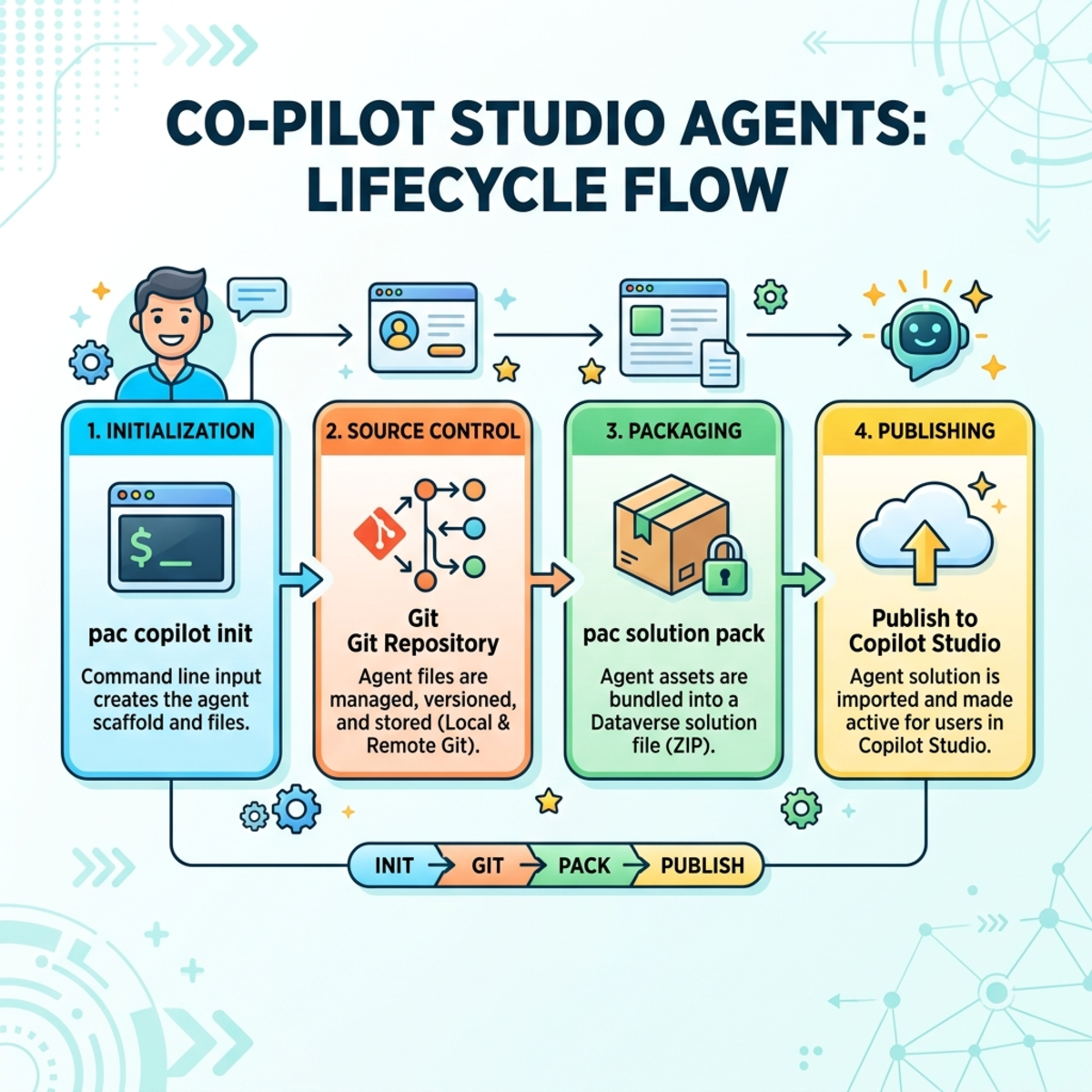
What this group is for: The full command-line lifecycle for Copilot Studio agents — create, sync to local files for source control, package into solutions, publish, deploy through environments, localize, and call AI Builder models.
Two ways to work with agents
| Model | What it is | Commands |
|---|
| Workspace (code-first / Git) | Agent lives as a folder of files you edit locally and sync with the studio. | init, clone, pull, push, pack |
| Template (YAML) | Extract an agent to a reusable YAML template, then stamp out new agents. | extract-template, create |
Everything else (publish, status, list, delete, quarantine, translations, MCP, AI models) supports both.
Workspace lifecycle
pac copilot init — scaffold a new agent workspace
| Parameter | Long / short | Required? | What it’s for |
|---|
| Name | --name / -n | Required | Agent display name. |
| Publisher prefix | --publisher-prefix / -pp | Required | Solution publisher prefix. |
| Instructions | --instructions / -ins | Optional | Agent system instructions. |
| Schema name | --schema-name / -sn | Optional | Override the derived schema name ({prefix}_{name}). |
| Project directory | --project-dir / -pd | Optional | Where to create the workspace. |
| Template | --template / -t | Optional | default or minimal. |
| Environment | --environment / -env | Optional | Target environment. |
pac copilot init --name "Contoso Helpdesk" --publisher-prefix con
pac copilot init --name "Contoso Helpdesk" --publisher-prefix con --template minimal --project-dir ./agents/helpdesk
pac copilot init --name "Contoso Helpdesk" --publisher-prefix con --instructions "You are a friendly IT helpdesk agent."
pac copilot init --name "Contoso Helpdesk" --publisher-prefix con --schema-name con_helpdeskbot --environment https://contoso-dev.crm.dynamics.com
pac copilot clone — pull an existing agent into a workspace
| Parameter | Long / short | Required? | What it’s for |
|---|
| Bot | --bot / -id | Required | The agent’s ID or schema name. |
| Component collection | --component-collection / -cc | Optional | Specific collection ID (repeatable). |
| Display name | --display-name / -dn | Optional | Display name for the output folder. |
| Output directory | --output-dir / -od | Optional | Root folder for the clone. |
| Environment | --environment / -env | Optional | Source environment. |
pac copilot clone --bot con_contosohelpdesk
pac copilot clone --bot 9ee3f7aa-ab79-4cf6-a726-d85c8c18cc3e --output-dir ./agents/helpdesk
pac copilot clone --bot con_contosohelpdesk --display-name "Helpdesk Agent" --environment https://contoso-dev.crm.dynamics.com
pac copilot pull / push — sync workspace ⇄ studio
Both take --project-dir / -pd (optional; defaults to current folder). pull brings remote changes down; push sends local edits up.
pac copilot pull
pac copilot pull --project-dir ./agents/helpdesk
pac copilot push
pac copilot push --project-dir ./agents/helpdesk
pac copilot pack — bundle the workspace into a solution zip
| Parameter | Long / short | Required? | What it’s for |
|---|
| Publisher prefix | --publisher-prefix / -pp | Required | Solution publisher prefix. |
| Project directory | --project-dir / -pd | Optional | Workspace to package. |
| Output path | --output-path / -op | Optional | Where to write the solution zip. |
| Solution name | --solution-name / -sn | Optional | Solution unique name (derived if omitted). |
pac copilot pack --publisher-prefix con
pac copilot pack --publisher-prefix con --project-dir ./agents/helpdesk --output-path ./dist/Helpdesk.zip
pac copilot pack --publisher-prefix con --solution-name ContosoHelpdeskAgent --output-path ./dist/Helpdesk.zip
Deploy & manage
pac copilot publish
| Parameter | Long / short | Required? | What it’s for |
|---|
| Bot | --bot / -id | Required | The agent’s ID or schema name. |
| Environment | --environment / -env | Optional | Which environment. |
pac copilot publish --bot con_contosohelpdesk
pac copilot publish --bot 9ee3f7aa-ab79-4cf6-a726-d85c8c18cc3e --environment https://contoso-prod.crm.dynamics.com
pac copilot status
| Parameter | Long / short | Required? | What it’s for |
|---|
| Bot ID | --bot-id / -id | Required | The agent (chatbot) ID. |
| Environment | --environment / -env | Optional | Which environment. |
pac copilot status --bot-id 9ee3f7aa-ab79-4cf6-a726-d85c8c18cc3e
pac copilot list
| Parameter | Long / short | Required? | What it’s for |
|---|
| Environment | --environment / -env | Optional | Which environment. |
pac copilot list
pac copilot list --environment https://contoso-dev.crm.dynamics.com
pac copilot delete
| Parameter | Long / short | Required? | What it’s for |
|---|
| Bot | --bot / -id | Required | The agent’s ID or schema name. |
| Confirm | --confirm / -y | Optional (switch) | Delete without prompting. |
| Environment | --environment / -env | Optional | Which environment. |
pac copilot delete --bot con_contosohelpdesk
pac copilot delete --bot con_contosohelpdesk --confirm
pac copilot quarantine
| Parameter | Long / short | Required? | What it’s for |
|---|
| Bot ID | --bot-id / -id | Required | The agent to quarantine/unquarantine. |
| Status | --status / -s | Optional (switch) | true = quarantine (default), false = release. |
| Environment | --environment / -env | Optional | Which environment. |
pac copilot quarantine --bot-id 9ee3f7aa-ab79-4cf6-a726-d85c8c18cc3e --status true
pac copilot quarantine --bot-id 9ee3f7aa-ab79-4cf6-a726-d85c8c18cc3e --status false
Templates (YAML model)
pac copilot extract-template
| Parameter | Long / short | Required? | What it’s for |
|---|
| Bot | --bot / -id | Required | Source agent ID or schema name. |
| Template file name | --templateFileName | Required | Output YAML path. |
| Template name | --templateName | Optional | Template name (default kickStartTemplate). |
| Template version | --templateVersion | Optional | X.X.X (default 1.0.0). |
| Overwrite | --overwrite / -o | Optional (switch) | Allow overwrite. |
| Environment | --environment / -env | Optional | Source environment. |
pac copilot extract-template --bot 9ee3f7aa-ab79-4cf6-a726-d85c8c18cc3e --templateFileName ./templates/Helpdesk.yaml
pac copilot extract-template --bot con_contosohelpdesk --templateFileName ./templates/Helpdesk.yaml --templateName "ContosoHelpdeskTemplate" --templateVersion 2.1.0 --overwrite
pac copilot create
| Parameter | Long / short | Required? | What it’s for |
|---|
| Display name | --displayName | Required | New agent display name. |
| Schema name | --schemaName | Required | New agent schema (unique) name. |
| Solution | --solution / -s | Required | Solution to create it in. |
| Template file name | --templateFileName | Required | Source YAML template. |
| Environment | --environment / -env | Optional | Target environment. |
pac copilot create --displayName "Contoso Helpdesk EU" --schemaName con_helpdeskeu --solution ContosoCore --templateFileName ./templates/Helpdesk.yaml
Localization
pac copilot extract-translation
| Parameter | Long / short | Required? | What it’s for |
|---|
| Bot | --bot / -id | Optional | The agent to extract from. |
| All | --all / -a | Optional (switch) | All supported languages (default primary only). |
| Format | --format | Optional | resx (default) or json. |
| Output dir | --outdir | Optional | Where to write the files. |
| Source dir | --sourcedir / -src | Optional | Read from a local solution folder. |
| Overwrite | --overwrite / -o | Optional (switch) | Allow overwrite. |
| Environment | --environment / -env | Optional | Source environment. |
pac copilot extract-translation --bot con_contosohelpdesk --outdir ./loc
pac copilot extract-translation --bot con_contosohelpdesk --all --format json --outdir ./loc
pac copilot merge-translation
| Parameter | Long / short | Required? | What it’s for |
|---|
| File | --file / -f | Optional | Translation file(s) (glob supported). |
| Solution | --solution / -s | Optional | Solution to merge into. |
| Source dir | --sourcedir / -src | Optional | Use a local solution folder. |
| What-if | --whatif | Optional (switch) | Preview without changing anything. |
| Verbose | --verbose | Optional (switch) | More diagnostics. |
| Environment | --environment / -env | Optional | Target environment. |
pac copilot merge-translation --file "./loc/*.resx" --solution ContosoCore
pac copilot merge-translation --file "./loc/*.json" --solution ContosoCore --whatif
| Command | Purpose | Key parameters |
|---|
pac copilot init-skills | Extract skill definition files. | --output / -o (default .github/skills), --skills / -s |
pac copilot mcp | Local MCP server info / run. | --run / -r (switch) |
pac copilot model list | List AI Builder models. | --environment / -env |
pac copilot model predict | Send text/prompt to a model. | --model-id / -id, --model-name / -n, --prompt / -p, --text / -t, --environment |
pac copilot model prepare-fetch | Prep LLM FetchXML for execution. | --inputFile / -i (req), --outputFile / -o (req), --environment |
pac copilot init-skills --skills admin,auth --output ./.github/skills
pac copilot mcp --run
pac copilot model list
pac copilot model predict --model-name "Contoso Sentiment" --prompt "How do customers feel about the new pricing?"
pac copilot model prepare-fetch --inputFile ./llm-output.xml --outputFile ./ready.xml
End-to-end recipes
New agent → source control → Prod:
pac copilot init --name "Contoso Helpdesk" --publisher-prefix con --project-dir ./agents/helpdesk
git init ./agents/helpdesk && git add . && git commit -m "Initial agent"
pac copilot push
pac copilot publish --bot con_contosohelpdesk
pac copilot pack --publisher-prefix con --output-path ./dist/Helpdesk.zip
pac auth select --name "Contoso-Prod"
pac solution import --path ./dist/Helpdesk.zip --publish-changes
pac copilot publish --bot con_contosohelpdesk
Bring an existing studio agent under source control:
pac copilot list
pac copilot clone --bot con_contosohelpdesk --output-dir ./agents/helpdesk
cd ./agents/helpdesk && git init && git add . && git commit -m "Import existing agent"
Localize into French and German:
pac copilot extract-translation --bot con_contosohelpdesk --all --format resx --outdir ./loc
pac copilot merge-translation --file "./loc/*.resx" --solution ContosoCore --whatif
pac copilot merge-translation --file "./loc/*.resx" --solution ContosoCore
pac copilot publish --bot con_contosohelpdesk
Emergency offline + restore:
pac copilot quarantine --bot-id <id> --status true
pac copilot quarantine --bot-id <id> --status false
Part 12 — pac canvas (Power Apps .msapp files)
What this group is for: Work with canvas apps at the file level. A canvas app is stored as a single binary .msapp. This group downloads/lists apps, generates an app from a connector, and (Preview) unpacks/packs an .msapp into source files for Git.
pac canvas list
| Parameter | Long / short | Required? | What it’s for |
|---|
| Environment | --environment / -env | Optional | Which environment. |
pac canvas list
pac canvas list --environment https://contoso-dev.crm.dynamics.com
pac canvas download
| Parameter | Long / short | Required? | What it’s for |
|---|
| Name | --name / -n | Required | App exact/partial name or App ID. |
| File name | --file-name / -f | Optional | Output file (default <appname>.msapp). |
| Extract to directory | --extract-to-directory / -d | Optional | Extract sources into this folder instead. |
| Overwrite | --overwrite / -o | Optional (switch) | Allow overwrite. |
| Environment | --environment / -env | Optional | Source environment. |
pac canvas download --name "Contoso Inspections"
pac canvas download --name 12345678-90ab-cdef-1234-567890abcdef --file-name ./apps/Inspections.msapp --overwrite
pac canvas download --name "Contoso Inspections" --extract-to-directory ./src/inspections
pac canvas create
| Parameter | Long / short | Required? | What it’s for |
|---|
| Msapp | --msapp | Required | Path of the .msapp to generate. |
| Connector display name | --connector-display-name | Optional* | Connector to build from, by display name. |
| Connector ID | --connector-id | Optional* | Connector to build from, by ID. |
| Environment | --environment | Optional | The connector’s environment. |
*Provide one of the two connector flags.
pac canvas create --msapp ./apps/OrdersApp.msapp --connector-display-name "Contoso Orders API"
pac canvas create --msapp ./apps/OrdersApp.msapp --connector-id shared_contoso-5forders --environment https://contoso-dev.crm.dynamics.com
pac canvas unpack (Preview) / pac canvas pack (Preview)
| Parameter | Long / short | Required? | What it’s for |
|---|
| Msapp | --msapp | Required | The .msapp file (input for unpack, output for pack). |
| Sources | --sources | unpack: optional / pack: required | Source folder (output of unpack, input to pack). |
| Layout | --layout | Optional | SourceCode (recommended) or Experimental (deprecated). |
| Overwrite | --overwrite | Optional (switch) | Allow overwrite. |
| Disable load from YAML | --disable-load-from-yaml | Optional (switch, pack only) | Don’t load from *.pa.yaml (SourceCode layout). |
pac canvas unpack --msapp ./apps/Inspections.msapp --sources ./src/inspections --layout SourceCode --overwrite
pac canvas pack   --msapp ./apps/Inspections.msapp --sources ./src/inspections --layout SourceCode --overwrite
Round-trip recipe (version-control a canvas app):
pac canvas download --name "Contoso Inspections" --file-name ./Inspections.msapp --overwrite
pac canvas unpack   --msapp ./Inspections.msapp --sources ./src/inspections --layout SourceCode --overwrite
git add ./src/inspections && git commit -m "Canvas app source"
pac canvas pack     --msapp ./Inspections.msapp --sources ./src/inspections --layout SourceCode --overwrite
Part 13 — pac pcf (Power Apps Component Framework controls)
What this group is for: Build code components (PCF controls) — custom TypeScript/React UI controls for model-driven and canvas apps.
pac pcf init
| Parameter | Long / short | Required? | What it’s for |
|---|
| Namespace | --namespace / -ns | Optional | Control namespace. |
| Name | --name / -n | Optional | Control name. |
| Template | --template / -t | Optional | field (one column) or dataset (a grid/list). |
| Framework | --framework / -fw | Optional | none (HTML, default) or react. |
| Output directory | --outputDirectory / -o | Optional | Where to create the project. |
| Run npm install | --run-npm-install / -npm | Optional (switch) | Auto-run npm install. |
pac pcf init --namespace Contoso --name LinearSlider --template field
pac pcf init --namespace Contoso --name OrdersGrid --template dataset --framework react --run-npm-install
pac pcf init --namespace Contoso --name LinearSlider --template field --outputDirectory ./controls/slider
pac pcf push
| Parameter | Long / short | Required? | What it’s for |
|---|
| Publisher prefix | --publisher-prefix / -pp | Optional | Solution publisher prefix (2–8 chars, not mscrm). |
| Solution unique name | --solution-unique-name | Optional | Existing solution to add to. |
| Incremental | --incremental / -inc | Optional (switch) | Push only changed files. |
| Interactive | --interactive / -i | Optional (switch) | Allow prompts — not for automation. |
| Verbosity | --verbosity / -v | Optional | minimal, normal, detailed, diagnostic. |
| Environment | --environment / -env | Optional | Target environment. |
pac pcf push --publisher-prefix con
pac pcf push --publisher-prefix con --incremental
pac pcf push --publisher-prefix con --solution-unique-name ContosoControls --verbosity detailed --environment https://contoso-dev.crm.dynamics.com
pac pcf version
| Parameter | Long / short | Required? | What it’s for |
|---|
| Strategy | --strategy / -s | Optional | None, GitTags, FileTracking, Manifest. |
| Patch version | --patchversion / -pv | Optional | Set the patch number (integer ≥ 0). |
| All manifests | --allmanifests / -a | Optional (switch) | Update every ControlManifest.xml. |
| Path | --path / -p | Optional | Path to a specific manifest. |
| File name | --filename / -fn | Optional | Tracker CSV (FileTracking strategy). |
| Update target | --updatetarget / -ut | Optional | build or project. |
pac pcf version --patchversion 3
pac pcf version --strategy GitTags --allmanifests
pac pcf version --path ./controls/slider/ControlManifest.Input.xml --patchversion 4
Part 14 — pac pages (Power Pages websites)
What this group is for: Manage Power Pages websites — download/upload site content, clone, migrate Bootstrap, and migrate the data model. (Formerly pac paportal → pac powerpages → pac pages.)
pac pages list
| Parameter | Long / short | Required? | What it’s for |
|---|
| Verbose | --verbose / -v | Optional (switch) | More detail per site. |
| Environment | --environment / -env | Optional | Which environment. |
pac pages list
pac pages list --verbose --environment https://contoso-dev.crm.dynamics.com
pac pages download
| Parameter | Long / short | Required? | What it’s for |
|---|
| Path | --path / -p | Required | Local folder to download into. |
| Website ID | --webSiteId / -id | Required | The site to download. |
| Model version | --modelVersion / -mv | Optional | Standard (default) or Enhanced. |
| Include entities | --includeEntities / -ie | Optional | Only these entities (comma-separated). |
| Exclude entities | --excludeEntities / -xe | Optional | Skip these entities. |
| Overwrite | --overwrite / -o | Optional (switch) | Overwrite existing content. |
| Environment | --environment / -env | Optional | Source environment. |
pac pages download --webSiteId 11111111-1111-1111-1111-111111111111 --path ./site
pac pages download --webSiteId 11111111-1111-1111-1111-111111111111 --path ./site --modelVersion Enhanced --overwrite
pac pages download --webSiteId 11111111-1111-1111-1111-111111111111 --path ./site --includeEntities adx_webpage,adx_contentsnippet
pac pages download-code-site
| Parameter | Long / short | Required? | What it’s for |
|---|
| Path | --path / -p | Required | Local download folder. |
| Website ID | --webSiteId / -id | Required | The site to download. |
| Overwrite | --overwrite / -o | Optional (switch) | Overwrite existing content. |
| Environment | --environment / -env | Optional | Source environment. |
pac pages download-code-site --webSiteId 22222222-2222-2222-2222-222222222222 --path ./codesite --overwrite
pac pages upload
| Parameter | Long / short | Required? | What it’s for |
|---|
| Path | --path / -p | Required | Local folder with site content. |
| Deployment profile | --deploymentProfile / -dp | Optional | Profile to use (default default). |
| Force upload all | --forceUploadAll / -f | Optional (switch) | Upload everything, not just changes. |
| Model version | --modelVersion / -mv | Optional | Data model version. |
| Environment | --environment / -env | Optional | Target environment. |
pac pages upload --path ./site
pac pages upload --path ./site --forceUploadAll --environment https://contoso-test.crm.dynamics.com
pac pages upload --path ./site --deploymentProfile prod
pac pages upload-code-site
| Parameter | Long / short | Required? | What it’s for |
|---|
| Root path | --rootPath / -rp | Required | Root source folder. |
| Compiled path | --compiledPath / -cp | Optional | Location of compiled output. |
| Site name | --siteName / -sn | Optional | Target site name. |
pac pages upload-code-site --rootPath ./codesite --compiledPath ./codesite/dist --siteName "Contoso Portal"
pac pages clone
| Parameter | Long / short | Required? | What it’s for |
|---|
| Path | --path / -p | Required | Source content path. |
| Output directory | --outputDirectory / -od | Required | Where to write the clone. |
| Name | --name / -n | Optional | Name for the clone. |
| Overwrite | --overwrite / -o | Optional (switch) | Overwrite the output folder. |
pac pages clone --path ./site --outputDirectory ./site-copy --name "Contoso Portal v2" --overwrite
pac pages bootstrap-migrate
| Parameter | Long / short | Required? | What it’s for |
|---|
| Path | --path / -p | Required | Website content path to migrate (Bootstrap V3 → V5). |
pac pages bootstrap-migrate --path ./site
pac pages migrate-datamodel
| Parameter | Long / short | Required? | What it’s for |
|---|
| Website ID | --webSiteId / -id | Required | The site to migrate. |
| Mode | --mode / -m | Optional | configurationData, configurationDataReferences, all. |
| Check status | --checkMigrationStatus / -s | Optional (switch) | Check migration status. |
| Reset | --resetMigration / -rs | Optional (switch) | Reset the migration. |
| Revert | --revertToStandardDataModel / -r | Optional (switch) | Revert Enhanced → Standard. |
| Update version | --updateDataModelVersion / -u | Optional (switch) | Update version after success. |
| Portal ID | --portalId / -pid | Optional | Portal ID. |
| Report path | --siteCustomizationReportPath / -p | Optional | Customization report path. |
| Verbose | --verbose / -v | Optional (switch) | More detail. |
| Environment | --environment / -env | Optional | Which environment. |
pac pages migrate-datamodel --webSiteId 11111111-1111-1111-1111-111111111111 --mode all
pac pages migrate-datamodel --webSiteId 11111111-1111-1111-1111-111111111111 --checkMigrationStatus
pac pages migrate-datamodel --webSiteId 11111111-1111-1111-1111-111111111111 --revertToStandardDataModel
Part 15 — pac code (Preview) (Code apps)
What this group is for: “Code apps” are pro-code (React/HTML) apps that use Power Platform connectors and connection references for data and deploy with your solutions.
pac code init
| Parameter | Long / short | Required? | What it’s for |
|---|
| Display name | --displayName / -n | Required | The app’s display name. |
| Environment | --environment / -env | Optional | Target Dataverse URL or GUID. |
| Description | --description / -d | Optional | App description. |
| Build path | --buildPath / -b | Optional | Directory of built assets. |
| File entry point | --fileEntryPoint / -f | Optional | File the app loads from. |
| App URL | --appUrl / -a | Optional | Local dev URL. |
| Logo path | --logoPath / -l | Optional | Path to a logo. |
| Region | --region / -c | Optional | Region to host in. |
pac code init --displayName "Contoso Orders" --environment https://contoso-dev.crm.dynamics.com
pac code init --displayName "Contoso Orders" --buildPath ./dist --fileEntryPoint index.html --appUrl http://localhost:5173
pac code add-data-source
| Parameter | Long / short | Required? | What it’s for |
|---|
| API ID | --apiId / -a | Required | The connector’s API ID (e.g. shared_sql). |
| Connection ID | --connectionId / -c | Optional | The connection to use. |
| Table | --table / -t | Optional | Table name. |
| Dataset | --dataset / -d | Optional | Dataset name. |
| Stored procedure | --storedProcedure / -sp | Optional | SQL stored procedure. |
| Connection reference | --connectionRef / -cr | Optional | Connection reference ID. |
| Solution ID | --solutionId / -s | Optional | Solution of the connection reference. |
| Log level | --logLevel / -l | Optional | Logging verbosity. |
| Environment | --environment / -env | Optional | The data source’s environment. |
pac code add-data-source --apiId shared_sql --connectionId 33333333-3333-3333-3333-333333333333 --table Orders
pac code add-data-source --apiId shared_sql --connectionId 33333333-3333-3333-3333-333333333333 --storedProcedure usp_GetOpenOrders
pac code add-data-source --apiId shared_commondataserviceforapps --connectionRef con_dataverseRef --solutionId 44444444-4444-4444-4444-444444444444 --table account
pac code delete-data-source
| Parameter | Long / short | Required? | What it’s for |
|---|
| Data source name | --dataSourceName / -ds | Required | The data source to remove. |
| API ID | --apiId / -a | Required | The connector’s API ID. |
| Stored procedure | --storedProcedure / -sp | Optional | Specific stored procedure to remove. |
pac code delete-data-source --dataSourceName Orders --apiId shared_sql
pac code run / pac code push
| Command | Purpose | Parameters |
|---|
pac code run | Run a local server loading connections locally. | (confirm with --help) |
pac code push | Publish a new version of the app. | --environment / -env, --solutionName / -s |
pac code run
pac code push
pac code push --solutionName ContosoCore --environment https://contoso-dev.crm.dynamics.com
pac code list… discovery commands
| Command | Purpose | Key parameters |
|---|
pac code list | List code apps. | (none) |
pac code list-connection-references | List connection references in a solution. | --solutionId / -s (req), --environment |
pac code list-datasets | List datasets a connector exposes. | --apiId / -a (req), --connectionId / -c |
pac code list-tables | List tables a connector/dataset exposes. | --apiId / -a (req), --connectionId / -c, --dataset / -d |
pac code list-sql-stored-procedures | List stored procedures for a SQL connection. | --connectionId / -c, --dataset / -d |
pac code list
pac code list-connection-references --solutionId 44444444-4444-4444-4444-444444444444
pac code list-tables --apiId shared_sql --connectionId 33333333-3333-3333-3333-333333333333
pac code list-sql-stored-procedures --connectionId 33333333-3333-3333-3333-333333333333
Part 16 — pac admin (Environment & tenant administration)
What this group is for: The administrator’s toolkit — create/copy/delete/reset environments, take/restore backups, assign users and roles, register Entra ID apps and service principals, manage environment groups, and configure tenant governance. Organized by job below. Commands marked — verify with --help couldn’t be captured verbatim from current docs; your local CLI shows exact flags.
Environment lifecycle
pac admin create
| Parameter | Long / short | Required? | What it’s for |
|---|
| Type | --type / -t | Required | Trial, Sandbox, Production, Developer, Teams, SubscriptionBasedTrial. |
| Name | --name / -n | Optional | Display name. |
| Domain | --domain / -d | Optional | URL segment (e.g. contosotest). |
| Region | --region / -r | Optional | Region (default unitedstates). |
| Currency | --currency / -c | Optional | Base currency (default USD). |
| Language | --language / -l | Optional | Base language (default English). |
| Templates | --templates / -tm | Optional | D365 apps to deploy (comma-separated). |
| Security group | --security-group-id / -sgid | Optional | Entra/M365 group ID (required for Teams envs). |
| Input file | --input-file / -if | Optional | JSON of arguments (CLI args override). |
| Async | --async / -a | Optional (switch) | Run asynchronously. |
| JSON | --json | Optional (switch) | Machine-readable output. |
pac admin create --name "Contoso Test" --type Sandbox --domain ContosoTest
pac admin create --name "Contoso Marketing" --type Production --region europe --currency EUR --domain ContosoMarketing
pac admin create --input-file ./config.json
pac admin list
| Parameter | Long / short | Required? | What it’s for |
|---|
| Type | --type / -t | Optional | Filter by type. |
| Name | --name / -n | Optional | Filter by name substring. |
| Application | --application / -a | Optional | Only envs with a given app. |
| Environment | --environment / -env | Optional | Filter by name/ID substring. |
| JSON | --json | Optional (switch) | Machine-readable output. |
pac admin list
pac admin list --type Sandbox
pac admin list --json
pac admin copy
| Parameter | Long / short | Required? | What it’s for |
|---|
| Source env | --source-env / -se | Optional | Environment copied from. |
| Target env | --target-env / -te | Optional | Environment copied to (overwritten). |
| Type | --type / -t | Optional | MinimalCopy or FullCopy. |
| Name | --name / -n | Optional | Target environment name. |
| Skip audit data | --skip-audit-data / -sa | Optional (switch) | Don’t copy audit data. |
| Async | --async / -a | Optional (switch) | Run asynchronously. |
pac admin copy --name "Contoso Test" --source-env 11111111-1111-1111-1111-111111111111 --target-env 22222222-2222-2222-2222-222222222222 --type MinimalCopy
pac admin copy --source-env 11111111-1111-1111-1111-111111111111 --target-env 22222222-2222-2222-2222-222222222222 --type FullCopy --skip-audit-data
pac admin delete
| Parameter | Long / short | Required? | What it’s for |
|---|
| Environment | --environment / -env | Optional | The environment to delete. |
| Async | --async / -a | Optional (switch) | Run asynchronously. |
pac admin delete --environment 22222222-2222-2222-2222-222222222222
pac admin delete --environment https://contosomarketing.crm4.dynamics.com
pac admin reset / list-app-templates
reset — wipes an environment back to clean; key flag --environment, others (name, currency, language, purpose, templates, async) — verify with --help. list-app-templates — lists D365 templates; --region / -r (optional).
pac admin reset --environment 22222222-2222-2222-2222-222222222222
pac admin list-app-templates --region Europe
Backups
| Command | Key parameters |
|---|
pac admin backup | --label / -l (req), --environment / -env |
pac admin list-backups | --environment / -env |
pac admin restore | source/target + selected-backup flags — verify with --help |
pac admin set-backup-retention-period | retention days 7|14|21|28 (req), --environment — verify alias |
pac admin backup --environment 11111111-1111-1111-1111-111111111111 --label "Pre-release backup"
pac admin list-backups --environment 11111111-1111-1111-1111-111111111111
Users, security & service principals
pac admin assign-user
| Parameter | Long / short | Required? | What it’s for |
|---|
| User | --user / -u | Required | Object ID/UPN, or App ID for an app user. |
| Role | --role / -r | Required | Security role name or ID. |
| Application user | --application-user / -au | Optional (switch) | Treat --user as an app user. |
| Business unit | --business-unit / -bu | Optional | Business unit to associate. |
| Environment | --environment / -env | Optional | Which environment. |
pac admin assign-user --environment 11111111-1111-1111-1111-111111111111 --user user@contoso.com --role "Basic User"
pac admin assign-user --environment 11111111-1111-1111-1111-111111111111 --user 33333333-3333-3333-3333-333333333333 --business-unit 44444444-4444-4444-4444-444444444444 --role "System Administrator"
pac admin assign-user --environment 11111111-1111-1111-1111-111111111111 --user 55555555-5555-5555-5555-555555555555 --role "System Administrator" --application-user
pac admin assign-group
| Parameter | Long / short | Required? | What it’s for |
|---|
| Group | --group / -g | Required | Entra ID object ID of the group. |
| Group name | --group-name / -gn | Required | Name of the group/team in Dataverse. |
| Membership type | --membership-type / -mt | Required | MembersAndGuests, Members, Owners, Guests. |
| Role | --role / -r | Required | Security role to apply. |
| Team type | --team-type / -tt | Required | Owner, Access, AadSecurityGroup, AadOfficeGroup. |
| Business unit | --business-unit / -bu | Optional | Business unit to associate. |
| Environment | --environment / -env | Optional | Which environment. |
pac admin assign-group --environment 11111111-1111-1111-1111-111111111111 --group 66666666-6666-6666-6666-666666666666 --group-name "Sales Team" --membership-type Members --team-type AadSecurityGroup --role "Basic User"
pac admin create-service-principal
Creates an Entra app and an app user; outputs Tenant ID, Application ID, Client Secret, expiration.
| Parameter | Long / short | Required? | What it’s for |
|---|
| Environment | --environment / -env | Optional | The environment to add the app user to. |
| Name | --name / -n | Optional | Application name to create in Entra ID. |
| Role | --role / -r | Optional | Security role (default System Administrator). |
pac admin create-service-principal --environment 11111111-1111-1111-1111-111111111111
pac admin create-service-principal --environment 11111111-1111-1111-1111-111111111111 --name "Contoso CI/CD" --role "Basic User"
pac admin list-roles / self-elevate
list-roles — --environment / -env (verify extra flags). self-elevate — grant yourself System Administrator; --environment / -env.
pac admin list-roles --environment 11111111-1111-1111-1111-111111111111
pac admin self-elevate --environment 11111111-1111-1111-1111-111111111111
Entra ID apps
| Command | Purpose | Parameters |
|---|
pac admin application list | List registered Entra ID apps. | (none) |
pac admin application register | Register an Entra ID app. | --application-id / -id (req) |
pac admin application unregister | Unregister an Entra ID app. | --application-id / -id (req) |
pac admin list-service-principal | List apps with Dataverse access. | --environment / -env (verify) |
pac admin application list
pac admin application register --application-id 77777777-7777-7777-7777-777777777777
pac admin application unregister --application-id 77777777-7777-7777-7777-777777777777
pac admin list-service-principal --environment 11111111-1111-1111-1111-111111111111
Environment groups & governance
| Command | Purpose | Parameters |
|---|
pac admin add-group | Add an environment to a group. | --environment-group / -eg (req), --environment / -env |
pac admin list-groups | List environment groups. | --environment / -env (verify) |
pac admin set-governance-config | Enable/disable/edit Managed Environments. | --environment + config flags — verify with --help |
pac admin set-runtime-state | Change administration mode. | --environment / -env + state flag — verify |
pac admin dlp-policy list | List DLP policies. | (none) |
pac admin dlp-policy show | Show one DLP policy. | --policy-name / -pn (req, GUID) |
pac admin list-tenant-settings | List tenant settings. | --json |
pac admin update-tenant-settings | Update tenant settings. | settings input — verify with --help |
pac admin status | List in-progress operations. | (none) |
pac admin add-group --environment-group 88888888-8888-8888-8888-888888888888 --environment 11111111-1111-1111-1111-111111111111
pac admin dlp-policy list
pac admin dlp-policy show --policy-name 99999999-9999-9999-9999-999999999999
pac admin list-tenant-settings --json
pac admin status
What this group is for: The org’s internal library of approved reusable components. Consumers: list → install → status. Publishers: submit → status → update.
pac catalog list
| Parameter | Long / short | Required? | What it’s for |
|---|
| Catalog item name | --catalog-item-name / -n | Optional | Search by name. |
| Catalog item ID | --catalog-item-id / -cid | Optional | Search by ID (name ignored if given). |
| Include active | --include-active / -ia | Optional (switch) | Include active items. |
| JSON | --json | Optional (switch) | Machine-readable output. |
| Environment | --environment / -env | Optional | Environment that hosts the catalog. |
pac catalog list
pac catalog list --catalog-item-name "Onboarding"
pac catalog list --catalog-item-id 11111111-1111-1111-1111-111111111111 --json
pac catalog install
| Parameter | Long / short | Required? | What it’s for |
|---|
| Catalog item ID | --catalog-item-id / -cid | Required | The item to install. |
| Target env | --target-env / -te | Optional | Environment to install into. |
| Target version | --target-version / -tv | Optional | Specific version (default published). |
| Settings | --settings / -s | Optional | Runtime install settings key=value|key=value. |
| Poll status | --poll-status / -ps | Optional (switch) | Wait/poll until done. |
| Environment | --environment / -env | Optional | Environment hosting the catalog. |
pac catalog install --catalog-item-id 11111111-1111-1111-1111-111111111111 --poll-status
pac catalog install --catalog-item-id 11111111-1111-1111-1111-111111111111 --target-version 2.0.0 --target-env https://contoso-test.crm.dynamics.com
pac catalog submit
| Parameter | Long / short | Required? | What it’s for |
|---|
| Path | --path / -p | Required | Submission document. |
| Package zip | --package-zip / -pz | Optional | Package zip to submit. |
| Solution zip | --solution-zip / -sz | Optional | Solution zip to submit. |
| Poll status | --poll-status / -ps | Optional (switch) | Poll until done. |
| Environment | --environment / -env | Optional | Environment hosting the catalog. |
pac catalog submit --path ./submission.json --solution-zip ./ContosoCore_managed.zip --poll-status
pac catalog submit --path ./submission.json --package-zip ./ContosoPackage.zip
pac catalog status / update / create-submission
| Command | Key parameters |
|---|
pac catalog status | --tracking-id / -id (req), --type / -t (req, Install/Submit), --environment |
pac catalog update | --path / -p (req), --environment |
pac catalog create-submission | --path / -p (being removed in a future release) |
pac catalog status --tracking-id 22222222-2222-2222-2222-222222222222 --type Install
pac catalog update --path ./catalog-settings.json
pac catalog create-submission --path ./submission.json
Part 18 — pac application (Marketplace/Dataverse applications)
What this group is for: Discover and install Dataverse applications from Microsoft Marketplace/AppSource.
pac application list
| Parameter | Long / short | Required? | What it’s for |
|---|
| Environment | --environment / -env | Optional | List for a specific env (else tenant-wide). |
| Install state | --installState / -s | Optional | NotInstalled, Installed, All. |
| Output | --output / -o | Optional | Write the list to a JSON file. |
pac application list
pac application list --environment https://contoso-dev.crm.dynamics.com --installState NotInstalled
pac application list --installState All --output ./apps.json
pac application install
| Parameter | Long / short | Required? | What it’s for |
|---|
| Application name | --application-name / -an | Optional* | Unique name of one app to install. |
| Application list | --application-list / -al | Optional* | JSON file listing several apps. |
| Environment | --environment / -env | Optional | Environment to install into. |
*Provide one of --application-name or --application-list.
pac application install --application-name msdyn_FieldServiceAnchor --environment https://contoso-dev.crm.dynamics.com
pac application install --application-list ./apps.json --environment https://contoso-dev.crm.dynamics.com
Part 19 — pac connector (Custom connectors)
What this group is for: Build and manage custom connectors — an OpenAPI definition + API properties (auth) file, optional icon and C# script — and create/update/download them in Dataverse.
pac connector init
| Parameter | Long / short | Required? | What it’s for |
|---|
| Connection template | --connection-template / -ct | Optional | NoAuth, BasicAuth, ApiKey, OAuthGeneric, OAuthAAD. |
| Generate script file | --generate-script-file | Optional (switch) | Also create a .csx script. |
| Generate settings file | --generate-settings-file | Optional (switch) | Also create a settings file. |
| Output directory | --outputDirectory / -o | Optional | Where to create the files. |
pac connector init --connection-template ApiKey --outputDirectory ./connector
pac connector init --connection-template OAuthAAD --generate-script-file --outputDirectory ./connector
pac connector create / update
Shared parameters: --api-definition-file / -df, --api-properties-file / -pf, --icon-file / -if, --script-file / -sf, --settings-file, --solution-unique-name / -sol, --environment / -env. update adds --connector-id / -id.
pac connector create --api-definition-file ./connector/apiDefinition.json --api-properties-file ./connector/apiProperties.json
pac connector create --api-definition-file ./connector/apiDefinition.json --api-properties-file ./connector/apiProperties.json --icon-file ./connector/icon.png --solution-unique-name ContosoCore
pac connector update --connector-id 44444444-4444-4444-4444-444444444444 --api-definition-file ./connector/apiDefinition.json --api-properties-file ./connector/apiProperties.json
pac connector list / download
| Command | Key parameters |
|---|
pac connector list | --json, --environment / -env |
pac connector download | --connector-id / -id (req), --outputDirectory / -o, --environment / -env |
pac connector list
pac connector download --connector-id 44444444-4444-4444-4444-444444444444 --outputDirectory ./connector
⚠️Windows-only. Launches Windows desktop apps; won’t run on macOS/Linux.
| Command | Purpose | Parameters |
|---|
pac tool list | List launchable tools + versions. | (none) |
pac tool cmt | Configuration Migration Tool. | --update / -u (switch), --clear / -c (switch) |
pac tool pd | Package Deployer. | --update / -u (switch), --clear / -c (switch) |
pac tool prt | Plugin Registration Tool. | --update / -u (switch), --clear / -c (switch) |
pac tool admin | Open the Admin Center in a browser. | --environment / -env |
pac tool maker | Open the Maker Portal in a browser. | --environment / -env |
pac tool list
pac tool cmt --update
pac tool pd --clear --update
pac tool prt --update
pac tool admin --environment https://contoso-prod.crm.dynamics.com
pac tool maker --environment https://contoso-dev.crm.dynamics.com
Part 21 — pac power-fx (Preview)
What this group is for: Run Power Fx from the command line against Dataverse.
pac power-fx repl
| Parameter | Long / short | Required? | What it’s for |
|---|
| Environment | --environment / -env | Optional | Which environment to run against. |
📌Known issue: the REPL can hang on a Windows MSI install — prefer
.NET-tool/VS Code for repl.
pac power-fx repl
pac power-fx repl --environment https://contoso-dev.crm.dynamics.com
pac power-fx run
| Parameter | Long / short | Required? | What it’s for |
|---|
| File | --file / -f | Required | Path to the Power Fx file to execute. |
| Echo | --echo / -e | Optional (switch) | Echo input commands to output. |
| Environment | --environment / -env | Optional | Which environment to run against. |
pac power-fx run --file ./scripts/seed-data.powerfx
pac power-fx run --file ./scripts/seed-data.powerfx --echo
pac power-fx run --file ./scripts/seed-data.powerfx --environment https://contoso-test.crm.dynamics.com
Part 22 — pac telemetry
What this group is for: Control whether the CLI sends anonymous usage data. Three commands, no parameters.
| Command | What it does |
|---|
pac telemetry status | Show whether telemetry is on or off. |
pac telemetry enable | Opt in. |
pac telemetry disable | Opt out. |
pac telemetry status
pac telemetry disable
pac telemetry enable
💡CI tip: set PP_TOOLS_TELEMETRY_OPTOUT=1 (or true) to opt out for an entire
shell/agent.
Part 23 — pac help
What this group is for: Your built-in, always-accurate reference — reflects your installed version exactly.
| Form | What it does |
|---|
pac help | List every command group. |
pac <group> help | List sub-commands in a group. |
pac <group> <command> --help | Full parameter list for one command. |
pac help
pac solution help
pac solution export --help
pac copilot init --help
pac admin create --help
This is the fallback for every command flagged “verify with --help” in this document.
Appendix A — Power Automate via the CLI
There is no dedicated pac command group for cloud or desktop flows. Options:
- Solution ALM — flows ship inside solutions:
pac solution export/import/pack/unpack.
- Connections/connectors —
pac connection, pac connector manage what flows depend on.
- Desktop flows (PAD) — trigger via a Run URL:
"…\PAD.Console.Host.exe" "ms-powerautomate:/console/flow/run?workflowName=<name>" (requires Power Automate Premium).
- Power Platform Build Tools — Azure DevOps / GitHub Actions wrap
pac for CI/CD.
- Community CLIs — e.g. open-source Python wrappers around the Power Automate Management API (flow list/get/create/start/stop/delete). Not Microsoft-supported.
Appendix B — Deprecated groups
These exist but are deprecated and intentionally omitted from the main reference:
pac modelbuilder (Deprecated) — code generator for early-bound Dataverse .NET classes (replaces CrmSvcUtil.exe). Use pac modelbuilder build if you must.pac test (Deprecated) — pac test run executes a Power App Test Plan file. Pre-release; breaking changes were introduced in CLI 1.43.
Reference reflects Microsoft Power Platform CLI v2.8.1 and current Microsoft Learn documentation. Always treat pac <command> --help as the authoritative source for your installed version.