From Answers to Ongoing Work: How Copilot and Microsoft IQ Fit Together

Writer

An AI assistant can summarize a customer meeting and still miss the most important thing: the commitment made afterward in a Teams chat. It can read a contract and still misunderstand the business event that triggered a claim. It can identify a sales pipeline gap and leave a person to coordinate every next step.
These are not simply problems of model intelligence. They are problems of context, continuity, and action.
Microsoft’s evolving Copilot architecture addresses those problems from two directions. Copilot provides ways to ask, delegate, and sustain work. Microsoft IQ supplies the organizational context that makes that work meaningful. The interesting shift is not that an assistant can produce another document. It is that an agent can connect business facts, institutional knowledge, and human decisions, then carry a task forward within defined boundaries.
This article explains that architecture through three scenarios: sales prioritization, recurring outreach monitoring, and claims analysis. The scenarios illustrate the design rather than establish production results or guaranteed behavior in every tenant.
Availability matters. This article reflects Microsoft documentation and announcements checked on November 21, 2026. The architecture spans generally available capabilities and previews. A demonstration of the combined experience should not be read as proof that every component is generally available or enabled in a particular organization.
Two Questions That Explain the Architecture
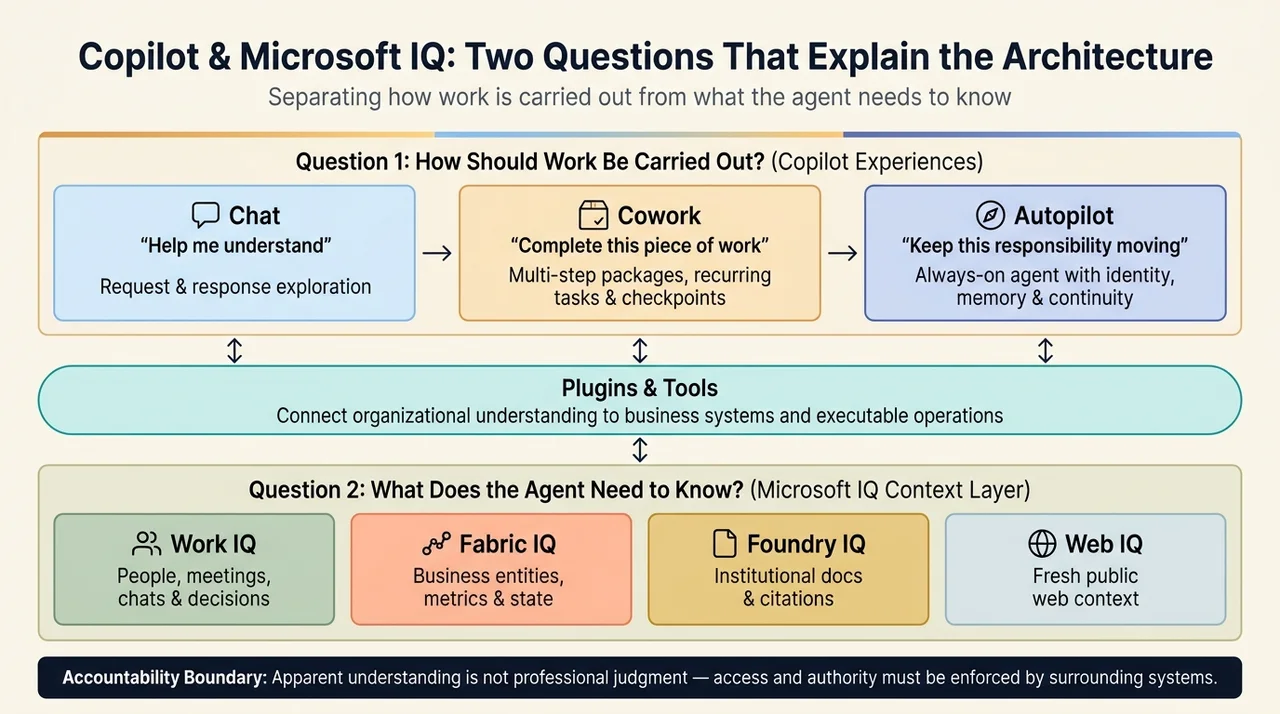
The simplest way to understand the stack is to separate two questions:
- How should the work be carried out? A quick answer, a delegated task, or an ongoing responsibility?
- What does the agent need to know? The business state, the relevant documents, or the people and decisions behind the work?
Copilot’s interaction experiences primarily address the first question. Microsoft IQ primarily addresses the second. Plugins and tools connect that understanding to business systems and executable operations.
Microsoft describes Copilot as bringing Chat, Cowork, Code, and Autopilot into one experience. It describes Microsoft IQ as an enterprise intelligence layer that connects how people work, how the business operates, and the knowledge agents need. These are complementary roles, not interchangeable product names. See Microsoft’s Ignite 2026 architectural overview and Microsoft IQ documentation.
A useful mental model is a capable colleague with three resources: access to the right records, an understanding of the organization, and permission to perform a defined job. The analogy stops at accountability. An agent’s apparent understanding is not professional judgment, and its access and authority must be enforced by the surrounding systems.
Chat, Cowork, and Autopilot Represent Different Kinds of Delegation
Chat: help me understand
Chat fits questions, exploration, and short exchanges. A sales lead might ask why pipeline coverage has fallen or what changed in an account since the last review.
The output may inform a decision, but the interaction is still centered on a request and response.
Cowork: complete this piece of work
Cowork is designed for multi-step tasks. Instead of asking for advice about preparing a customer review, a user can delegate the review package itself: gather account history, analyze opportunities, assemble a brief, and prepare supporting material.
Microsoft describes Cowork as planning and executing work across applications and systems, grounded in Work IQ and extended through Fabric, Dynamics 365, and plugins. It also supports recurring tasks and checkpoints. See the Copilot Cowork capability overview.
That last point is important: recurrence is not exclusive to Autopilot. A weekly task can belong in Cowork. The distinction is broader than whether a schedule exists.
Autopilot: keep this responsibility moving
Autopilot is positioned as an always-on, personal agent with its own identity, memory, and tools. Microsoft describes it as participating in Teams and Outlook, monitoring channels, following up on emails, and managing recurring work without a fresh prompt for every step.
The conceptual difference is continuity. A delegated package has a completion point. An ongoing responsibility, such as tracking outreach and following up with stakeholders, requires the agent to maintain context as circumstances change.
Microsoft’s November 17 Copilot announcement says Autopilot is beginning to roll out to Frontier customers. Its prerelease documentation makes clear that access requires applicable enrollment, preview assignment, and participation terms. Frontier enrollment alone does not enable every preview feature.
Microsoft IQ: Different Context for Different Questions
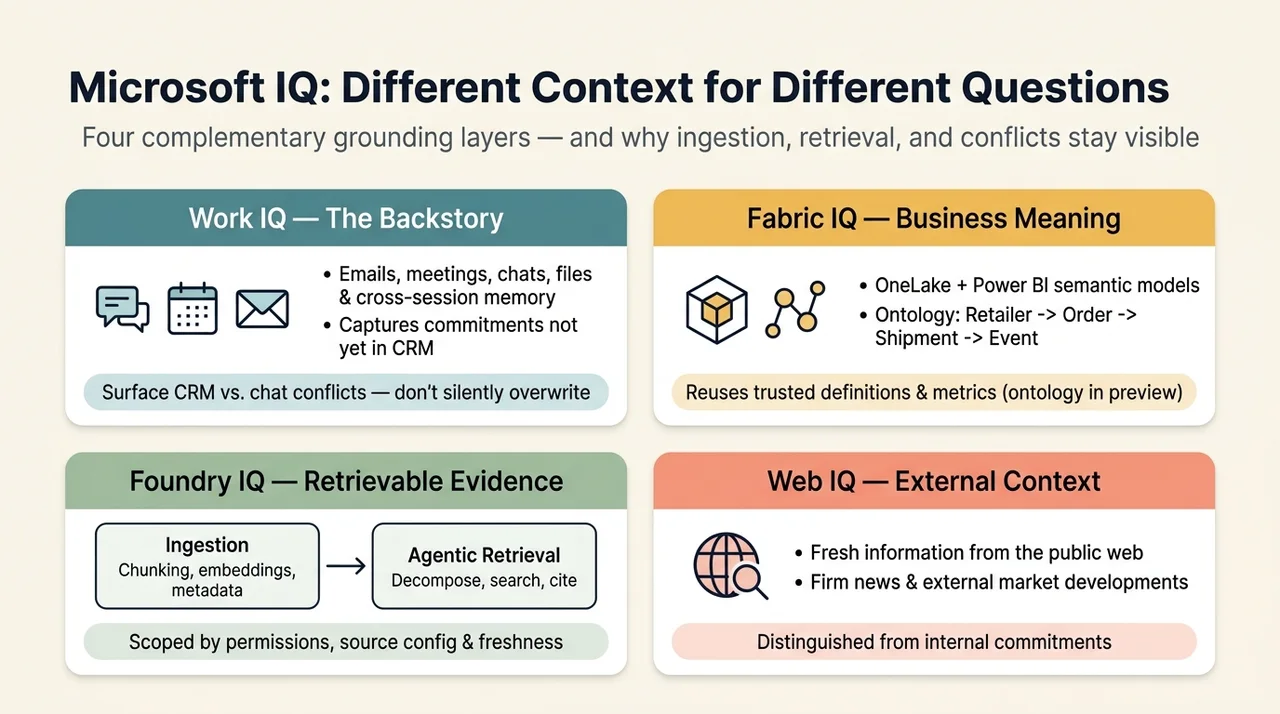
The source scenarios emphasize Work IQ, Fabric IQ, and Foundry IQ. Microsoft’s current umbrella documentation also includes Web IQ. The four capabilities provide different kinds of context, although their data sources and integrations can overlap.
| Capability | Main context it contributes | Example question |
|---|---|---|
| Work IQ | People, collaboration, workflows, and the context behind work | Who discussed this exception, and what did they decide? |
| Fabric IQ | Business entities, relationships, metrics, and operational state | Which shipments and customers are associated with this claim pattern? |
| Foundry IQ | Retrieval from institutional knowledge and connected content | Which contract clause or policy applies? |
| Web IQ | Fresh information from the public web | What external development might affect this account? |
These roles follow the Microsoft IQ documentation. They are a mental model, not a rule that each source belongs to only one service.
Work IQ supplies the backstory
A customer relationship does not live entirely in a customer relationship management system, or CRM. It also lives in meeting notes, email exchanges, shared documents, and conversations about commitments.
Work IQ connects Copilot and agents to that work context. Microsoft’s Work IQ announcement describes grounding across emails, meetings, chats, files, and people, alongside business-application context and memory that carries across sessions.
This is the difference between retrieving an opportunity record and understanding why the team believes the opportunity is ready to move. The record provides a stage and value. Collaboration may reveal an unresolved concern, a promised follow-up, or a decision that has not yet been reflected in the record.
Neither source should automatically override the other. A disagreement between the CRM and a recent conversation is something to surface, not silently reconcile into a confident answer.
Fabric IQ supplies business meaning
Raw data does not explain itself. A table can contain customer identifiers, shipment events, and adjustment amounts without expressing how those things relate or which calculation the business trusts.
Fabric IQ adds semantic context over business data. Its foundation includes OneLake and Power BI semantic models. Its ontology capability defines business entities, properties, relationships, rules, and metrics bound to enterprise data. An ontology is a machine-understandable representation of the concepts the business operates with.
For example, a claims workflow may need to connect a retailer to an order, an order to a shipment, and a shipment to an event that affects eligibility. That is a relationship question, not merely a search for matching words.
Microsoft’s Fabric IQ overview distinguishes trusted analytical definitions from operational context and identifies ontology and the IQ workload as preview capabilities. Existing Power BI semantic models should not be confused with the availability status of every newer IQ feature.
Foundry IQ supplies retrievable evidence
Contracts, engineering standards, and policy documents contain knowledge that is difficult to represent entirely as business tables.
Foundry IQ provides knowledge bases and knowledge sources for retrieving that content. Its agentic retrieval can decompose a complex question, select sources, execute searches, and return grounding material with citations. Multiple agents can use the same knowledge base.
Microsoft’s Foundry IQ overview also describes document preparation, including chunking, vector embeddings, and metadata extraction for indexed sources. Ingestion prepares searchable content; retrieval finds relevant evidence when a question is asked. Those are separate stages.
This is more precise than saying that an agent “knows all the documents.” It has a configured route to retrieve relevant content, subject to supported permissions, source configuration, and freshness. Some Foundry IQ features are generally available and others remain in preview, with availability depending on the API version.
Scenario One: Turn a Pipeline Gap into a Client Package
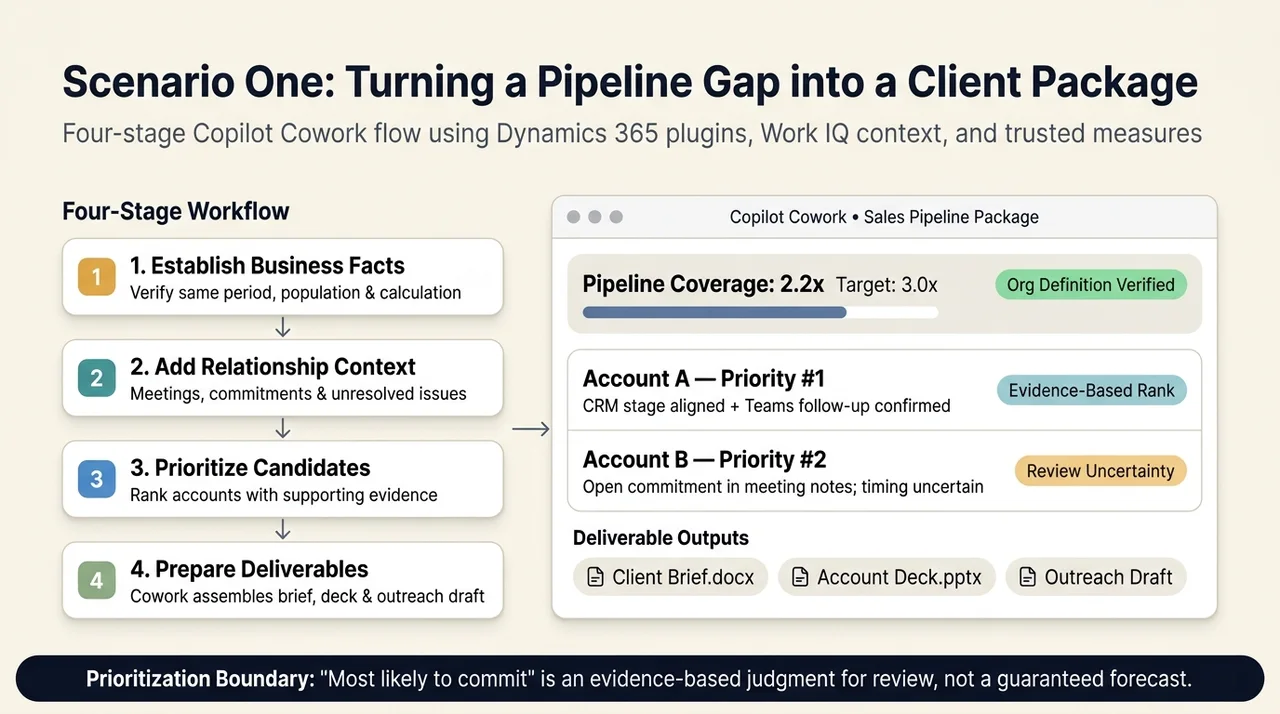
Consider a sales lead whose target is three-times pipeline coverage, while the current view shows 2.2-times coverage. These figures are illustrative scenario values, not a benchmark or a universal sales target.
Pipeline coverage generally compares a defined opportunity pipeline with a sales target. The useful question is not simply whether 2.2 is below 3. It is whether both values use the same period, opportunity population, and calculation. An agent should reuse the organization’s definition rather than invent one.
A coherent workflow then progresses through four stages:
- Establish the business facts. Retrieve opportunities, account information, and the relevant pipeline measures.
- Add relationship context. Examine recent discussions, customer commitments, and unresolved issues.
- Prioritize candidates. Identify accounts that merit attention and explain the supporting evidence.
- Prepare the work. Assemble client-specific briefs, presentations, and outreach drafts for review.
Microsoft’s Copilot announcement describes Dynamics 365 plugins and sales skills for account plans, pipeline prioritization, meeting preparation, and sales presentations. That supports the workflow pattern. It does not establish that an agent can reliably predict which customer will commit.
“Most likely to commit” should therefore be treated as an evidence-based prioritization judgment, not a guaranteed forecast. A useful result explains why an account ranks highly and what uncertainty remains.
The architecture becomes valuable when the analysis flows into a deliverable. The sales lead no longer has to translate every insight into a separate request for a brief, a deck, and an email. Cowork can carry the delegated package forward, while the user retains control over consequential next steps.
Scenario Two: Make Outreach Monitoring an Ongoing Responsibility
Fundraising or client outreach is not finished when the first message is sent. Responses arrive at different times. Commitments are discussed in meetings. Relevant news changes the context.
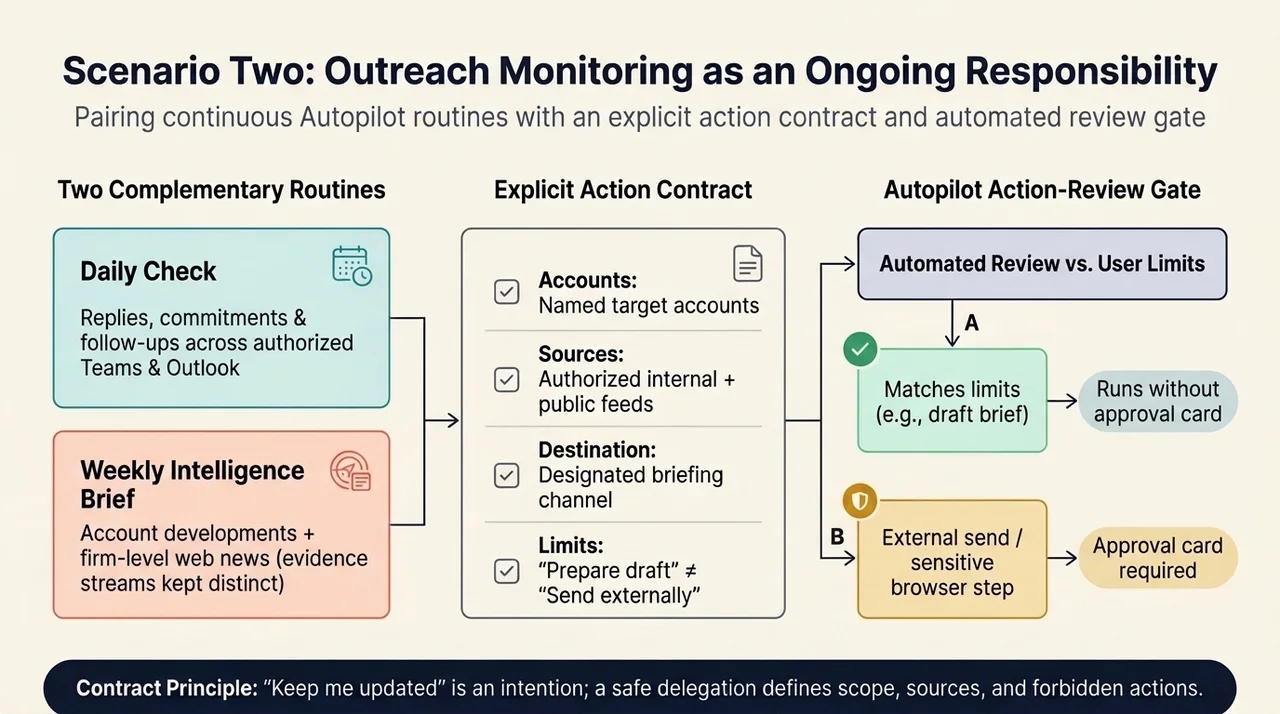
An ongoing agent could maintain two complementary routines:
- A daily check for replies, commitments, and follow-ups across authorized business and collaboration systems.
- A weekly intelligence brief combining account developments with relevant firm-level news.
This illustrates the continuity that Autopilot is designed to support. It also exposes an important boundary: internal work context and external news are different evidence streams. A weekly brief should distinguish an internal commitment from a public report or an inferred implication.
A well-scoped delegation specifies the accounts, the sources, the delivery destination, and the permitted actions. For example, “prepare a follow-up draft” is different from “send a follow-up.” A restriction such as “do not send external messages” should be explicit.
Do not assume, however, that every write operation always triggers a manual approval. Microsoft’s Autopilot action-review documentation describes an automated review system that compares actions with the user’s request and limits. Some matching actions can run without an approval card; other actions require approval, and certain sensitive browser steps always do.
The practical lesson is to define the responsibility and its boundaries together. “Keep me updated” is a useful intention, but an incomplete action contract.
Scenario Three: Explain a Claim Across Data, Documents, and Decisions
Claims analysis brings the context layers together particularly clearly.
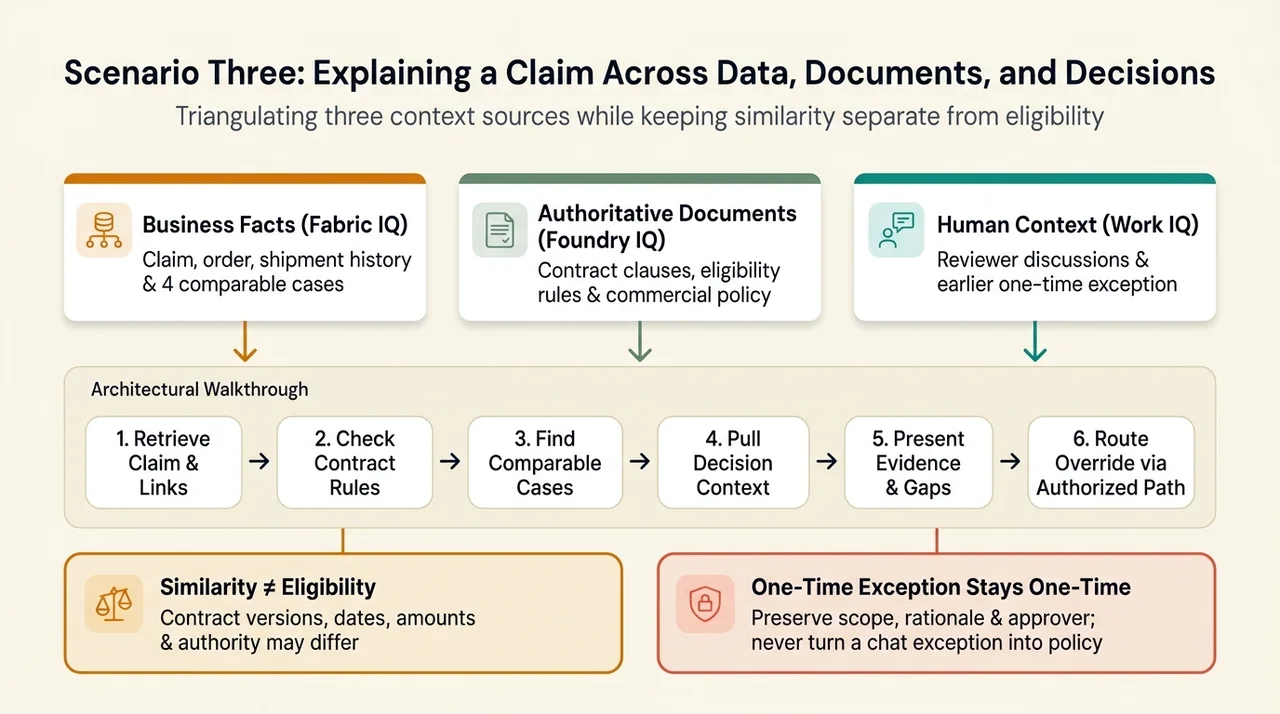
Imagine an analyst asking why a retailer’s claim appears inconsistent with the expected treatment. The answer may depend on three distinct sources:
- Business facts: the claim, shipment history, amounts, and comparable cases.
- Authoritative documents: the contract, eligibility criteria, and commercial guidance.
- Human context: earlier discussions and an authorized reviewer’s decision about an exception.
An architectural walkthrough might look like this:
- Retrieve the current claim and establish the relevant business relationships.
- Find the applicable contract and policy evidence.
- Search historical claims for comparable patterns.
- Retrieve discussions that explain how earlier cases were handled.
- Present a recommendation with its evidence and unresolved differences.
- Route any override through the authorized action path.
The fragmented demonstration material describes four similar historical claims and a reviewer recommending a one-time adjustment. Those details belong to the demonstration scenario. They do not establish a measured accuracy rate, a universal similarity algorithm, or an automatic settlement capability.
The important insight is that each source answers a different question. A contract explains the rule. Business data explains the event. A conversation may explain an exception. A defensible recommendation needs to keep those roles visible.
Similarity is not eligibility
Two claims can look alike and still require different outcomes. Contract versions, dates, amounts, jurisdictions, and approval authority may differ.
Historical similarity is useful evidence for investigation. It is not sufficient authority for an override.
A one-time exception must remain one-time
The demonstration’s suggestion that a reviewer’s judgment can inform the next case is compelling, but easy to overstate.
Remembering a decision is not the same as changing a policy. Retrieving an earlier exception is not the same as authorizing a new one. And neither requires retraining the underlying model: persistence can come from saved memory, updated records, or reusable knowledge.
Microsoft’s Autopilot memory documentation describes conversation, personal, and workspace memory, including review and correction. It does not establish that every claims agent automatically converts chat decisions into approved business rules.
A sound design preserves the decision’s scope, rationale, approver, and conditions. The next agent should be able to say, “A similar case received a one-time adjustment,” without turning that into, “All similar cases qualify.”
Institutional memory should preserve the boundary of a decision, not just its outcome. Otherwise, an exception can quietly become a policy nobody approved.
Plugins Connect Context to Repeatable Work
Context alone does not create an operational workflow. An agent also needs instructions for the job and tools that can interact with the relevant systems.
Microsoft’s announcements describe business plugins that package reusable context, skills, and tools, including role-specific capabilities for sales, service, finance, and legal. See the Ignite overview of Microsoft IQ and business plugins.
An engineering or commercial workflow can use the same pattern: bring relevant standards into the task, retrieve supporting organizational data, and apply a repeatable procedure to the deliverables. That is a conceptual application of the architecture, not evidence that every organization already has such a plugin deployed.
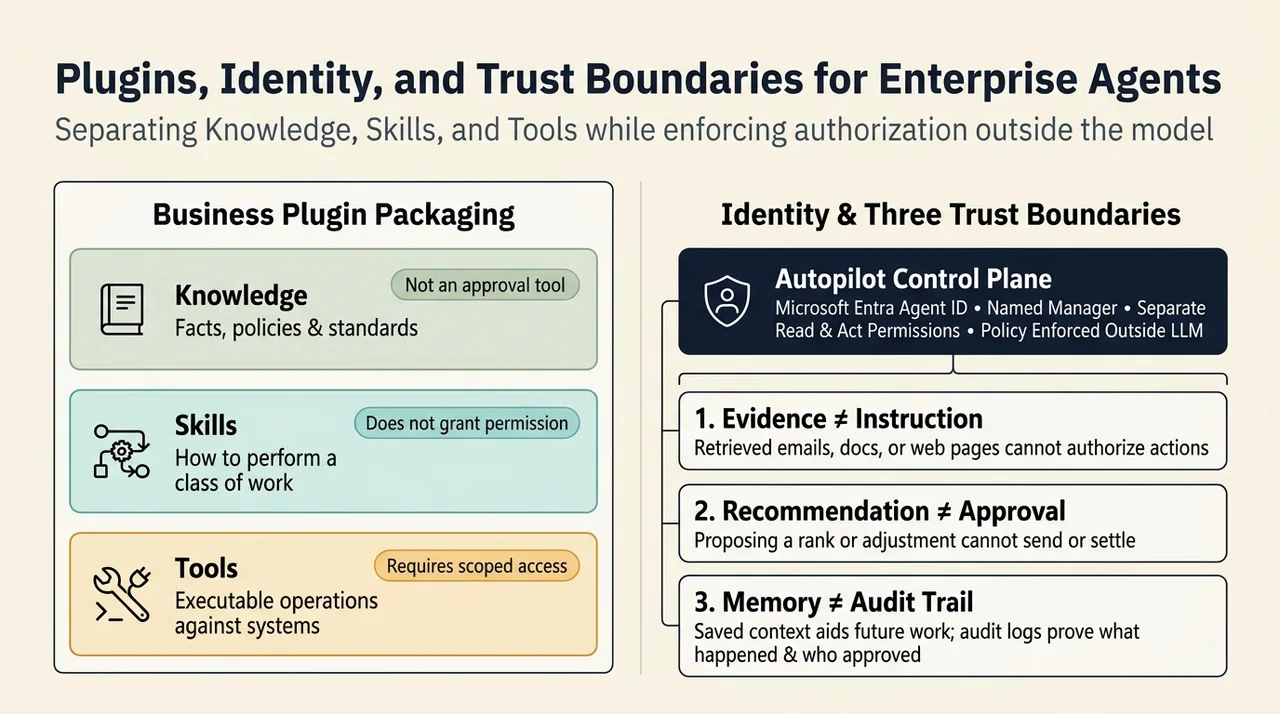
Three distinctions help keep the design clear:
- Knowledge supplies facts, policies, and standards.
- Skills describe how to perform a class of work.
- Tools provide executable operations against systems.
A document describing an approval process is not an approval tool. A skill describing a CRM update does not itself grant permission to update the CRM. Packaging them together improves reuse, but does not erase their different responsibilities.
Trust Depends on More Than a Confident Answer
As agents move from retrieval to action, access control and audit become part of the architecture rather than optional additions.
Microsoft describes Autopilot as having its own Microsoft Entra Agent ID, a named manager, scoped access, and actions logged under its identity. The Work IQ announcement also describes separating read and act permissions and enforcing policy outside the large language model.
For the scenarios above, three boundaries matter:
- Evidence is not instruction. A retrieved email or document can inform the agent, but should not authorize an action merely because it contains imperative language.
- Recommendation is not approval. Ranking an account or proposing an adjustment does not confer authority to send or settle.
- Memory is not an audit trail. Saved context helps future work; an audit record must establish what happened, who authorized it, and which evidence supported it.
Microsoft’s Autopilot approval guidance explicitly says that instructions found in emails, documents, or web pages do not count as user authorization. Its memory guidance distinguishes saved memory from conversation history and exported files. These distinctions prevent a persuasive narrative from being mistaken for a controlled process.
The Real Shift Is From Isolated Prompts to Contextual Work
The central architectural idea is straightforward: useful enterprise agents need both a way to carry work forward and a reliable way to understand what that work means.
Copilot provides interaction patterns for answering, delegating, and maintaining ongoing responsibilities. Microsoft IQ connects those patterns to collaboration context, business semantics, institutional knowledge, and external information. Plugins and tools turn that context into repeatable operations.
The result is potentially more valuable than a better summary. A pipeline gap can become a reviewed client package. Outreach can become a maintained responsibility. A claim can be explained through the business event, the governing document, and the decision history together.
But continuity is only useful when meaning survives with it. The agent must preserve the difference between a fact and an inference, a recommendation and an authorization, a remembered exception and an approved rule.
That is the standard to apply when evaluating this architecture: not whether the agent sounds like it understands the organization, but whether it can show the evidence, respect the boundaries, and move the right work forward.
Read next