Microsoft 365 Copilot Aug 2026: Massive New Update Wave

Writer

Microsoft 365 Copilot is no longer evolving as a single chat box. It is becoming a system of models, agents, skills, organizational context, and app-native actions that can carry work from a prompt into an editable document, workbook, presentation, or completed task.
That is the real story in early August 2026. It is not one giant August release. Most of the changes discussed here were announced or rolled out in June and July, including several items in Microsoft’s July roundup published on July 31. Because Microsoft uses staged deployment, a feature described as “rolled out” may still appear at different times across tenants, platforms, update channels, licenses, and administrative configurations.1
Article type: This is a product capability overview for technical professionals, IT leaders, architects, administrators, and power users. It focuses on what changed, how the pieces fit together, and which availability details matter.
The mental model: Copilot is becoming a work orchestration layer
The easiest way to understand this wave of changes is to separate Copilot into five layers:
- Models provide reasoning and generation. GPT-5.6 and Claude Sonnet 5 expand the model choices available for different kinds of work.
- Work IQ supplies context. Copilot can ground requests in permitted files, meetings, chats, and business data.
- Agents plan and act. Word, Excel, and PowerPoint agents create files, while Cowork handles longer, multi-step outcomes.
- Skills encode repeatable methods. A skill packages instructions for recurring work so users do not have to rebuild the same prompt each time.
- Microsoft 365 apps provide the working surface. Copilot acts inside documents, workbooks, presentations, meetings, and content repositories rather than returning text alone.
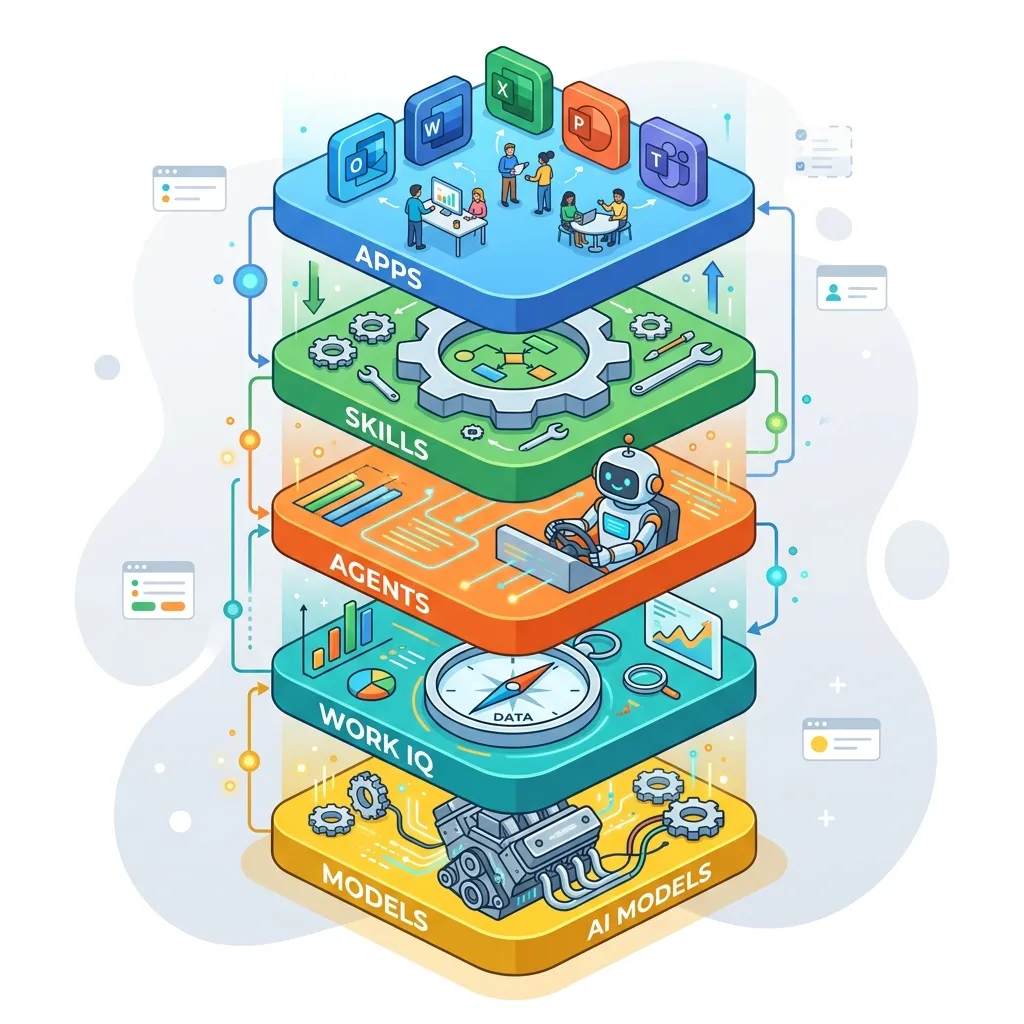
Think of the model as the engine, Work IQ as the navigation context, agents as the driver, skills as the operating procedure, and Microsoft 365 apps as the roads on which the work happens. A more powerful engine matters, but the larger improvement comes from connecting all five parts.
Microsoft formally made agentic capabilities in Word, Excel, and PowerPoint generally available in April 2026. These capabilities can perform multi-step, app-native actions while leaving the resulting artifact under human control.2
Copilot Chat: from answer surface to agent launchpad
The Add capabilities menu turns Chat into a launch surface
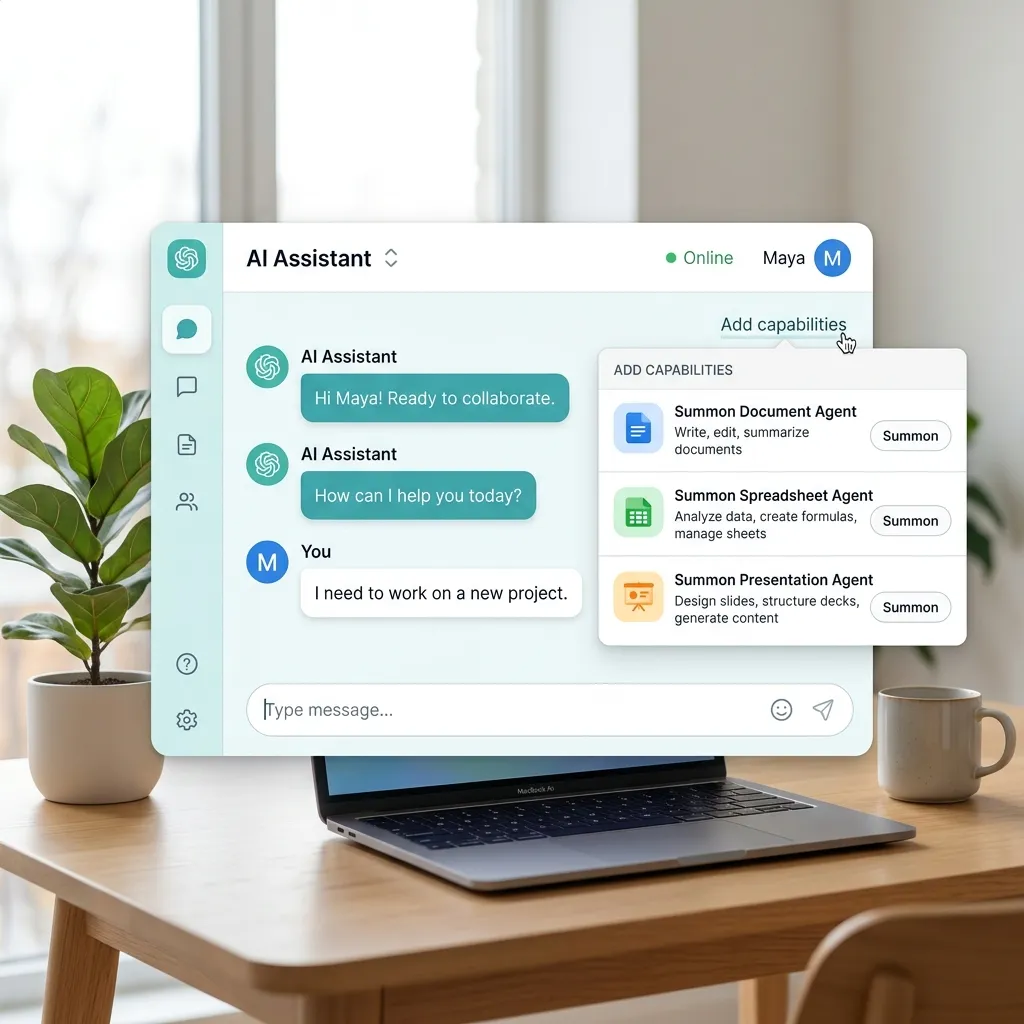
The Add content experience now includes an Add capabilities path. From the source interface, users can start a Copilot Page, generate code or imagery, and add specialist capabilities such as the Analyst and Researcher agents. Word, Excel, and PowerPoint agents can also be attached through this menu or invoked with an @mention directly in the prompt.
Microsoft formally confirms the @mention flow for Word, Excel, and PowerPoint agents, which rolled out in July.3 The broader menu can vary by license, tenant, and rollout ring, so treat the exact list of visible capabilities as tenant-specific rather than universal.
This changes the role of Chat. It remains a place to ask questions, but it also becomes a routing surface for specialized workers:
- Use the Word agent when the desired output is a structured document.
- Use the Excel agent when the task requires a workbook or analytical artifact.
- Use the PowerPoint agent when the outcome is a presentation.
- Use Researcher or another specialist when the task is primarily investigation, synthesis, or planning.
The important distinction is between conversation and artifact creation. Chat helps shape the request; the app agent produces something that can be opened, reviewed, and edited in its native application.
Microsoft’s documentation says the Word, Excel, and PowerPoint file-creation agents use Anthropic models and depend on the tenant allowing that model provider. Administrators can disable Anthropic access, and availability can be affected by regional data-boundary commitments and phased deployment.4
UI, Work IQ, sources, and tasks
The source interface also shows several navigation changes that are easy to overlook:
- A new-versus-previous interface toggle lets some users return to the older design, including the former Work and Web split.
- A Work IQ toggle provides an explicit way to change whether enterprise work context is in scope for the current experience.
- Add and manage sources makes it easier to discover organizational and third-party connectors and scope a prompt to a selected source. Microsoft confirms this connector-scoping experience in its July roundup.3
- A consolidated Tasks area brings agent work and scheduled prompts into one view. In the demonstrated interface, it also surfaces run cadence, Prompt Coach, and Researcher access.
The first, second, and fourth items above are observations from the supplied product walkthrough. Their exact labels and placement are not documented as broadly available in the official July roundup, so they should be treated as interface-dependent rather than contractual product behavior.
The model layer is now visibly multi-model
OpenAI’s GPT-5.6 became available across Microsoft 365 Copilot in July and is the preferred model family in Word, Excel, PowerPoint, Chat, and Cowork. Microsoft positions it as an improvement for ambiguous, multistep knowledge work: stronger document structure in Word, deeper analysis in Excel, richer draft presentations in PowerPoint, clearer reasoning in Chat, and more complete execution in Cowork.5
Claude Sonnet 5 also rolled out in July for Word, PowerPoint, and Cowork, while Microsoft announced Claude Opus 5 on July 24 and documented it in Excel’s July update.3 6 7 This is not simply a “bigger model wins” contest. The practical value of a multi-model system is task fit. Drafting, visual creation, analysis, research, and long-running execution do not necessarily benefit from the same model in the same way.3
Do not assume that every user will see every named model in every surface. Model access can vary by application, license, rollout ring, region, and tenant configuration.
Search answers are becoming more concise and contextual
Microsoft also updated Copilot Search so that file results can show shorter Copilot-generated answers, with an option to expand into a more complete response. The design goal is sensible: return enough synthesized context to help the user decide whether a result is relevant, without turning every search into a full research report.3
This is a small interface change with a larger implication. Search is moving beyond ranking links toward explaining why an item may matter. Users should still open the source and verify important details, especially where a summary affects a decision.
Word: editing becomes reviewable work
Copilot in Word is moving from “generate a paragraph” toward document-level editing. The most valuable improvements are not just better prose. They are mechanisms that keep the human reviewer in control.
Revisions with Track Changes
Microsoft’s July roundup describes Copilot making edits while Track Changes is enabled, allowing the user to inspect additions and deletions as redlines. That makes AI-assisted rewriting behave more like a conventional editorial workflow: propose, inspect, accept, or reject.3
A useful pattern is:
- Turn on Track Changes.
- Give Copilot a bounded instruction, such as restructuring one section for an executive audience.
- Review factual changes separately from stylistic changes.
- Accept only the edits that preserve meaning and evidence.
- Run a final human review for citations, numbers, names, and commitments.
This matters because fluent writing can hide semantic drift. Visible changes make that drift easier to spot.
Model choice and comment-driven editing
Word gained model choice for editing work, including supported Anthropic models. Depending on the surface and rollout, the source demonstrates Claude Sonnet 5, Claude Opus, and GPT-5.6 reasoning or faster-response choices. Copilot can also add, read, reply to, and manage comments, then reason over that feedback and apply requested edits.8 3
Document structure, not only prose
Copilot can insert and update a table of contents as a document changes. Microsoft’s July roundup also lists assistance with headers, footers, page numbers, dates, and footnotes.3 The source author had not yet seen the table-of-contents capability across every environment and expected wider availability by the end of August. The official roundup, however, describes it as rolled out in July. That difference is a useful reminder that announcement status and tenant visibility are not the same thing.
The right mental model is not “Copilot replaces reviewers.” It is “Copilot can execute a reviewer’s instructions, while the document owner remains accountable for the result.”
PowerPoint: brand, reusable skills, and grounded creation
PowerPoint’s changes revolve around a persistent enterprise problem: generating slides is easy, but generating slides that look and feel like the organization is much harder.
Brand kits are richer than themes
An official Brand kit can include logos, color palettes, typography, templates, layout patterns, visual guidance, and brand voice. Brand managers can create and maintain official kits, while users select approved kits during presentation creation. Microsoft’s support documentation says official Brand kit management requires the appropriate policy assignment and a Microsoft 365 Copilot Premium license.9
A Brand kit should not be confused with a PowerPoint theme:
| Mechanism | Primary purpose | Typical contents |
|---|---|---|
| Theme | Basic visual styling | Fonts, colors, effects |
| Template | Slide structure and reusable layouts | Masters, layouts, placeholders, sample slides |
| Brand kit | Broader organizational guidance | Templates, logos, imagery rules, data-visualization styles, tone, and usage guidance |
Copilot still depends heavily on well-constructed templates and representative sample slides. Microsoft advises that template structure, placeholder types, content density, and visual hierarchy all influence the generated result.10
Skills turn repeated instructions into reusable methods
PowerPoint users can create and reuse Copilot skills for recurring presentation tasks. A skill is best understood as a reusable operating procedure: a saved set of instructions that tells Copilot how to perform a particular kind of presentation work. Microsoft reported that reusable PowerPoint skills rolled out in July.8
Examples include:
- turning a project update into a standard steering-committee deck;
- applying a consistent narrative structure to sales presentations;
- reviewing slide density and rewriting crowded slides;
- creating a recurring executive summary in the same format.
Skills improve consistency, but they do not guarantee correctness. The supplied walkthrough describes three Microsoft-provided skills plus custom skills created through a form or uploaded from a skill.md file. Microsoft’s documentation confirms creation, upload, and update of custom user skills stored in OneDrive, with rollout in August, although the exact starter-skill count can change.3
Any skill that transforms business data or creates externally shared material should include explicit review steps.
Comments become part of the workflow
Copilot can write, reply to, and resolve comments in PowerPoint. It can use feedback distributed across slides to help revise a deck. Microsoft also lists the ability to assign follow-up tasks and notify stakeholders from comments as an August rollout, which is distinct from basic comment creation and resolution that rolled out in July.3
Mobile PowerPoint closes part of the gap
On iPhone and iPad, Copilot can plan multi-step creation, editing, and analysis; ground implicitly in the current slide or explicitly in attached files; and continue working in the background while the user changes apps. Microsoft lists these mobile capabilities as rolled out in July.3
Reference existing organizational content
Copilot in PowerPoint can use SharePoint libraries and OneDrive folders as references when creating a presentation. It can also create a new deck or restyle an existing deck by using another presentation as a visual reference. In that workflow, Copilot reuses the reference deck’s layouts, theme, and visual system, so a separately selected Brand kit may not be necessary.8 3
Together, these features make grounding more intentional: the user can point Copilot toward both the content and the design system that should shape the deck.
Excel: personalization, skills, rules, and governed data context
Excel’s updates are less about flashy generation and more about repeatable analytical behavior.
Personalization sets user-level preferences
Personalization lets users define standing preferences for formatting, naming conventions, formulas, PivotTables, and report styles. These preferences follow the user across workbooks, reducing the need to repeat the same instructions.8
Use personalization for how you prefer to work, not for workbook-specific requirements.
Skills package repeatable analytical workflows
Excel skills package recurring methods as reusable instructions. The demonstrated skills catalog includes a substantial set aimed at finance work. A finance team might encode its preferred variance-analysis sequence; an operations team might standardize data cleanup and weekly reporting. The skill captures the method, while the workbook supplies the data.8
Workbook rules travel with the file
Workbook rules sheets provide file-specific guidance that stays with a workbook. Rules can describe structure, formatting, formulas, naming conventions, examples, ranges, and other sheets. Microsoft describes these as .Rules sheets that guide Copilot’s edits for that particular workbook.8
Two Microsoft-authored formatting skills extend this pattern. The Brand kit skill applies approved colors, fonts, and logos to workbook content and rolled out in July. The Theme design skill applies a coordinated palette, chart styling, layout, and visual hierarchy and is listed for August rollout.3 7
The distinction is important:
| Capability | Scope | Best use |
|---|---|---|
| Personalization | User | Personal working preferences across files |
| Skill | Repeatable task | A reusable analytical or formatting method |
| Workbook rules | File | Standards and examples specific to one workbook |
Workbook rules create shared, workbook-specific instructions for anyone using Copilot with that file. They are guidance for Copilot, not a substitute for Excel protection, data validation, access control, or formal compliance controls. They improve consistency, but they should not be described as “hard governance.”
Power BI context extends the analytical surface
Work IQ can reason over Power BI reports and semantic models to return grounded answers from governed enterprise data. Microsoft first described this as a Frontier rollout in June, with broader Power BI context included in the July update stream.8 3
This can reduce the gap between a business question and the semantic model that contains the answer. It does not eliminate the need for a well-designed model, correct measures, valid permissions, or human interpretation.
Teams and SharePoint: summaries move closer to the content
A centralized meeting recaps experience
The Meeting Recaps app in Teams brings recordings, transcripts, and AI-generated recaps into one place. Microsoft’s July roundup said the app was expected to roll out in August.3
This is primarily a retrieval improvement. The value comes from reducing the time spent locating meeting artifacts across chats, calendars, recordings, and recap pages.
SharePoint gains audio overviews and document creation
Microsoft announced AI summaries and audio overviews for SharePoint news. From a collection of recent news, users can play a combined audio overview or view a consolidated text summary. On an individual page, Copilot can summarize that page or create its audio overview.3
The source also describes structured, form-driven document generation for standardized and potentially high-volume document workflows, with an expected end-of-September arrival. Microsoft’s July roundup identifies the underlying Generate document from form Power Automate action as Preview and says it rolled out in June. The safest interpretation is that the underlying preview action existed before the broader SharePoint user experience described in the walkthrough.3
These are two different patterns:
- Audio overview: transform existing content into a consumable summary.
- Form-driven generation: collect structured input and turn it into a standardized document.
The first helps people consume information. The second helps organizations produce consistent artifacts.
Copilot Notebooks: curated context becomes a production workspace
Copilot Notebooks brings chats, generated outputs, and references together around a project. In the supplied walkthrough, Notebooks has returned to the Copilot app’s left navigation and uses a simpler workspace divided into chats, document creations, and reference documents. The interface can also open a notebook in OneNote for users who prefer the more detailed OneNote experience.
Microsoft has expanded the references that can be added, including Outlook emails and existing Copilot conversations. TXT and RTF reference support rolled out in July, while Markdown reference support was scheduled for August.8 3
The deeper change is that a notebook is no longer only a place to ask questions about a collection of sources. It can turn curated context into editable Word documents, Excel workbooks, PowerPoint presentations, mind maps, and other artifacts. Microsoft’s release notes list direct creation of Word, Excel, and PowerPoint files from notebook context.1
A good notebook workflow is:
- Collect the smallest useful set of authoritative references.
- Remove stale or contradictory material where possible.
- Ask Copilot to identify gaps and disagreements between sources.
- Generate the target artifact from that curated context.
- Open the artifact in its native app for final review.
The quality of a notebook output depends heavily on the quality of its reference set. More context is not always better context.
Copilot Cowork: execution, not just assistance
Copilot Cowork became generally available worldwide in June 2026. Microsoft describes it as an agentic system that plans and executes multi-step work and returns a completed deliverable rather than only advice or a draft.11
Cowork can use Work IQ, supported models, plugins, custom skills, branded PowerPoint templates, and long-running task notifications. Microsoft also added mobile access and a Chat/Cowork toggle in the Copilot app.8
Models, plugins, and skill sharing
The source’s model picker shows a broad and partly tenant-dependent roster, including Sonnet 5, Opus 4.8, a “5.6 Soul” label, Terra, GPT-5.5, Opus 5, and Fable 5. Not every label in that demonstration has matching public documentation. Official sources confirm GPT-5.5 Thinking in Frontier, GPT-5.6, Sonnet 5, Opus 5, and Fable 5 in applicable Microsoft 365 Copilot experiences, with Fable 5 off by default in Cowork.8 3 5 6 Treat any other picker label as tenant-specific, experimental, renamed, or otherwise unverified rather than as a generally available model commitment.
Cowork’s Customize tab supports a guided skill-creation flow and uploads of .md, .zip, or .skill files. Plugin packages can also be uploaded, with supported Claude or Open-Plugin ZIP packages converted into publishable packages. Users can share a skill or plugin with named colleagues while retaining ownership, so later edits propagate to the shared item.3
Event-triggered execution
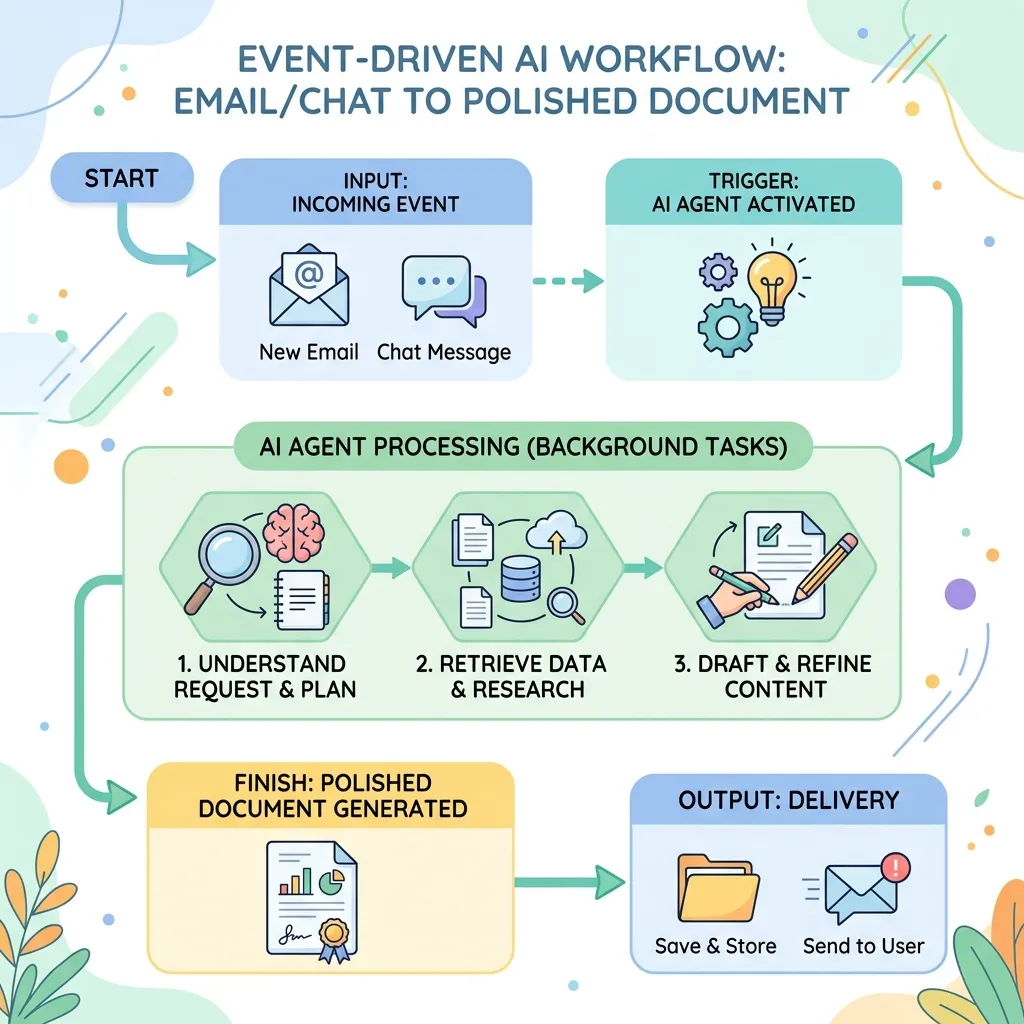
Cowork can create event-driven tasks that watch Teams or Outlook and execute when a specified event occurs, such as a sender, @mention, keyword, topic, or meeting name. Microsoft says this capability rolled out to Frontier in July.3
This is materially different from a scheduled prompt. A schedule asks, “Is it time to run?” An event trigger asks, “Did the relevant thing happen?” The latter can reduce delay, but it also deserves careful scoping so that a broadly worded trigger does not run more often than intended.
The useful distinction is simple:
- Use Chat when you want an answer, synthesis, or interactive thinking partner.
- Use an app agent when you want a specific Word, Excel, or PowerPoint artifact.
- Use Cowork when the outcome requires a longer sequence of coordinated actions across tools and files.
Cowork does introduce an operational consideration that is genuinely relevant: Microsoft enables it through usage-based billing with Copilot Credits, and the Microsoft 365 admin center provides budgets, policies, reporting, alerts, and spending controls. That does not make every Cowork task expensive, but it does mean organizations should treat long-running agent execution as a managed service rather than an unlimited chat feature.8
What this update wave actually means
The headline is not GPT-5.6 by itself. The larger shift is that Microsoft 365 Copilot is connecting stronger models to three things models cannot provide alone:
- trusted work context through Work IQ and explicit references;
- repeatable behavior through personalization, skills, and file-specific rules;
- action surfaces through agents, Cowork, and native editing inside Microsoft 365 apps.
That combination moves Copilot from passive assistance toward supervised execution. “Supervised” is the crucial word. Track Changes, comments, templates, rules, citations, permissions, sensitivity labels, and administrative model controls all exist because useful automation still needs boundaries and review.
Practical rollout checklist
For technical teams evaluating these capabilities in August 2026:
- Check actual tenant availability. Compare the Microsoft 365 Copilot release notes, roadmap, app platform, and update channel.
- Review model-provider settings. Word, Excel, and PowerPoint creation agents depend on supported Anthropic access, while model availability varies by surface.
- Separate preferences from controls. Personalization, skills, and workbook rules guide behavior; they are not replacements for permissions, protection, validation, or compliance policy.
- Start with reviewable workflows. Track Changes in Word, template-based PowerPoint creation, and bounded Excel transformations make human review easier.
- Curate grounding sources. A smaller set of authoritative references usually produces a better result than a large, noisy collection.
- Monitor Cowork usage. If Cowork is enabled, configure the relevant credit policies, budgets, and reporting before scaling long-running tasks.
Final take
Early August 2026 finds Microsoft 365 Copilot in a transition from a collection of AI features to a coordinated work system. Models are more capable, but the more consequential improvements are orchestration, grounding, reusable methods, native app actions, and reviewability.
The best way to evaluate this generation of Copilot is not to ask, “How good is the chat?” Ask a harder question: Can it use the right context, follow a repeatable method, produce the correct artifact, and leave enough evidence and control for a person to verify the result?
That is the standard that separates an impressive demo from dependable knowledge work.
Sources
Footnotes
-
Microsoft Learn, Release Notes for Microsoft 365 Copilot. ↩ ↩2
-
Microsoft 365 Blog, Copilot’s agentic capabilities in Word, Excel, and PowerPoint are generally available, April 22, 2026. ↩
-
Microsoft 365 Copilot Blog, What’s New in Microsoft 365 Copilot, July 2026, July 31, 2026. ↩ ↩2 ↩3 ↩4 ↩5 ↩6 ↩7 ↩8 ↩9 ↩10 ↩11 ↩12 ↩13 ↩14 ↩15 ↩16 ↩17 ↩18 ↩19 ↩20 ↩21
-
Microsoft Learn, Create files with Word, Excel, and PowerPoint Agents in Microsoft 365 Copilot. ↩
-
Microsoft 365 Copilot Blog, Available today: OpenAI’s GPT-5.6 in Microsoft 365 Copilot, July 9, 2026. ↩ ↩2
-
Microsoft 365 Copilot Blog, Available today: Anthropic Claude Opus 5 in Microsoft 365 Copilot, July 24, 2026. ↩ ↩2
-
Microsoft Excel Blog, What’s New in Excel, July 2026, July 28, 2026. ↩ ↩2
-
Microsoft 365 Copilot Blog, What’s New in Microsoft 365 Copilot, June 2026, June 30, 2026. ↩ ↩2 ↩3 ↩4 ↩5 ↩6 ↩7 ↩8 ↩9 ↩10 ↩11
-
Microsoft Support, Create and manage official Brand kits in the Microsoft 365 Copilot app. ↩
-
Microsoft Support, Keep your presentation on-brand with Copilot. ↩
-
Microsoft 365 Blog, Copilot Cowork is now generally available, June 16, 2026. ↩
Read next