Securing Copilot Studio Agents: Identity, Connector Policies, and Controlled MCP Access

Writer

An agent can pass every functional test and still fail the most important security test: whose authority does it use when it acts?
Imagine an employee asking a customer-service agent to retrieve a Dataverse record. If the tool uses the employee’s connection, the request is bounded by that employee’s permissions. If it uses a privileged maker’s connection, the same conversation can become an unintended route to capabilities the employee never received directly. Microsoft explicitly identifies this oversharing risk in its guidance on maker-provided credentials.
The solution is not one security switch. It is a clear separation of identity, permitted integrations, and authorization at the point where work happens. This article explains that separation, then develops an architecture for exposing narrowly scoped business operations through Azure Logic Apps and the Model Context Protocol (MCP).
The focus is enterprise agents, their tools, and their downstream access. Product behavior and availability are checked against Microsoft documentation available on October 23, 2026. Most connector examples concern Copilot Studio’s standard harness; the newer Frontier agent-account experience is discussed separately because its identity model and limitations must not be confused with ordinary connector authentication.
1. Separate the security questions before choosing the controls
“Is the agent authenticated?” is too broad a question. Break it into four:
- Who can interact with the agent? This is the conversation and channel boundary.
- Which identity executes each tool? This is the connection and credential boundary.
- Which integrations can the agent use? This is the connector-policy boundary.
- What may this caller do through this integration? This is the resource and business-authorization boundary.
Copilot Studio provides user-authentication options, credential controls, and data policies, but these address different parts of the problem. Signing in to an agent does not, by itself, prove that every downstream tool uses the signed-in user’s identity. See Microsoft’s user-authentication documentation and connector credential configuration.
A useful mental model is a building with a reception desk, access badges, approved corridors, and locked rooms. Authentication gets someone past reception. Connector policy determines which corridors exist. The execution identity supplies the badge. Resource authorization decides which doors that badge opens.
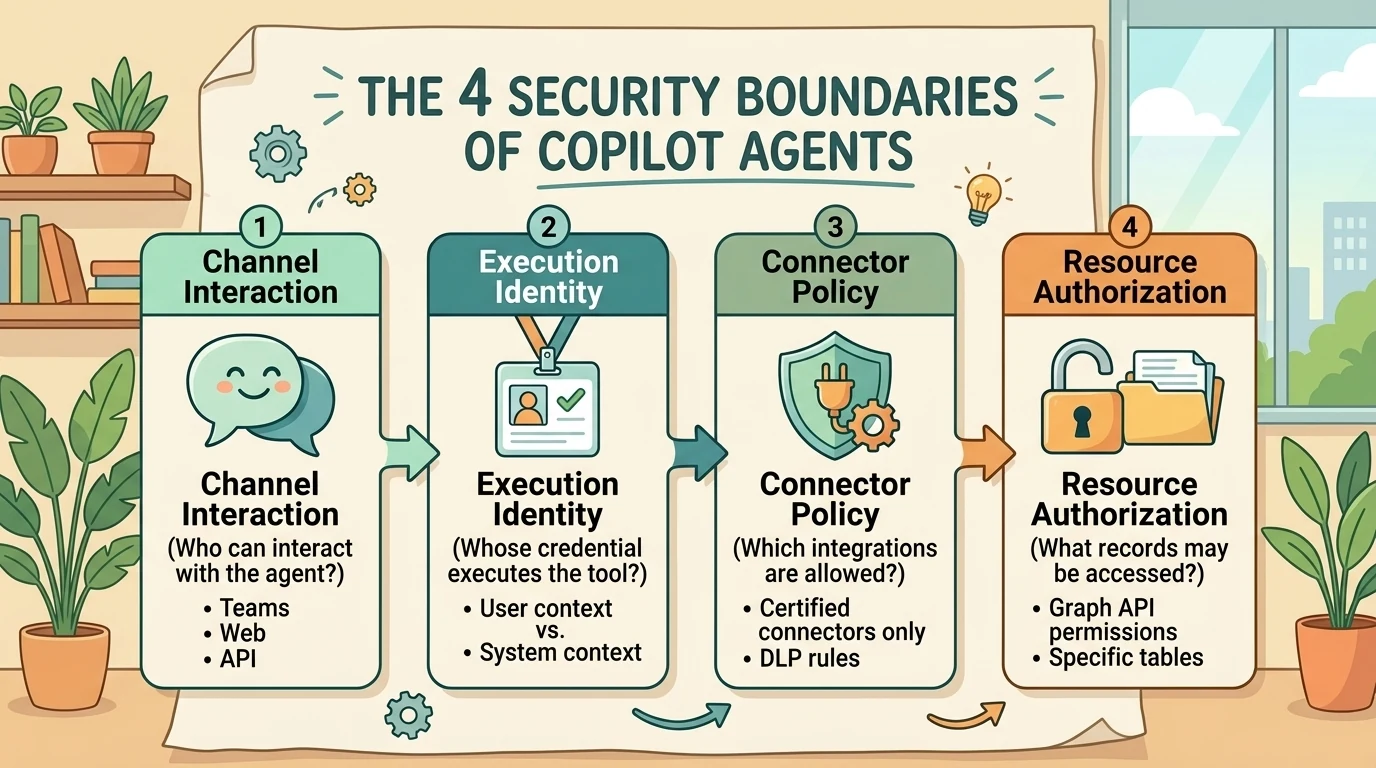
The analogy has a limit: an agent can invoke a workflow that changes identities midway through the journey. You must inspect the whole call chain, not just its entrance.
2. Default to the user’s authority for user-driven work
For interactive tasks that should respect the requesting employee’s existing access, end-user credentials are the natural starting point. Copilot Studio’s standard-harness connector tools use user credentials by default, while makers can configure maker-provided credentials where supported. The relevant setting is documented under using connectors with maker-provided credentials.
The distinction is not simply “my account versus your account.” It is delegated user access versus a shared execution identity.
With end-user credentials, the downstream service evaluates the authenticated user’s access. With maker-provided credentials, the tool uses the configured connection’s identity. That connection might belong to the maker, a dedicated service account, or another supported principal. Agent ownership alone does not tell you whose permissions execute the operation.
Consider two illustrative tasks:
- Read a customer record: Use the employee’s authority when the employee should see only records they are permitted to access.
- Write an operational event to an approved logging destination: A narrowly privileged workload identity may be appropriate because employees need not receive direct access to the logging infrastructure.
The second example is an intentional service capability, not permission inheritance from the employee. Its safety depends on restricting the operation, destination, and execution identity.
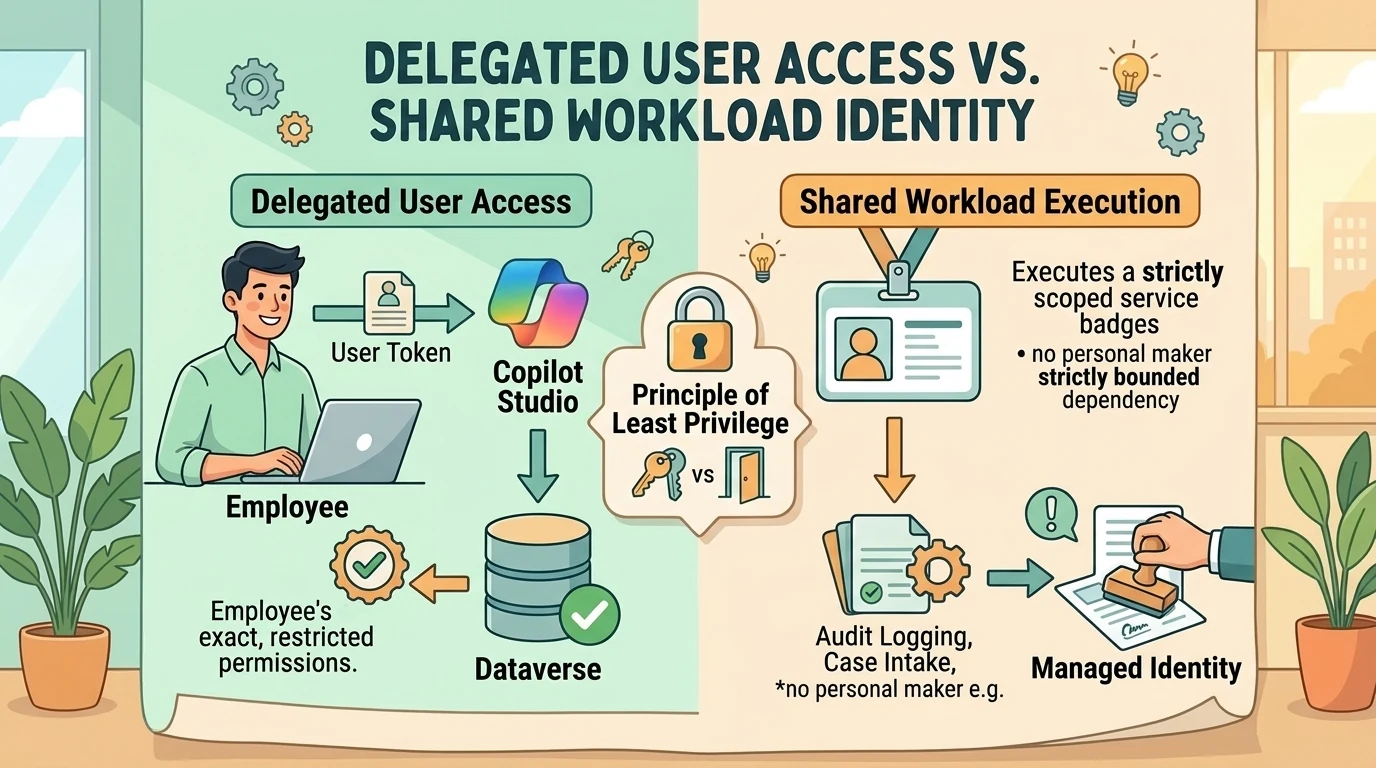
Enforce the choice instead of relying on maker discipline
Administrators can use Control maker credential options to permit end-user credentials, maker-provided credentials, or both for an environment or environment group. Both options are enabled by default; a tool’s default selection is not the same thing as an enforced organizational restriction. Microsoft documents the control and its scope in Control maker-provided credentials for authentication.
For a standalone environment, the documented path is Manage → Environments → select the environment → Settings → Product → Features → Copilot Studio agents → Control maker credential options. Environments governed by a group must be configured through the group’s settings rather than treated as independent exceptions.
Restricting maker-provided credentials is a behavior change, not merely a safer default for future agents. Microsoft documents that existing and new agents in the affected scope must adhere to the rule once it propagates. Prepare users, connections, and dependent workflows before enabling it broadly.
There is also an operational trade-off. Microsoft’s credential-control guidance warns that scheduled or autonomous agents relying on maker-provided connections can fail when those credentials are prohibited and no active user can authenticate. Do not assume that an interactive authentication policy is suitable for unattended automation, or that newer agent-account behavior automatically resolves every standard-harness scenario.
3. Shared execution needs a workload identity, not a powerful employee account
A shared connection is sometimes necessary. A personal account is usually a poor long-term foundation for it.
As an architectural recommendation, separate operational identity from the person who built the solution. A maker’s departure, account disablement, permission change, or connection revocation can otherwise become an application dependency. A dedicated service account reduces that coupling, but it does not automatically reduce privilege.
The dangerous pattern is a single “automation account” reused across unrelated agents and projects. Every additional permission expands what a compromised or misused tool could reach.
For shared execution:
- Use a distinct identity for a meaningful workload or trust boundary.
- Grant only the permissions required by the approved operations.
- Avoid tenant-wide administrative roles for routine business automation.
- Record ownership, connection dependencies, and credential-maintenance responsibilities.
- Prefer managed identities where the target resource and connector support them.
Azure Logic Apps supports managed-identity authentication for specified connectors and Microsoft Entra-protected Azure resources. Support is connector- and operation-specific, not universal. Microsoft’s managed-identity connection guide explains how to grant resource access and configure supported actions.
Removing a password reduces one attack surface. It does not make an identity impossible to misuse: permissions, tokens, workflow configuration, and access to the hosting platform still matter.
4. Do not confuse an Entra Agent ID with an agent account
The phrase “agent identity” can hide two materially different capabilities.
Entra Agent ID: an identity and governance representation
Microsoft Entra Agent IDs are service principals with an Agent subtype. Copilot Studio provisions them automatically for new agents, while older agents may still use legacy app registrations. Microsoft documents the transition beginning in May 2026 in Agent identities and authentication.
Provisioning timing depends on the harness: the standard harness provisions the identity when the agent is created; the GitHub Copilot harness provisions it at first publication. An Agent ID improves visibility and governance, but it is not automatically a mailbox-enabled employee replacement.
For standard-harness agents, publishing attaches connector API permissions to the Agent ID. The Power Platform connector runtime revalidates these permissions against applicable data policies and advanced connector policies. They are not a mechanism for bypassing those policies. Microsoft also documents sign-in visibility and Conditional Access targeting in Manage Entra Agent IDs.
Agent account: a separate Microsoft 365 experience
The Frontier agent account capability gives an agent its own Microsoft 365 account, mailbox, and supported Teams presence. It requires preview enrollment, administrator enablement, an early-release environment, and applicable entitlements. These prerequisites are distinct from automatic Agent ID creation. See Give your agent an account (Frontier).
As documented on October 15, 2026, important preview limitations include:
- The agent does not respond to users outside its tenant.
- Protected documents cannot be read.
- Generating new documents is supported, but editing existing documents through co-authoring is not.
- Not all Microsoft Graph operations and permission scopes are supported.
- Each tool still needs the appropriate identity, connection, consent, and permissions.
These restrictions do not mean that every Entra Agent ID is unable to read existing files. Nor do they establish that a service account and an agent account have identical capabilities. The protected-document and co-authoring restrictions belong to the documented Frontier experience, not to a universal rule about agent identities.
The external-user restriction also does not mean that Copilot Studio cannot support external customer interactions through other supported configurations. It means this particular preview account experience should not be treated as an external-facing AI mailbox.
A security caveat beyond credentials: shared memory
The same Frontier documentation describes shared memory across people who interact with an agent account. It explicitly warns that summaries of shared files or chats can appear in responses to other users, including users without access to the originals, and that shared memory has no privacy boundary between users in this preview.
That changes the security evaluation. Even when a tool’s resource access is correct, retained information can create a separate disclosure path. Evaluate the account experience’s memory behavior alongside its credentials and permissions. Do not assume that delegated access to a source guarantees equivalent isolation of everything the agent later remembers.
5. Connector policies control integration paths, not business permissions
Power Platform data policies, often called data loss prevention (DLP) policies, govern which connectors can be used and which can be combined. Classic policies classify connectors as Business, Non-business, or Blocked. The first two groups are separation boundaries, not endorsements of a connector’s inherent safety. Microsoft explains this model in its data policy strategy guidance.
For example, placing SharePoint in Business and Dataverse in Non-business prevents their combination where that policy’s separation rules apply. Moving both into Business permits the combination, subject to other applicable restrictions. It does not grant access to a SharePoint site or Dataverse record.
Classic policies also have non-blockable connectors, including Microsoft-owned standard connectors and Common Data Service connectors. Consequently, placing SharePoint in a separate group can restrict combinations without being equivalent to disabling SharePoint itself.
For Copilot Studio, data policies extend beyond ordinary service connectors to capabilities such as authentication, knowledge sources, HTTP requests, and publication channels. Microsoft states that enforcement has applied across tenants since early 2025 and that agent exemptions are no longer supported. See Configure data policies for agents.
Advanced connector policies: an allowlist model
Advanced connector policies (ACP) replace connector classification with a default-deny allowlist for supported connector types. Administrators explicitly allow connectors and, for certified connectors, individual actions. MCP server-level blocking is also supported. Microsoft announced ACP general availability on June 4, 2026, while its current documentation describes workload-specific design-time rollout conditions.
This is a better mental model for tightly controlled environments: approve the capabilities you need rather than continually classify everything you do not.
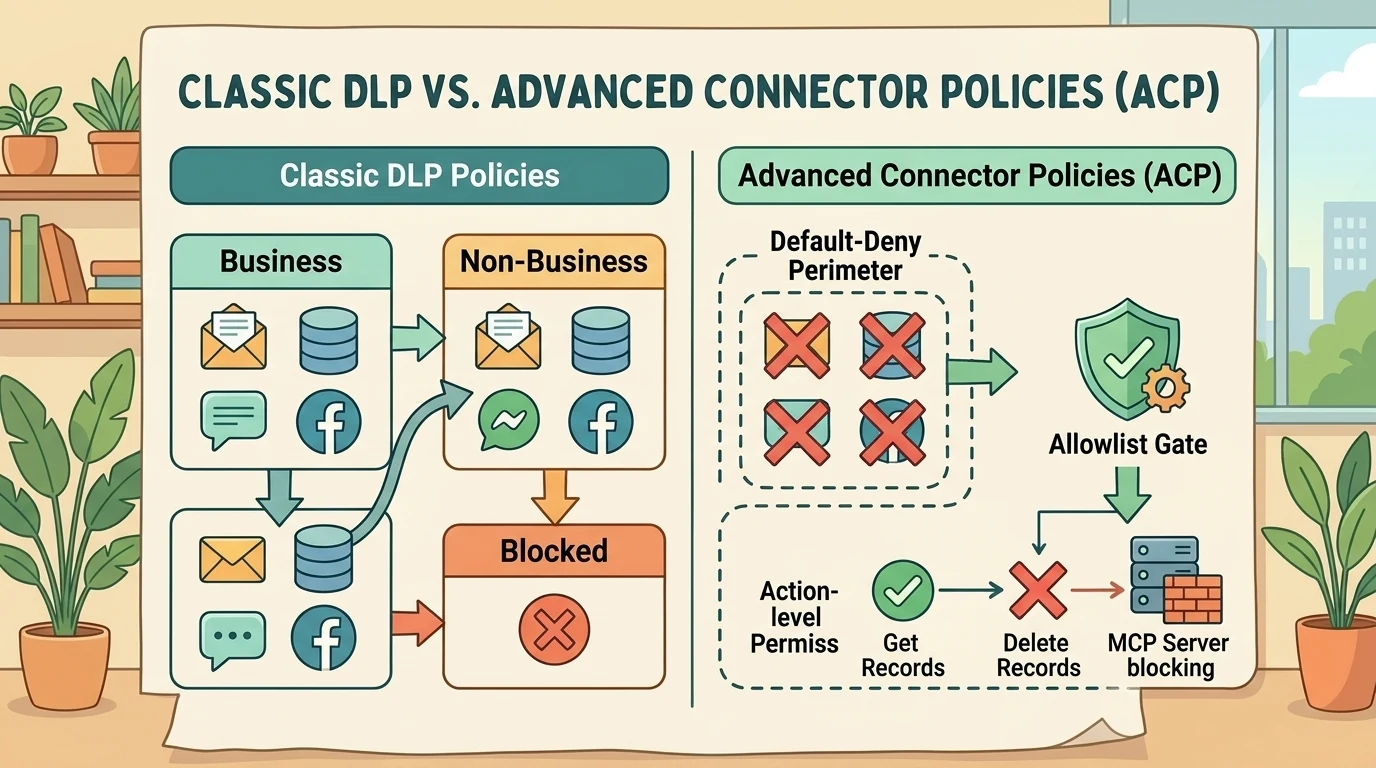
However, several details prevent “everything is blocked” from being a complete security claim:
- Coverage is not universal. Custom connectors and HTTP connectors are not yet supported by ACP; classic policies remain necessary for those paths and for Copilot Studio virtual connectors.
- MCP granularity differs. ACP can block an entire MCP server, but it does not currently provide individual-tool control inside that server.
- Initial configuration matters. The configuration experience preloads traditionally non-blockable connectors as allowed. Review the actual allowlist rather than assuming an empty starting state.
- Mixed mode remains restrictive. Classic policies and ACP are both evaluated, with the most restrictive applicable settings enforced.
- ACP-only mode ignores classic policies. Switching modes requires checking whether protections for unsupported connector types or virtual capabilities would be lost.
- Design-time availability is workload-specific. Microsoft documents runtime-only enforcement until design-time support reaches the relevant maker portal.
All of these qualifications are covered in the ACP documentation. They matter more than the simplicity of the allowlist slogan.
6. Department-specific access has two different solutions
Connector policies are not per-user authorization lists. Classic policies apply at tenant or environment scope; ACP applies to environments or environment groups. That does not mean every department must receive the same capabilities everywhere. See data policy scoping and ACP environment configuration.
Separate two requirements:
- Different maker populations need different integration catalogs: Use appropriately governed environments and environment groups.
- Different callers need different operations through the same integration: Enforce authorization at the service or tool boundary.
A finance environment with an approved connector policy may solve the first problem without introducing another service. A controlled MCP endpoint is useful for the second, especially when the organization wants to expose a business operation rather than an entire connector.
The distinction is between “Finance may build with SharePoint” and “approved Finance users may submit a case to this specific list.” Those are not interchangeable permissions.
7. Logic Apps MCP: expose a business capability, not a connector escape hatch
Azure Logic Apps Standard can expose qualifying workflows as remote MCP tools. Microsoft documents this capability as preview. The workflows must run in a supported hosting plan, start with When an HTTP request is received, end with Response, and be enabled in a running resource. See Create remote MCP servers from Standard workflows.
The architectural value is a controlled facade: a small interface in front of a larger system.
An illustrative Finance intake service
Suppose direct SharePoint and Teams connector use is restricted in a Copilot Studio environment. Finance nevertheless needs an approved intake process.
Instead of exposing generic “create item anywhere” and “post message anywhere” operations, publish two narrowly scoped tools:
- SubmitFinanceCase: Accept a title, service category, and summary; create an item in a fixed SharePoint list.
- NotifyFinanceReviewers: Post an approved notification to a fixed Teams destination.
This is an architectural example, not a claim of a verified customer deployment.
The intended call chain is:
- An authenticated employee interacts with the agent.
- Copilot Studio calls an approved MCP endpoint.
- The endpoint authenticates the caller and checks authorization.
- A workflow validates the request and invokes the configured downstream connection.
- The workflow returns a bounded result, such as a case identifier.
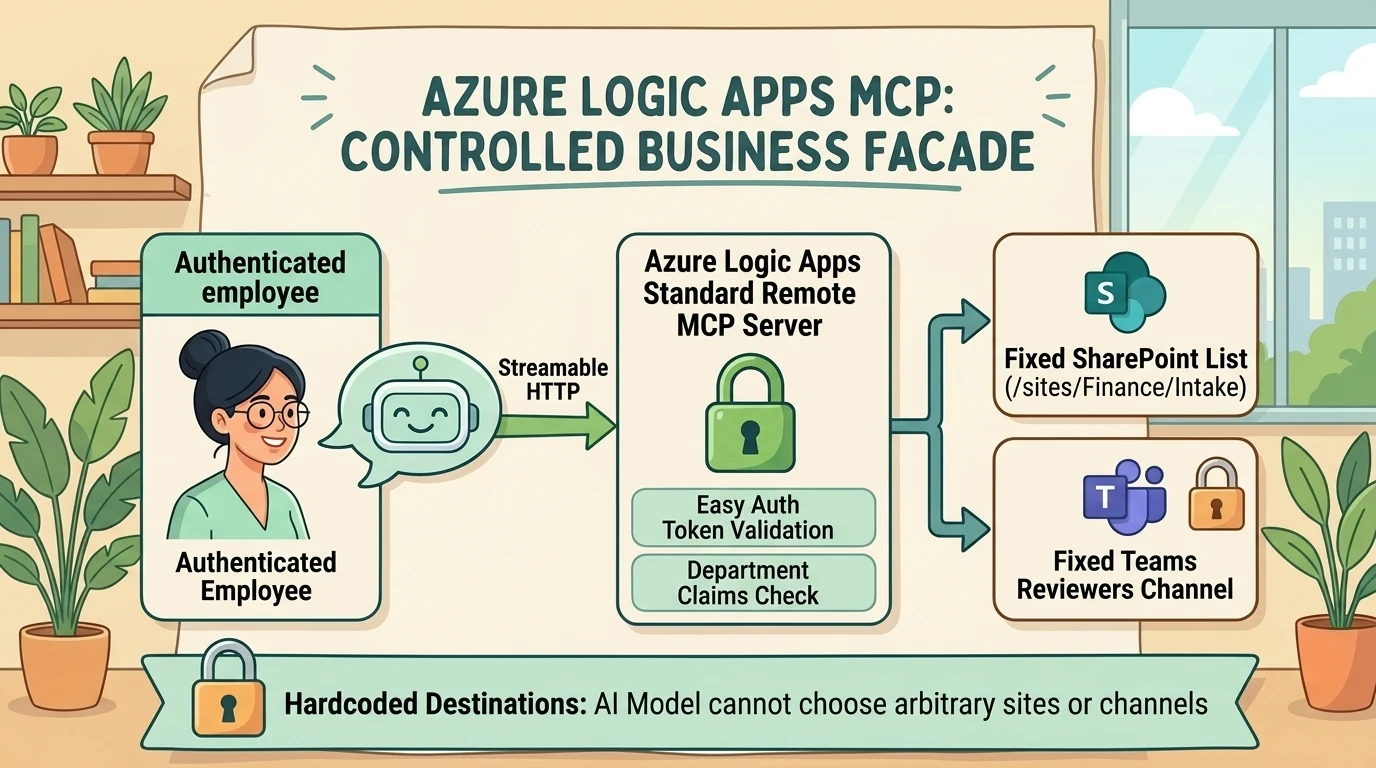
The security improvement comes from reducing the reachable operation surface. The agent requests a business outcome; it does not choose arbitrary sites, lists, channels, or HTTP requests.
Wrapping a blocked connector in MCP is not automatically an approved exception. The MCP connection must itself be permitted by applicable Power Platform policies, and the Azure-hosted workflows require their own security review. Copilot Studio’s MCP connection documentation explicitly states that MCP connectivity is subject to data policies.
OAuth at the entrance does not change the downstream identity
This is the most important architectural correction.
OAuth authentication to an MCP server identifies and authorizes access to that server. It does not automatically replace the identity stored in a SharePoint or Teams connection inside a Logic Apps workflow. Microsoft’s MCP workflow setup separately configures server authentication and connector connections; its managed-identity guide likewise treats downstream authentication as an explicit configuration.
Two designs are possible:
- Delegated execution: The downstream service evaluates the caller’s identity through a supported delegated implementation.
- Service execution: The workflow uses its own narrowly privileged connection and independently authorizes which callers may invoke each operation.
The second design can be appropriate for intake or logging, but it must not be described as “running with the employee’s SharePoint permissions.” It deliberately grants a constrained service capability.
Microsoft’s MCP security guidance describes the related confused-deputy risk: a server must not lend broad privileges to a lower-privileged caller merely because the caller authenticated successfully.
8. Build the controlled endpoint in deliberate stages
Stage 1: Define the operation and its fixed boundaries
Specify what the workflow may do, which resources it may touch, who may call it, and what it returns. Keep resource destinations in trusted configuration rather than model-controlled parameters.
Logic Apps distinguishes model-provided inputs from development-time static values. Its MCP guide documents that the User input-source option refers to values supplied during development, typically hardcoded across interactions, rather than necessarily a live end-user prompt. Review those settings carefully when fixing sites, lists, or destinations.
Stage 2: Create the workflows and their contracts
Use qualifying Request–Response workflows, then register them under Agents → MCP servers in the Standard logic app. Alternatively, generate workflows from selected connector actions during registration. Both paths are documented in the Logic Apps MCP setup guide.
Define input types, required fields, and meaningful descriptions in the Request trigger’s JSON schema. Map the accepted business fields to the intended SharePoint columns or Teams message content.
Descriptions help the agent select tools and supply inputs. They are not security enforcement. As a design recommendation, validate allowed categories, field lengths, destinations, and caller authorization in trusted workflow or service logic, and return controlled errors rather than unnecessary downstream data.
Stage 3: Secure and authorize the MCP endpoint
Logic Apps supports key-based and OAuth authentication for its MCP servers. OAuth setup uses App Service authentication, commonly called Easy Auth. The documented configuration includes restrictions for client applications, caller identities, and tenant access. Follow the MCP-specific Easy Auth instructions, not a generic assumption about how every HTTP endpoint should be configured.
For a departmental service, OAuth is preferable to distributing a shared key because it supports identifiable callers. But selecting OAuth alone does not implement “Finance only.” Configure the permitted identities and, where the requirement is group- or role-based, implement and validate the appropriate authorization checks before execution.
Do not trust a department name, email address, or user identifier supplied in the tool’s request body as proof of identity. Use validated identity claims. Microsoft’s Entra MCP authorization guidance recommends established token-validation middleware and checking the token before running a tool.
Stage 4: Configure downstream connections independently
Identify the principal used by each connector action and grant only the access needed for the approved operation. If managed identity is supported, configure it explicitly. If a service account is necessary, keep its permissions and reuse bounded.
Record the difference between the caller’s authorization and the workflow’s execution authority. That record is essential for reviewing both successful calls and denied requests.
Stage 5: Connect Copilot Studio using the supported transport
Copy the MCP server URL from Logic Apps. In Copilot Studio, use Tools → Add a tool → New tool → Model Context Protocol, enter the server details, configure authentication, create the connection, and add it to the agent. OAuth configuration may require registering the callback URL generated by the onboarding experience. See Connect to an existing MCP server.
Use Streamable HTTP for Copilot Studio. Although Logic Apps documents multiple transport options, Copilot Studio states that it no longer supports the older Server-Sent Events transport after August 2025. Compatibility must be checked at both ends.
Stage 6: Test the boundary, not just the happy path
A successful SharePoint write proves that an integration works. It does not prove that the intended security boundary works.
Use a validation matrix like this:
| Test | Expected security outcome |
|---|---|
| Approved Finance caller submits a valid case | Only the intended operation succeeds |
| Non-Finance caller invokes the same endpoint | Authorization denies execution |
| Request omits authentication or presents an invalid token | Tool execution is denied |
| Caller attempts to supply another site, list, or channel | The destination remains fixed or the request is rejected |
| Caller lacks downstream access in a delegated design | The downstream operation fails without privilege substitution |
| Approved caller uses a service-execution design | Only the explicitly granted service capability is available |
| MCP server is blocked by applicable policy | Copilot Studio cannot use that connection |
| A scheduled agent has no usable execution credentials | The failure is understood and handled, not masked |
Also verify that callers cannot reach a less-protected underlying workflow endpoint to avoid the MCP boundary. Review the actual downstream audit identity, workflow run history, and returned data. Logic Apps provides run history and monitoring integrations, as described in its MCP documentation.
Conclusion: make authority explicit at every hop
A secure agent is not simply an authenticated agent, an agent with an Entra ID, or an agent behind a connector allowlist. Each control answers a different question.
For user-driven work, prefer the user’s authority. For shared execution, use a deliberately scoped workload identity. Use connector policies to constrain integration paths, and resource or service authorization to decide what each caller may actually do.
Logic Apps MCP can make this model practical by exposing small, approved business capabilities instead of broad connector access. Its value is not that it gets around a restriction. Its value is that it lets you replace an overly broad interface with a narrower, reviewable one.
The decisive question remains the same from the first conversation to the final API call: who is acting, with whose authority, against which resource, and under which enforced boundary?
Read next