Shadow AI Is Not One Visibility Problem: Three Microsoft Security Layers Explained

Writer
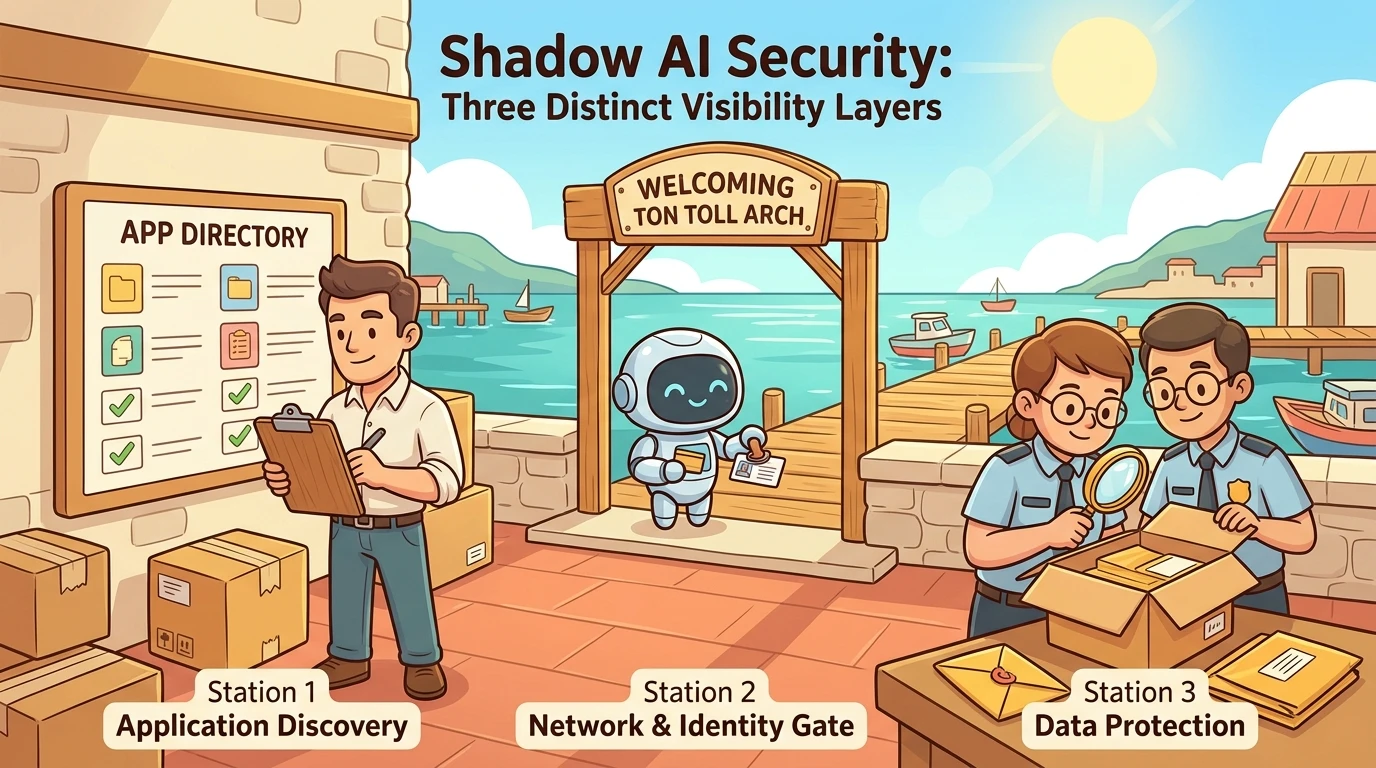
An employee opens an AI assistant, pastes a paragraph, and gets a useful answer. From the organization’s perspective, those few seconds raise three different questions: Which service did they reach? Who accessed it? What information crossed the boundary?
Those questions are related, but they are not interchangeable. A network connection is not a prompt. An application risk score is not evidence of a data leak. And discovering a service does not automatically mean you can inspect or control every interaction with it.
Microsoft Defender for Cloud Apps, Microsoft Entra Global Secure Access, and Microsoft Purview approach this problem from different directions. Understanding their overlap, prerequisites, and blind spots is more useful than treating them as three competing “shadow AI dashboards.”
The central distinction: Application discovery tells you where activity is happening. Data-security telemetry helps establish what happened there. Neither should be mistaken for complete visibility.
Start with the question, not the portal
Shadow AI is the use of AI applications and tools outside an organization’s approved arrangements. That can include a consumer chatbot, an API used by a developer, or a remote tool endpoint accessed by an agent. Microsoft’s shadow AI discovery documentation explicitly covers generative AI applications, model-provider APIs, and software-as-a-service (SaaS) Model Context Protocol servers.
Model Context Protocol, or MCP, is a protocol through which AI applications and agents interact with tools and other resources. For discovery purposes, the important distinction is between a recognizable remote service and an arbitrary MCP server. A catalog can identify known services; it is not automatically an inventory of every server or tool an agent can reach.
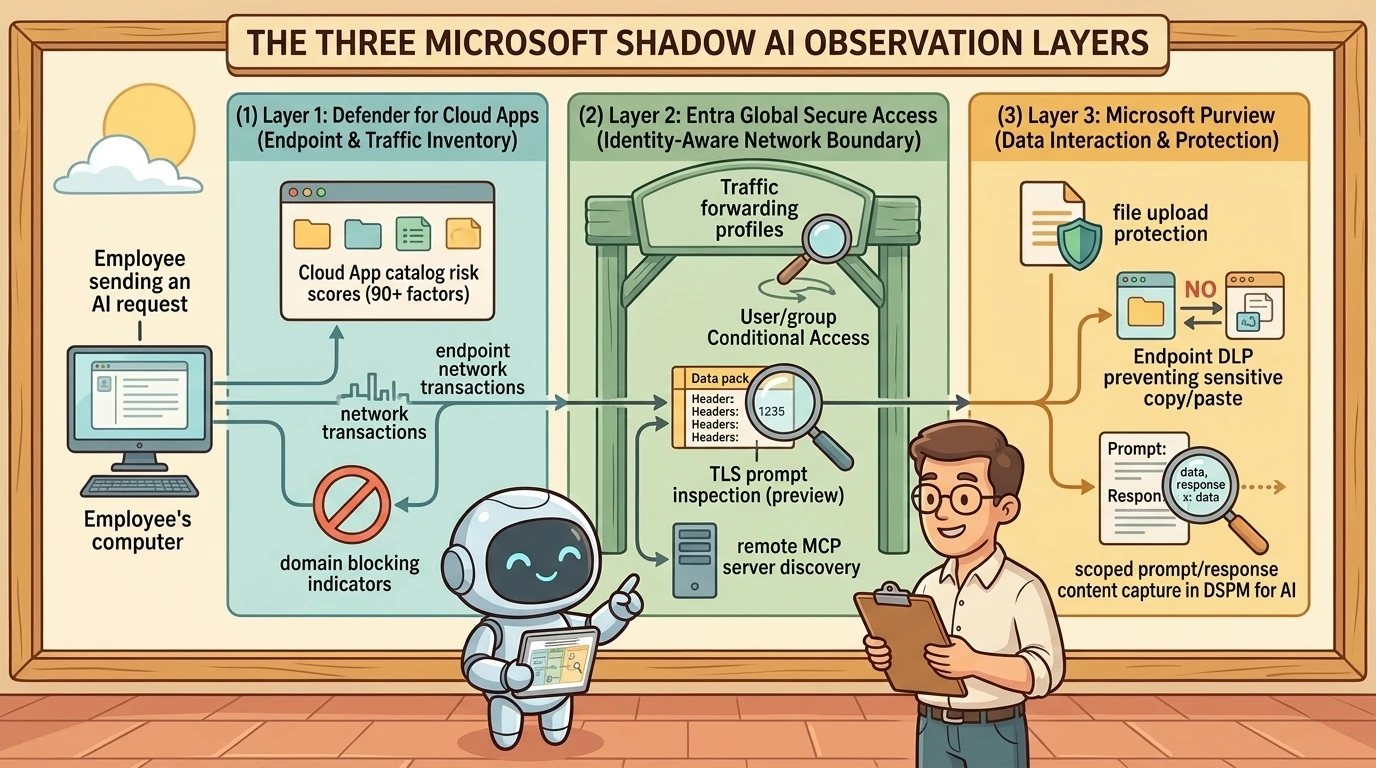
A useful mental model is three observation points:
- The endpoint and traffic inventory: Which applications appear in observed traffic, and how enterprise-ready are they?
- The identity-aware network boundary: Which users access which destinations through the organization’s controlled traffic path?
- The data interaction: Which supported activities involve sensitive information, and what content can be collected or protected?
These are observation points, not rigid product boundaries. Defender for Cloud Apps can include user information. Global Secure Access now has a separate preview capability for deeper AI telemetry. Purview can integrate at the network layer as well as the endpoint and browser. The architecture matters more than the shorthand.
1. Defender for Cloud Apps: Discover the application landscape
Microsoft Defender for Cloud Apps uses Cloud Discovery to analyze traffic against its Cloud app catalog. The catalog supplies application classification and enterprise-readiness information; discovery supplies evidence that applications are being accessed in your environment. Microsoft describes this process in its Cloud Discovery overview.
That distinction prevents a common misunderstanding: an application appearing in the catalog does not mean your employees use it. Conversely, an application missing from discovery is not necessarily unused. It may be outside your telemetry coverage or absent from the catalog.
Reuse endpoint telemetry, but verify the integration
For organizations already using Microsoft Defender for Endpoint, the integration can be an efficient starting point. It reuses endpoint network-transaction telemetry without requiring a separate traffic-mirroring deployment.
However, “we deployed Defender for Endpoint” is not the same as “Cloud Discovery is configured.” Microsoft’s integration prerequisites and configuration steps require a Defender for Cloud Apps license, supported onboarded devices, and an eligible endpoint product, such as Defender for Endpoint Plan 2 or Defender for Business. The integration must also be enabled in the Defender portal.
The documented configuration path is:
- Open Settings > Endpoints > General > Advanced features.
- Enable Microsoft Defender for Cloud Apps.
- Save the configuration and allow time for telemetry to appear.
Microsoft documents up to two hours for initial data to appear after enabling the integration. Discovery is therefore not an instantaneous test of whether a connection occurred. Platform-specific prerequisites also matter: for example, the documented macOS integration requires network protection and does not cover UDP traffic through that mechanism. See the integration documentation.
If endpoint integration is not available, supported firewall and proxy logs can provide another route. Cloud Discovery supports manually uploaded snapshot reports and continuous ingestion through log collectors and other integrations. The resulting visibility depends on the fields and traffic present in those logs, as explained in the Cloud Discovery overview.
Look beyond chatbot websites
In the Defender portal, start with Cloud Apps > Cloud Discovery, then inspect discovered applications rather than relying only on dashboard totals. Review these catalog categories:
- Generative AI: Applications whose capabilities include generating content.
- AI – Model Provider: Platforms or APIs providing access to foundation models or large language models.
- AI – MCP Server: Public cloud services implementing MCP.
These categories are documented in Microsoft’s catalog filters and categories reference. They help distinguish a user-facing AI application from model access and remote tool connectivity.
Do not assume that a model-provider entry reveals every model used inside a particular coding assistant. It identifies observed access to a classified destination, not the assistant’s complete internal execution path.
Risk scores describe the service, not the interaction
The catalog evaluates applications using more than 90 risk factors across general, security, compliance, and legal categories. Administrators can adjust factor weights to reflect organizational priorities. Microsoft explains the calculation and customization in its risk-score documentation.
Think of the score as a supplier-readiness assessment, not a verdict on a particular employee action. A well-rated service can still receive information it should not receive. A poorly rated service may have been visited without any sensitive content being submitted.
Single sign-on support is a useful evaluation signal. For example, Security Assertion Markup Language (SAML) support may indicate an opportunity to move an informal usage pattern into an enterprise-managed offering. But a catalog attribute does not prove that the employee used that offering, that the feature is included in the purchased plan, or that your organization configured it. Treat it as a procurement and architecture question to investigate, not evidence of existing control.
Exact catalog-size claims add little value here. Microsoft’s documentation and product pages use different totals. The durable point is that discovery matches against a large, maintained catalog, not that the catalog contains a particular number of entries. See the catalog reference and product overview.
Separate user attribution from enforcement scope
It is inaccurate to describe Defender for Cloud Apps discovery as exclusively device- or IP-based. Microsoft explicitly states that the Defender for Endpoint integration supplies both user and device information for traffic activities. Firewall-log attribution depends on the source data. See how the integration works.
The more useful distinction concerns enforcement. Marking an application Unsanctioned can propagate domain-blocking indicators to Defender for Endpoint when the blocking integration and prerequisites are configured. This uses endpoint network protection; it is not an inline decision about the sensitivity of a prompt. Microsoft also supports device-group scoping and warning experiences, so the mechanism is not limited to a single organization-wide block. See governing discovered applications.
A Sanctioned tag records approval; it should not be treated as a universal allow rule overriding other security controls. An Unsanctioned tag is likewise not proof that blocking is already effective. Microsoft documents propagation latency of up to three hours, and catalog URL coverage can affect consistency. Validate enforcement on representative devices and application variants rather than relying on the tag alone. See the blocking prerequisites and catalog URL caveats.
2. Global Secure Access: Put identity into the traffic path
Microsoft Entra Global Secure Access brings network access into the Entra security model. For internet-facing AI services, the relevant component is Microsoft Entra Internet Access, part of Microsoft’s Security Service Edge (SSE) offering.
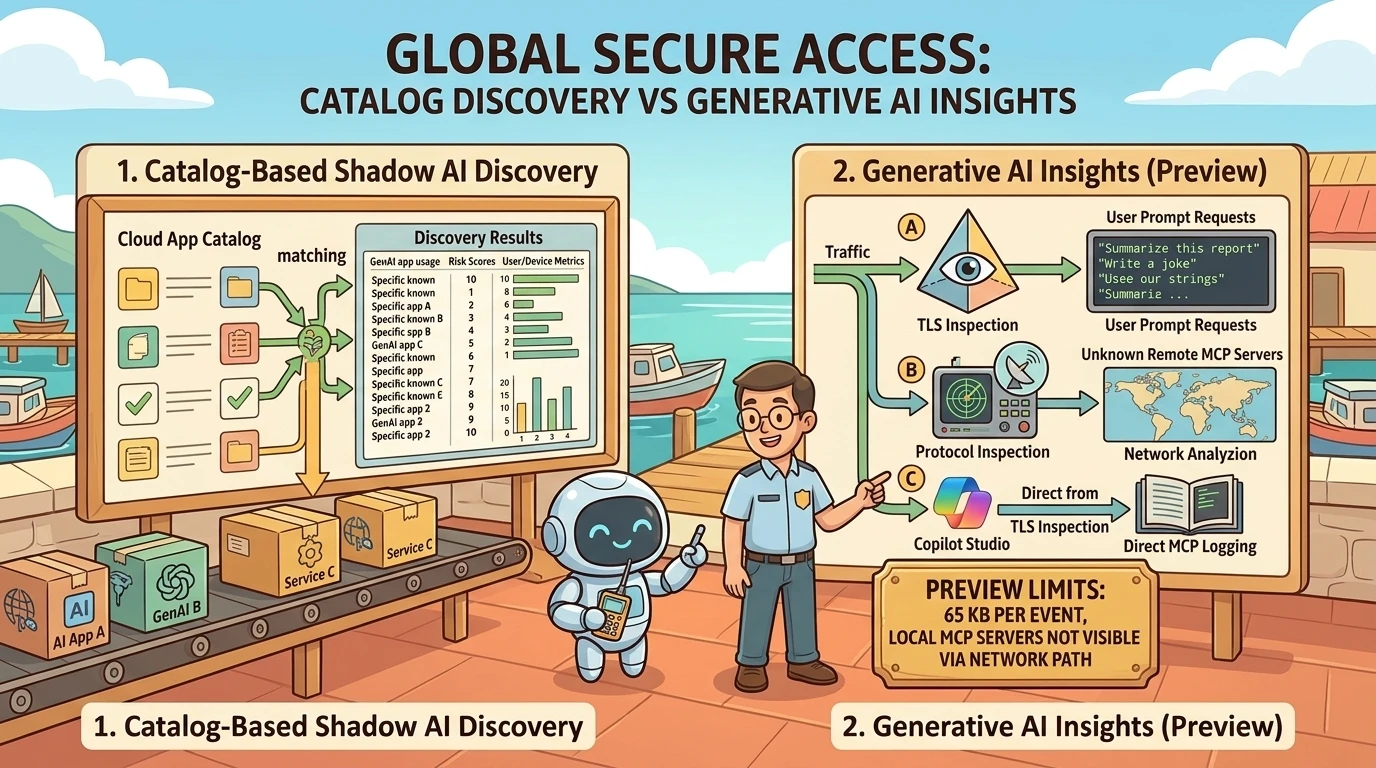
Its shadow AI discovery analyzes observed traffic and matches destinations against the same Defender for Cloud Apps catalog. It surfaces application usage, users, traffic volumes, and risk information. The shared catalog means these are complementary views of application use, not two independent assessments of a provider’s trustworthiness. See shadow AI discovery in Global Secure Access.
Forwarded traffic defines the coverage
The Internet Access traffic forwarding profile routes acquired traffic through Global Secure Access using the client or configured remote networks. It supports inclusion and exclusion policies, so enabling the profile should not be described as automatically routing every outbound connection without exception. Microsoft documents default bypasses, custom bypasses, and acquisition rules in its traffic forwarding profile guide.
This creates a straightforward architectural rule: if the relevant traffic does not traverse the observation point, that observation point cannot report it.
Global Secure Access can extend coverage to network-connected devices without Defender for Endpoint, but this does not make every such connection identity-aware. Remote-network coverage and authenticated user-level policy are different capabilities. Verify the actual traffic path and identity context, especially for shared devices. Microsoft’s Internet Access deployment guide distinguishes user/group policies from extending protection to entire networks.
Use identity-aware policy where it is available
Global Secure Access is particularly useful when access decisions need to differ by user or group. For example, an organization might permit an approved research team to access a service while restricting other users. Microsoft documents category- and destination-based filtering, user/group targeting, and override policies in its deployment guide.
For discovery, Microsoft’s current documented navigation is Global Secure Access > Applications > Insights and Analytics, with the Generative AI apps and tools filter. Portal labels can change, so follow the current shadow AI discovery instructions rather than assuming a recorded demonstration’s navigation remains exact.
Important update: Network visibility can go deeper than discovery
The simple statement “Global Secure Access finds apps; Purview sees content” is now incomplete.
Microsoft documents Generative AI Insights, currently in preview, as a separate Global Secure Access telemetry surface. It can log prompt requests to supported AI applications and MCP traffic to remote servers. Prompt extraction uses Transport Layer Security (TLS) inspection; MCP detection uses protocol inspection rather than relying only on catalog membership. See Generative AI Insights.
This distinction matters in two ways:
- Catalog-based discovery identifies known AI destinations and supplies application-level risk context.
- Generative AI Insights provides supported event-level prompt and MCP telemetry, including discovery of unknown remote MCP servers through protocol inspection.
The preview is not universal conversation recording. Microsoft documents prompt-request logging and MCP request/response payloads, a content limit of 65 KB per event, and no visibility into local MCP servers through this network mechanism. Content extraction normally requires TLS inspection; the documented Copilot Studio integration has a separate MCP logging path that does not require it. See the preview’s mechanisms and limitations.
Similarly, discovering an AI destination does not itself enable prompt-injection protection. Inventory, content inspection, and protective policy are separate capabilities with separate configuration requirements.
3. Purview: Move from access evidence to data-security evidence
Microsoft Purview addresses the question application inventories cannot answer on their own: Was sensitive information involved, and what controls applied to the interaction?
Data Security Posture Management (DSPM) provides a front door to these capabilities, using underlying Purview auditing, classification, collection, and protection mechanisms. Microsoft’s current documentation distinguishes the newer DSPM experience from DSPM for AI (classic) and DSPM (classic). New deployments should follow the current DSPM setup guidance, not treat these names as three equivalent products requiring separate deployment.
Browser monitoring is a configured capability, not blanket surveillance
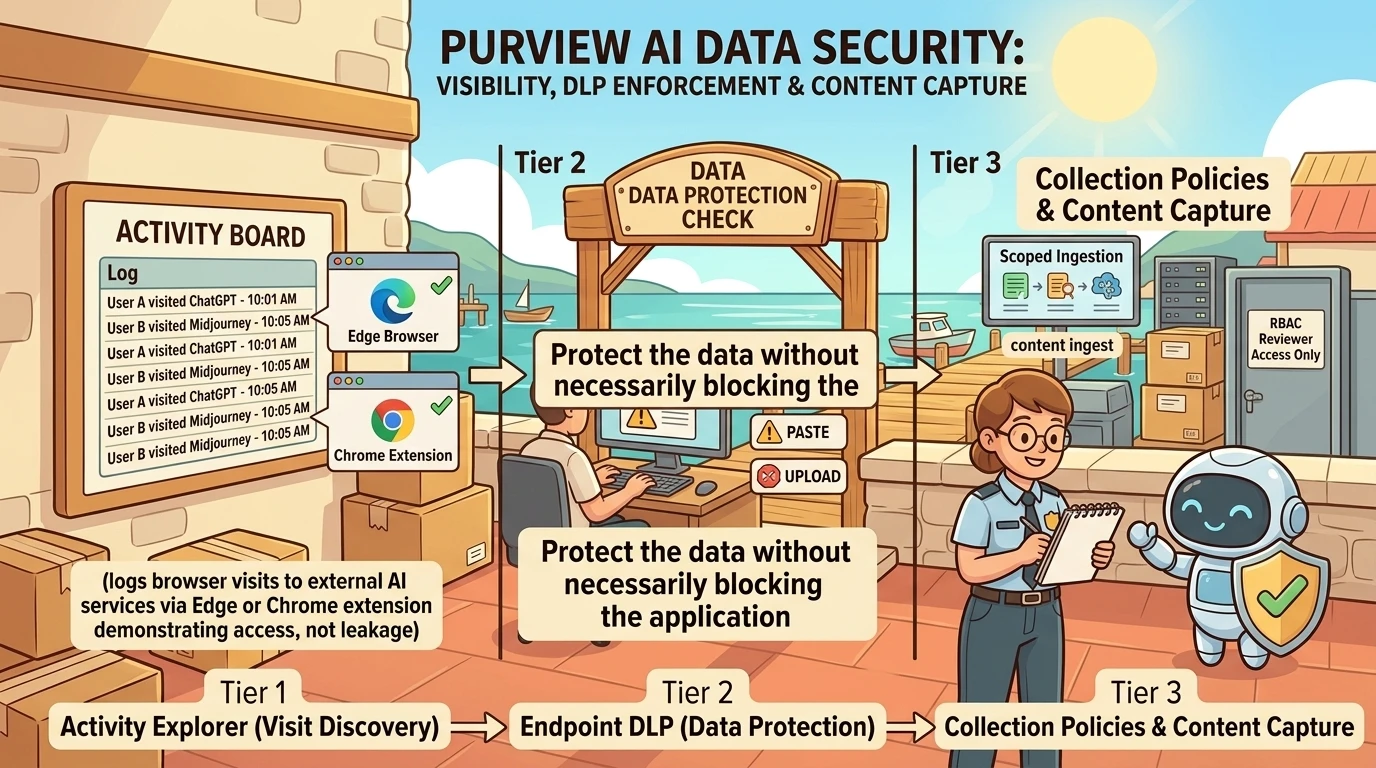
For the endpoint/browser discovery path, prerequisites include supported devices onboarded to Purview, the relevant browser integration or extension, and policies that collect the intended signals. The Purview browser extension is required for Windows browser-visit discovery through Insider Risk Management policies and for Endpoint DLP in Chrome. Edge also has direct Purview integration paths with their own configuration requirements. See DSPM setup tasks and third-party AI application support.
Existing Defender for Endpoint onboarding can simplify device onboarding, but it does not replace checking Purview readiness, browser support, and policy scope.
Once configured, Activity explorer can expose supported events such as AI-site visits and sensitive-information interactions. These are different event types. A visit record should not be interpreted as evidence that a prompt was submitted, much less that confidential data was disclosed.
Seeing prompts and responses requires more than an extension
Purview can display collected AI prompt and response data, but this depends on the supported application, collection path, policy configuration, and reviewer permissions. Microsoft documents content-viewing permissions and solution-specific limitations in its third-party AI application guide.
Collection policies provide a particularly important boundary. Enabling content capture allows supported detected prompts and responses to be stored; without it, detected content is limited to sensitive information. Microsoft also specifies that AI content capture requires Content contains classifiers to be set to All, and that this capability does not include the content of files shared with generative AI. See content capture for AI interactions.
Supported site does not mean supported everywhere. A site’s presence in the discovery list does not guarantee prompt capture, retention, eDiscovery, or identical DLP behavior across browsers and operating systems.
For example, Microsoft documents narrower Edge-based application support for certain third-party AI compliance capabilities than for general site discovery. Check both the supported-site list and the capability-specific restrictions.
Purview also supports network data security integrations and direct Edge browser data security. The extension-based path is therefore one architecture, not the entirety of Purview’s AI visibility.
Protect the data without necessarily blocking the application
Endpoint Data Loss Prevention (DLP) can warn or block supported attempts to share sensitive information with third-party AI sites. Depending on the configured policy and platform, this can include sensitive file uploads and pasting sensitive information into a browser. Microsoft documents audit, block-with-override, and block actions for supported Chrome activities in its extension guide, and AI-specific protection scenarios in its third-party AI guide.
This is fundamentally different from blocking a destination. One policy says, “Do not access this service.” Another says, “You may use the service, but not for this sensitive data.” Neither is automatically the right answer for every application.
Content visibility also creates a responsibility to limit collection and review. Collection policies can scope ingestion, while Purview solutions provide role-based access and privacy controls. Establish a justified collection scope and restricted reviewer access before enabling broad content capture. See collection-policy design and Purview’s AI support and privacy controls.
Compare the layers without flattening their differences
| Layer | Best starting question | Evidence and control boundary |
|---|---|---|
| Defender for Cloud Apps Cloud Discovery | Which AI services appear in our endpoint or network telemetry? | Catalog classification, application risk, and available user/device context; endpoint-integrated blocking is distinct from prompt inspection. |
| Global Secure Access shadow AI discovery | Which AI destinations do users access through our controlled network path? | Catalog-based usage and risk analytics; user/group access policies depend on the configured identity-aware path. |
| Purview DSPM and underlying controls | Which supported interactions involve sensitive information? | Policy-driven activity, classification, collection, and DLP; content visibility depends on the specific integration and permissions. |
| Global Secure Access Generative AI Insights, preview | What supported prompts or remote MCP operations cross the inspected path? | Deeper network telemetry with inspection prerequisites and documented content and coverage limits. |
These boundaries follow Microsoft’s Defender integration, Global Secure Access discovery, Purview AI capability guide, and Generative AI Insights preview.
Licensing: Do not turn “we have E5” into an architecture assumption
Licensing is a prerequisite here, not the article’s central subject. Three distinctions are enough to avoid a misleading rollout plan:
- Defender discovery and endpoint blocking: Microsoft 365 E5 is one documented licensing route for the blocking integration, but the service configuration and endpoint prerequisites still apply. See Defender blocking requirements.
- Internet Access: Microsoft Entra Internet Access is included in Entra Suite, which Microsoft currently documents as available standalone or included in Microsoft 365 E7. Do not assume E5’s Entra ID entitlement includes the full Internet Access service. See Microsoft Entra licensing.
- Purview third-party AI interactions: Microsoft explicitly requires enabling pay-as-you-go billing for managing these interactions. Per-user entitlements do not eliminate that requirement. See Purview third-party AI prerequisites and DSPM billing setup.
These are the documented distinctions checked for this article on October 25, 2026. Validate the specific feature, tenant availability, and commercial terms before deployment, especially for preview capabilities.
A practical validation sequence
Consider an illustrative scenario: employees use an external AI assistant to rewrite internal documents. The objective is to understand usage and prevent sensitive information from being shared, not to assume every visit is a violation.
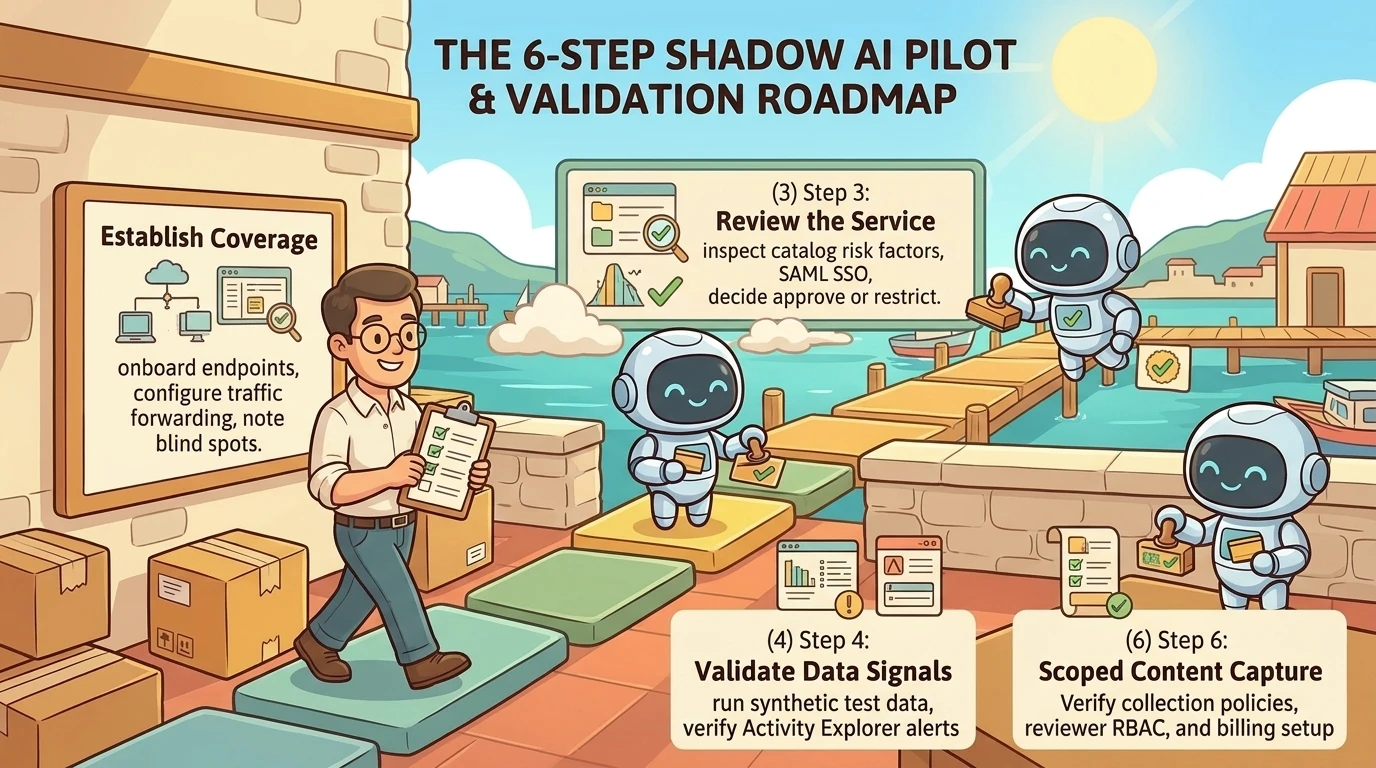
A useful pilot would proceed in this order:
- Establish coverage. Identify the onboarded endpoints, ingested logs, forwarded traffic, and supported browsers. Record what remains outside observation.
- Confirm application discovery. Generate benign test traffic and check whether the expected destination appears with the expected user and device context.
- Review the service. Evaluate catalog factors and the actual offering being used. Decide whether the appropriate response is approval, enterprise adoption, restriction, or further investigation.
- Validate data-security signals. Use approved synthetic test content to check supported sensitive-information detection and the resulting Activity explorer events.
- Test enforcement separately. Confirm destination blocking, warning, or data-specific DLP behavior on the actual target platforms. Allow for documented propagation delays.
- Test content capture only if justified. Verify collection policy, application support, reviewer permissions, and billing configuration. Confirm what is captured and what is not.
This is a proposed validation method, not a claim of a completed deployment. Its prerequisites and control boundaries come from Microsoft’s Defender integration guide, Internet Access forwarding guide, and Purview AI configuration guidance.
The result should be more precise than “employees are using AI.” It should distinguish observed access, supported data interactions, policy matches, and verified enforcement.
The real goal is evidence you can act on
Shadow AI discovery is not a contest to produce the largest application count. It is a progression from uncertainty to evidence.
Defender for Cloud Apps helps establish the application landscape and its risk context. Global Secure Access adds a controlled, potentially identity-aware network observation and enforcement point. Purview connects supported interactions to data-security policy. Newer network inspection capabilities can deepen that picture, but they do not remove the need to understand prerequisites and limits.
Start with the question you need to answer. Then choose the observation point and control that can actually answer it.
Knowing that someone reached an AI service is the beginning of the investigation, not its conclusion.
Read next