Copilot Cowork: Architecture, Credits & Cost Management

Writer

Microsoft Copilot Cowork reached General Availability worldwide on June 16, 2026, after a three-month preview in the Frontier program. That milestone is more than a feature launch — it changes how enterprise IT is funded. Cowork is a multi-step, agentic automation engine that acts on a user’s behalf to manage calendars, orchestrate cross-application communications, draft deliverables, and run complex workflows end to end.
Because agentic workflows vary enormously in computational cost — from a quick data fetch to a multi-hour autonomous reasoning loop — a flat per-seat subscription can’t cover them economically. Microsoft’s answer is a usage-based (consumption) model priced in Copilot Credits, layered on top of the seat license you already pay for.
This guide covers the architecture, the procurement modes and the order they’re spent, a forecasting method with a fully worked example, and a click-by-click admin setup. It is written so you can act on it the same day.
TL;DR
- Cowork runs as a fully managed service inside Microsoft’s compliance boundary — there is no infrastructure for you to host or patch.
- Every agentic action consumes Copilot Credits, pooled at the tenant level and shared across Cowork, Copilot Studio, Dynamics 365, Power Platform, and the Work IQ API.
- You buy credits three ways — Capacity Packs (monthly prepaid), Pre-Purchase Plans / P3 (annual prepaid, bought in Azure), and Pay-As-You-Go (metered Azure billing) — and they’re drawn down in that order.
- A Copilot seat license includes zero credits. Credits are a separate budget line.
- Configure at least one usage-based billing path before your enforcement date (the author’s tenant deadline is June 30, 2026). With Pay-As-You-Go active, users are never interrupted; the only real failure mode is having no billing path configured at all.
1. Architectural Foundations and Governance Boundaries
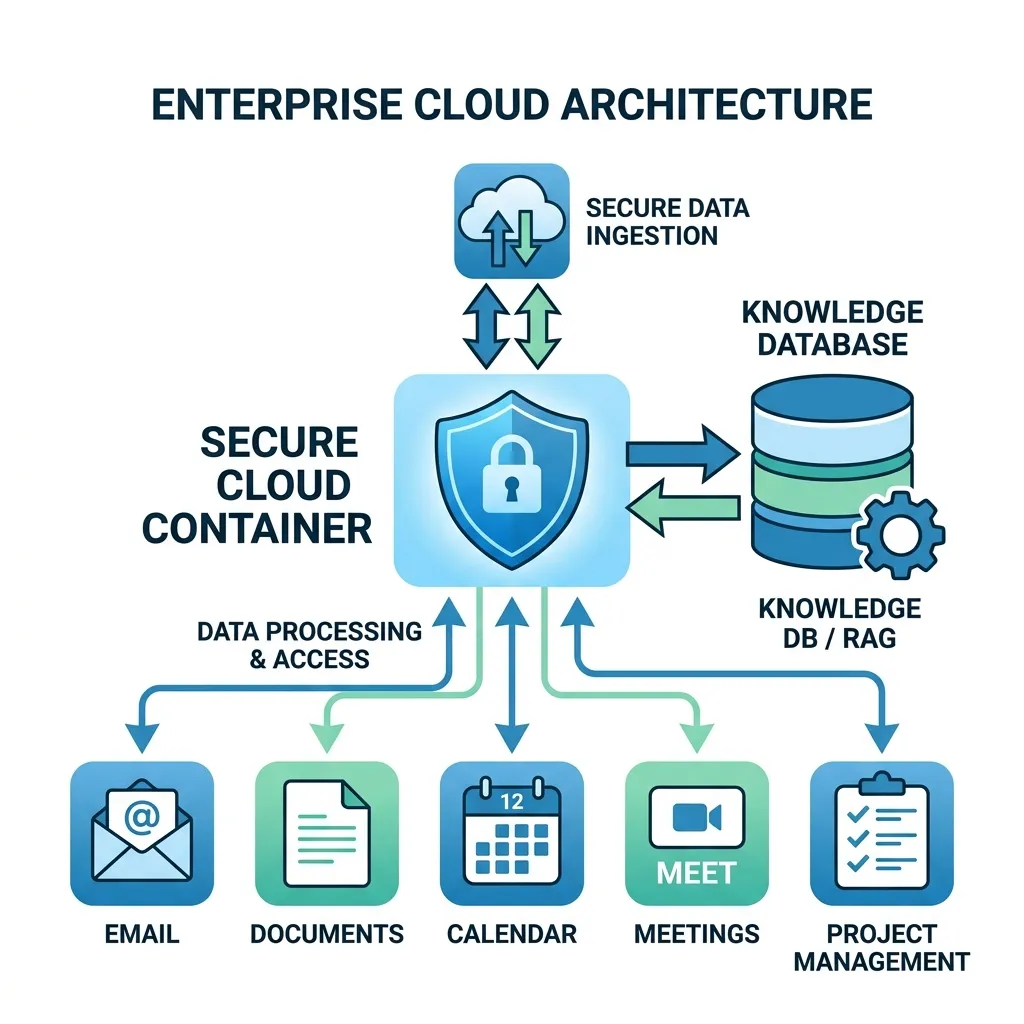
Cowork leverages advanced foundation models specialized in multi-step reasoning, planning, and long-context execution. (The current generation includes models from Anthropic alongside Microsoft and OpenAI models — see §2, the Models cost bucket, for how the orchestrator picks one per task.) Crucially, Cowork is not customer-hosted infrastructure. It runs as a fully managed service inside isolated, secure Linux containers within the Microsoft 365 compliance boundary.
The Work IQ Grounding Layer
Every action Cowork initiates is grounded in Work IQ, the workplace intelligence layer that indexes the relationships and signals already present in your tenant: org structure, user behavior, communications (email, Teams chats), meetings, and documents. Work IQ is what lets an agent know who “my manager” is, which deck is the latest, and what the relevant thread was — without you spelling it out.
Two practical consequences:
- Grounding has a cost. Retrieving and processing that context is one of the four credit cost buckets (the Context bucket in §2). Richer grounding = more credits.
- Grounding respects existing permissions. Work IQ only surfaces content the requesting user can already see. It does not create a new access path to data.
Autonomous but Bounded
Cowork can autonomously draft and send email, structure documents, schedule multi-party meetings, and post to Teams channels. What it cannot do is exceed the user’s existing security clearances or bypass Microsoft 365 data-governance rules (sensitivity labels, DLP, retention, conditional access). The agent operates as the user, never above them.
Deterministic Control Gates (Human-in-the-Loop)
Despite running long background operations, Cowork enforces human-in-the-loop validation: outward-facing or hard-to-reverse actions (sending an external email, posting publicly, deleting content) surface an approval gate before they execute. Read-only and internal-prep steps generally run without interruption.
Hands-on — what this means for you: You don’t size VMs, manage GPUs, or patch containers. Your levers are governance (labels, DLP, conditional access — already yours) and cost (the credit configuration in this guide). Treat Cowork rollout as a billing and governance project, not an infrastructure project.
2. The Mechanics of Copilot Credits
Copilot Credits are the universal currency for agentic automation across the Microsoft enterprise stack. They are pooled at the tenant level, so you procure centrally and spend across multiple environments:
- Microsoft Copilot Cowork
- Copilot Studio custom agents
- Dynamics 365 agentic workflows
- Power Platform automations
- Work IQ API integrations
The Four Cost Buckets
The credit cost of any single agentic task is computed dynamically from four operational variables:
| Cost Bucket | What it pays for |
|---|---|
| Models | The compute cost of the LLM chosen for the task. An orchestrator balances speed, output quality, and credit efficiency — a quick summary may use a small fast model; a deep analysis escalates to a larger one. |
| Runtime | The cost of keeping background execution contexts and memory alive during multi-step, long-running processes. The longer the agent “thinks” and persists state, the higher this is. |
| Context | The retrieval and processing cost of parsing organizational knowledge — RAG tokens ingested from email, files, and calendar via Work IQ. |
| Tools | The execution cost of invoking APIs, updating databases, or triggering native M365 application hooks. |
Worked Example — Anatomy of a Credit Charge
Consider a “Monday pipeline brief” agent for a sales rep. A single run might break down like this (illustrative, to show how the buckets combine — your tenant’s actuals will vary):
| Bucket | What happened in this run | Approx. credits |
|---|---|---|
| Context | Pulled 3 email threads, last week’s CRM notes, 2 shared files | 120 |
| Models | One mid-tier model pass to synthesize + rank opportunities | 150 |
| Runtime | ~90 seconds of orchestration, state held across 4 steps | 70 |
| Tools | 2 CRM reads + 1 calendar lookup (≈0.1 credit/call is negligible here) | ~1 |
| Total | ≈ 341 credits |
The lesson: Context and Models dominate most everyday tasks. If you want to control spend, the biggest levers are how much grounding an agent pulls and how often it runs — not the handful of tool calls at the end.
3. Workload Classification and Pricing
To build a budget you first classify workloads into three complexity tiers based on historical resource consumption.
Task Complexity Tiers
| Tier | Credits / task | At PAYG ($0.01/credit) | Typical example |
|---|---|---|---|
| Light | 70 – 200 | $0.70 – $2.00 | A weekly status script that reads a user’s Planner tasks and calendar and drafts a short summary. |
| Medium | 400 – 600 | $4.00 – $6.00 | A meeting-prep agent that pulls historical email threads, CRM entries, and shared files into a structured briefing doc. |
| Heavy | 1,500+ | $15.00+ | An end-of-month financial audit that processes large spreadsheets, isolates anomalies, identifies trends, and produces an enterprise-ready PDF. |
Rule of thumb: A “prompt” in a chat box is cheap; an agentic task that runs for minutes and touches multiple sources is not. When forecasting, count agentic tasks, not keystrokes — a single power user may only trigger a handful of Heavy tasks a week, but each one can cost more than a hundred Light tasks.
Translating Credits to Dollars — Quick Reference
| Credits | PAYG cost ($0.01/credit) |
|---|---|
| 1,000 | $10 |
| 25,000 (one Capacity Pack) | $250 list value* |
| 100,000 | $1,000 |
| 1,000,000 | $10,000 |
*At the $0.01 PAYG rate. A Capacity Pack’s prepaid price is lower — see §4.
Work IQ API Consumption Model
Teams building bespoke agents or extending Cowork via custom integrations can call the Work IQ APIs directly, with two billing models:
- Chat and Context APIs (variable pricing): Cost scales with the input/output token volume needed for grounding, semantic search, and retrieval.
- Tools API (static pricing): A flat 0.1 credit per API call for executing explicit actions or calling transactional connectors.
4. Procurement Architecture and Drawdown Hierarchy
There are three ways to buy Copilot Credits. They are purchased in different places and drawn down in a strict order — getting both right is what prevents accidental overages and stranded prepaid value.
The Three Procurement Modes
1. Capacity Packs — monthly prepaid (bought in the M365 admin center) Each pack provides a fixed 25,000 Copilot Credits per month, replenished at the start of every billing cycle. Unused monthly credits do not roll over. Packs are consumed first. Publicly reported list pricing is ~$200 per pack per month — an effective $0.008/credit, ~20% below the PAYG rate — but confirm current pricing in your own tenant, as list prices change.
Important ordering rule: You must enable Pay-As-You-Go billing first, then attach a Capacity Pack. PAYG acts as the safety net that absorbs any usage beyond the prepaid 25,000 credits, so there’s no interruption when a pack runs dry mid-month.
2. Pre-Purchase Plans (P3) — annual prepaid (bought in the Azure portal) An upfront, one-year commitment that earns a volume discount across nine tiers (~5% up to ~20%). P3 is purchased as Copilot Credit Commit Units (CCCUs) under Azure portal → Reservations, not in the M365 admin center — a detail many setup guides miss. One CCCU pays down $1 of retail Copilot Credit usage, i.e. ~100 credits at the PAYG rate. So a 300,000-credit entry plan ≈ $3,000 ≈ 3,000 CCCUs.
Critical constraint — P3 is “use it or lose it” and final: Unused P3 credits expire at the end of the 12-month term, and cancellations and exchanges are not supported — all purchases are final. Over-provisioning is lost capital with no refund path. Size conservatively and top up later rather than over-committing on day one.
3. Pay-As-You-Go (PAYG) — metered, zero commitment (linked to an Azure subscription) The flexible fallback. Consumption is billed monthly in arrears to a linked Azure subscription at ~$0.01 (one cent) per credit. No upfront cost, no expiry, no cap unless you set one.
P3 Discount Tiers — Quick Reference
The table below shows the published anchor points, not the full schedule. Microsoft lists nine tiers; the exact thresholds and percentages between the anchors should be confirmed live in Azure → Reservations → Copilot Credit Pre-Purchase Plan, because list prices and tier boundaries change over time.
| Anchor | Approx. credits | ≈ CCCUs ($) | Indicative discount |
|---|---|---|---|
| Entry tier | 300,000 | $3,000 | ~5% |
| Mid tier (per MS example) | 1,500,000 | $15,000 | ~6% |
| Higher steps | 3,000,000 / 15,000,000 | — | progressive |
| Top enterprise tier | 300,000,000 | $3,000,000 | ~20% |
Note: Treat all but the entry/top anchors as illustrative. Don’t hard-code mid-tier percentages into a business case — pull the current grid from the portal at purchase time.
The Liquidation (Drawdown) Order
When a user triggers an action, the billing engine checks balances and draws them down in this fixed sequence:
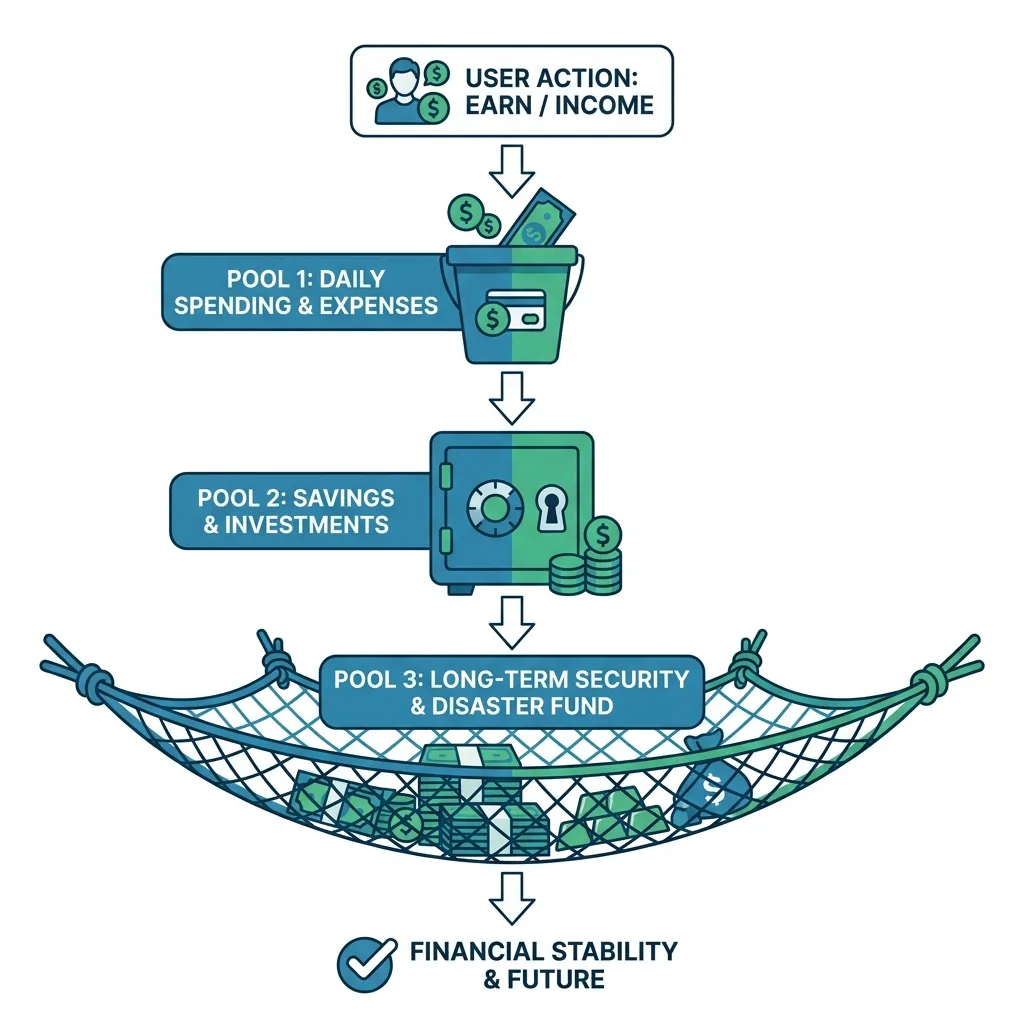
Why the order matters: prepaid money (Packs, then P3) is spent before metered money (PAYG), so you never pay the full PAYG rate while prepaid value sits unused. And because PAYG sits at the bottom, there is no service interruption when prepaid pools empty — usage simply meters to Azure. The only way users get blocked is if no billing path is configured at all, or if you’ve set a hard spending cap that’s been hit (see §6).
Hands-on — Which mix should you buy?
| Your situation | Recommended mix |
|---|---|
| Piloting / unpredictable usage | PAYG only. Zero commitment; learn your real consumption first. |
| Stable monthly baseline, modest scale | Capacity Pack(s) + PAYG safety net. Packs cover the predictable floor at ~20% off; PAYG absorbs spikes. |
| Large, forecastable annual demand | P3 for the baseline + PAYG for overage. Lock in the volume discount; never over-buy P3 (it’s non-refundable). |
| Seasonal spikes | P3 sized to annual total (flexible within the year) + PAYG. Avoid Packs whose unused monthly credits evaporate. |
A common enterprise pattern: P3 for ~80% of forecast baseline, PAYG for the rest. You capture most of the discount while keeping headroom that can’t strand capital.
5. Prerequisites & The 4-Step Budget Forecasting Framework
Licensing prerequisite: Users must hold an active Microsoft 365 Copilot seat license to use Cowork. The seat subscription includes zero native credits. Credits are a completely separate, additional budget line. Budgeting for seats but not credits is the most common first-year planning miss.
The 4-Step Forecasting Framework
In plain language: for each group of similar users, multiply (how many people) × (how many agentic tasks each runs per month) × (the average credits a task costs that group), then add the groups together.
- Segment by persona. Split your target users into functional cohorts (Sales, Engineering, Customer Care, Operations, …). Different roles consume very differently.
- Estimate the volume matrix. Project the average number of agentic tasks (not chat prompts) each persona runs per month.
- Apply complexity weighting. Estimate each persona’s split across Light / Medium / Heavy, and compute a blended average credit cost per task.
- Compute monthly aggregates. Multiply users × tasks × blended cost per persona, then sum.
Worked Example — Forecasting a 500-Person Rollout
Assume representative blended costs of Light = 135, Medium = 500, Heavy = 2,000 credits per task.
| Persona | Users | Tasks/user/mo | Light / Med / Heavy | Blended credits/task | Monthly credits |
|---|---|---|---|---|---|
| Sales | 150 | 20 | 60% / 35% / 5% | 356 | 1,068,000 |
| Customer Care | 120 | 40 | 75% / 23% / 2% | 256 | 1,230,000 |
| Engineering | 130 | 15 | 40% / 40% / 20% | 654 | 1,275,300 |
| Operations | 100 | 20 | 50% / 35% / 15% | 543 | 1,085,000 |
| Total | 500 | 4,658,300 |
- Monthly: ≈ 4,658,300 credits → ≈ $46,583/mo at PAYG.
- Annual: ≈ 55,899,600 credits → ≈ $558,996/yr at PAYG.
Procurement decision for this org: ~55.9M credits/year sits in a high P3 tier. Putting the predictable baseline on P3 saves real money against straight PAYG:
| Strategy | Annual cost | Savings vs PAYG |
|---|---|---|
| All PAYG | $558,996 | — |
| P3 @ ~15% (baseline) + PAYG (overage) | ~$475,000 | ~$84,000 |
| P3 @ ~20% (top tier) | ~$447,000 | ~$112,000 |
Even a mid-tier P3 discount returns ~$84K/year here — which is why forecasting before you buy is worth the hour it takes.
Build Your Own Capacity Planner
You don’t need a special tool — the framework is a spreadsheet. Recreate the model above in Excel with these columns and you have a reusable planner:
Tip: Build it with conservative task volumes, run the first 30–60 days on PAYG only, then replace your estimates in columns C–F with the actual numbers from the M365 admin center usage report before committing to any P3 purchase.
6. Admin Implementation Guide
Activate a usage-based billing path before your enforcement date so agentic features have a way to consume credits. (The author’s tenant deadline is June 30, 2026 — confirm your own date in the Microsoft 365 Message Center, as enforcement timing can vary by tenant and region.)
Before You Start — Roles & Prerequisites
| To do this | You need |
|---|---|
| Set up Pay-As-You-Go billing | Billing Administrator or AI Administrator (Global Admin also works) |
| Buy / activate a Capacity Pack | Global Administrator (Billing Admin can buy but not activate) |
| Buy a P3 Pre-Purchase Plan (Azure) | Owner or Reservation Purchaser on the target Azure subscription |
You’ll also need an active Azure subscription in the tenant to receive PAYG/overage charges, and at least one M365 Copilot seat license assigned.
Least privilege: Global Administrator is highly privileged — use the narrowest role that completes the task (often Billing Admin + AI Admin) and reserve Global Admin for the one activation step that truly requires it.
Step-by-Step — Configure Usage-Based Billing (M365 Admin Center)
- Verify roles. Confirm your account holds the roles in the table above. (Verify: you can see Billing → Your products in the admin center.)
- Open the admin center. Go to
admin.microsoft.com. - Find Cost Management. In the left nav, expand Copilot, then select Cost Management. (Don’t see Copilot? You likely lack the role, or no Copilot licenses are assigned to the tenant yet — fix that first.)
- Start provisioning. In the Cost Management pane, click Get started. The system scans the tenant for active Azure subscriptions, Capacity Packs, and P3 plans.
- Bind an Azure subscription. Select the subscription that will carry overage/PAYG charges (e.g., your “SPF Azure Plan”). (Verify: the subscription appears as “linked.”)
- Set spending thresholds.
- Tenant level: choose Don’t limit monthly spending or set a hard credit ceiling to cap overruns. A hard cap protects budget but will stop agentic features when hit — see the caution below.
- User level (optional): set per-user limits to contain distributed consumption.
- Configure alerts. Notifications auto-push to Global and Billing Admins when consumption hits your thresholds. Add extra stakeholder emails in the UI field (finance, FinOps, the project owner).
- Activate. Review the policy, click Activate Pay-As-You-Go, and wait for the green policy-tip confirming deployment.
Hard caps cut both ways: A tenant-level credit ceiling prevents runaway spend, but once reached, users lose agentic features until the next cycle or until you raise the cap. For most orgs, generous alerts beat a low hard cap. If you do set one, socialize it with affected teams first.
Adding a Capacity Pack (optional, after PAYG is active)
- In the M365 admin center, go to Billing → Purchase services and buy a Copilot Studio Capacity Pack (25,000 credits/month).
- As Global Admin, enable/activate the pack for the tenant. (Verify: the pack shows as active in Cost Management; remember PAYG must already be on as the overage net.)
Buying a P3 Pre-Purchase Plan (Azure portal — different place!)
- Go to the Azure portal → Reservations → Add.
- Select Copilot Credit Pre-Purchase Plan.
- Choose the paying subscription and a scope (single subscription, resource group, management group, or shared).
- Select the number of CCCUs for your tier (size to ~70–80% of forecast annual credits — remember it’s non-refundable).
- Choose auto-renew (on by default) and complete the purchase. The plan begins paying down eligible usage immediately; it appears as its own invoice line item.
The Critical Org-Level Toggle
A billing policy alone doesn’t turn the service on. Flip the feature toggle:
- In the Copilot control system, open Settings.
- Select View all and locate the Cowork parameters.
- Set the main service toggle to On at the organization level. (Verify: a test user sees Cowork available in their M365 client.)
Verify It’s Working
- Billing path: Cost Management shows an active PAYG policy (and Pack/P3 if purchased).
- Service on: the Cowork org toggle reads On.
- End-to-end: a licensed pilot user runs a small Light task and you see credits register in the usage report within the reporting window.
Troubleshooting
| Symptom | Likely cause | Fix |
|---|---|---|
| No Copilot menu in admin center | Missing role or no Copilot licenses assigned | Assign role; assign at least one seat license |
| Get started does nothing / no subscription found | No active Azure subscription in tenant | Create/link an Azure subscription, then retry |
| Capacity Pack won’t activate | PAYG not enabled first, or not Global Admin | Enable PAYG, then activate the pack as Global Admin |
| Users blocked despite credits available | Hard spending cap reached, or org toggle Off | Raise/remove the cap; set the Cowork toggle to On |
| P3 option missing in Azure | Wrong subscription role | Use an account with Owner / Reservation Purchaser |
7. Day-2 Operations — Monitoring & Cost Optimization
Setup is the start, not the finish. Ongoing habits that keep spend predictable:
- Reconcile estimates monthly. Compare forecast vs. actual credits in the admin usage report; refresh your planner’s task-volume and complexity assumptions.
- Watch the four buckets. Runaway spend is usually Context (agents over-grounding) or Runtime (loops running too long). Tighten agent scope before adding budget.
- Right-size P3 at renewal, not mid-term. Because P3 is non-refundable and use-it-or-lose-it, adjust the commitment only at the annual renewal, informed by a full year of actuals.
- Use alerts, not surprises. Route threshold notifications to finance/FinOps as well as admins.
- Govern high-cost personas. A small number of Heavy-task power users can drive a large share of spend; consider per-user limits or agent design reviews for them.
8. Pre-Deadline Checklist
- Confirm your tenant’s enforcement date in the Message Center.
- Assign M365 Copilot seat licenses to target users.
- Confirm an active Azure subscription exists for billing.
- Enable a Pay-As-You-Go billing policy (the universal safety net).
- Set alert thresholds (and a hard cap only if you’ve socialized it).
- (Optional) Buy/activate Capacity Packs for a predictable monthly floor.
- (Optional) Size and purchase a P3 plan in Azure for the annual baseline.
- Flip the Cowork org-level toggle to On.
- Run an end-to-end pilot task and confirm credits register.
- Schedule a 30/60-day forecast reconciliation.
Glossary
- Agentic task — a multi-step action Cowork runs autonomously on a user’s behalf (vs. a single chat prompt).
- Copilot Credit — the consumption unit for usage-based Copilot/agent features; ~$0.01 at PAYG.
- CCCU (Copilot Credit Commit Unit) — the unit a P3 plan is sold in; 1 CCCU pays down $1 of retail credit usage (~100 credits).
- Work IQ — the tenant intelligence/RAG layer that grounds agent actions in your org’s data.
- Capacity Pack — a prepaid monthly bundle of 25,000 credits.
- P3 / Pre-Purchase Plan — an annual, discounted, prepaid credit commitment bought via Azure Reservations.
- PAYG — Pay-As-You-Go metered billing to an Azure subscription.
FAQ
Does my Copilot license include any credits? No. Seat licenses and credits are separate budget lines. The license is the entry ticket; credits fuel the agentic work.
Will users be cut off if we run out of prepaid credits? Not if Pay-As-You-Go is active — usage simply meters to Azure with no interruption. Users are only blocked if no billing path exists or a hard spending cap is hit.
Can I get a refund on unused P3 credits? No. P3 is use-it-or-lose-it within its 12-month term, and cancellations/exchanges aren’t supported. Size conservatively.
Where do I buy each option? Capacity Packs and PAYG: the M365 admin center. P3: the Azure portal under Reservations.
Do credits work across more than Cowork? Yes — the tenant credit pool is shared across Cowork, Copilot Studio, Dynamics 365, Power Platform, and the Work IQ API.
Sources & Further Reading
- Microsoft 365 Blog — Copilot Cowork is now generally available (June 16, 2026)
- Microsoft Learn — Understand usage-based billing and cost management for Copilot Credits (covers Cowork and the Work IQ API)
- Microsoft Learn — Use prepaid Capacity Packs vs Pay-as-you-go billing for Microsoft 365 Copilot
- Microsoft Learn — Optimize Copilot Credit costs with a pre-purchase plan (P3) (Azure Cost Management / Reservations)
- Copilot Credit Guide (Microsoft) — the authoritative, current source for credit rates and tier schedules
Pricing figures ($0.01/credit PAYG, ~$200/Capacity Pack, P3 tier percentages) reflect publicly reported list values at time of writing and are non-binding. Always confirm current rates and your tenant’s enforcement date in the Microsoft 365 admin center, the Azure Reservations grid, and the Copilot Credit Guide before committing budget.
Read next